Blog
Insights & updates from our experts


Resolve plant floor and IT issues before they disrupt production.

Stay audit-ready while resolving issues and reducing operational risk.
Resolve issues quickly with an AI-powered system that automates ticketing.

Unifiy IT, HR, Facilities, Finance, and more on a single, AI-powered service platform.

Simplify on-call scheduling, automate escalations, and reduce burnout.

Automate postmortems, AI summaries, and post-incident workflows

Create, organize, and continuously improve your knowledge base to find the right answers with Sera AI.

We're here to help

The integration with Atlassian Jira using the Xurrent Integration Service is

The integration with Atlassian Jira using the Xurrent Integration Service is

The integration with Atlassian Jira using the Xurrent Integration Service is

The integration with Atlassian Jira using the Xurrent Integration Service is

The integration with Atlassian Jira using the Xurrent Integration Service is

The integration with Atlassian Jira using the Xurrent Integration Service is

The integration with Atlassian Jira using the Xurrent Integration Service is

The integration with Atlassian Jira using the Xurrent Integration Service is
Resolve issues quickly with an AI-powered system that automates ticketing.
Unifiy IT, HR, Facilities, Finance, and more on a single, AI-powered service platform.
Simplify on-call scheduling, automate escalations, and reduce burnout.
Automate postmortems, AI summaries, and post-incident workflows
Create, organize, and continuously improve your knowledge base to find the right answers with Sera AI.
Resolve plant floor and IT issues before they disrupt production.
Stay audit-ready while resolving issues and reducing operational risk.

Detect, respond, and resolve incidents fast to cut downtime and MTTR.

Keep your store online, even during your biggest sales moments.

Protect patient data and resolve issues fast, so care teams stay focused on care.

Standardize service delivery across every store and channel.

We are here to help 24/7

Connect with other Xurrent Users

Get insights and tips on how to get the most out of Xurrent

Apps, APIs, and updates

Xurrent service functionality

Eliminate manual tasks, optimize workflows, and deliver faster resolutions.
Learn how organizations have reduced downtime, improved 50% MTTA & MTTR, and cut costs with Xurrent IMR.
Discover Xurrent IMR's quick support, bidirectional integrations with Jira and Slack, and more cohesive incident response capabilities compared to Opsgenie.
Understand why users value Xurrent IMR for its intuitive interface, efficient incident alerting, customizable On-call schedules, and escalations.
Originally published Aug 28, 2024 | Last updated February 24, 2026
In an increasingly connected world where businesses operate around the clock, the importance of having an effective on-call system cannot be stressed enough. With technological advances and the expectation of immediate attention to business-critical issues, creating a reliable on-call rotation and schedule is essential for ensuring operational continuity. This comprehensive guide will walk you through the various aspects of on-call rotations and schedules that you need to consider for 2026.
The term on-call refers to the practice of having designated staff members who are available to respond to urgent issues outside of regular work hours. This arrangement is critical in sectors like IT, healthcare, and customer service where downtime can lead to significant impacts. On-call employees usually carry a device such as a mobile phone or watch and must be ready to respond to incidents, emergencies, or urgent inquiries at specified times.
Call rotations and schedules are designed to distribute the responsibility of being on-call among team members evenly. This not only prevents burnout but also ensures that someone is always available to address urgent matters. The need for a well-structured on-call schedule arises from several factors:
Creating an effective call rotation schedule involves a clear understanding of your team's needs and the associated challenges. Here are some best practices to consider:
On-call schedules can vary widely based on organizational needs, team size, and urgency of incidents. The most common types include:
Weekly Rotations: Team members take turns being on-call for an entire week. This approach offers predictability but might lead to burnout if not managed properly.
Weekly Rotation Example (5-person team):
Monthly Rotations: Similar to weekly, but lasts a month. This type can be convenient for larger teams but might feel overwhelming for smaller ones.
Follow-the-Sun Coverage: Teams in different time zones handle coverage during their normal business hours.
Follow-the-Sun Example:
On-Call Pools: A larger group of employees share the on-call responsibilities. This allows for a rotational approach where team members have more balanced workloads.
Follow these actionable steps to create an effective on-call schedule from scratch:
Before designing any schedule, involve your team in the planning process. Survey team members about their preferred shifts, family commitments, and availability constraints. When people contribute to schedule design, compliance and satisfaction increase significantly. Hold a team meeting to discuss rotation preferences, establish ground rules for shift swaps, and set expectations for schedule changes.
Choosing the appropriate call rotation schedule depends on several factors:
Effective management of on-call rotations can be streamlined through various tools and apps designed for this purpose:
Key Features to Evaluate in On-Call Tools:
To maximize effectiveness, integrate your on-call rotations with a robust incident management framework. This integration allows for efficient escalations and real-time reporting of issues:
An effectively communicated on-call schedule ensures transparency and preparedness:
When dealing with emergencies, it is vital to respond methodically:
The nature of on-call work can lead to fatigue and burnout. Here are some strategies to foster a healthier environment:
Hear Menahi Shayan from Xurrent IMR talk about On-Call Schedules
On-call schedules play a crucial role in Xurrent IMR in determining the engineer(s) who is responsible for the Incident that comes in. Schedules helps the team managers create and manage on-call shifts for their teams, override users with another user in case of any change in the schedule, and ensure that their created schedule has a 24 x 7 coverage.
Here at Xurrent IMR, we define Layers in the schedule. Layers are used to define and customize rotations. Rotations can be daily, weekly or custom set. Daily rotation means participants will rotate every 24 hours from specified starting date and time.
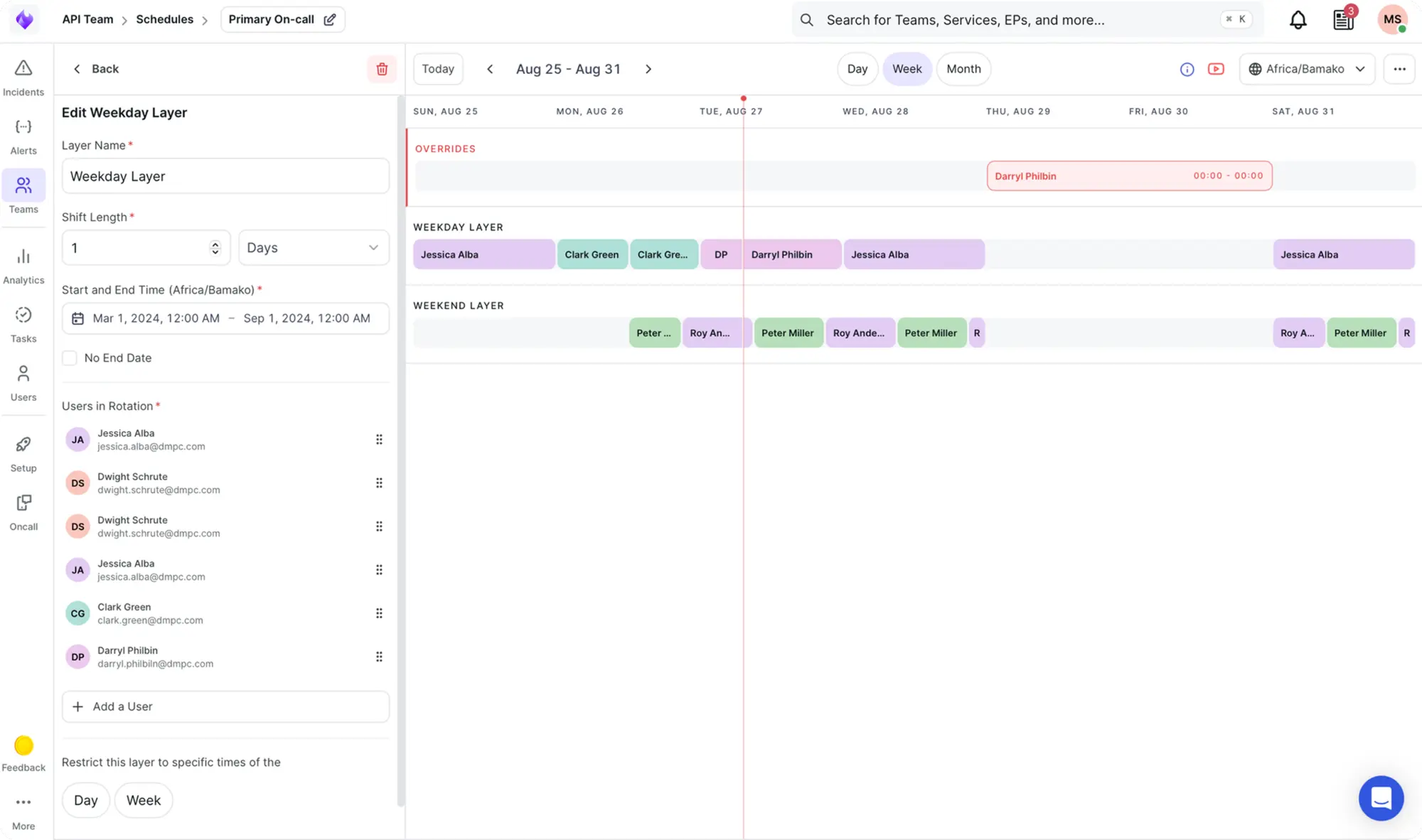
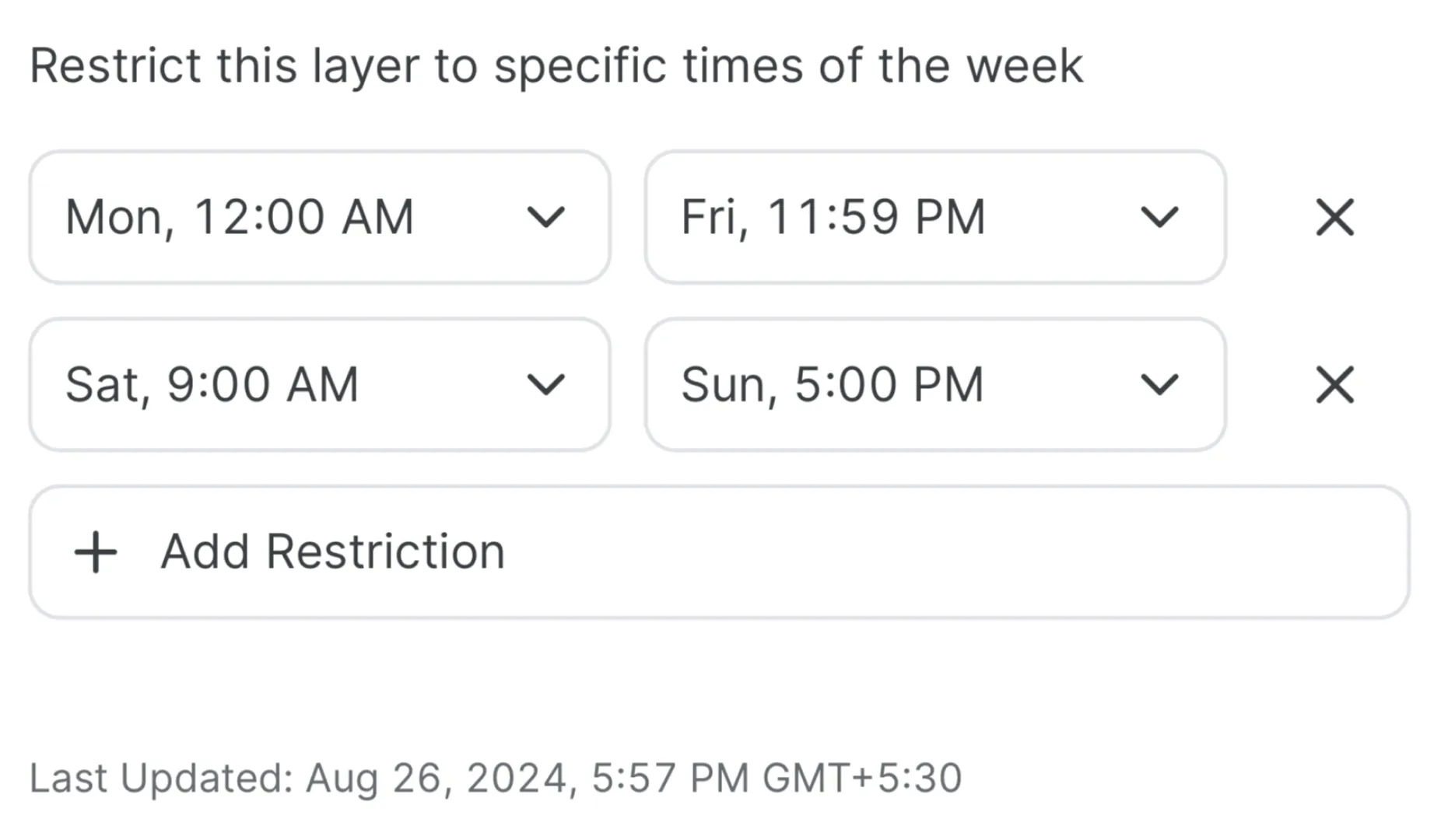
Rotations can be restricted to certain days and times of the week. Limiting the time frame of the rotations allows defining different on-call rotations at different time periods, such as working hours, off hours, and weekends. Rotations are cumulative. If the time frames for rotations overlap, all the rotations apply, hence there may be multiple participants assigned to be on-call at the same time.
Layers have the following components:
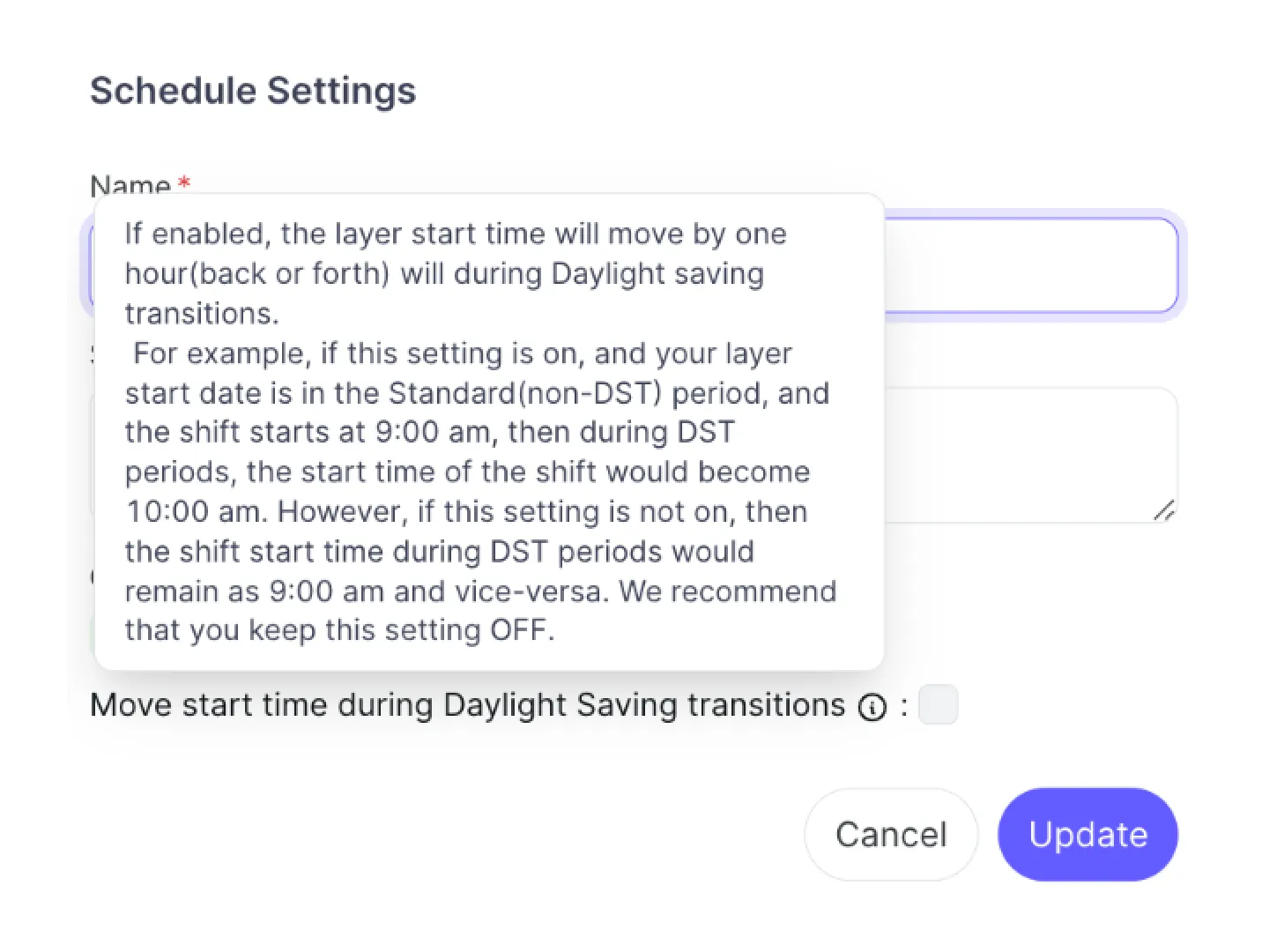
On-call schedule on Xurrent IMR also handles the Daylight savings. This helps the team managers to manage the users with an ease that are in the geographical region of DST.
Xurrent IMR supports calendar sync with Google Calendar wherein the members of the team can sync their personal On-call calendar with google calendar, as well as they can download the ICS file for the complete team's on-call schedule and export it to their choice of webcal (web calendar)
The override feature in Xurrent IMR allows the Team manager to swap any user's shift with another user without making changes to the complete schedule. This helps with ease of shift swapping in case of any minor changes to the schedule due to end user's change of plans.
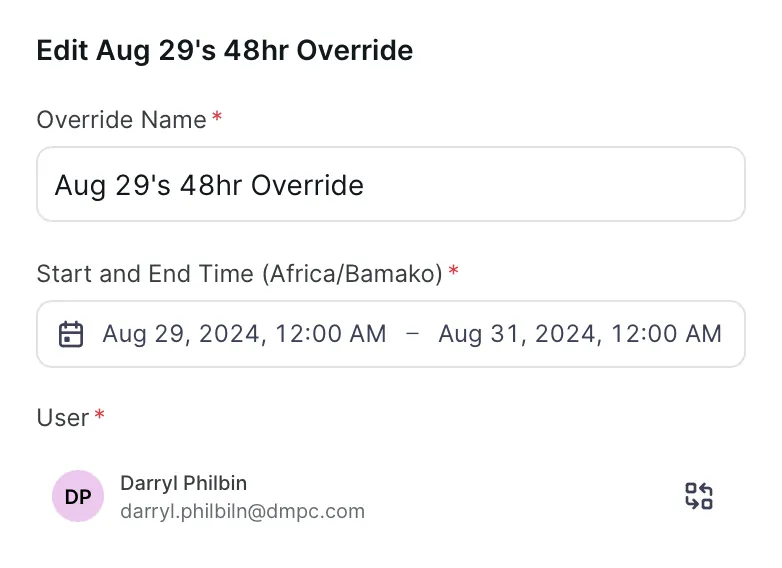
Override is performed on the complete schedule and takes the start time and the end time along with the user who will override the existing user's shift.
On-call rotations and schedules play a critical role in ensuring responsive, reliable operations across organizations. By understanding the implications of on-call work, considering best practices, and leveraging the right tools, you can create a system that supports both your team's needs and your organizational goals. With proper planning, communication, and support, your on-call process for 2026 can enhance efficiency, reduce burnout, and improve overall service quality.
As you embark on refining your on-call strategies in the coming year, remember that the well-being of your teams is just as important as the service you provide. Create an environment where both your employees and your customers feel valued, and watch your operational effectiveness soar.
Weekly rotations work best for teams of 3+, while smaller teams may need daily alternation or longer periods.
At least 3 people to avoid excessive burden; 5+ is ideal for comfortable rotation without burnout.
Use follow-the-sun scheduling where each region covers their daytime hours, or designate specific timezone owners for different coverage windows.
Light duties are acceptable, but avoid scheduling major projects or deep-focus work during on-call periods.
Rotate weekend and holiday duties equally, and use scheduling tools that track workload balance automatically.
Establish clear swap policies, require advance notice when possible, and use tools that maintain visibility of all schedule changes.

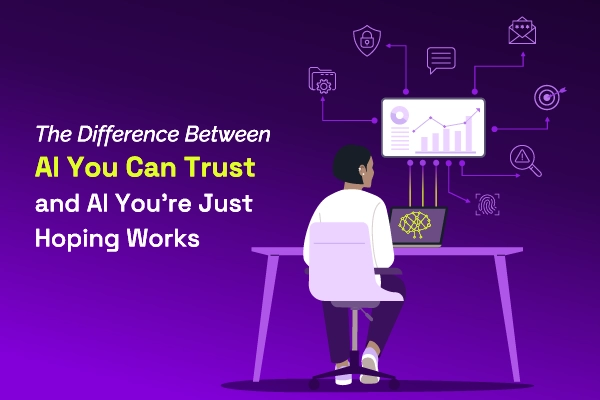
Most AI SREs are pattern matchers trained on public data. They know what a memory leak looks like in the abstract. They don't know that your payments-api has a flaky liveness probe everyone ignores, that the checkout team owns the retry policy, or that the last three "database incidents" were actually cache misconfigurations. That knowledge lives in your postmortems, your Slack channels, and the heads of two senior engineers.

Most vendors will tell you ITSM implementation takes six months to a year — but modern, configuration-first platforms have rewritten the math entirely. See what real implementations look like in 2026, and why a long rollout is now a choice, not a given.


.webp)
.webp)