Blog
Insights & updates from our experts


Resolve plant floor and IT issues before they disrupt production.

Stay audit-ready while resolving issues and reducing operational risk.
Resolve issues quickly with an AI-powered system that automates ticketing.

Unifiy IT, HR, Facilities, Finance, and more on a single, AI-powered service platform.

Simplify on-call scheduling, automate escalations, and reduce burnout.

Automate postmortems, AI summaries, and post-incident workflows

Create, organize, and continuously improve your knowledge base to find the right answers with Sera AI.

We're here to help

The integration with Atlassian Jira using the Xurrent Integration Service is

The integration with Atlassian Jira using the Xurrent Integration Service is

The integration with Atlassian Jira using the Xurrent Integration Service is

The integration with Atlassian Jira using the Xurrent Integration Service is

The integration with Atlassian Jira using the Xurrent Integration Service is

The integration with Atlassian Jira using the Xurrent Integration Service is

The integration with Atlassian Jira using the Xurrent Integration Service is

The integration with Atlassian Jira using the Xurrent Integration Service is
Resolve issues quickly with an AI-powered system that automates ticketing.
Unifiy IT, HR, Facilities, Finance, and more on a single, AI-powered service platform.
Simplify on-call scheduling, automate escalations, and reduce burnout.
Automate postmortems, AI summaries, and post-incident workflows
Create, organize, and continuously improve your knowledge base to find the right answers with Sera AI.
Resolve plant floor and IT issues before they disrupt production.
Stay audit-ready while resolving issues and reducing operational risk.

Detect, respond, and resolve incidents fast to cut downtime and MTTR.

Keep your store online, even during your biggest sales moments.

Protect patient data and resolve issues fast, so care teams stay focused on care.

Standardize service delivery across every store and channel.

We are here to help 24/7

Connect with other Xurrent Users

Get insights and tips on how to get the most out of Xurrent

Apps, APIs, and updates

Xurrent service functionality

Eliminate manual tasks, optimize workflows, and deliver faster resolutions.
Learn how organizations have reduced downtime, improved 50% MTTA & MTTR, and cut costs with Xurrent IMR.
Discover Xurrent IMR's quick support, bidirectional integrations with Jira and Slack, and more cohesive incident response capabilities compared to Opsgenie.
Understand why users value Xurrent IMR for its intuitive interface, efficient incident alerting, customizable On-call schedules, and escalations.
This post is a living document, updated throughout the month as new product releases roll out. Each update listed here is released to our QA environment on the date shown and typically promoted to production the following week. Along the way, customers can review changes, share feedback, and help shape what ships next. Xurrent delivers product updates on a weekly cadence to keep enhancements moving continuously.
Team involvement data, captured automatically when requests move between teams, is now exposed through three new standard reports plus a per-request chain drill-down. The common operational questions (which teams have held a request, for how long, how often it bounces between teams) are now reportable directly.
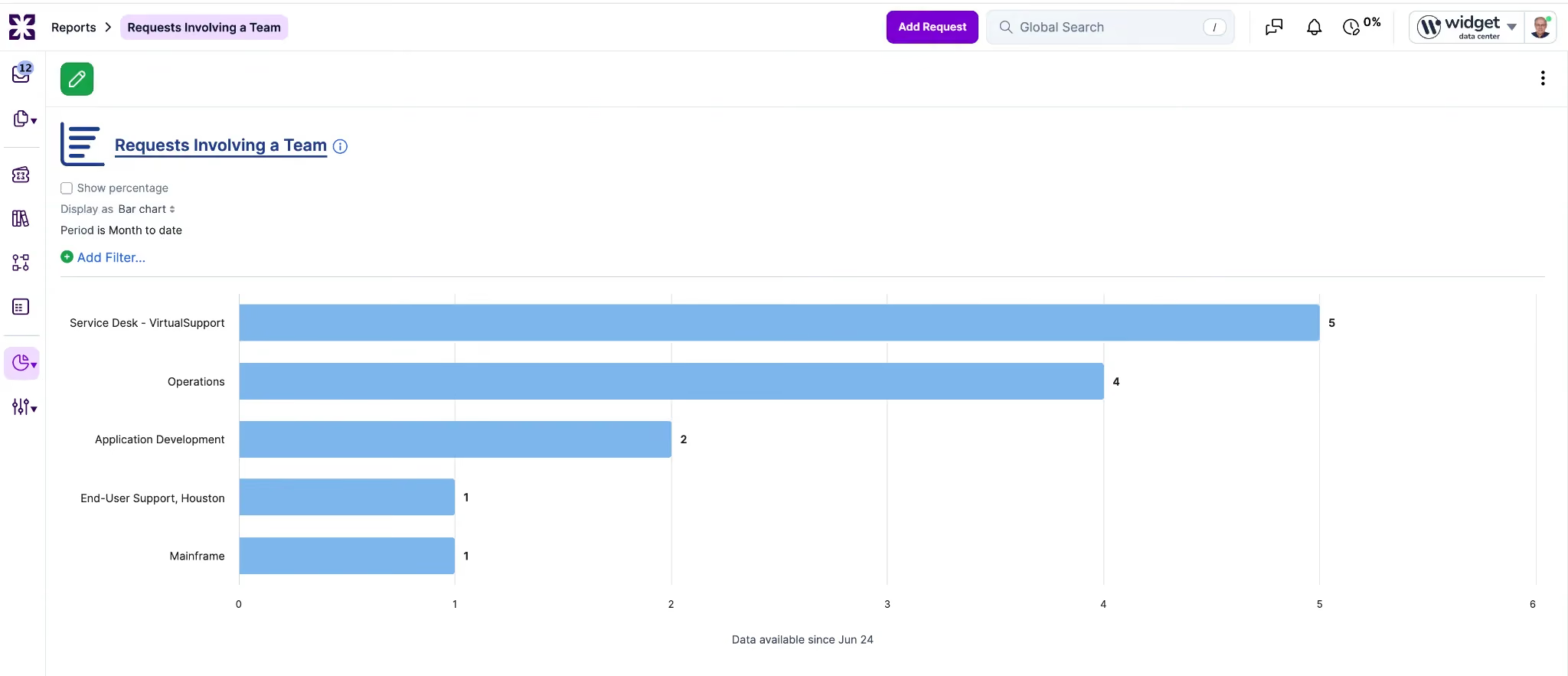
"Requests Involving a Team" lists every request a selected team has held at any point, regardless of current assignment, so a team that triaged, noted, or reassigned a request without logging time is now visible.
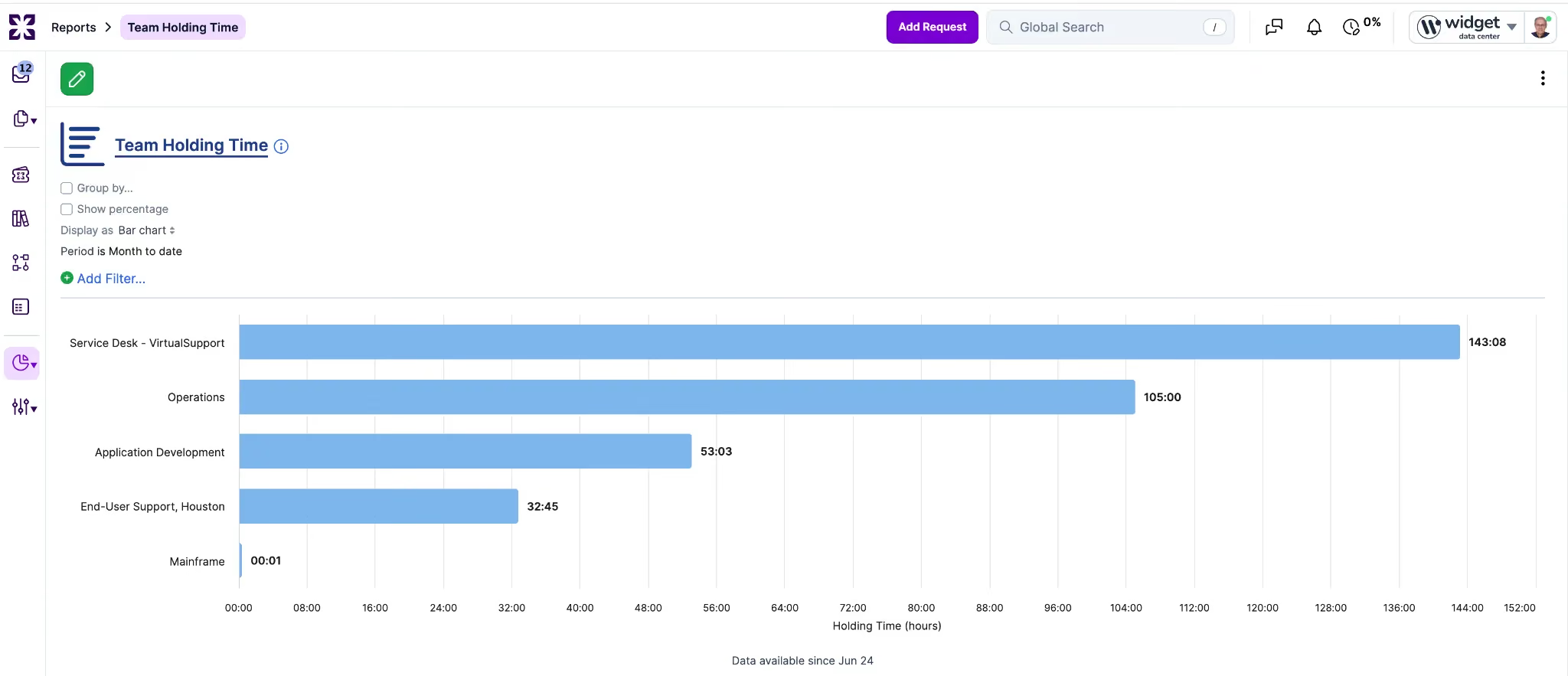
"Team Holding Time" shows total and average wall-clock duration each team held requests over a selected period, independent of logged time entries; a still-open leg contributes its live elapsed time, computed at query time. It sits alongside the existing "Time Spent by Team" report as a complementary metric: holding time is wall-clock queue ownership, Time Spent is logged effort, and both remain available.
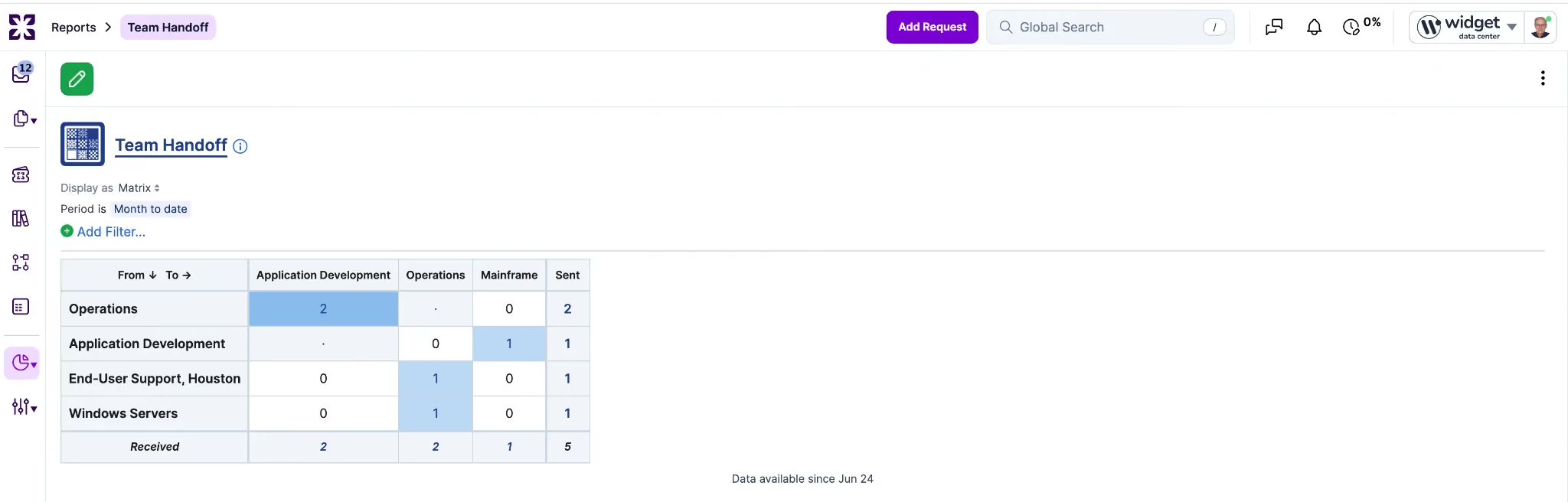
"Team Handoff" counts transitions from each source team to each destination team over a selected period, presented as a source-to-destination crosstab matrix (with a plain table on the Table toggle); a cell drills into the handoffs between those two specific teams.
This reporting is a new capability, since nothing in the platform could reconstruct team-to-team movement before. Each request now has a per-request assignment chain drill-down showing the full sequence of teams in order, with returns to a previously holding team rendered as separate entries rather than continuations. A touch count, derived from the number of involvement events in the sequence, is exposed as a per-request metric. Each report displays a "data available since" date derived from the earliest captured leg, so sparse early history is not misread as missing requests. There is no historical backfill.
The Asset Management Reports dashboard now supports filtering across three dimensions: Product, Product Category, and Team.
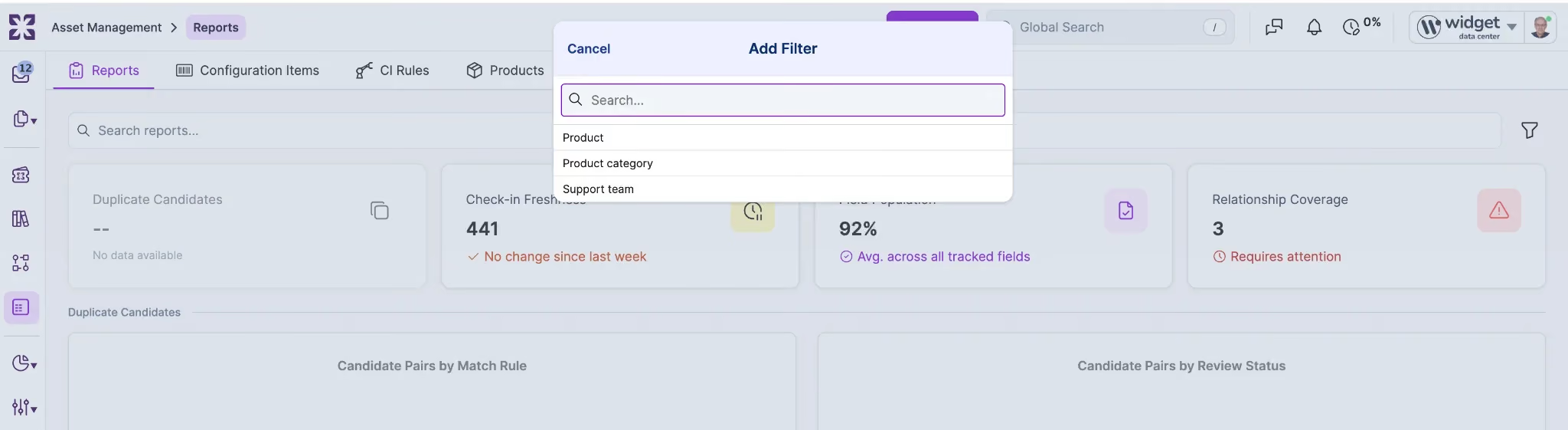
The filter control sits to the right of the "Search reports..." field, and every report card recomputes against the chosen scope. Previously the dashboard showed every report card at full account scope, with no way to narrow results by product, category, or team. Filtering behaves like filtering elsewhere in Xurrent, including "Is"/"Is Not" matching and removable filter indicators.
The Quick Replies settings list now uses the standard search-backed list technology used elsewhere in Xurrent, with sortable columns and the standard "Customize Columns" option. A "Created" column is now available; it is hidden by default.
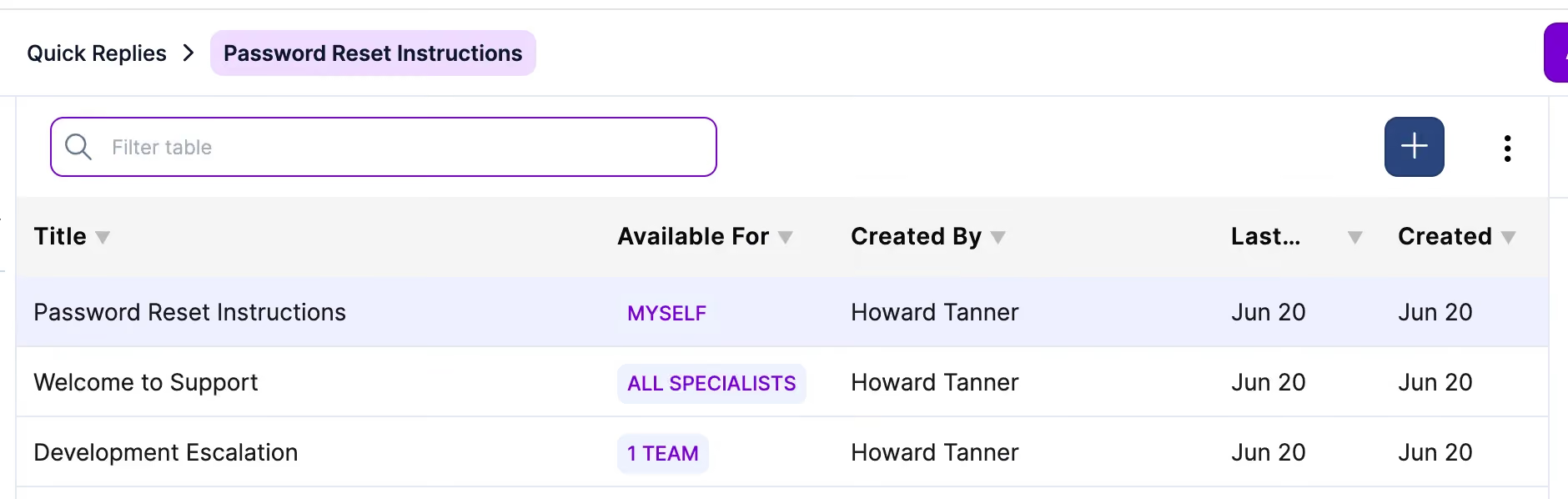
Specialists add it through "Customize Columns" when needed and sort the list by clicking either the "Created" or "Last Updated" column heading.
Rich text set to dark colors is now readable on the dark theme, instead of blending into the background.

Previously, when an author picked a very dark text color, the automatic readability adjustment that normally adds a backdrop did not trigger because the underlying contrast formula overstated contrast for dark colors. Pure black text on a dark background was treated as readable and left without help, making the text effectively invisible. The readability decision now uses a perceptual contrast model (APCA), measured against the actual background the text is shown on rather than an assumed one. When text would be effectively invisible on its background, a subtle backdrop in the opposite shade is added; when only a background color is set, the default text color is switched to whichever shade reads best. Intentionally muted colors are left untouched, so authors keep control.
The Virtual Agent "thinking panel" now dismisses cleanly once Sera has finished generating a response, rather than remaining visible after the response completes. When Sera completes a response, the panel waits about one second so the user can see the final reasoning step land, then renders nothing for the remainder of the turn. It reappears when the user starts a new conversation turn.
Sera Assist is a new AI assistant for service desk specialists, available as a chat panel alongside the Service Hierarchy Browser in the specialist UI.
The Sera logo opens the panel as a slide-out from the right. Each session opens with a greeting and a set of starter actions for the current record; specialists can choose a starter action or type their own question in the chat box.

The starter actions adapt to the record you are working on. On a task, they include "Summarize this task," "What instructions were given?," "Draft a completion note," and "Show the workflow status." On a request, they include "Summarize this request," "Look for similar requests," "Draft a note for the customer," and "What is the blast radius?" On requests, "Look for similar requests" surfaces likely duplicates of the current record.
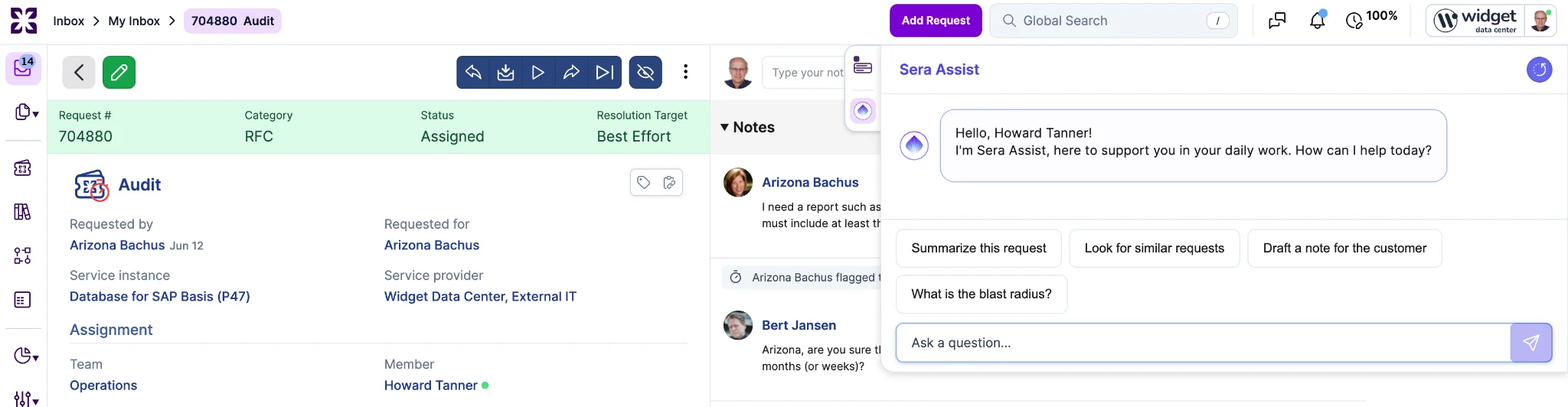
Sera Assist grounds its answers in the current record and its history, so summaries, drafted notes, and next-step suggestions reflect the ticket in front of you.
The current focus is the inbox and requests, with coverage extending to more of the application in future releases.
Specialists can now duplicate a Request for Change in one click.
A "Duplicate Request" entry has been added to the request ellipsis ("...") menu as the first option, available only on RFCs where the user is permitted to create a request under existing rules.

Selecting Duplicate opens the standard New Request modal pre-filled with the source RFC's content. No record is created until the user saves; cancelling the modal leaves no new records behind.
Carried forward from the source RFC: Subject, Category (always RFC, with sub-type), Service Instance, Impact, linked Configuration Items, Supplier (not Supplier Request ID), and any UI extension field values where the same field exists on the target.
Reset on the new RFC: Requested by and Requested for default to the user clicking Duplicate, Status starts at Assigned, Team is the default for the service instance, Member is empty. Operational and lineage state (status history, completion timestamps, audit trail, attachments) start fresh. Notes from the source are not carried forward. Links to Problem, Project, or Workflow are also not carried forward.
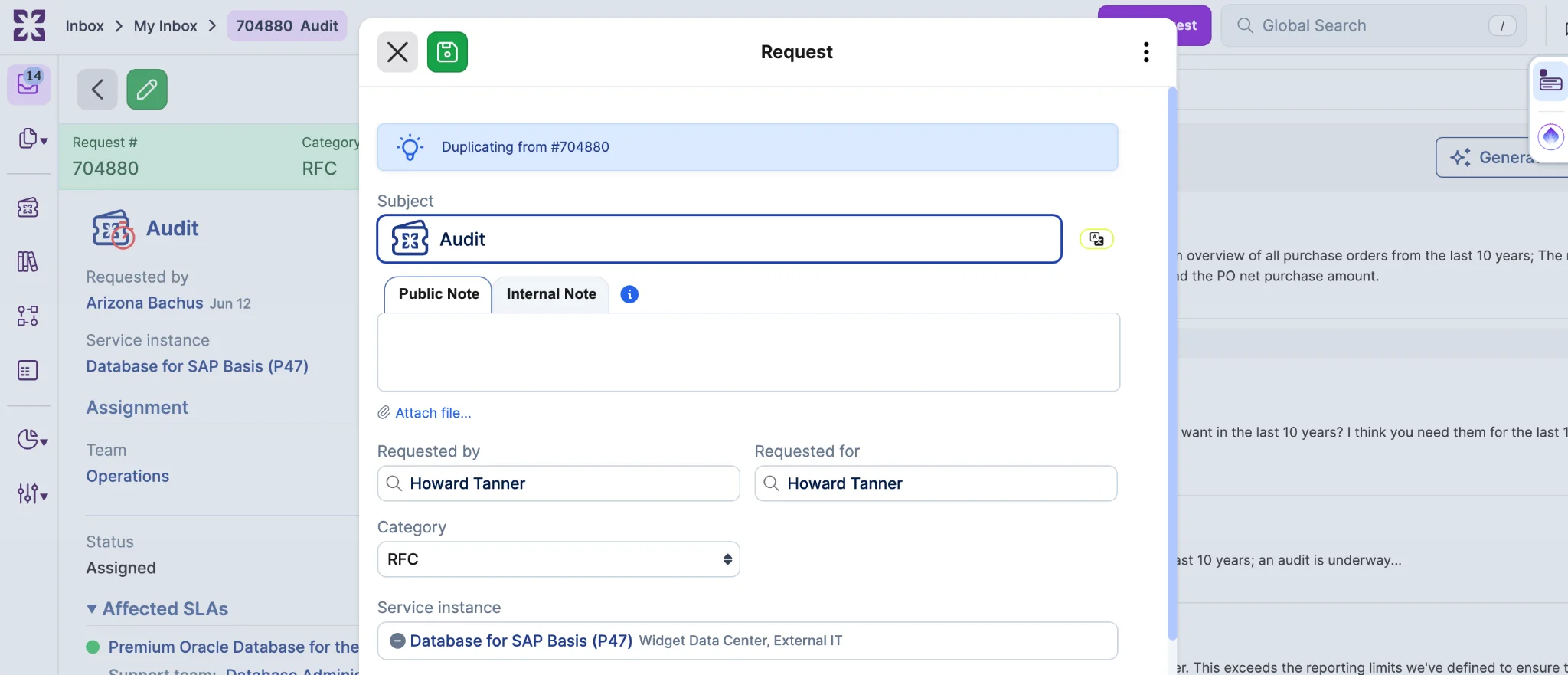
The new RFC records its source request as structured metadata and surfaces it in the audit trail. The reference points to the immediate source only, not a flattened chain when duplicates are themselves duplicated.

The Duplicate option appears only on RFCs (including all RFC sub-types) in the specialist UI, only when the source RFC is not linked to a Problem, Project, or Workflow, only in accounts without Case Management enabled, and only when the user is permitted under existing request creation rules. The hotkey Shift+D triggers the action when hotkeys are enabled and these eligibility rules are satisfied.
The Reconciliation Queue and the Lifecycle Reviews tab now refresh live as records are acted on, by you or by other reviewers. When a reconciliation or lifecycle review is approved, rejected, dismissed, or otherwise resolved, handled records disappear from the queue and newly arrived or changed pending records appear without a manual refresh. The same behavior applies for both single record actions and bulk operations.
Live updates are limited to the active work lists. The Archived and Trashed views remain static history.
Collision detection follows the standard pattern used elsewhere in Xurrent: if another reviewer changes a record while you have it open, you are warned, which prevents two reviewers from unknowingly acting on the same item.
Three follow-up items extend the Lifecycle Reviews capability.

Bulk "No action needed" dismissal is now supported from the Lifecycle Reviews list view. Reviewers select multiple pending reviews and dismiss them in a single action; suppression follows the same rule as single dismissal, with the CI and field pair suppressed for the configured threshold period. All other review outcomes (Request created, CI updated, Other) continue to require per-CI review.
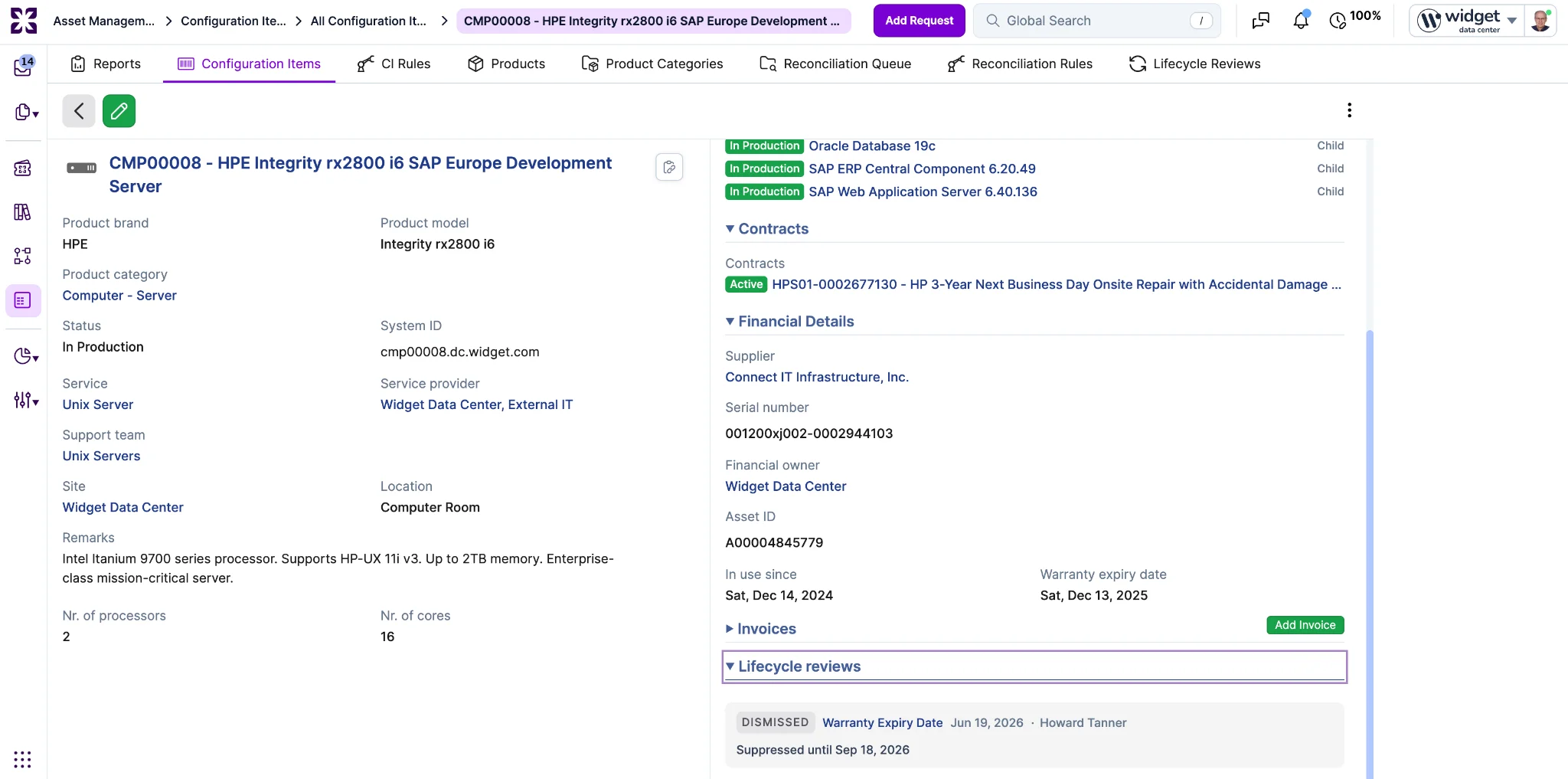
Review history on the CI record. The CI show page now includes a collapsed "Lifecycle reviews" section listing past reviews for that CI: outcome, reviewer, timestamp, linked request, CI-update summary, reviewer note, and suppression expiry. Newest reviews appear first; the section caps the inline list at 10 with a total count.
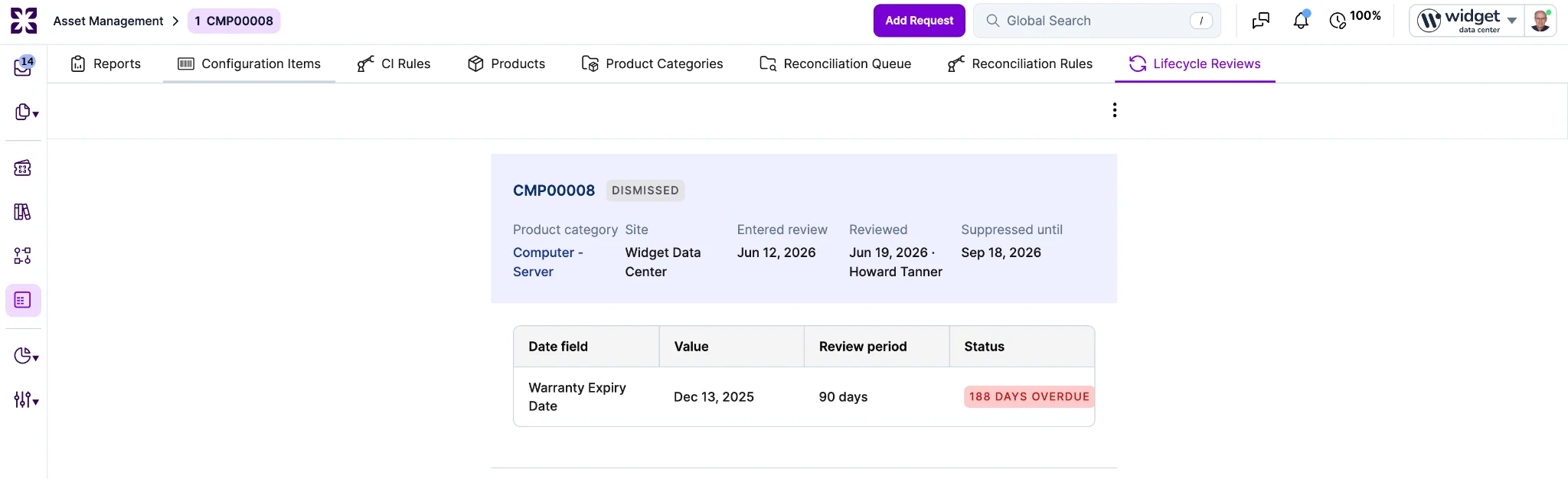
Show page for each lifecycle review. Each lifecycle review now has its own show page accessible via a direct link, so reviewers can Cmd-click (or Ctrl-click) a row in the queue to open it in a separate browser tab.
Two improvements to the Time Entries view are shipping in this release.
A new filter for locked time entries lets you surface entries from closed periods. A time entry becomes locked once the period it belongs to has been closed, usually at month end. Once locked, an entry can no longer be edited, moved, or deleted. The filter lets you find those closed-period entries directly.
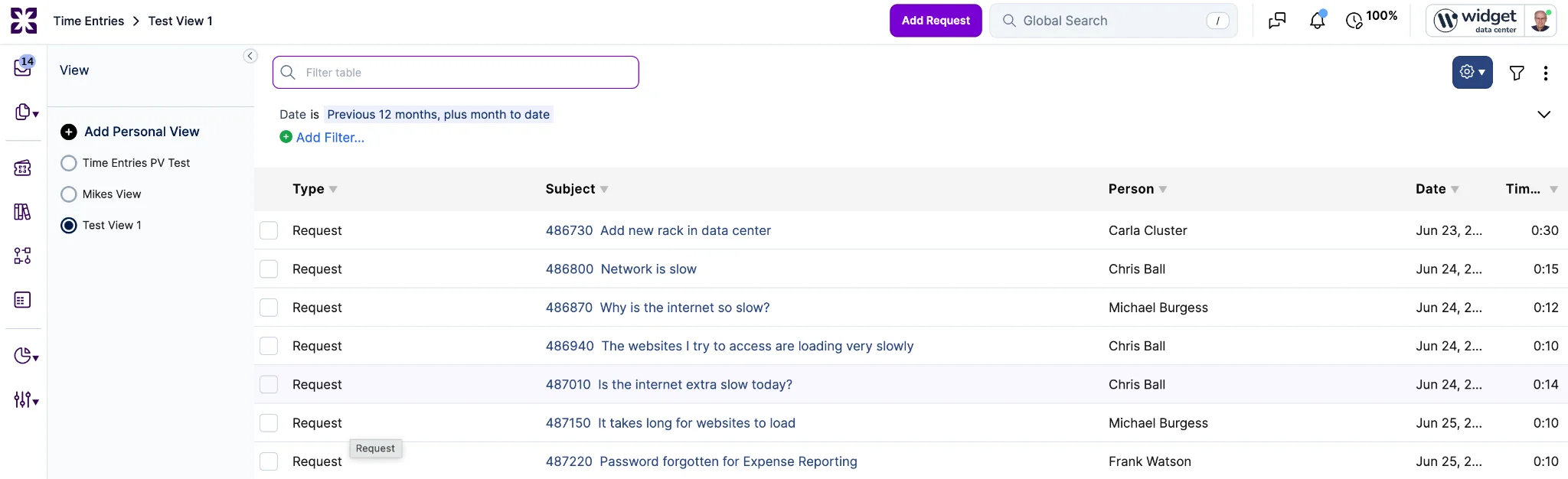
Personal views are now enabled on the Time Entries view, so you can save your own filtered layouts and return to them.
Filtering for entries that are not yet locked is not included in this release. Further enhancements to time entries reporting can be filed as new requests.
Account administrators can now control the Limited Service Instances behavior directly from Account Settings, instead of relying on a configuration that only support could change.

A new account-level setting offers three states:
The setting is editable by administrators and read-only for auditors, consistent with other account settings.
Narrowing was previously available only to a small set of beta accounts through a support-managed configuration. Those accounts have been backfilled to preserve their current behavior: accounts that had narrowing limited to external or cross-cloud requests now have the setting at "Only for external or cross-cloud requested-for," and accounts that had narrowing on all requests now have it at "Always." All other accounts default to "Off," which matches their current behavior, so nothing changes for them.
The Licensed Users chart in Account Settings now shows the licensed-user count for every month, instead of only on months where there was room to display it. Customers can now read the licensed-user count across all 13 months at a glance.
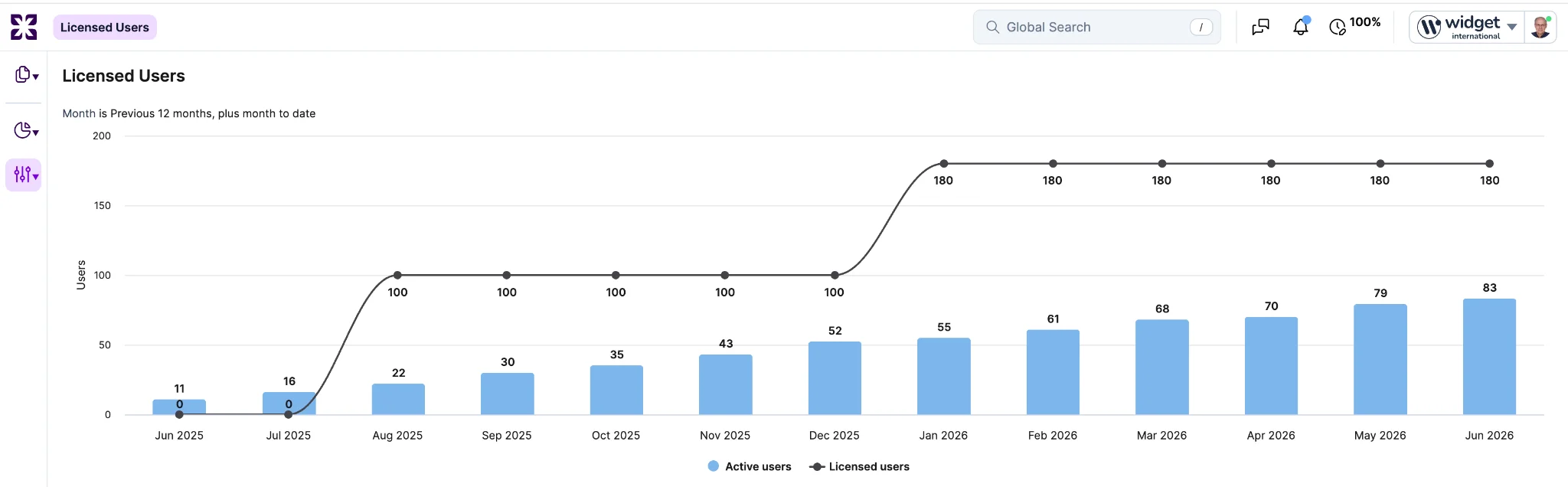
Previously, labels that ran close to the active-user column tops were hidden to avoid overlap, so the count appeared only on some months. The labels are now anchored just beneath each point and shown for every month.
As a reminder, the Licensed Users page is only reachable on directory accounts that operate their own platform and are not billed to a parent customer, and access is gated to Financial Manager, Account Administrator, or Auditor.
CI Reconciliation now includes an identification phase that detects suspected duplicates before they are created. When an ingestion source (discovery, an import, or a connector) sends in a record that would create a new CI, the identification phase checks it against existing CIs first. A record that clearly matches an existing CI is converted into an update of that CI rather than being added as a second one, a record with no match is treated as new, and a record the engine cannot resolve on its own is parked for a reviewer to decide.
Previously, a record from an ingestion source that referred to an asset already in the CMDB was inserted as a new CI, so the same physical asset reported by more than one source produced duplicates that had to be merged by hand.
The engine matches incoming records against existing CIs on a set of built-in criteria, including a matching "label" and "name", a matching serial number, a matching asset tag, and a matching "name" and "type". Each candidate match carries a confidence score, labeled with what it matched on (for example "name+type"), so a reviewer can see how strong each match is. Serial number matching now works within account scope only, dropping the previous account-plus-brand restriction, so the same asset reported from different sources with different brand metadata resolves to a single CI instead of two.
What happens next depends on how many matches a record finds. No matches means the record is genuinely new, so it proceeds as a new CI (the unmatched outcome). A single match resolves the record to that CI as a proposed update for a reviewer to apply (the matched outcome). Two or more matches are treated as ambiguous, because the engine cannot tell on its own which existing CI is the right one.
Any record that cannot resolve automatically and needs a person to decide is parked at one of three statuses: "Needs identification", "Needs review", or "Ambiguous match", and waits there until a reviewer acts on it.
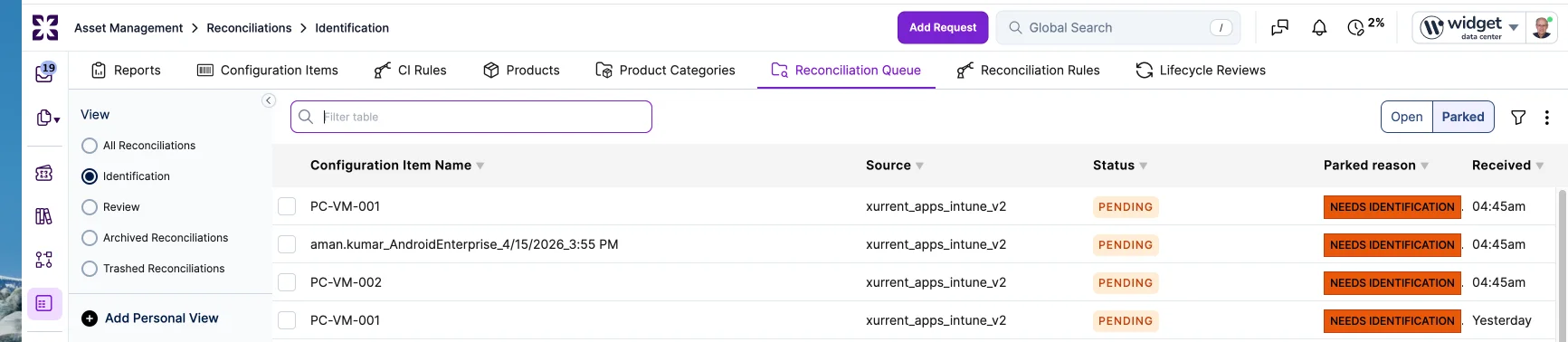
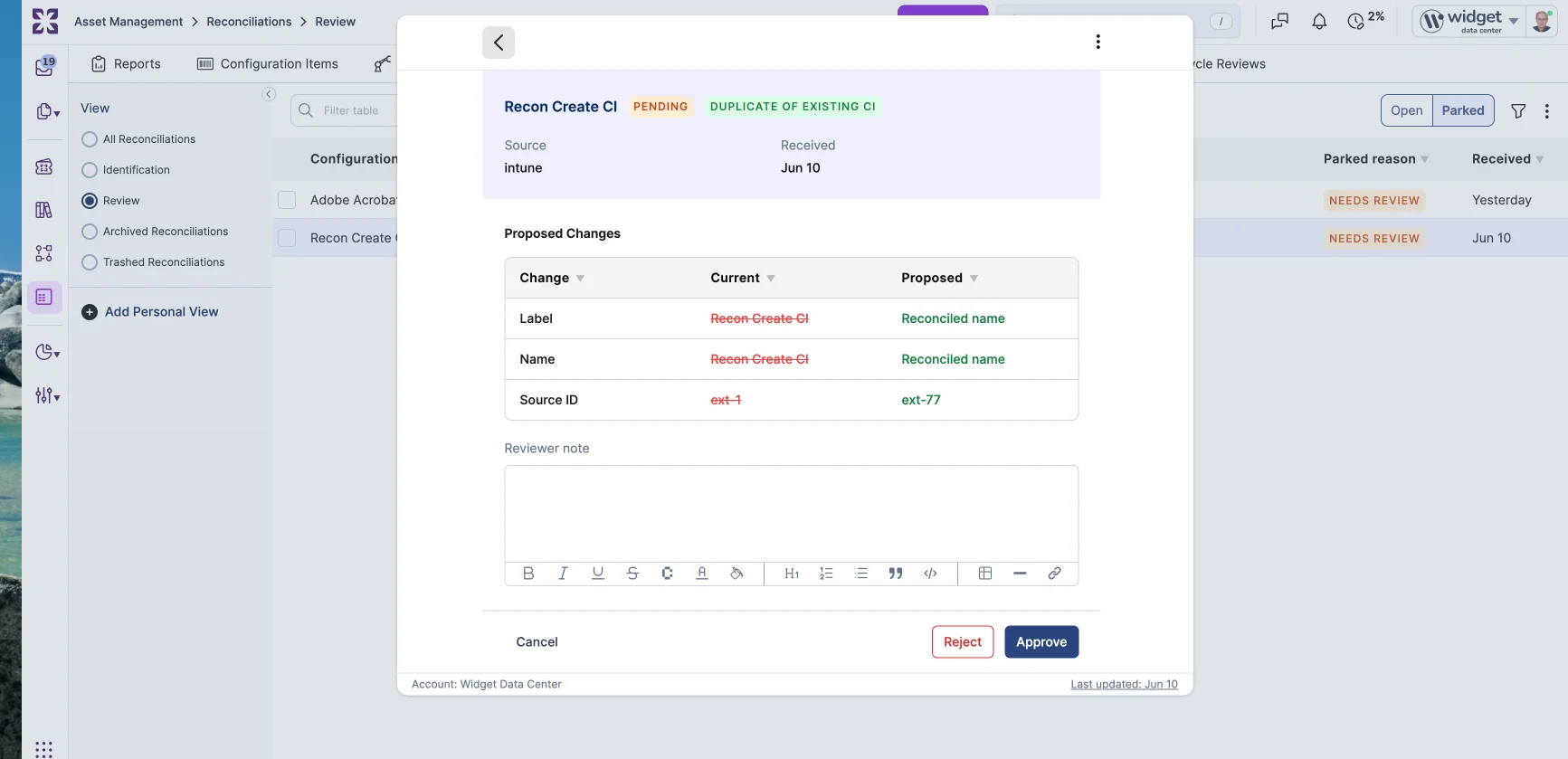
The reconciliation modal now has two panels for this work. The "Identify" panel runs while a record is still being matched: it lists the ambiguous candidates with their confidence scores, offers "Create as new CI", and lets a reviewer search the account's own CIs to link the record to an existing one by hand. The "Review" panel runs once a CI has been resolved and shows a current-versus-proposed field diff, so the reviewer can see exactly what the update would change. A "Back to identification" action lets a reviewer undo an identification they no longer trust and send the record back to matching.
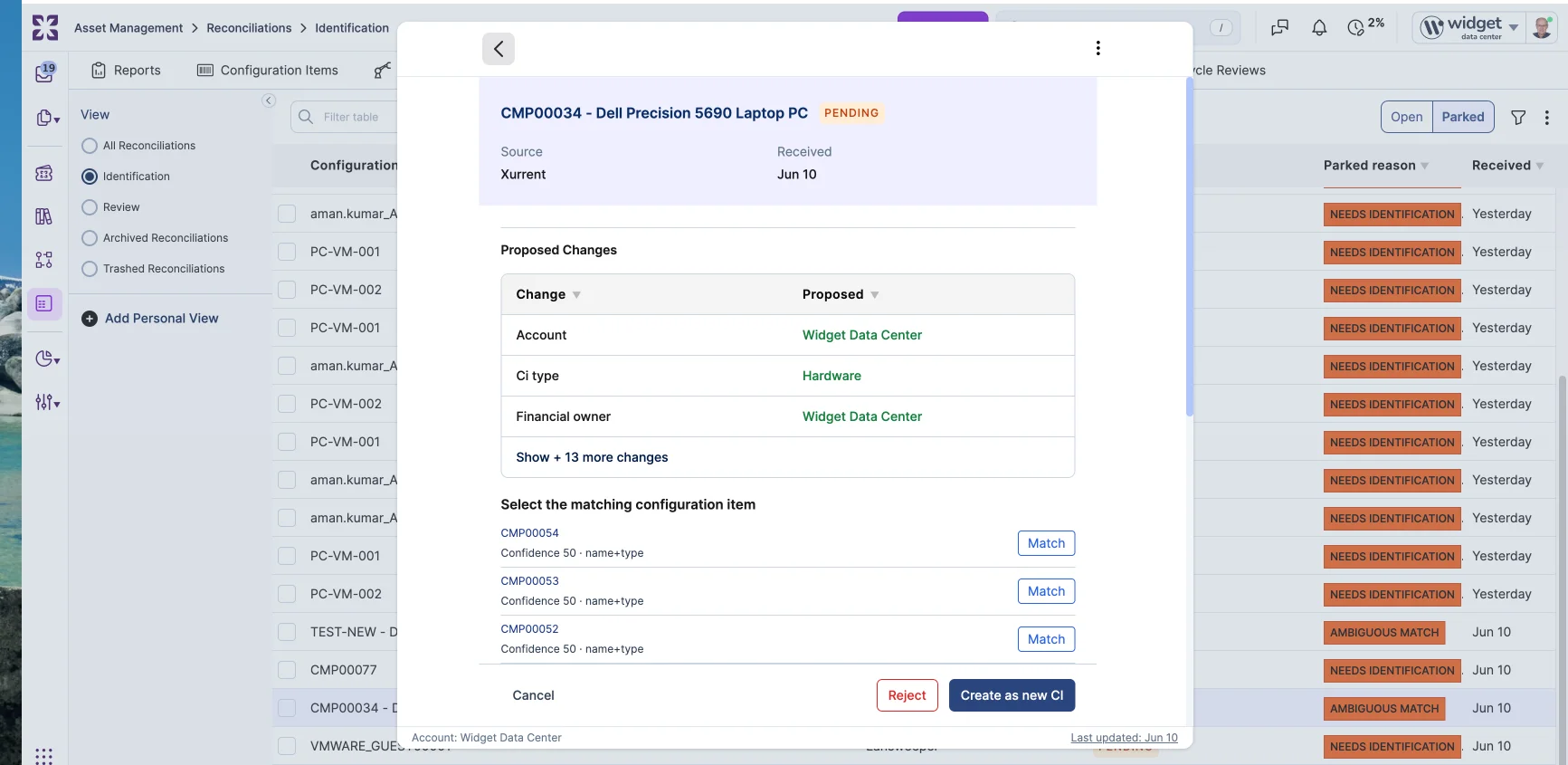
From the "Review" panel, three actions confirm or override the conversion: apply the proposed values to the matched CI (the incoming record becomes an update of that CI), accept the record as a new CI (existing matched CIs are left unchanged), or dismiss the record (rejected with no changes). In all three cases the candidate matches are kept on the completed record for audit.
Automation rules can react to these outcomes through four new triggers: "on identify", "on matched", "on unmatched", and "on ambiguous". In a rule's conditions, customers can read the matched CIs ("matched_cis") and, for each candidate, its confidence score, what it matched on ("matched_on"), and the CI it points to ("ci"). This lets customers tune matching to their own data, auto-resolve specific cases, or escalate ambiguous matches using their own logic.
The Reconciliation Queue gains views that segment records by pipeline phase: "All Reconciliations", "Identification", and "Review". State buttons then split each view into "Open", "Parked", and "Completed". "Parked" collects the records that have paused mid-pipeline waiting on a reviewer, meaning anything sitting at "Needs identification", "Needs review", or "Ambiguous match"; "Open" covers records still moving through the pipeline, and "Completed" covers records that have been resolved (applied, accepted, or dismissed). The "Reconciliation Rules" tab gains a matching split: "All Reconciliation Rules", "Identification Rules", and "Review Rules".
This release ships the identification engine itself. Four pieces are scoped for follow-up releases: routing every ingestion path through the engine (so a "label" or "name" collision becomes a candidate match rather than a 422 error), an "Auto-resolved" view for spot-checking conversions that happened automatically, the CMDB Health "Duplicate candidates" tiles, and a per-candidate side-by-side diff. Auto-resolving a single high-confidence match stays opt-in through an "on review" rule and is not turned on by default.
Asset Management now includes a Lifecycle Reviews tab as a top-level workspace for surfacing CIs whose time-based thresholds need attention. The tab is positioned at the end of the tab bar, after Reconciliation Rules.
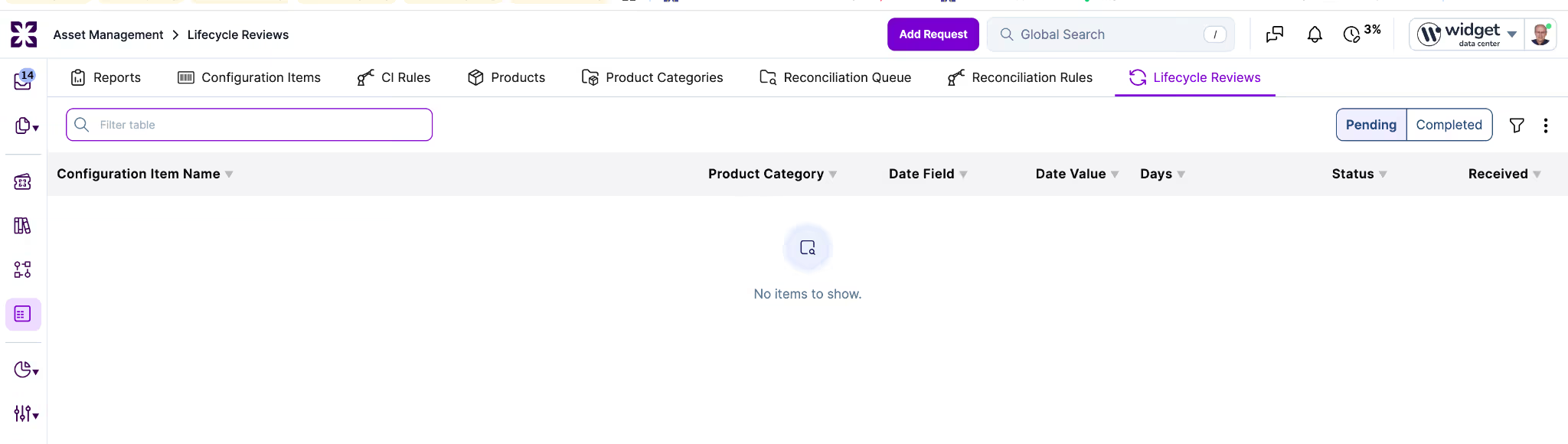
An administrator configures watch periods on a Product Category record under a new "Lifecycle Reviews" section.
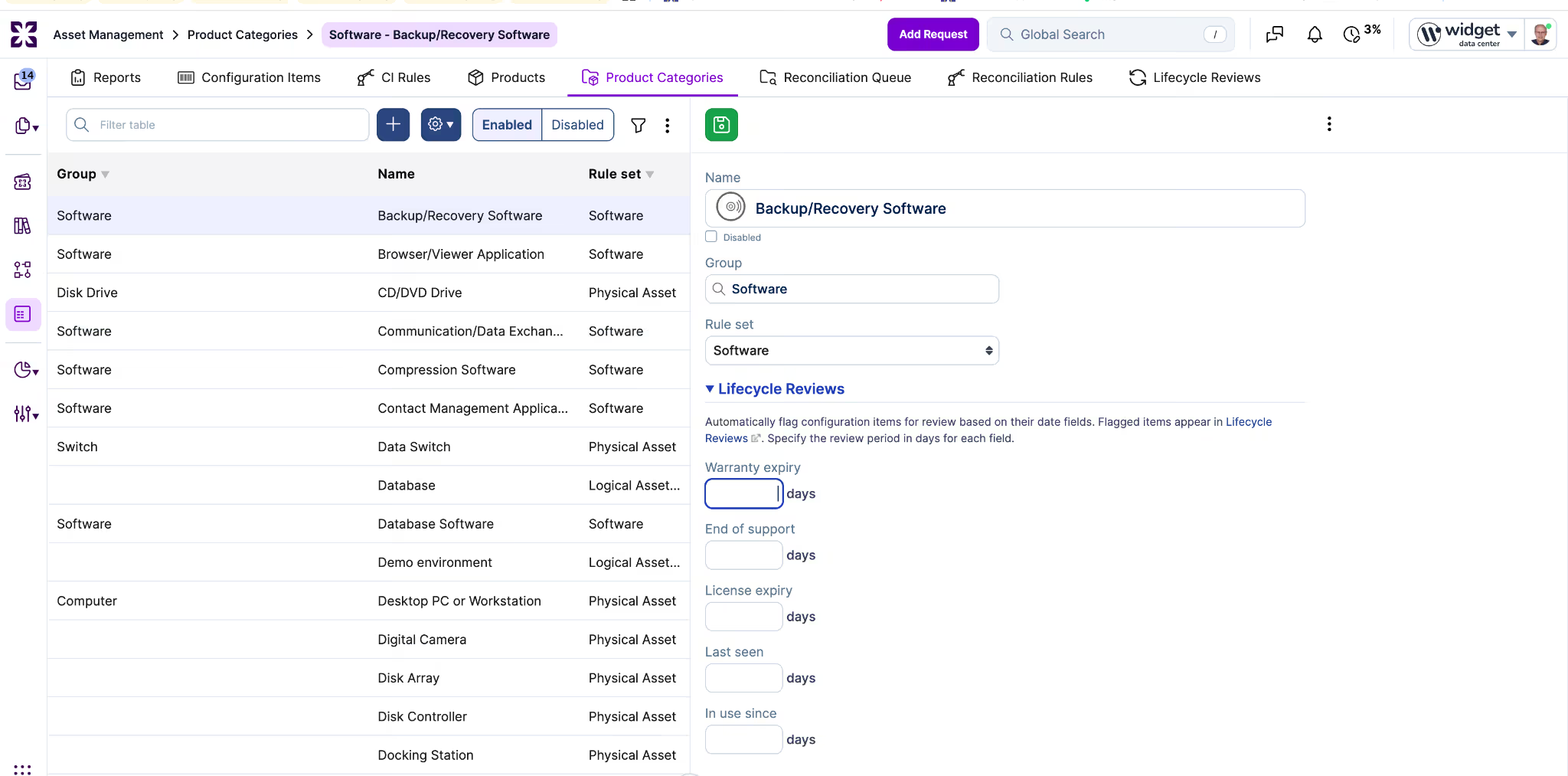
Five CI date fields can be watched per Product Category: "Warranty expiry", "End of support", "License expiry", "Last seen", and "In use since". Each accepts an optional review period in days (for example, 30, 60, or 90). A period of 0 surfaces a CI when the date has passed; a blank period leaves the field unwatched.
Each flagged entry opens a detail modal that requires a review outcome: "No action needed", "Request created" (which exposes a button to open the request creation flow with the CI pre-linked), "CI updated" (which exposes quick-action fields for the most common updates), or "Other" (which requires a note). Completing the review records the reviewer, timestamp, triggering date field, outcome, linked request ID if applicable, and optional note.
Suppression rules keep the queue focused. "No action needed" and "Other" suppress the CI and field pair for the configured review period. "Request created" suppresses while the linked request remains open and re-evaluates after it closes. "CI updated" re-evaluates against the new field values on the next daily run.
Lifecycle Reviews operates independently of the "Enable CI Reconciliation" setting and the reconciliation pipeline. A CI can have both a pending staged change in the Reconciliation Queue and a pending lifecycle review in Lifecycle Reviews; the two appear in their respective tabs.
CI Reconciliation now routes only CI updates that carry a non-blank source value through the reconciliation pipeline. Updates that do not carry a source apply directly to the CMDB.
Previously, the "Enable CI Reconciliation" account setting staged every CI update for reviewer approval. That included direct edits in the UI. Routine GUI edits and API writes did not carry a source value, but they were staged anyway. This mismatched user expectations and added review overhead with no governance benefit.
Ingestion paths are unaffected. Discovery, imports, and integration writes carry a source value, so they continue to enter the reconciliation pipeline as before.
Notes and email replies on a record now auto-save as drafts in the background while the user types. Returning to the same record after a reload, on a different machine, or after a session interruption restores the in-progress content on the same tab.
Each tab type has its own draft slot: public note, internal note, public email, and internal email. A user can have an internal email half-written alongside a public note, for example, without one overwriting the other.
For email tabs, drafts also preserve recipient chips (existing people and free-form addresses), the subject line, and any attachments the user uploaded. Coming back to the page restores the chips, the subject, and the attachments together with the body text.

If the user navigates away from a record with unposted content, the existing unsaved-changes prompt now offers a "Save note as draft" button alongside "Don't Save", "Cancel", and "Save". The label says "note" because only the note field is captured; other unsaved edits on the same form (such as a status change) are not part of the draft. Posting the note, or receiving an inbound email reply from the user, clears the draft automatically.
Drafts age out after 30 days if never posted. Internal note and internal email drafts are scoped to the working account they were typed in, so unposted internal content does not surface across customers when switching between working accounts. Public note and public email drafts are not account-scoped: a public reply started from one account is still available when the user opens the record from another.
A "Copy Link to Clipboard" button is now available on knowledge article pages in the Self Service Portal, matching the affordance already present in the specialist UI.
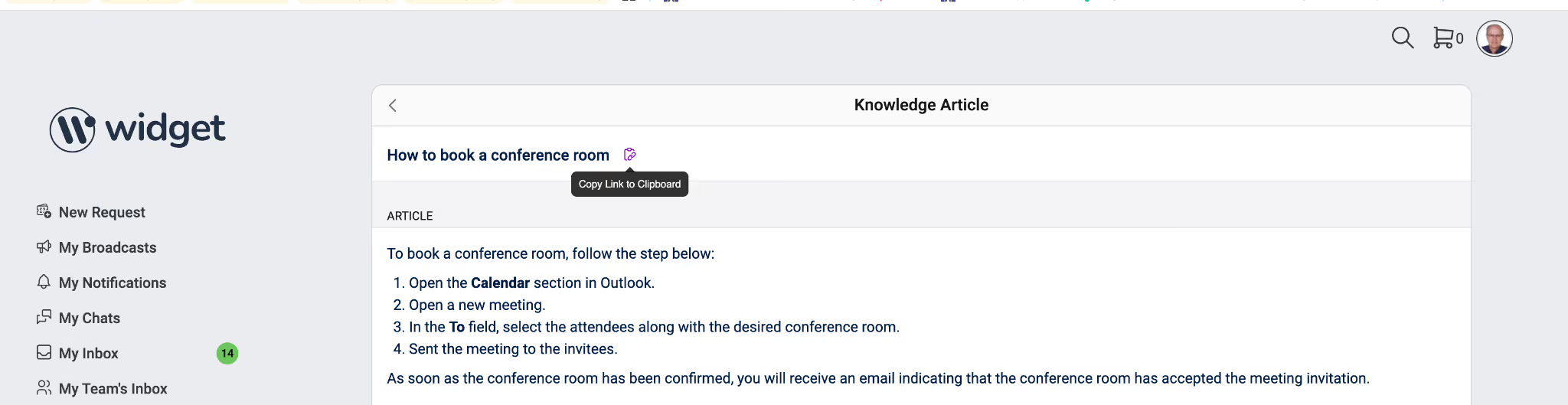
Clicking the button copies a canonical, identity-free URL to the user's clipboard and shows a visible confirmation. The copied URL excludes the requested_for_id and requestor_id query parameters that some navigation paths attach to the URL bar; when a recipient opens the link, the portal resolves identity from their own authenticated session.
Legacy URLs that still contain those parameters continue to work on direct navigation; the parameters are ignored rather than rejected. The address-bar URL behavior is unchanged.
The button is available on desktop Self Service Portal views in this release. The mobile portal view is not in scope. The button is keyboard-accessible and announces its label and confirmation state to screen readers.
A new Raynet integration app is now available in the Xurrent App Store. It imports and maintains device inventory data from Raynet in the Xurrent Configuration Management Database (CMDB).
The integration creates product categories, products, and configuration items for newly discovered devices. It checks the CMDB for existing assets and updates them as needed. Synchronization runs automatically.
To get started, install the integration from the Xurrent App Store and follow the Raynet Installation Guide. If you run into any issues during setup, raise a support request for assistance.