







Blog
Insights & updates from our experts


Resolve plant floor and IT issues before they disrupt production.

Stay audit-ready while resolving issues and reducing operational risk.
Resolve issues quickly with an AI-powered system that automates ticketing.

Unifiy IT, HR, Facilities, Finance, and more on a single, AI-powered service platform.

Simplify on-call scheduling, automate escalations, and reduce burnout.

Automate postmortems, AI summaries, and post-incident workflows

Create, organize, and continuously improve your knowledge base to find the right answers with Sera AI.

We're here to help

The integration with Atlassian Jira using the Xurrent Integration Service is

The integration with Atlassian Jira using the Xurrent Integration Service is

The integration with Atlassian Jira using the Xurrent Integration Service is

The integration with Atlassian Jira using the Xurrent Integration Service is

The integration with Atlassian Jira using the Xurrent Integration Service is

The integration with Atlassian Jira using the Xurrent Integration Service is

The integration with Atlassian Jira using the Xurrent Integration Service is

The integration with Atlassian Jira using the Xurrent Integration Service is
Resolve issues quickly with an AI-powered system that automates ticketing.
Unifiy IT, HR, Facilities, Finance, and more on a single, AI-powered service platform.
Simplify on-call scheduling, automate escalations, and reduce burnout.
Automate postmortems, AI summaries, and post-incident workflows
Create, organize, and continuously improve your knowledge base to find the right answers with Sera AI.
Resolve plant floor and IT issues before they disrupt production.
Stay audit-ready while resolving issues and reducing operational risk.

Detect, respond, and resolve incidents fast to cut downtime and MTTR.

Keep your store online, even during your biggest sales moments.

Protect patient data and resolve issues fast, so care teams stay focused on care.

Standardize service delivery across every store and channel.

We are here to help 24/7

Connect with other Xurrent Users

Get insights and tips on how to get the most out of Xurrent

Apps, APIs, and updates

Xurrent service functionality

Eliminate manual tasks, optimize workflows, and deliver faster resolutions.
Learn how organizations have reduced downtime, improved 50% MTTA & MTTR, and cut costs with Xurrent IMR.
Discover Xurrent IMR's quick support, bidirectional integrations with Jira and Slack, and more cohesive incident response capabilities compared to Opsgenie.
Understand why users value Xurrent IMR for its intuitive interface, efficient incident alerting, customizable On-call schedules, and escalations.
Your service desk has a lot of context locked inside it. Open requests, assignments, knowledge articles, the queue you've been meaning to triage all morning. Useful information, but it lives in tabs and tickets, not where you actually do your thinking.
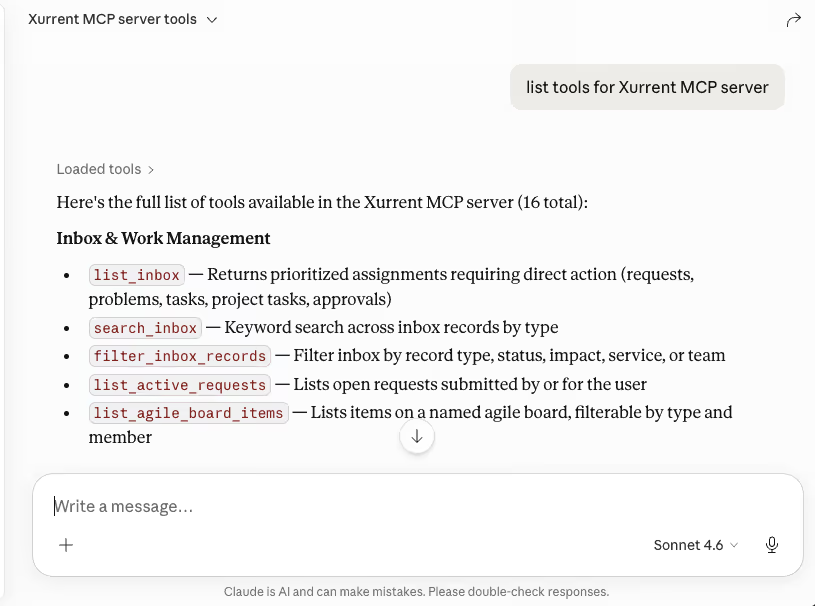
We're proud to announce that the Xurrent MCP server is generally available to all customers. Connect it to your AI client of choice and Xurrent becomes part of the conversation. Ask what's in your inbox, summarize a request, pull up the right knowledge article, kick off a service request from a template, check whether a service is healthy. The data and the actions are right there.
The MCP server exposes the parts of Xurrent that show up in everyday work. Some of what's available on day one:
Want to see everything the server exposes in your tenant, just ask the assistant to list tools. The available set surfaces automatically.
Setup takes a few minutes: generate a PAT in your Xurrent account, point your AI client at https://mcp.xurrent.com/mcp, paste the token, restart.
Full step-by-step instructions, including the Claude Desktop config snippet, are in the help article.
If you're using Xurrent IMR for incident management, there's a second MCP server you'll want connected too. With the IMR MCP server, Claude (or Copilot) can pull live incident data, on-call schedules, and timelines into the same conversation, so you can ask "who's on call for SRE right now?" or "walk me through the timeline of incident #75" without leaving your chat window.
The real power shows up when you connect both. Picture a major incident: you ask Claude (or Copilot) to walk you through the timeline of the IMR incident, identify which CIs and services were affected, then open a problem record in ITSM linked back to the incident, and surface any related knowledge articles the team should review before the postmortem. One conversation, two systems, no tab-switching.
Together, the two MCP servers cover the full ITxM picture: service operations on one side, incident response on the other, both reachable from a single conversation.
We'd love to hear what works, what doesn't, and what you want to do next. Give it a spin and let us know.



.webp)
.webp)

.webp)


