Blog
Insights & updates from our experts


Resolve plant floor and IT issues before they disrupt production.

Stay audit-ready while resolving issues and reducing operational risk.
Resolve issues quickly with an AI-powered system that automates ticketing.

Unifiy IT, HR, Facilities, Finance, and more on a single, AI-powered service platform.

Simplify on-call scheduling, automate escalations, and reduce burnout.

Automate postmortems, AI summaries, and post-incident workflows

Create, organize, and continuously improve your knowledge base to find the right answers with Sera AI.

We're here to help

The integration with Atlassian Jira using the Xurrent Integration Service is

The integration with Atlassian Jira using the Xurrent Integration Service is

The integration with Atlassian Jira using the Xurrent Integration Service is

The integration with Atlassian Jira using the Xurrent Integration Service is

The integration with Atlassian Jira using the Xurrent Integration Service is

The integration with Atlassian Jira using the Xurrent Integration Service is

The integration with Atlassian Jira using the Xurrent Integration Service is

The integration with Atlassian Jira using the Xurrent Integration Service is
Resolve issues quickly with an AI-powered system that automates ticketing.
Unifiy IT, HR, Facilities, Finance, and more on a single, AI-powered service platform.
Simplify on-call scheduling, automate escalations, and reduce burnout.
Automate postmortems, AI summaries, and post-incident workflows
Create, organize, and continuously improve your knowledge base to find the right answers with Sera AI.
Resolve plant floor and IT issues before they disrupt production.
Stay audit-ready while resolving issues and reducing operational risk.

Detect, respond, and resolve incidents fast to cut downtime and MTTR.

Keep your store online, even during your biggest sales moments.

Protect patient data and resolve issues fast, so care teams stay focused on care.

Standardize service delivery across every store and channel.

We are here to help 24/7

Connect with other Xurrent Users

Get insights and tips on how to get the most out of Xurrent

Apps, APIs, and updates

Xurrent service functionality

Eliminate manual tasks, optimize workflows, and deliver faster resolutions.
Learn how organizations have reduced downtime, improved 50% MTTA & MTTR, and cut costs with Xurrent IMR.
Discover Xurrent IMR's quick support, bidirectional integrations with Jira and Slack, and more cohesive incident response capabilities compared to Opsgenie.
Understand why users value Xurrent IMR for its intuitive interface, efficient incident alerting, customizable On-call schedules, and escalations.
This post is a living document, updated throughout the month as new product releases roll out. Each update listed here is released to our QA environment on the date shown and typically promoted to production the following week. Along the way, customers can review changes, share feedback, and help shape what ships next. Xurrent delivers product updates on a weekly cadence to keep enhancements moving continuously.
The Asset Management "Review Queue" has been renamed to "Reconciliation Queue" to align with industry-conventional terminology for CMDB integration workflows. The change touches the tab label, sub-navigation, the related account setting, and the automation rule surface in lockstep.
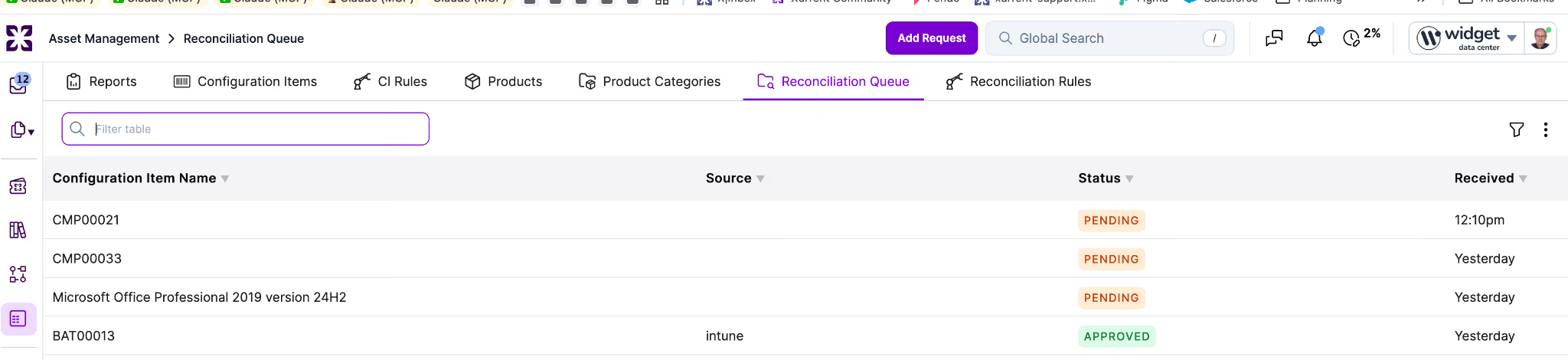
In Asset Management, the tab now reads "Reconciliation Queue" and the related rules tab reads "Reconciliation Rules".
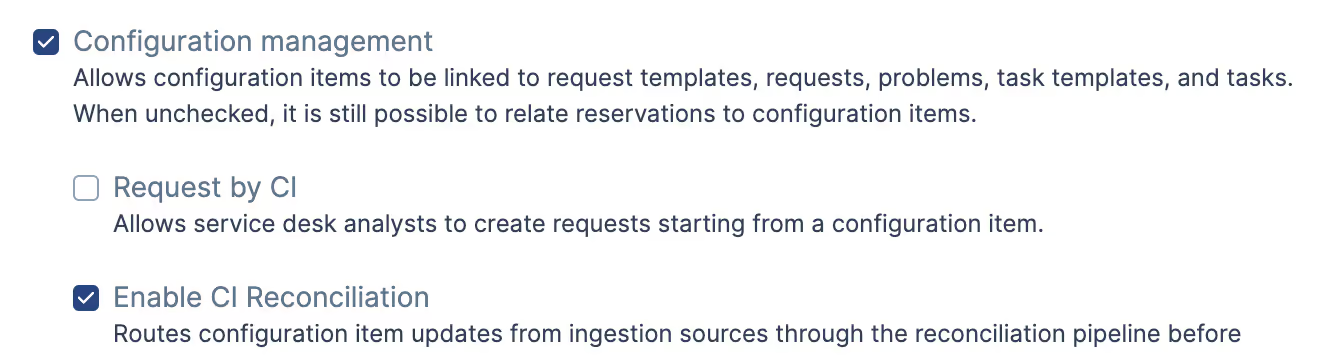
Under Configuration Management, the "Stage updates to configuration items" setting is now "Enable CI Reconciliation", with supporting copy updated to refer to the reconciliation pipeline. The "Generic" field on a rule reads "Reconciliation" instead of "Ci staged change".

In the automation rule authoring surface, the rule engine variable staged_ci is replaced by proposed_ci. The rule triggers on staged, on staged approved, and on staged rejected are renamed to on review, on approved, and on rejected. Existing rules are migrated automatically; no manual changes are required.
The public REST, GraphQL, and webhook surface for the staged-change object has been removed (ci_staged_changes REST routes, the CiStagedChange GraphQL type and ciStagedChangeUpdate mutation, and webhooks for ci_staged_change.create and ci_staged_change.update). A replacement public surface for the reconciliation pipeline is not introduced in this release; the broader phase model and identification engine work will define that surface later.
Automation rule authors can now read and set the rfc_type field on requests, using the same syntax that already works for other reference-keyed request fields.
Previously, the rfc_type field was modeled in the data layer but was not recognized by the rules engine. Rules could not read rfc_type in conditions or set it via actions. The new support brings rfc_type in line with fields like supplier, closure code, and major incident status.

Rule conditions can now reference rfc_type using the field's reference as the comparison value (for example, rfc_type = 'service_request'). The _was suffix resolves to the prior value within a rule (for example, rfc_type != rfc_type_was). The set action accepts rfc_type with the same quoted-reference syntax.
The model-layer dependency between category and rfc_type is preserved: rfc_type can only be set when category = 'rfc', and is automatically cleared when category changes away from RFC. Within a single set block, this means setting category to rfc must precede setting rfc_type. The reverse order fails with the existing validation message.
The Automation Rule details pane now includes a "Duplicate Automation Rule…" option in the ellipsis menu.
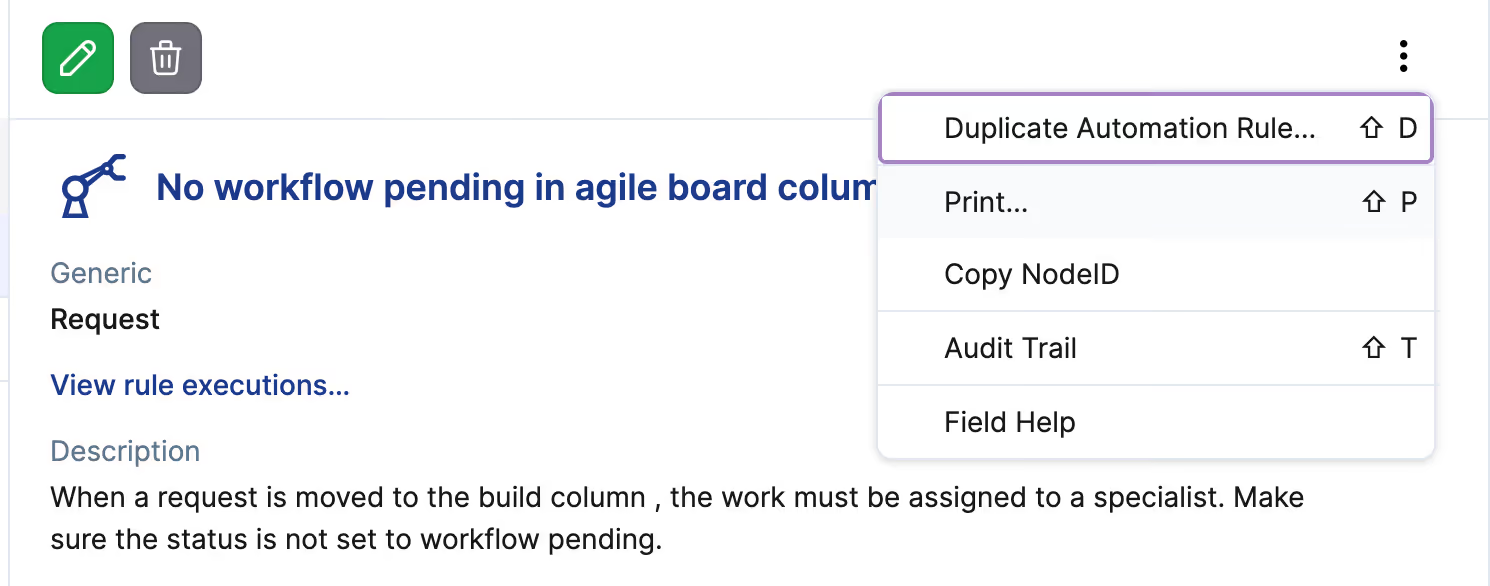
Choosing it opens the New Automation Rule form pre-filled with the source rule's name, description, trigger, expressions, condition, actions, enabled state, and parent context (workflow template, project template, or generic record type). The user must change the name before saving; the existing uniqueness validation rejects the form with "Name has already been taken" otherwise.
Lineage and operational state are intentionally not carried over. Identifiers, version history, deployment timestamps, sync-set origin, and position in the rule list are produced fresh when the duplicate is saved. The duplicate is independent of the source: deleting or modifying either one cannot affect the other.
This matches the duplication experience already available on Workflow Templates, Project Templates, Service Instances, and Knowledge Articles.
Audit history now renders small changes to custom fields inline, instead of collapsing them behind a "Show details" link when the unchanged surrounding content would have made the legacy serialization exceed 10KB.
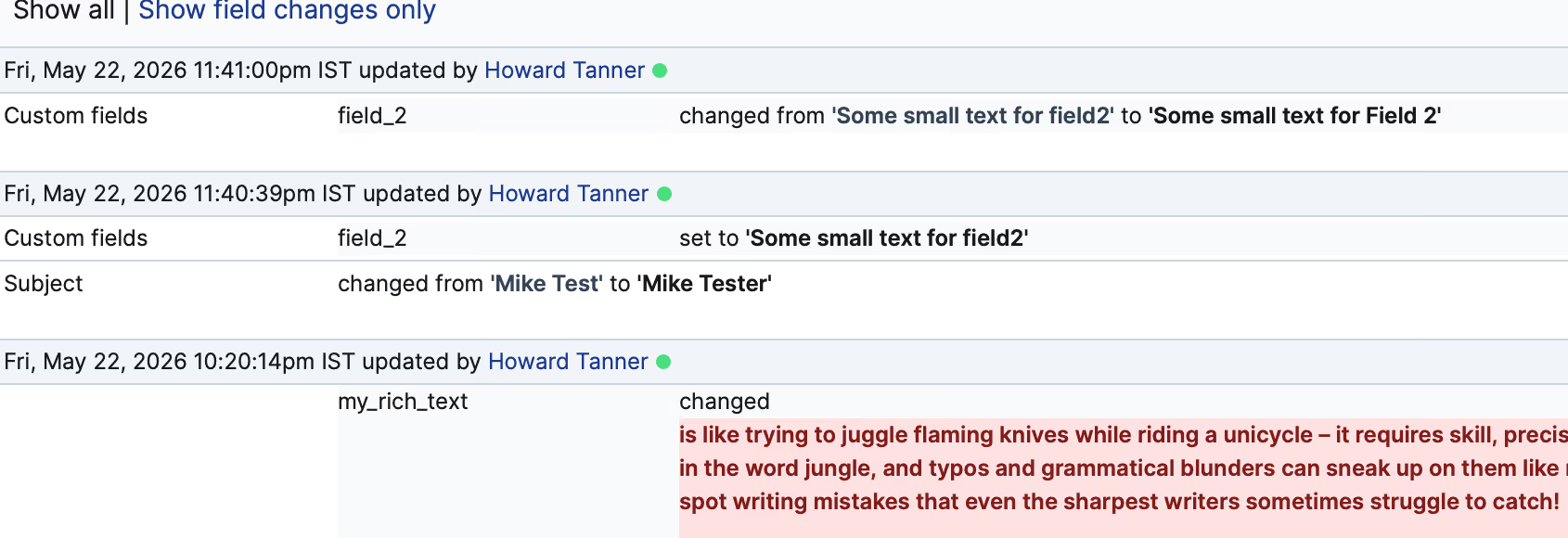
Previously, when an audit entry recorded a small change to one or a few custom fields on a record with a large custom_fields_json, the audit history collapsed the entry behind "Show details" because the serialization included the full unchanged content alongside the delta. The new inline behavior surfaces what actually changed without requiring an extra click.
Audits where the changed values themselves exceed 10KB (for example, a large rich-text replacement) continue to collapse behind "Show details", by design.
The change is forward-only. Existing audit lines render as before; only new audit lines benefit. The REST /audit_lines JSON shape is unchanged (changes.custom_fields, changes.custom_data); on new rows, those arrays now contain only the changed fields.
Personal Access Tokens issued against a directory account can now be used with MCP tools by adding an X-Xurrent-Account header to the MCP client configuration. The header value is the sitename of a child support-domain account the PAT holder has access to.
Previously, directory-account PATs returned 403 Forbidden on every MCP tool call, including read-only tools like list_inbox and list_active_requests. With this release, the MCP server forwards the X-Xurrent-Account header to the backend, which uses it to resolve the working account for the call. This unblocks customers who operate across multiple support-domain accounts under a single directory and want a single PAT to address any of them.
Two requirements apply to the header value:
Support-domain PATs continue to work without the header and require no configuration changes.
Which setup should I use?
For most customers, a PAT issued directly against the support-domain account is the simplest path: no header configuration, no cross-account resolution, and the permission model maps cleanly to the account the work actually happens in. We recommend this setup as the default.
The directory-account path is purpose-built for customers running multiple support-domain accounts under one directory who want a single PAT that can target any of them by passing the account sitename in the header. If that's your structure, this release is for you. If it isn't, no action is needed.
An example MCP client configuration is available in the MCP documentation.
SSO now enforces the SAML specification's Destination, Recipient, and Audience binding checks during sign-in, confirming that each assertion was issued for this Service Provider and ACS endpoint.
No action is required for accounts whose Identity Provider sends standard SAML values, which is the default for Okta, Azure AD/Entra, Google Workspace, OneLogin, ADFS, and other major IdPs configured against the SP metadata. Existing cross-account SSO setups (directory accounts with multiple support domains, accounts grouped by certificate fingerprint) continue to work without changes.
Customers using custom IdP configurations should confirm their IdP's Destination and Recipient values match the ACS URL in their Xurrent SSO settings, and that the Audience matches the SP entity ID. Mismatches will surface as sign-in failures in the SSO audit log.
Sera AI Studio gives administrators a defined pathway to a successful virtual agent rollout: write the instructions, score the templates, validate against a golden set, and adjust. It is now available in QA as the single workspace for configuring Sera AI on an account.
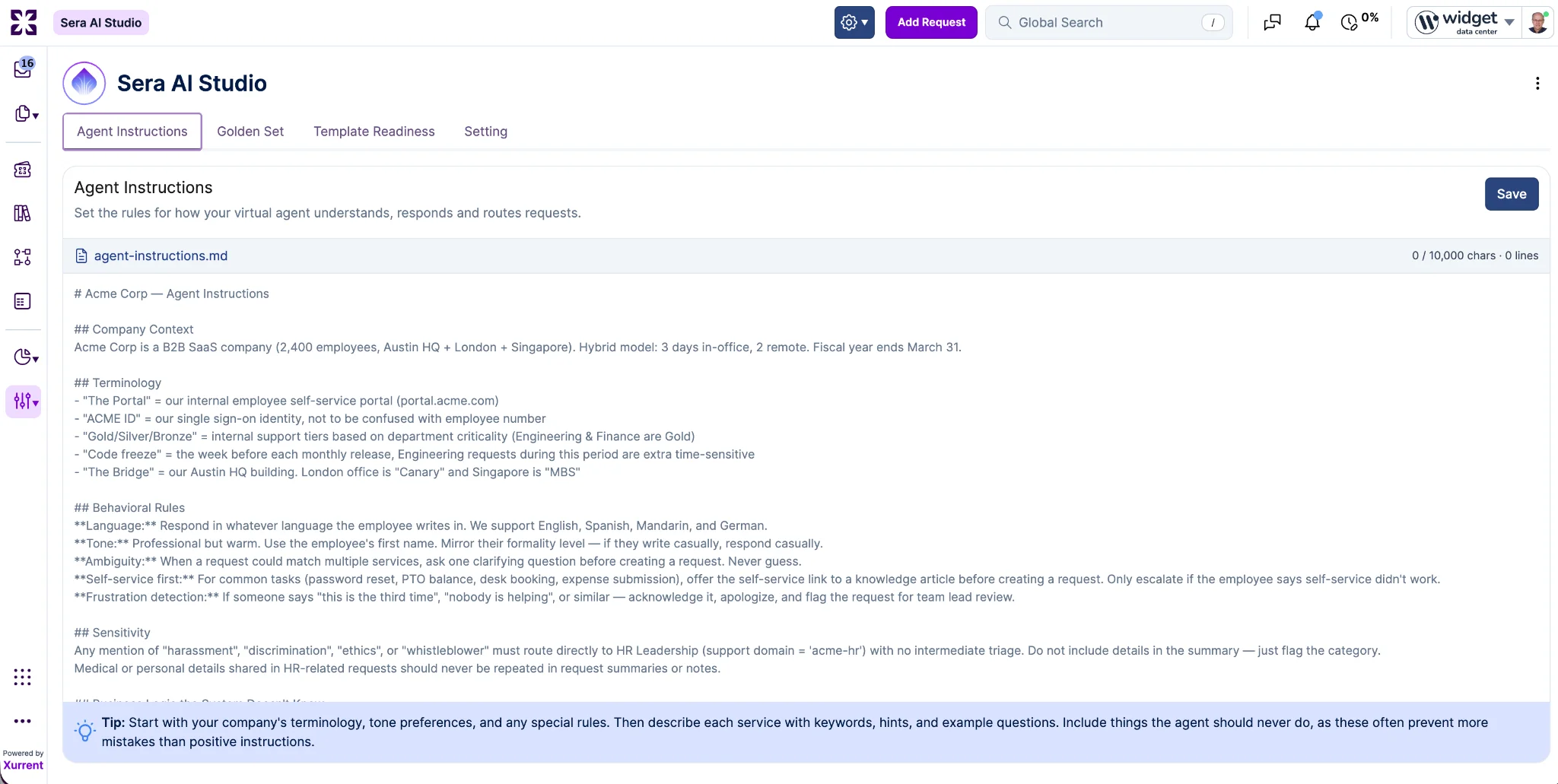
The "Agent Instructions" tab is where administrators personalize the virtual agent for their business: terminology, tone, behavioral rules, sensitivity handling, and the business logic the system cannot infer on its own. Instructions are written in a markdown editor with a 10,000 character limit (an error is returned on save if exceeded). Inline guidance walks administrators through a recommended structure, starting with terminology and tone, then per-service detail (keywords, hints, example questions), and finishing with explicit guardrails for what the agent should never do.
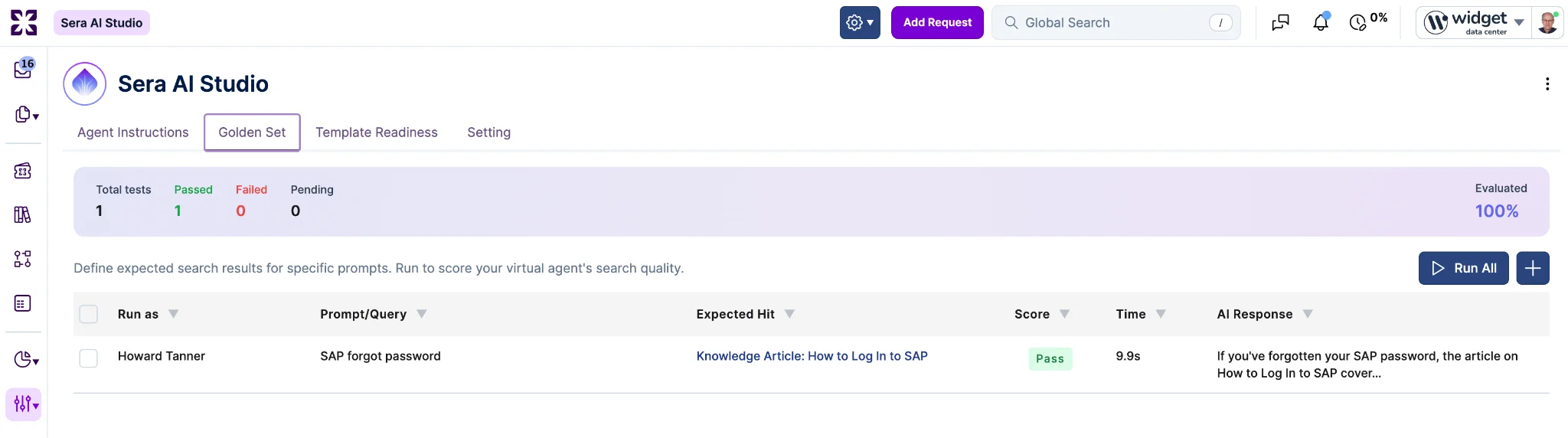
The "Golden Set" and "Template Readiness" tabs together answer the question of whether the account's underlying resources are ready for the virtual agent to use. The "Golden Set" tab focuses on knowledge: administrators define expected search results for specific prompts (run as a chosen user), then click "Run All" to score the virtual agent's search quality against the set. Each row records pass or fail, response time, and the AI response, with a pass-rate summary at the top. This is the surface administrators use to confirm the agent is retrieving the right knowledge articles, validate configuration changes before they reach end users, and catch regressions after agent instructions or knowledge articles are updated.
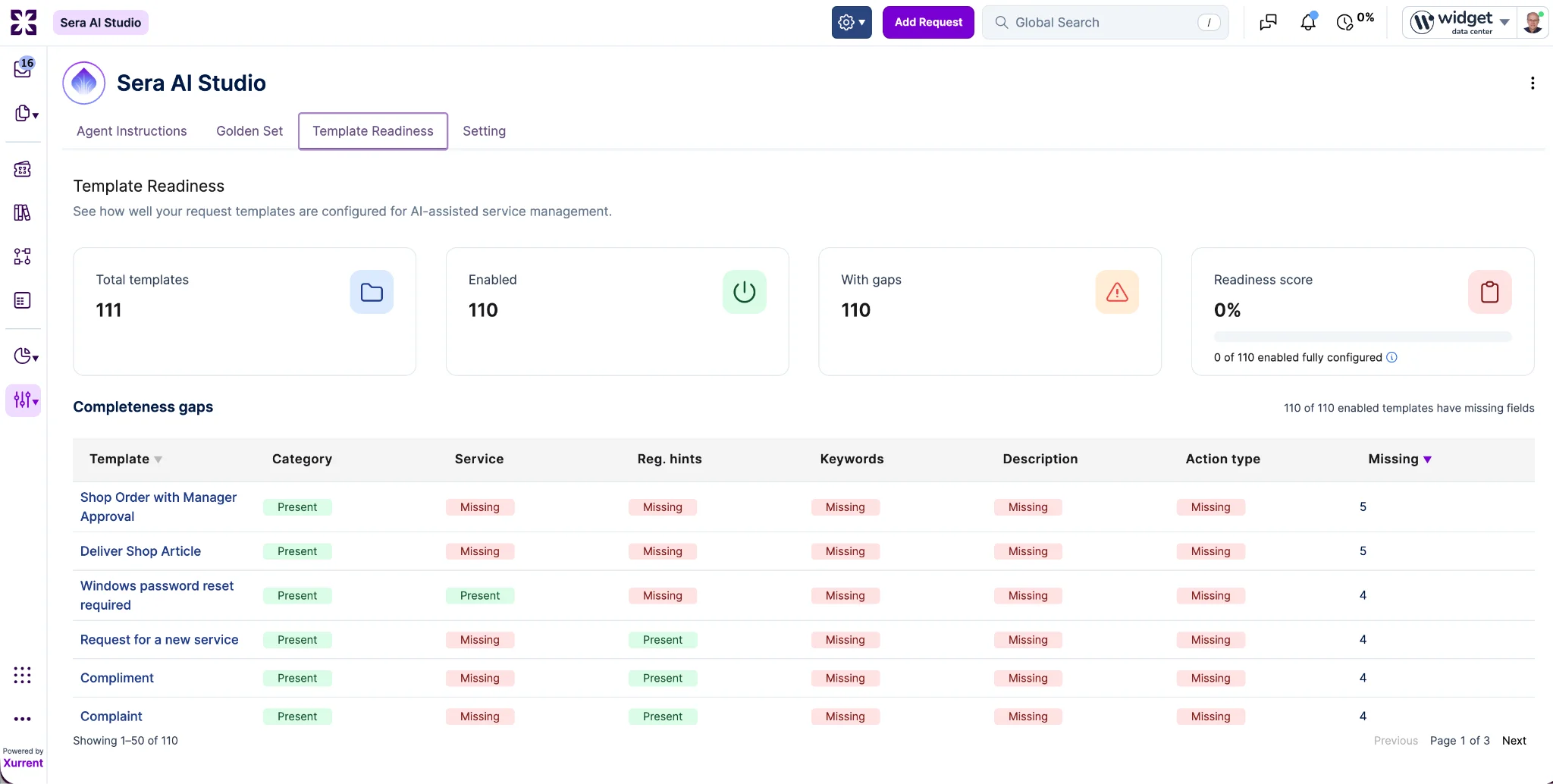
The "Template Readiness" tab focuses on the request templates the agent will act on. It scores how well existing templates are configured for AI-assisted service management, surfacing total templates, how many are enabled, how many have completeness gaps, and an overall readiness percentage with a count of fully configured templates. A "Completeness gaps" table lists every enabled template with per-field status (Category, Service, Reg. hints, Keywords, Description, Action type) and a missing-field count, sortable to prioritize remediation. This is the tab that tells an administrator what configuration work still stands between the current state and a virtual agent that can confidently identify and act on requests.
The "Setting" tab holds Studio-level configuration. For this release it contains a single setting, a default "Run as" user that pre-fills the user column when adding new Golden Set rows. Additional settings are expected over time.
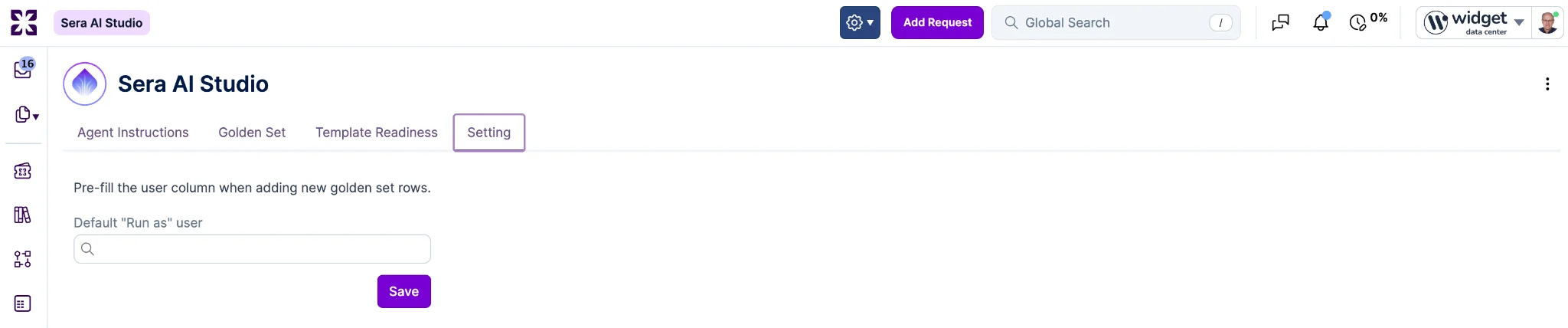
Access is gated to Account Administrator. In this release Sera AI Studio is available on Support Domain Accounts; the Directory Account version is expected to land next week.
A new "Licensed Users" page is available under Settings. Support Domain Accounts and accounts billed through a parent customer do not see the page. Access is limited to Financial Manager, Account Administrator, and Auditor.
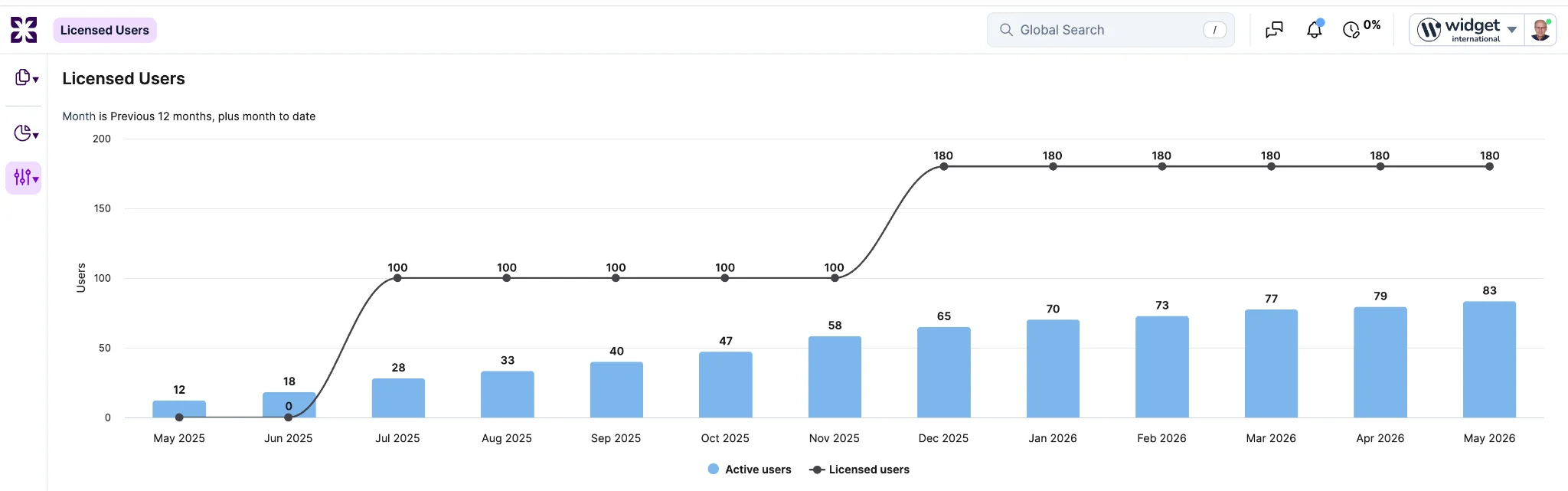
The page shows a 13-month chart comparing active user consumption against contracted licensing, covering the trailing 12 months plus the current month to date. Active users appear as column bars (summed across the account, its support-domain accounts, and any accounts this customer pays for). Contracted licensing appears as a line overlay drawn from the Purchase Order line items in force for each month.
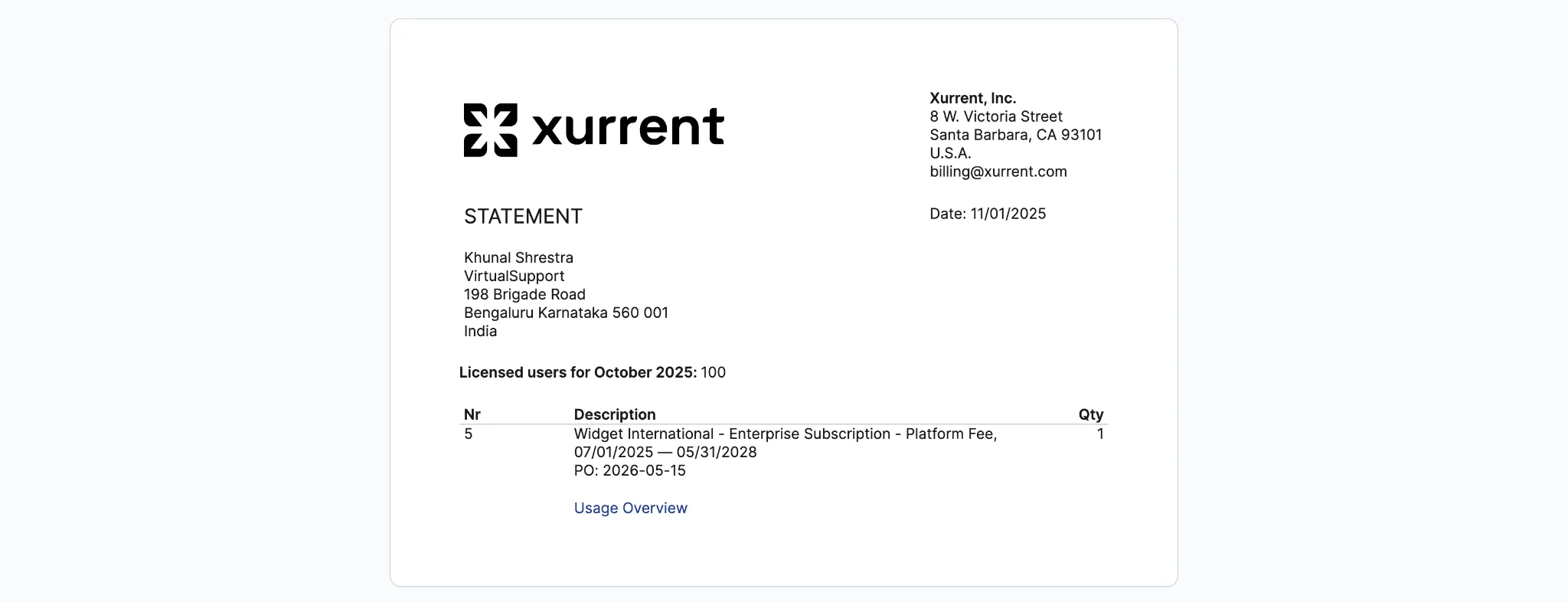
Each bar opens that month's public statement in a new browser tab, including the current month and months where licensed users is zero.
The public customer statement now also lists the Purchase Order line items in force for the period (Number, Description, Quantity) above the Usage Overview link, so the statement is useful even for months that have not yet been finalized. Non-SaaS billing statements (pay-as-you-go, used-prepaid, and so on) are unchanged.
The hide-internal-notes control has moved from a per-request setting to a session-wide one.
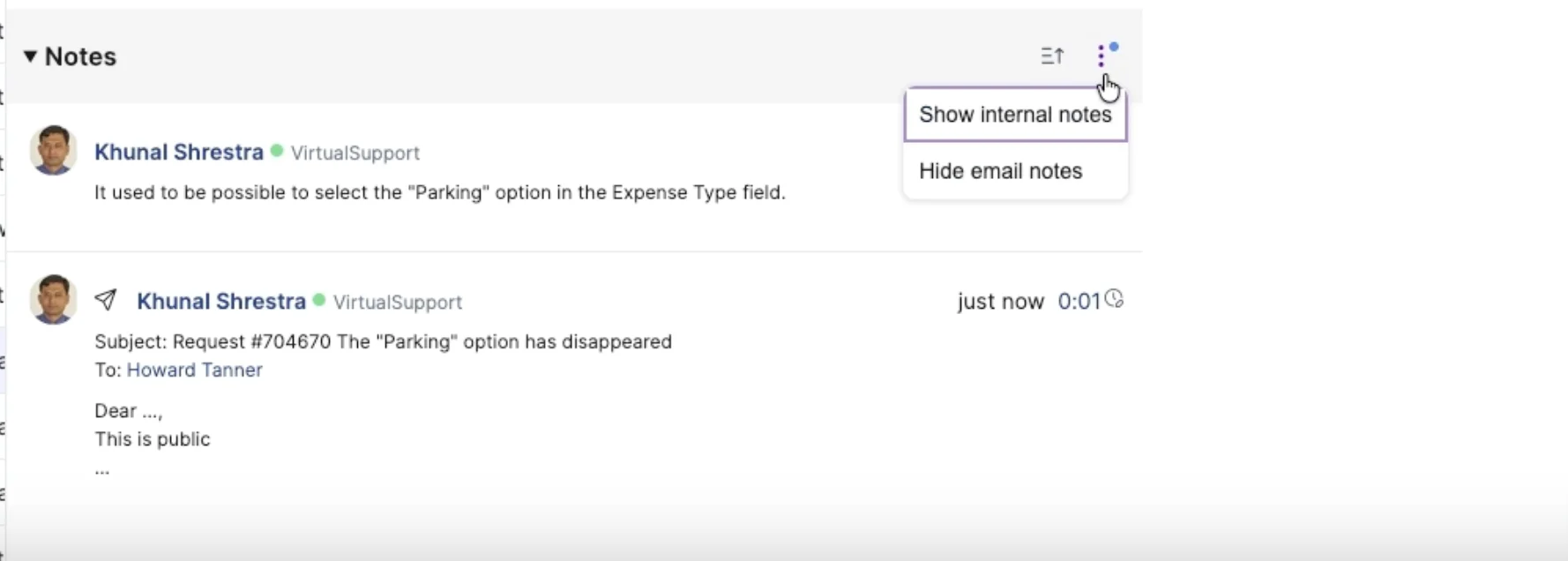
Once a specialist enables it, internal notes stay hidden on every request opened for the rest of the browser session, with a persistent visual indicator shown while the filter is active so the specialist always knows it is on. The indicator is discreet enough that its presence during a screen share does not itself reveal that internal content exists.
Previously, the same control existed but was scoped to a single request. A specialist preparing for a customer-facing review (such as a service delivery review where multiple requests are walked through on a shared screen) had to toggle each request individually, and the toggle action itself was visible to the customer. The per-request behavior has been removed as part of this change.
The toggle stays on as the specialist moves between requests and refreshes tabs, and turns itself off when the browser is closed. The setting is per-specialist and does not affect other users. Internal notes can still be written and edited normally while the toggle is on; it only changes what is shown. Turning it off brings internal notes back into view right away.
Activity ID, Rate ID, and Agreement ID are now available as selectable columns in the Time Entries view.
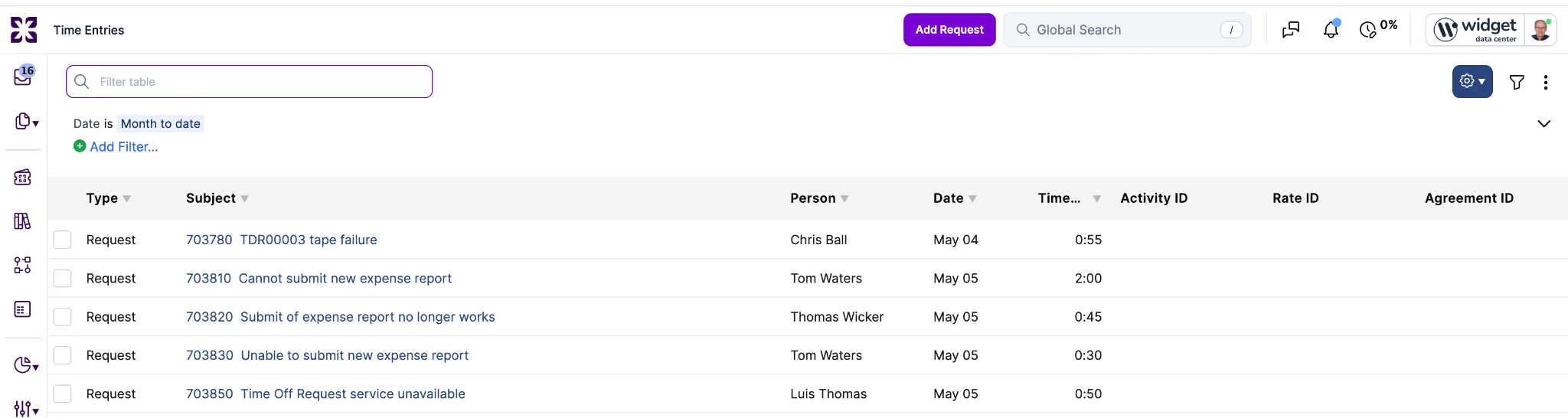
When added to the active view, the fields are included in the view's XLSX or CSV export.
RFC types defined on a directory account are now fully usable from bulk edit forms and CSV imports on support-domain accounts. The request template bulk edit form now shows the "RFC type" field for directory-defined types, and CSV round-trips (export then re-import) of request templates and requests preserve the RFC type rather than clearing it.
Previously, the bulk edit forms and CSV importers only recognized RFC types defined on the support-domain account itself, so directory-defined types were either hidden from the form or silently dropped on import. The single-template editor was unaffected and continues to work as before.
The CSV importers also now raise a row-level error when an "RFC type" reference cannot be resolved, rather than silently clearing the field. Imports of unchanged exported files now round-trip cleanly.
Knowledge articles now have a built-in review signal that helps knowledge managers identify and refresh stale content without forcing an unnecessary edit.

A new account-level "Knowledge article review threshold" setting controls how long an article can go without an update before it appears in the "Needs Review" view. The threshold is expressed in months and defaults to 12.
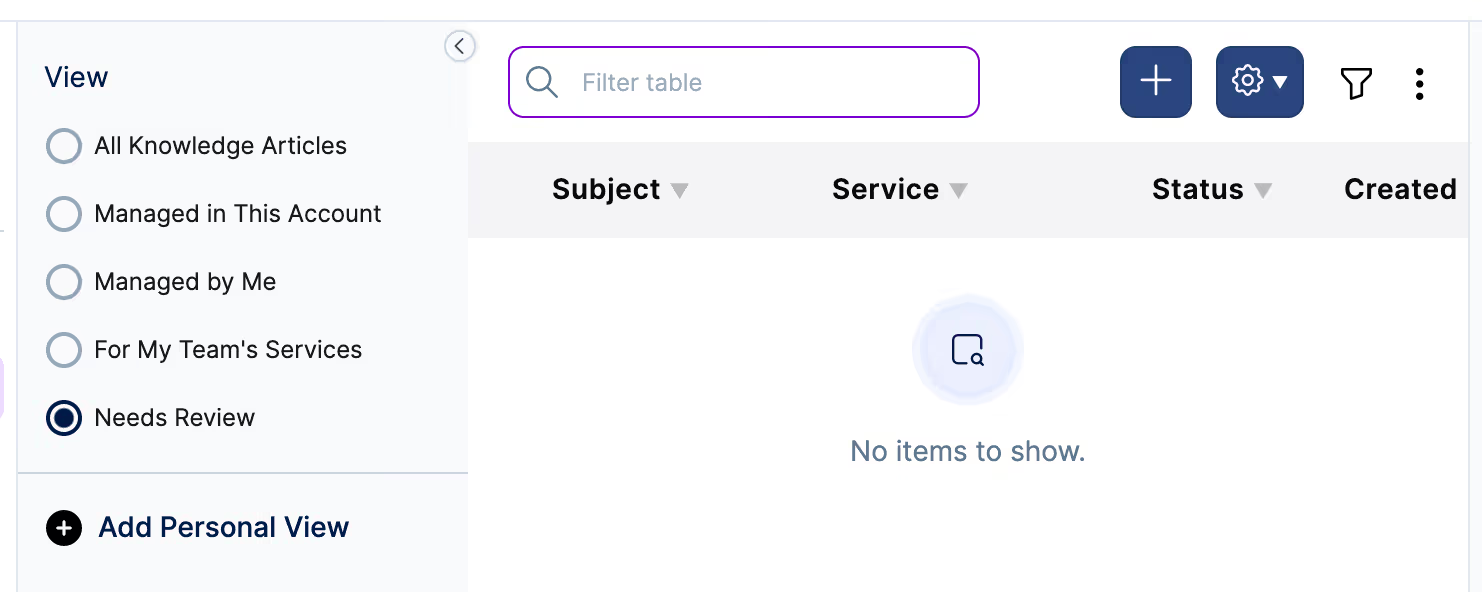
A new "Needs Review" view has been added to the knowledge article view list. It shows articles in "Validated" or "Not Validated" status whose "updated at" timestamp is older than the threshold, sorted oldest first. Articles in "Work in Progress" or "Archived" status are excluded.
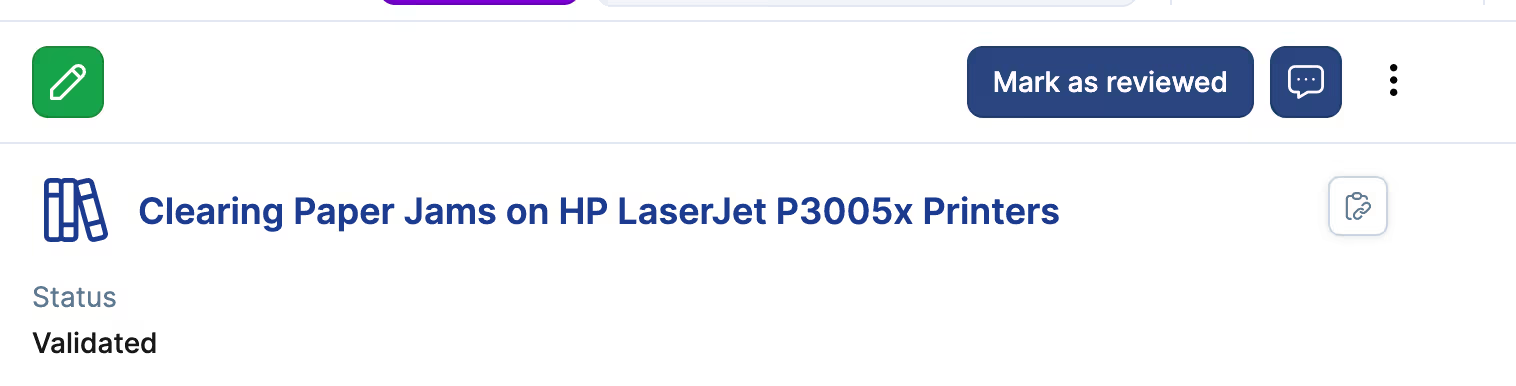
A new "Mark as reviewed" action is available on the article detail page and as a bulk action on the list view. It updates the article's "updated at" timestamp without creating a new version or changing content, so reviewed articles drop off the "Needs Review" view immediately. Each review is recorded as a distinct audit log entry capturing the actor and timestamp. Any user with edit rights on the article can mark it reviewed; no additional permission is required.
The action is also available in the REST and GraphQL APIs and produces the same result as the UI, including the audit entry.
Asset Management now provides an account-level setting to control whether CI updates flow through a staging queue, plus support for automation rules on staged CI records.
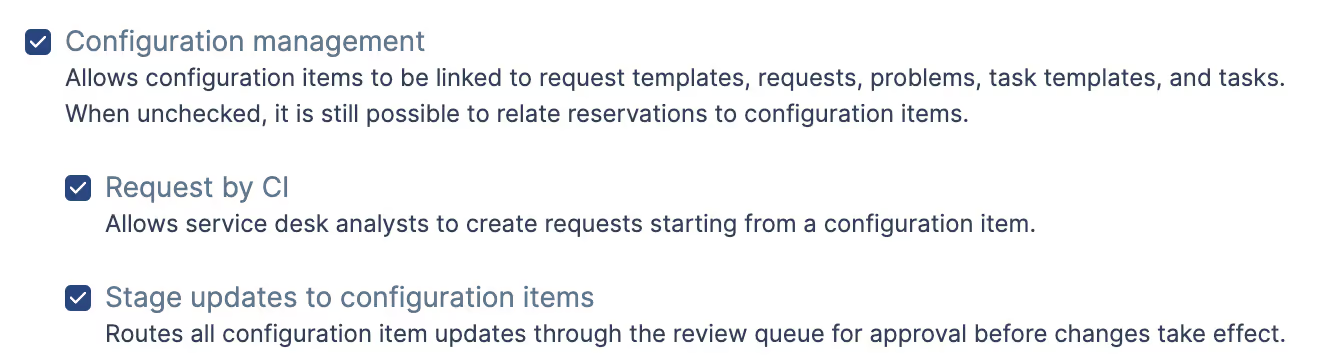
The new "Stage updates to configuration items" setting (Configuration Management, account administrators only) controls staging queue behavior. When enabled, the staging queue is used for all CI updates that originate from an approved staged CI. When disabled, CI updates bypass the staging queue and apply directly.
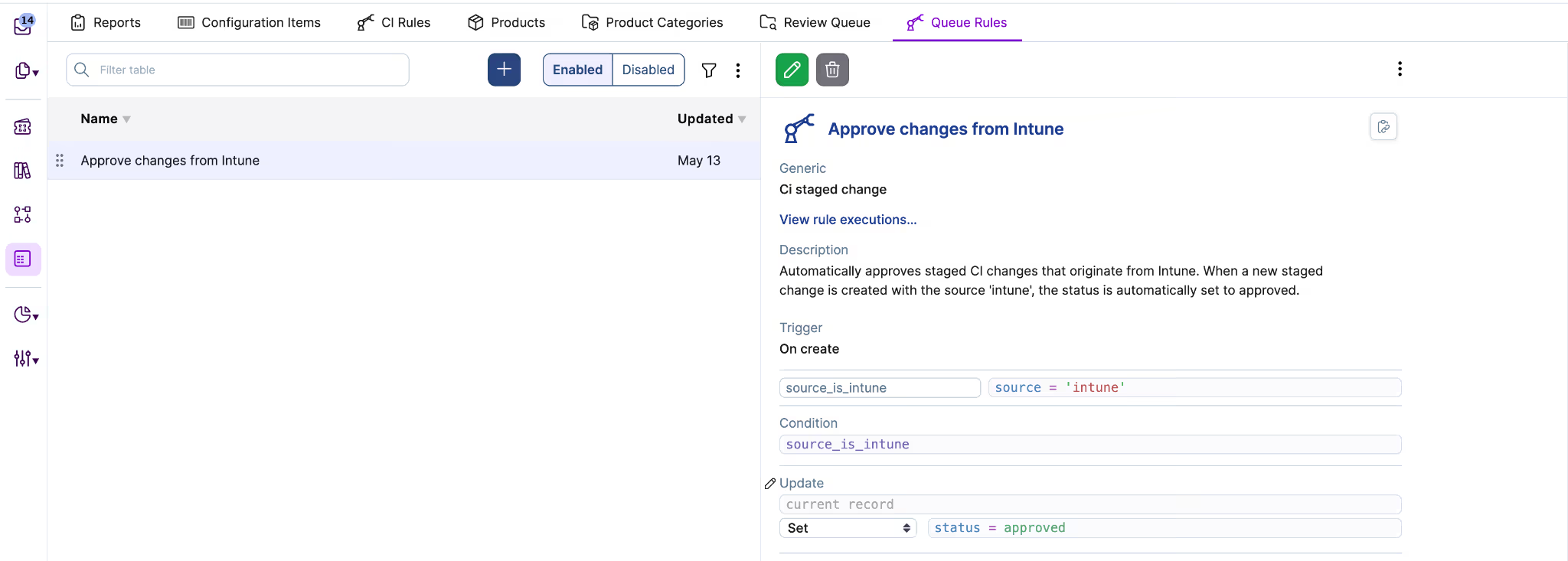
Automation rules can now be defined on staged CI records, with both on-create triggers (when a new staged CI is created) and on-field-update triggers (matching the options available for standard CI updates). Within a rule, the current CI is accessible via its belongs-to relation and retains its existing values, while the staged CI is accessible as a temporary virtual copy with the proposed values applied (similar to how today and related_note are exposed in other automation rules).
The dedicated approve action on a staged CI copies the staged changes to the actual CI and can trigger any automation rules defined on the CI model. This behavior is unchanged.
The Virtual Agent chat in Self-Service v2 has received accessibility improvements as part of our continued commitment to high accessibility standards across the product. Screen reader users can now hold a full conversation with the Virtual Agent without assistance.
Four changes in this release:
Layout, spacing, and styling are unchanged for sighted users.
The Time Spent Description field now accepts up to 255 characters across every entry point where the field is shown.
Previously, the limit was inconsistent. The in-note Time Tracking widget accepted about 250 characters, but reopening the same entry in the Edit Time Entry modal silently truncated the description at 80 characters. The weekly timesheet row and the Self Service or specialist sign-off field disagreed with both of the others.
All four places where a Time Spent Description can be typed or edited now share the same 255-character limit, matching the database column width. A server-side length check enforces the same maximum for descriptions submitted through APIs or imports, so the limit cannot be silently exceeded from any client.
On the single-item translation editor, the "Save & Next", "Save", "Cancel", and "Skip" buttons now sit directly beneath the translation text field, right-aligned, rather than at the bottom of the page.
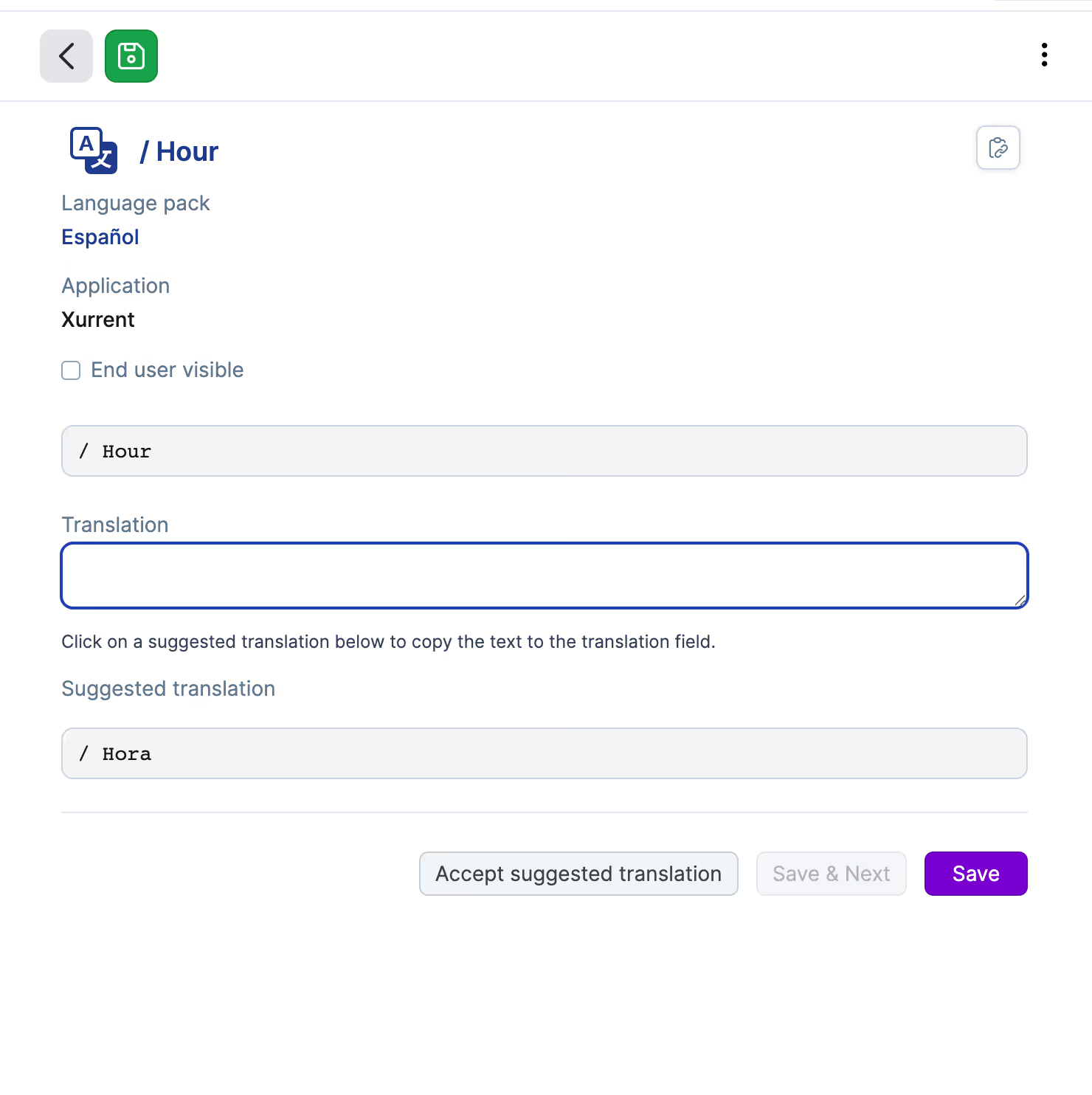
Previously, the action buttons were anchored to the page bottom regardless of content size. On large monitors, this created a long mouse travel from the translation content to the save action for every entry, which slowed down high-volume translation work. The bottom-anchored layout optimized for content-heavy pages but penalized the translation editor, where the content is small and the buttons ended up disconnected from the work area.
Button ordering, behavior, and keyboard tab flow are unchanged. The change applies to every entry point that opens the single-item translation editor. Bulk translation flows and import flows are unaffected.
The rating prompt for completed requests now appears inline in specialist, matching the experience in self-service.
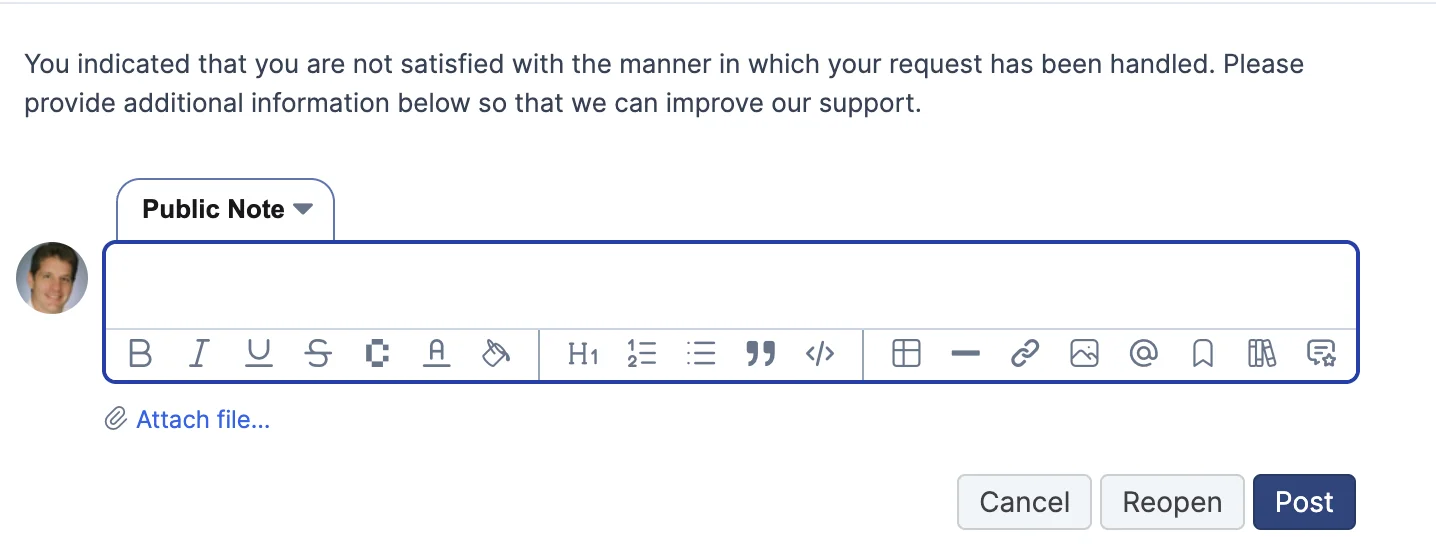
After clicking thumbs up or thumbs down, a short prompt appears above the note editor (encouraging for thumbs up, asking what could be improved for thumbs down).
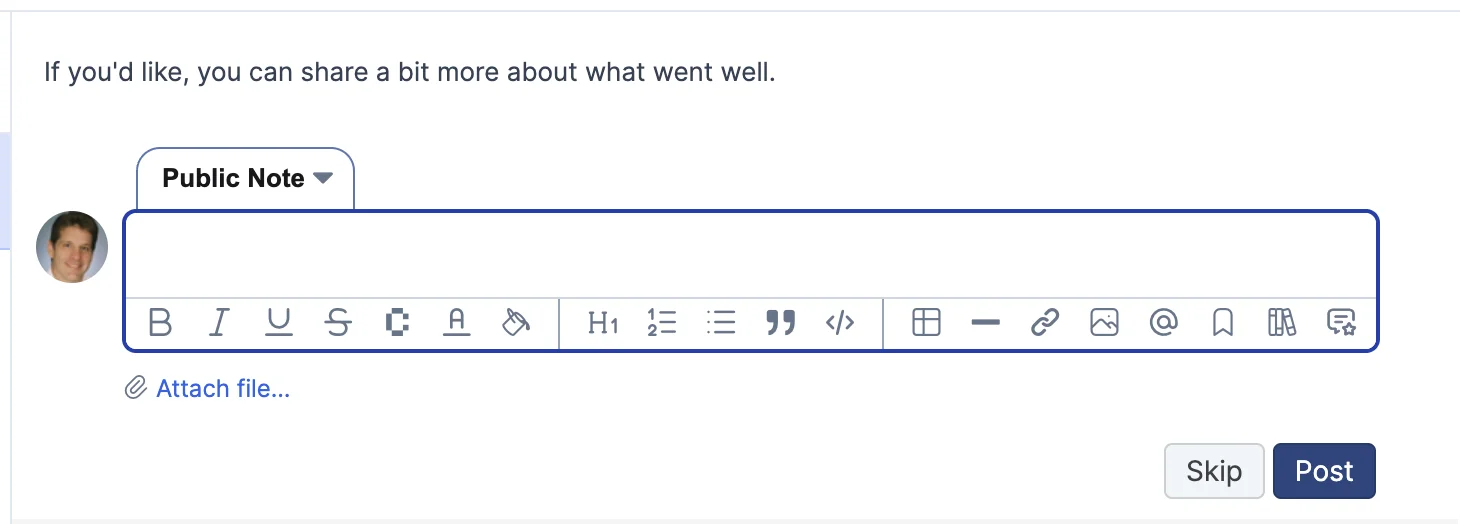
While rating, the editor is focused on public feedback: the Internal Note tab, email tabs, and time-spent row are hidden. Rich text formatting, inline images, and file attachments remain available.
To save a rating with feedback, users type a note and click "Post". To skip the comment, they click "Skip" (thumbs up) or "Cancel" (thumbs down), which clears the editor without saving. "Reopen" (thumbs down) still requires a note, since reopening a completed request is a meaningful change.
The CMDB Health dashboard has been refreshed with clearer, more consistent naming as part of preparing the section for general availability.
The four KPI tiles and their section headers have been renamed: "Potential Duplicates" is now "Duplicate candidates", "Stale Records" is now "Check-in freshness", "Field Completeness" is now "Field population", and "Orphan CIs" is now "Relationship coverage". "Supporting Views" is now "Lifecycle & financial".
The "Configuration Items by status" tile (formerly "CI By Status") has moved from Check-in freshness into the new Lifecycle & Financial section, where it joins "Configuration Items by warranty status", "Configuration Item age distribution", and "Total Configuration Item value" as descriptions of the estate rather than its health.
Tile names now use sentence case with the full "Configuration Item(s)" instead of "CI(s)", and lowercase "by", as in "Field population by Configuration Item type".
The REST API now accepts node IDs (the base-64 strings returned by the GraphQL API) on the People endpoint and on relationship endpoints. If you pipe GraphQL results into REST calls, you no longer need to convert IDs first. This matches how every other record type already works.
Two cases were previously broken and have been fixed:


.webp)
.webp)

.webp)