

Blog
Insights & updates from our experts


Resolve plant floor and IT issues before they disrupt production.

Stay audit-ready while resolving issues and reducing operational risk.
Resolve issues quickly with an AI-powered system that automates ticketing.

Unifiy IT, HR, Facilities, Finance, and more on a single, AI-powered service platform.

Simplify on-call scheduling, automate escalations, and reduce burnout.

Automate postmortems, AI summaries, and post-incident workflows

Create, organize, and continuously improve your knowledge base to find the right answers with Sera AI.

We're here to help

The integration with Atlassian Jira using the Xurrent Integration Service is

The integration with Atlassian Jira using the Xurrent Integration Service is

The integration with Atlassian Jira using the Xurrent Integration Service is

The integration with Atlassian Jira using the Xurrent Integration Service is

The integration with Atlassian Jira using the Xurrent Integration Service is

The integration with Atlassian Jira using the Xurrent Integration Service is

The integration with Atlassian Jira using the Xurrent Integration Service is

The integration with Atlassian Jira using the Xurrent Integration Service is
Resolve issues quickly with an AI-powered system that automates ticketing.
Unifiy IT, HR, Facilities, Finance, and more on a single, AI-powered service platform.
Simplify on-call scheduling, automate escalations, and reduce burnout.
Automate postmortems, AI summaries, and post-incident workflows
Create, organize, and continuously improve your knowledge base to find the right answers with Sera AI.
Resolve plant floor and IT issues before they disrupt production.
Stay audit-ready while resolving issues and reducing operational risk.

Detect, respond, and resolve incidents fast to cut downtime and MTTR.

Keep your store online, even during your biggest sales moments.

Protect patient data and resolve issues fast, so care teams stay focused on care.

Standardize service delivery across every store and channel.

We are here to help 24/7

Connect with other Xurrent Users

Get insights and tips on how to get the most out of Xurrent

Apps, APIs, and updates

Xurrent service functionality

Eliminate manual tasks, optimize workflows, and deliver faster resolutions.
Learn how organizations have reduced downtime, improved 50% MTTA & MTTR, and cut costs with Xurrent IMR.
Discover Xurrent IMR's quick support, bidirectional integrations with Jira and Slack, and more cohesive incident response capabilities compared to Opsgenie.
Understand why users value Xurrent IMR for its intuitive interface, efficient incident alerting, customizable On-call schedules, and escalations.
This post is a living document, updated throughout the month as new product releases roll out. Each update listed here is released to our QA environment on the date shown and typically promoted to production the following week. Along the way, customers can review changes, share feedback, and help shape what ships next. Xurrent delivers product updates on a weekly cadence to keep enhancements moving continuously.
"My Reservations" now shows a person's bookings as a scannable list under a "Your Reservations" heading, sorted with upcoming reservations first.
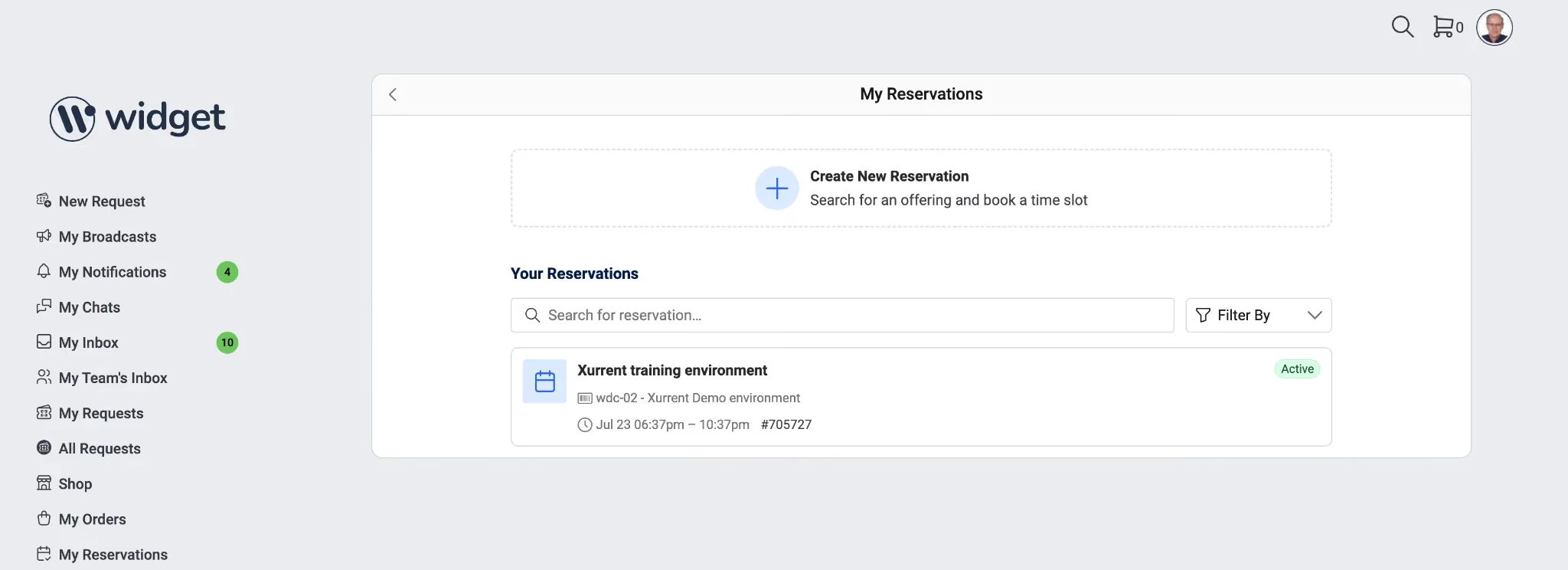
Each row shows the offering name, the reserved configuration item, the date and time window, the request reference, and a status badge of "Upcoming", "Passed", "Canceled", or "Conflicting". A "Search for reservation..." field narrows the list by offering name or configuration item, a "Filter By" control narrows it by status, and a "Create New Reservation" entry point starts a new booking. Selecting a row opens the reservation detail.
Selecting a reservation now opens a read-only detail card showing the "Subject", "Status", "Asset", "Requested For", "Start Date & Time", and "End Date & Time". From the card, a person can download the booking through "Add to Calendar" or end it through "Cancel", which prompts for confirmation and syncs the linked request.
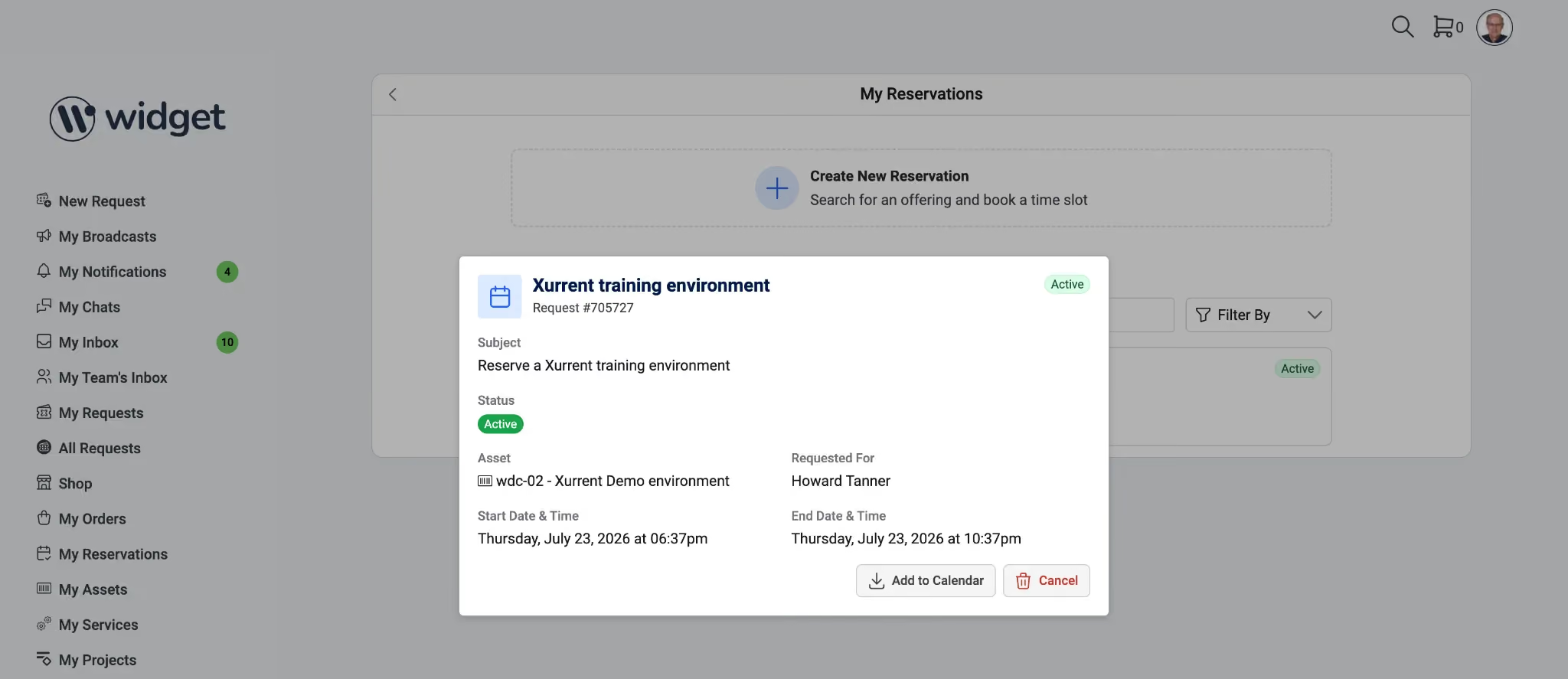
Actions appear only when the reservation's state and the person's permissions allow them.
Agile Boards can now be filtered.
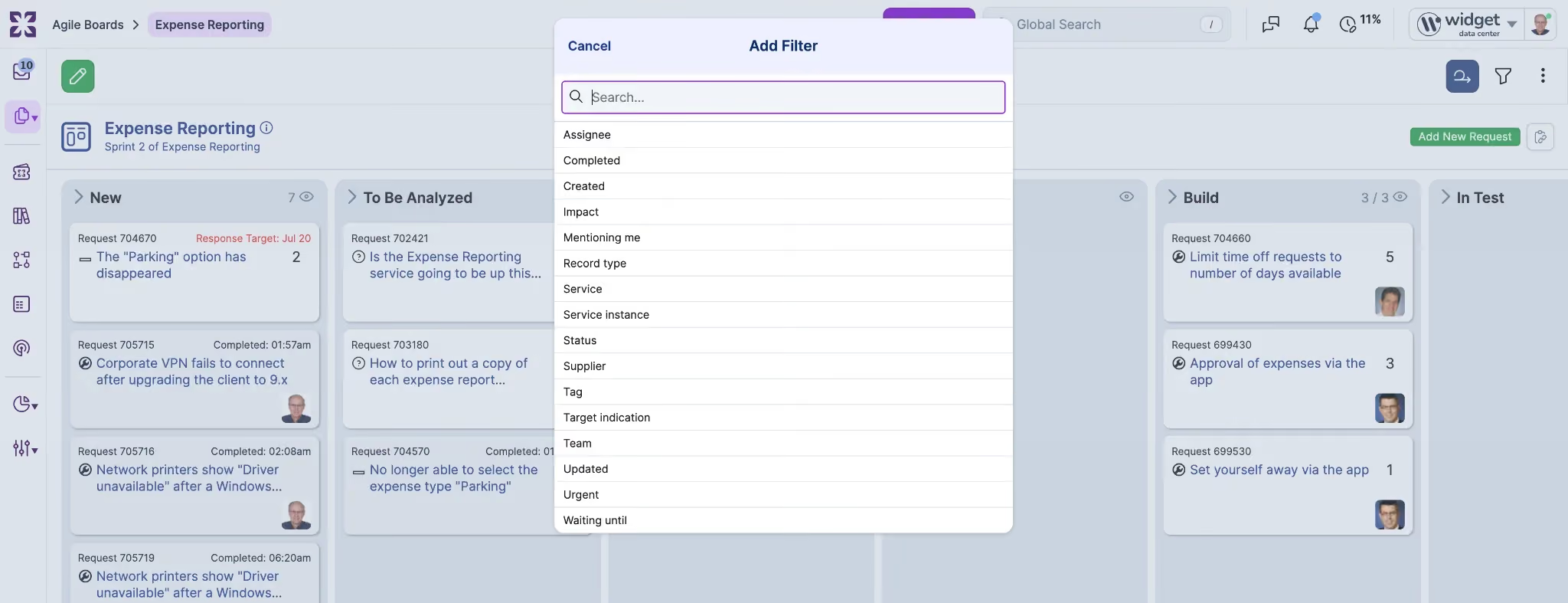
The "Add Filter" control opens a searchable list including "Assignee", "Mentioning me", "Service", "Service instance", "Status", "Team", "Impact", "Urgent", "Record type", "Supplier", and "Tag", along with date filters for "Created", "Updated", "Completed", and "Waiting until". This gives a person a way to narrow a board to their own work, a single service instance, or a status.
Specialists can now rate any Sera Assist reply with a thumbs up or thumbs down control in the panel, the same way end users rate Sera AI answers. A thumbs down opens a short optional prompt to describe what went wrong; skipping it cancels the vote without recording anything.
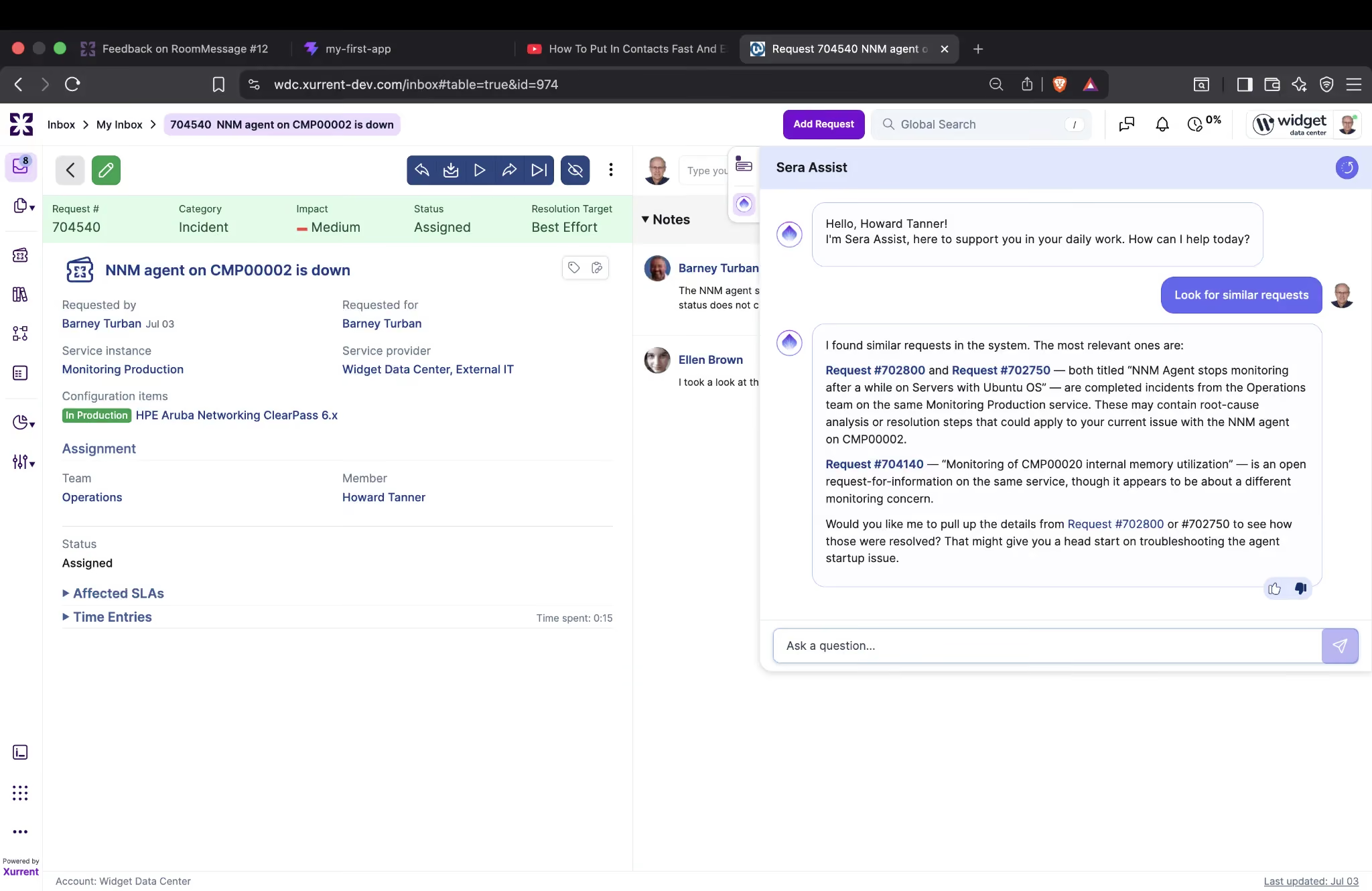
Because an Assist answer is only held while the conversation is open, the rated question and answer are saved at the moment they are rated, and unrated exchanges are not stored. Changing a vote updates the existing record rather than creating a duplicate. All Assist feedback appears in the same "AI Feedback" overview already used for Sera AI, labeled as an Assist response.
The "Avg Success Rate" and "Time Saved/Week" tiles on the Agent Designer dashboard now calculate from a defined formula.
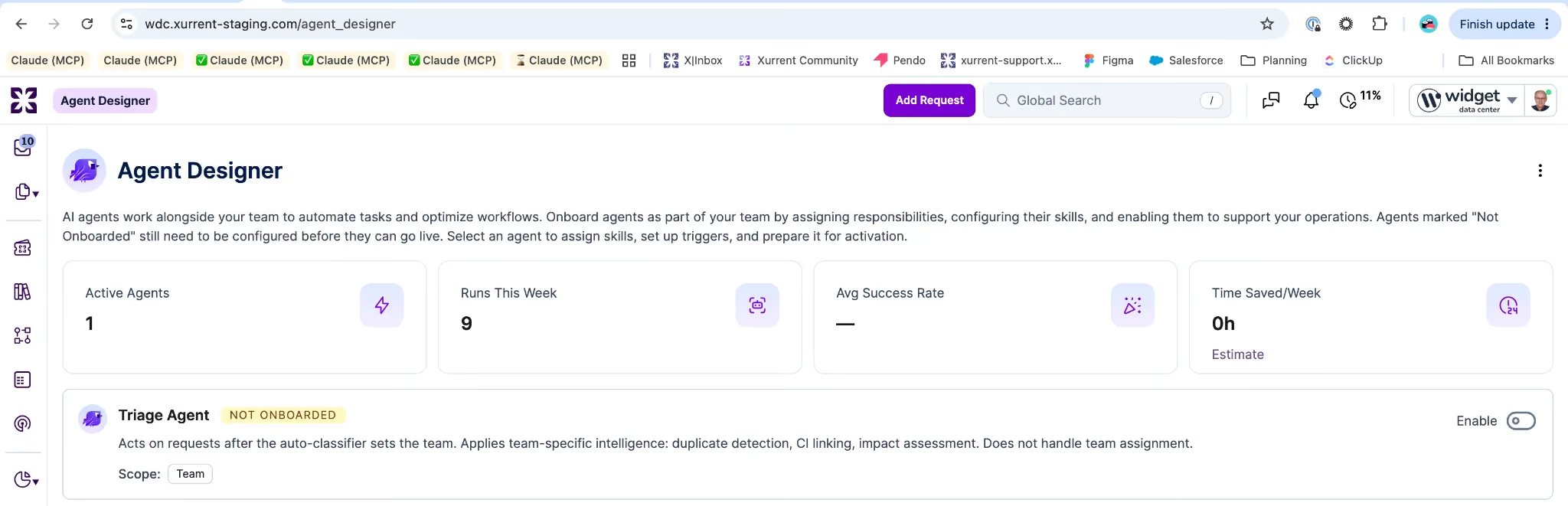
"Avg Success Rate" is the share of Triage Agent runs that took at least one action and were not corrected within a set correction window, currently seven days. "Time Saved/Week" sums an administrator-configurable minutes-saved credit for each uncorrected action across the week and displays as an estimate.
Runs that took no action are excluded from the success rate. An action a person corrects within the window counts as a failure and contributes zero time saved. Any action type without a defined credit contributes zero, so a new action type cannot silently inflate the number.
Discovered configuration items can now carry a "Location Hint", a free-text field that stores the raw location string a scanner reports, verbatim (for example an SNMP sysLocation value like "Rack 4, Row B, DC-1"). It records the scanner's text for reference without creating or touching Site records, so authoritative Site assignment stays with the existing "Location" field. "Location Hint" appears alongside "Location" on physical asset, server, and software CIs, and round-trips through CSV import and export and global search.
Tags now apply across Requests, Problems, Workflows, Tasks, Projects, and Project Tasks, drawn from one shared tag set per account.
A tag created on any of these record types is reusable on the others without re-creating it, so one label can span a major incident's Request, its Problem, and the Workflow that resolves it.
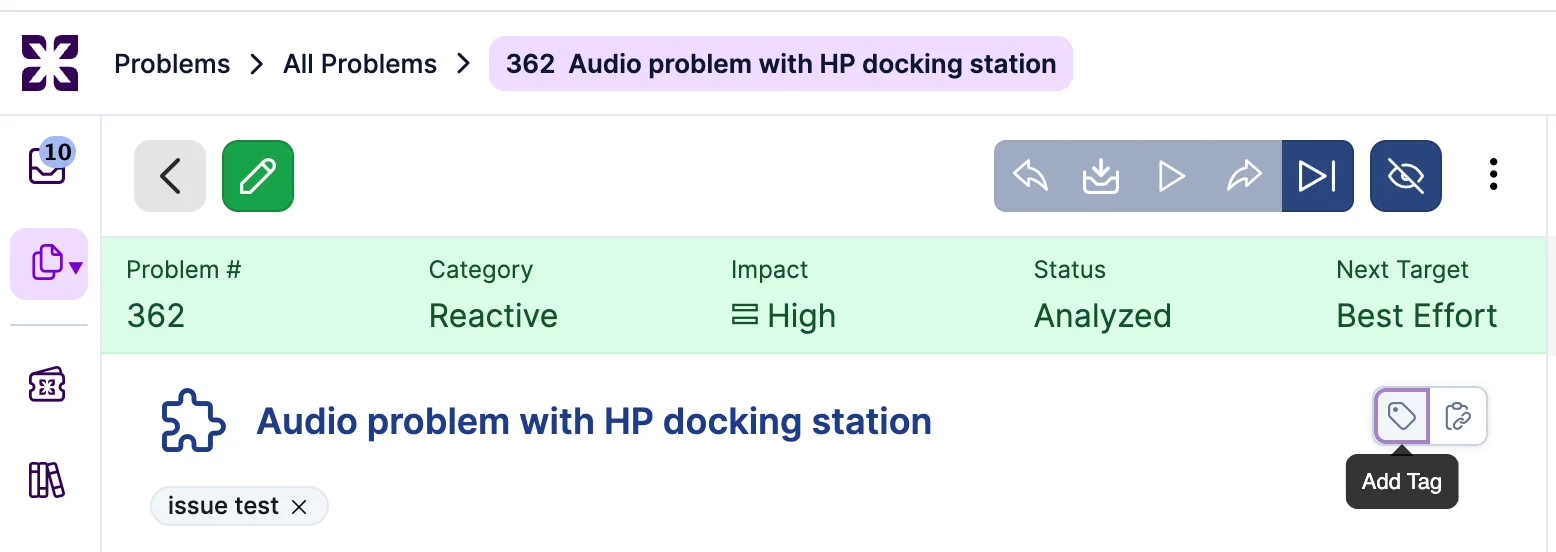
Tags are filterable in the standard view and standard reports for each record type, matching how tag filtering works on Requests. The tag usage count reflects every record type a tag touches and breaks the total down by type on the tag detail page.

Specialists can create and rename tags from the UI, consistent with the API and GraphQL. Existing Request tagging is unchanged. Each record type enforces the same per-record tag cap as Requests, and specialists can only tag records they can access. A tag applied on a request shared across accounts stays visible only in the account where it was applied. Disabling a tag remains an Account Administrator action; the tag detail page shows the linked-record count broken down by record type, with drill-down to the records, so the cross-type impact is visible before disabling.
A standalone report, scoped to a single Support Domain Account, groups the account's specialist-license holders into age bands by how long since they last used the specialist console: 0 to 30 days, 30 to 90, 90 to 180, 180 to 365, 365+, and "No data yet".
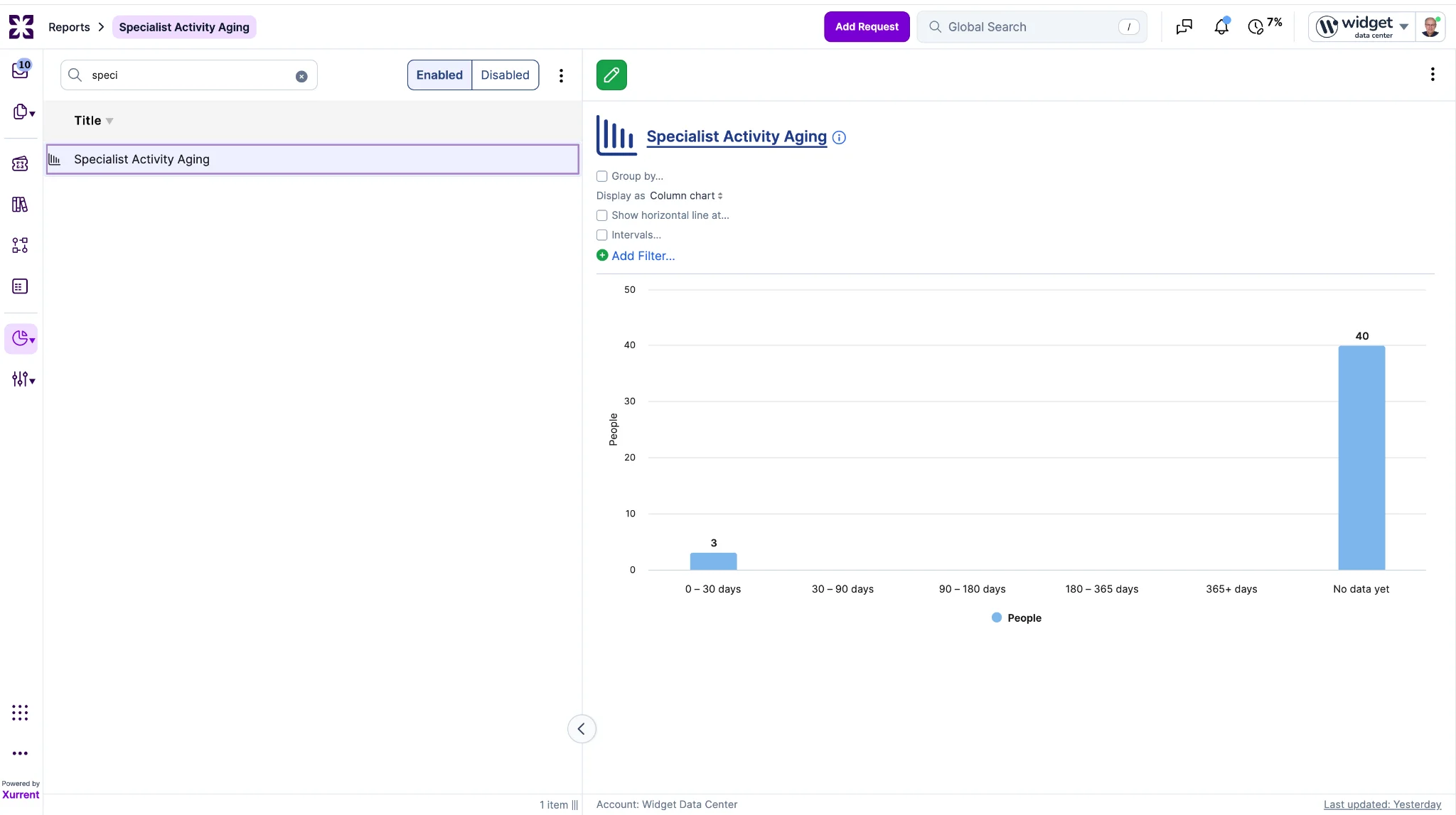
Specialist-console activity is captured only when a specialist opens the console, and only against the account being worked in, so aging is measured per account. Licenses in the higher bands are the review candidates, giving admins a direct way to find and reclaim underused licenses. When a license has never been used, the report falls back to how long the license has been held, so a long-granted but never-touched license still ages into the bands.
Each account has a "tracking since" date, and licenses still within warm-up (tracking since less than 90 days old) appear under "No data yet" rather than being aged. The report covers one account at a time and is triage only, with no automatic reclamation.
For accounts with Limited Service Instances enabled, the "+ Link service instance" picker on a request now offers the same set the Service Hierarchy Browser presents for the requested-for person: the service instances that person is covered for, plus any instance already selected on the request. The picker and the browser now agree, so a specialist cannot link a request to a service the requested-for person has no coverage for.
Accounts with the setting off, or in external-or-cross-cloud mode, are unaffected. The instance already selected on a request is always retained, so editing an existing request keeps working.
Building on last week's release, which applied the custom "Chat box name" to the open Sera AI chat header, that same configured name now drives the collapsed virtual agent launcher on the Self Service homepage, both its label and its hover tooltip.
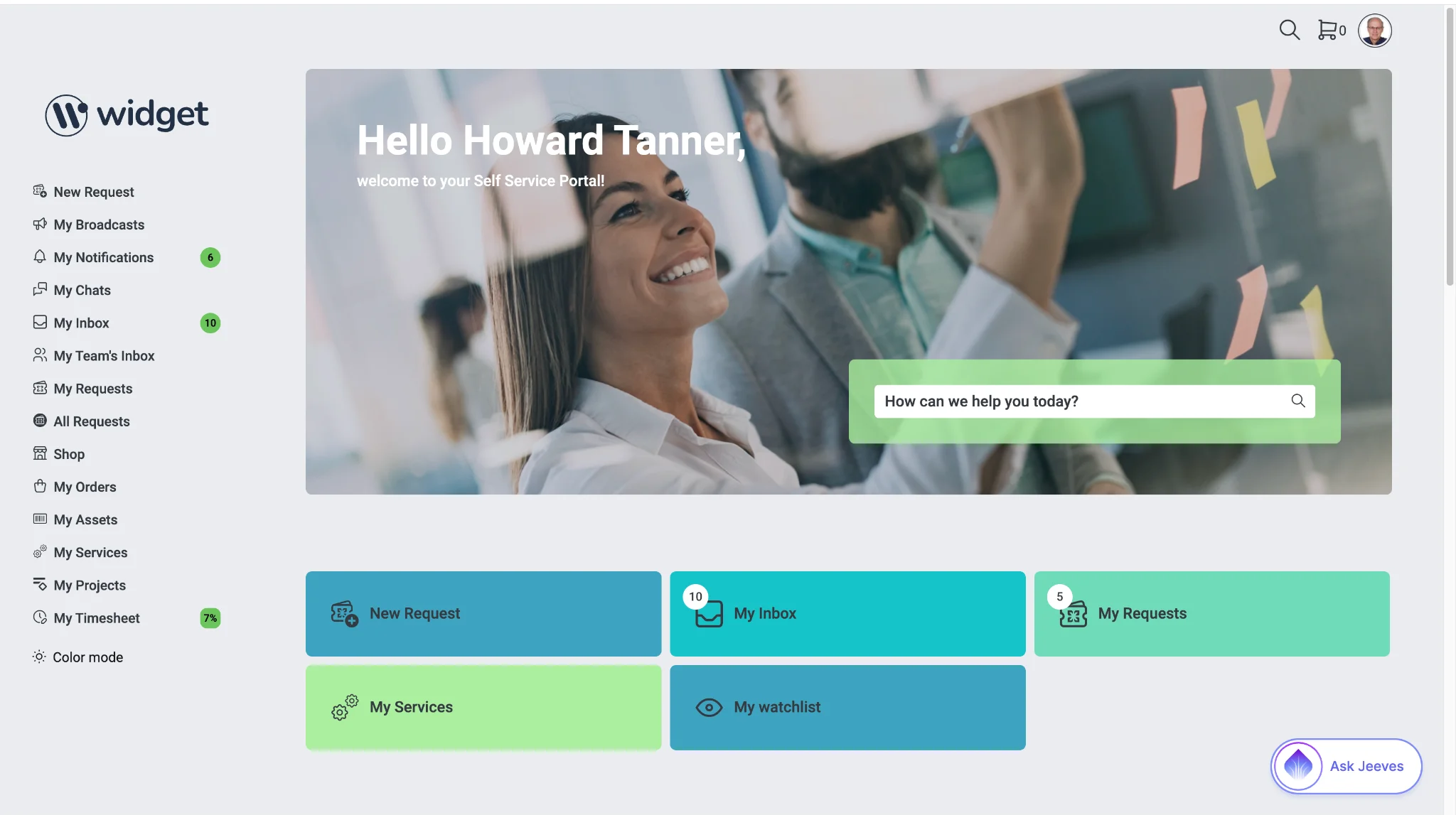
The launcher keeps the "Ask" prefix in front of the configured name (for example, "Ask Jeeves"). When no custom name is set, the launcher shows "Ask Sera AI". This is display-only. The virtual agent's identity, instructions, and logging are unchanged.
When Sera Assist creates a request or opens the full request form in a new tab, the card's final state now persists across closing and reopening the panel. Reopening Sera Assist shows the completed confirmation (created-request or form-opened) rather than the editable draft. The state is stored with the conversation, which already survives panel closes and page reloads.
The JSON Webhook Connector now supports OAuth 2.0 authentication, covering both the Client Credentials and Refresh Token grant types. When a workflow runs, the connector retrieves an access token from the configured authorization server and refreshes it automatically as it expires, so long-running or scheduled workflows keep working without manual token rotation. This opens up secure integration with the large set of modern APIs that require OAuth 2.0, alongside the connector's existing schema validation for inbound requests.
Configuration is per-connection: an admin supplies the grant type, token endpoint, and credentials when setting up the connector. Existing JSON Webhook connections are unaffected until OAuth is explicitly enabled on them.
A new native CSV Parser action converts raw CSV content into structured records that downstream steps in an iPaaS workflow can read and act on. It handles the common variations that break naive parsing: configurable field delimiters, quoted values that contain commas or line breaks, and an optional header row that maps columns to named fields. The action also normalizes to UTF-8 so mixed-encoding files parse reliably.
The action is drop-in: point it at CSV content from a prior step (an upload, an HTTP response, a file read) and it returns structured rows for the rest of the workflow to consume.
A new native Slack Connector brings Slack into Xurrent iPaaS as a first-class integration rather than a hand-built HTTP setup. It authenticates with Slack over OAuth 2.0 and supports four core operations: sending and retrieving messages, monitoring channels for new messages, and uploading and downloading files. Together these cover the common patterns teams want, such as posting notifications to a channel, pulling message context into a workflow, triggering off new activity, and moving files between Slack and Xurrent.
Setup uses a Slack OAuth connection; once authorized, the connector's actions and triggers are available to any workflow. Channel monitoring runs as a trigger, so workflows can start automatically on new messages.
When a configuration item change lands in the reconciliation queue, the "Proposed Changes" panel now presents the difference the way the rest of the product displays records.
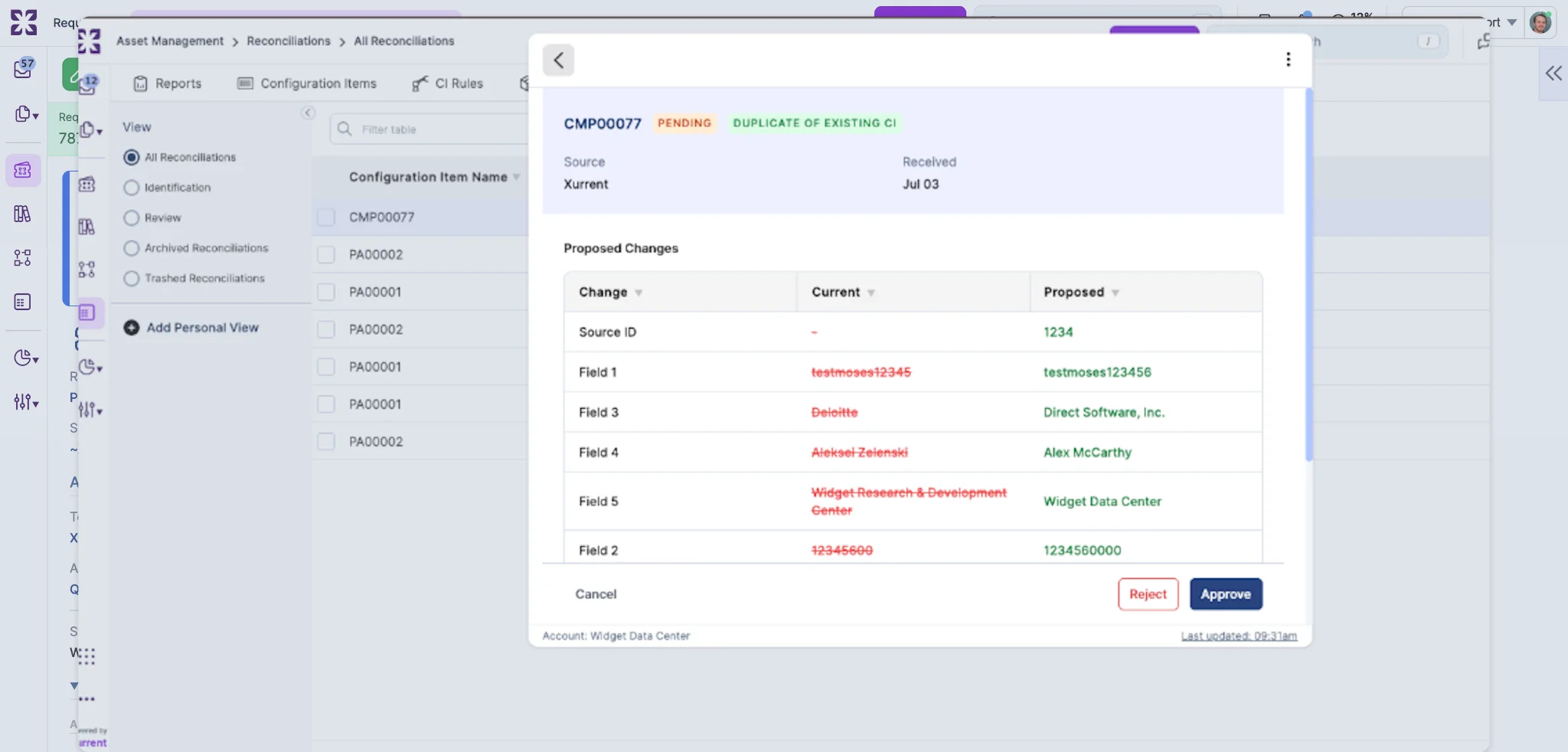
Each custom field that actually changed appears on its own row with its configured label and a human-readable value. Remarks and other rich-text fields render as formatted text with working inline-image previews, including images added as part of the proposed change. Fields that did not change no longer appear as emptied. When an approval cannot go through unchanged, a reviewer can edit the proposed remarks directly in the rich-text editor before approving.
For privacy, the raw bundle of custom-field data is no longer sent to the browser. Approval always applies the value stored with the proposed change.
Account administrators can now set the name shown in the Sera AI chat widget header on the Self Service homepage. A "chat box display name" field appears in the "Global Settings" tab of "Self Service Design", in the "Self service homepage" section directly below the "Show chat widget" control.
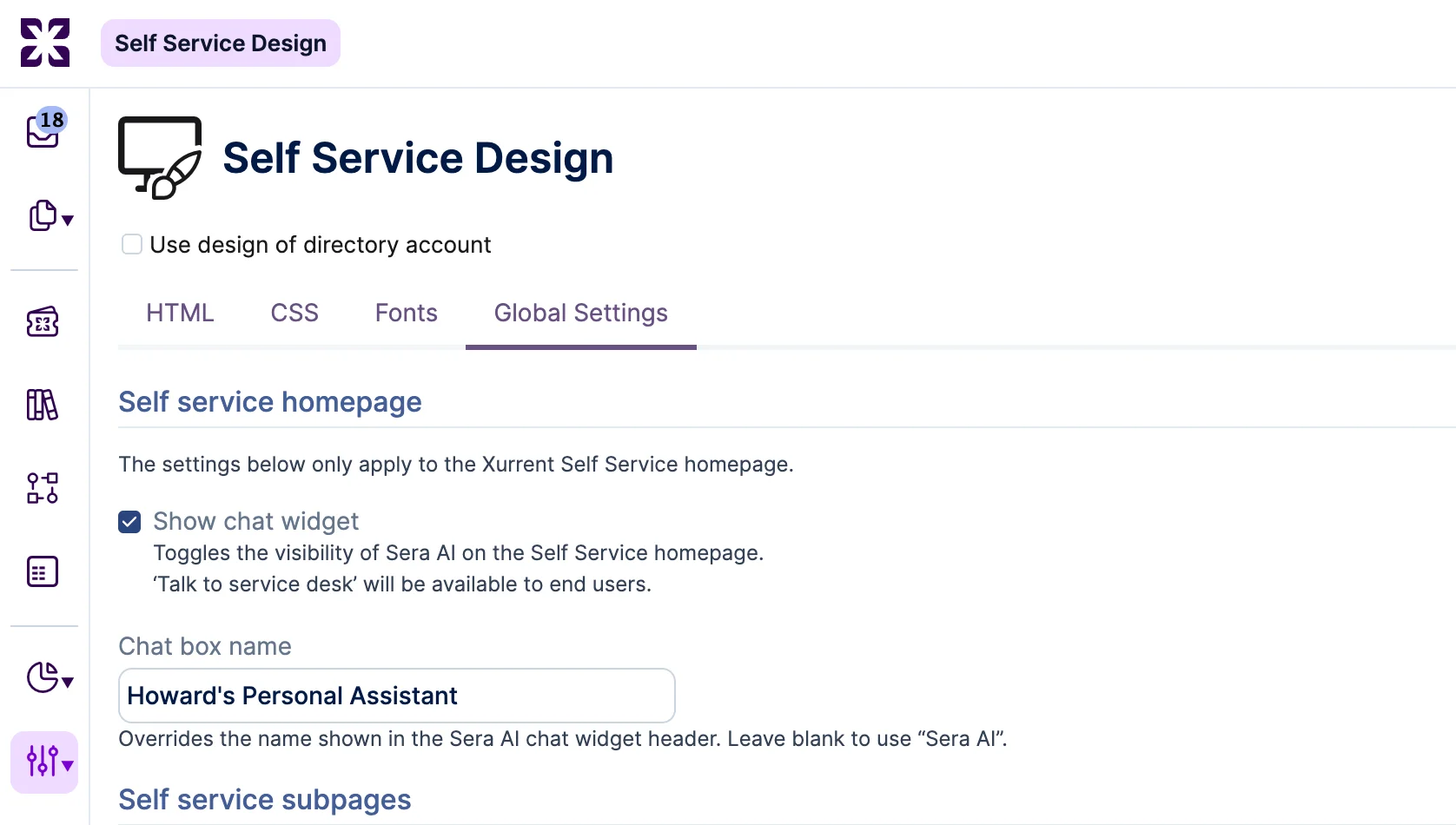
Setting a value replaces "Sera AI" in the widget header for end users; leaving it blank keeps the header reading "Sera AI". The field accepts plain text up to 40 characters, trims whitespace, and treats a whitespace-only value as empty.
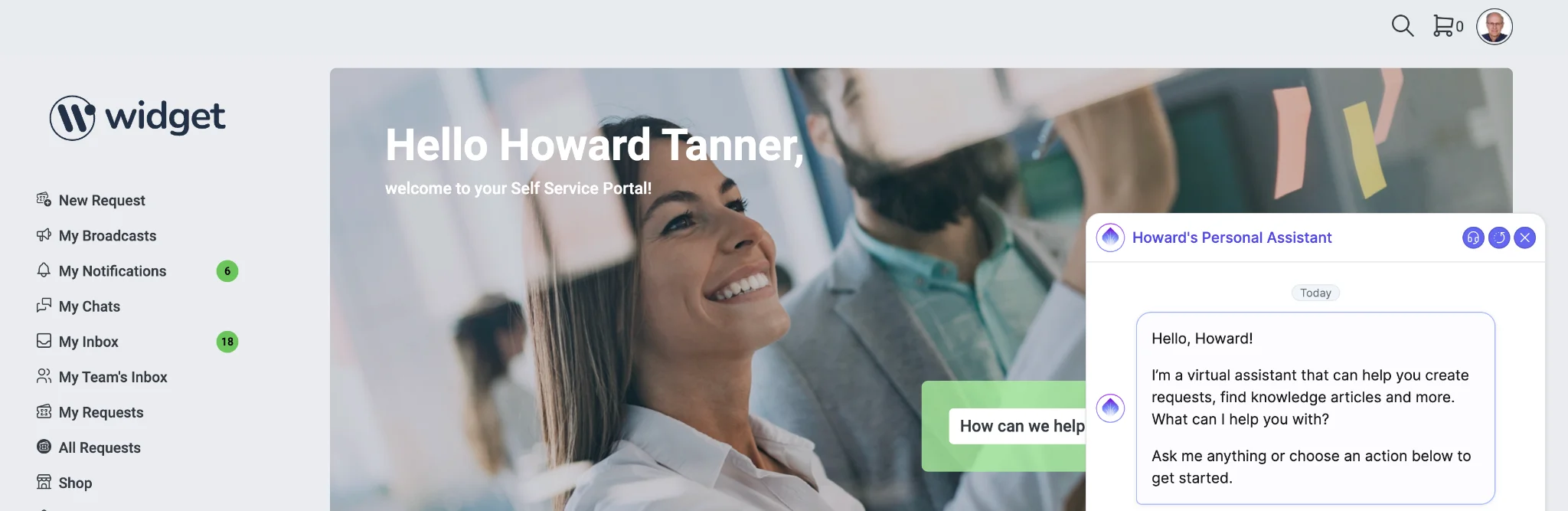
The override affects the widget header title only; supporting strings in the widget are unchanged. The value is display-only and does not change the agent's internal name, instructions, persona, or how interactions are logged. It applies only to the account's own self-service experience. With "Show chat widget" unchecked the field has no rendered effect, and an entered value is preserved if the widget is unchecked and rechecked.
The new request wizard now offers the "submit on behalf of" option on every step of the flow, in any account that permits submitting on behalf of someone else. Availability depends only on whether the account allows it, not on the portal's layout, so users whose portal opens directly on a service instance or a request template can now reach it.
This builds on the earlier fix on the same request that clears the self-registered flag when an account administrator reassigns a person to a different organization.
This release includes several accessibility conformance improvements identified through recurring monitoring. Anchor elements that carry an "onclick" handler but no "href" now automatically receive role="button" and tabindex="0" so they are reachable and operable by keyboard and assistive technology. The page's html tag now sets its lang attribute dynamically to match the active language. Positive tabindex values have been removed so focus order follows the natural document order, and legacy ".button" class references have been cleaned up.
We review accessibility conformance on a recurring basis, and further updates will follow in future releases.
Xurrent Agents are now available in Sera AI. Two agents ship in this release: Closure Agent and Triage Agent. Account administrators manage agents in a new Agent Designer section of the settings console, and each agent has a set of configurable skills.
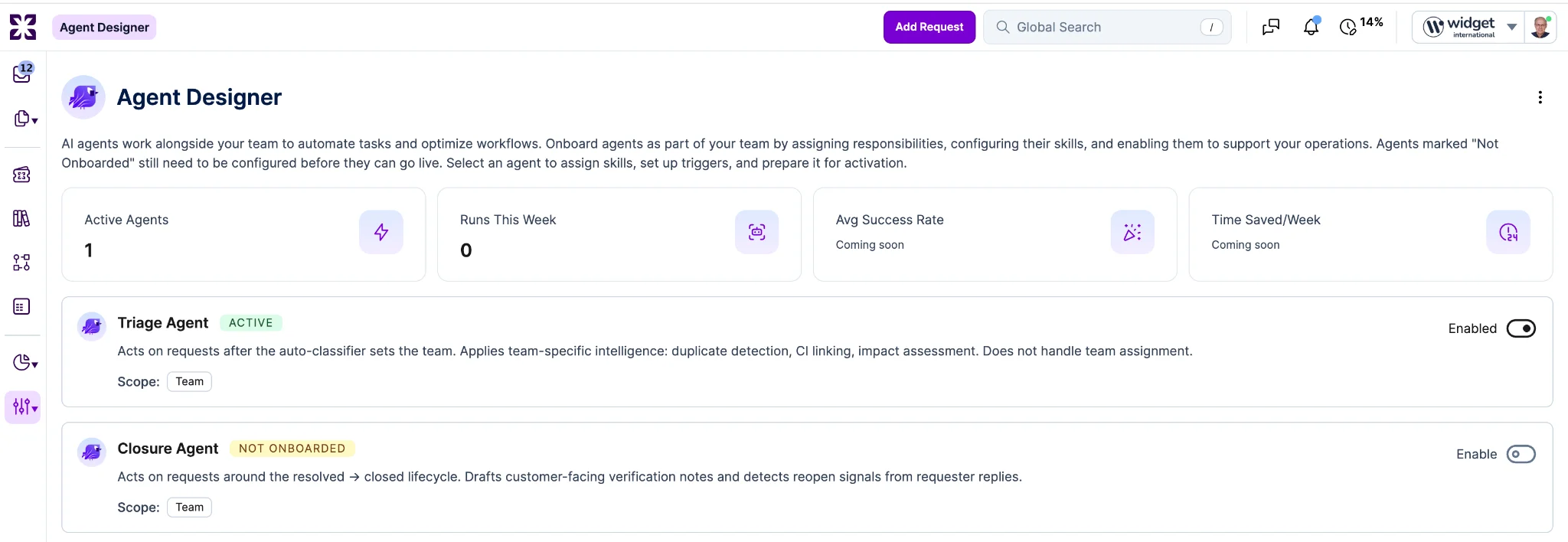
Closure Agent manages requests around the resolved to closed lifecycle. Its skills
Triage Agent acts on requests after the auto-classifier sets the team. It applies team-specific intelligence and does not handle team assignment. Its skills:
Skills operate in either "Suggest" mode (posts a recommendation for a human to review) or "Auto Confirm" mode (performs the action directly). Each skill can be tuned per team based on the level of automation the team wants.

Adjustments can also be made to the confidence threshold at which the agent can take a given action.

An agent can be added to a team like any other member and then assigned to individual requests by a human team member.
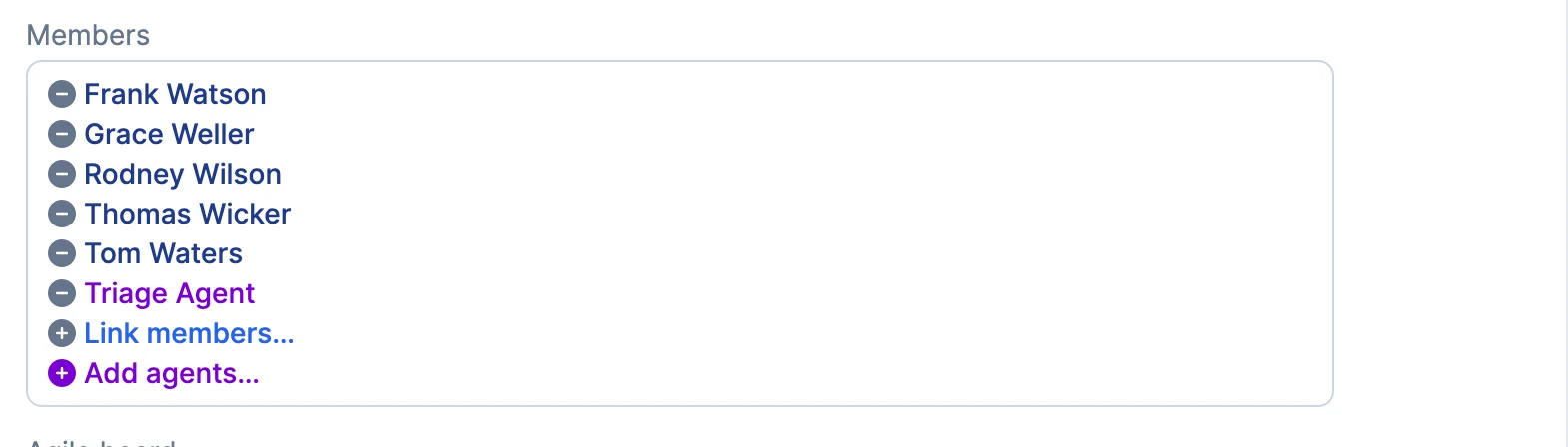
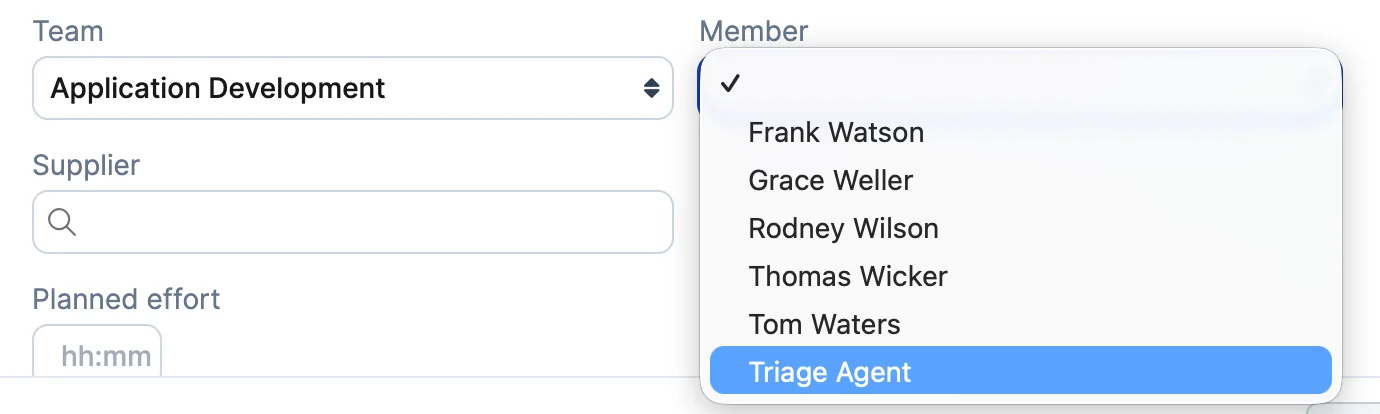
In this release, agents are assigned to requests manually by team members. Automations for assigning agents based on rules or triggers are planned for a follow-on release.
Sera AI Studio now includes a "Knowledge Article Readiness" tab, sitting alongside Agent Instructions, Golden Set, Template Readiness, and Settings. It gives you a single place to see how ready your knowledge articles are for Sera to use, and what is holding any of them back. The layout matches Template Readiness, so if you have used that tab, this one will feel familiar.
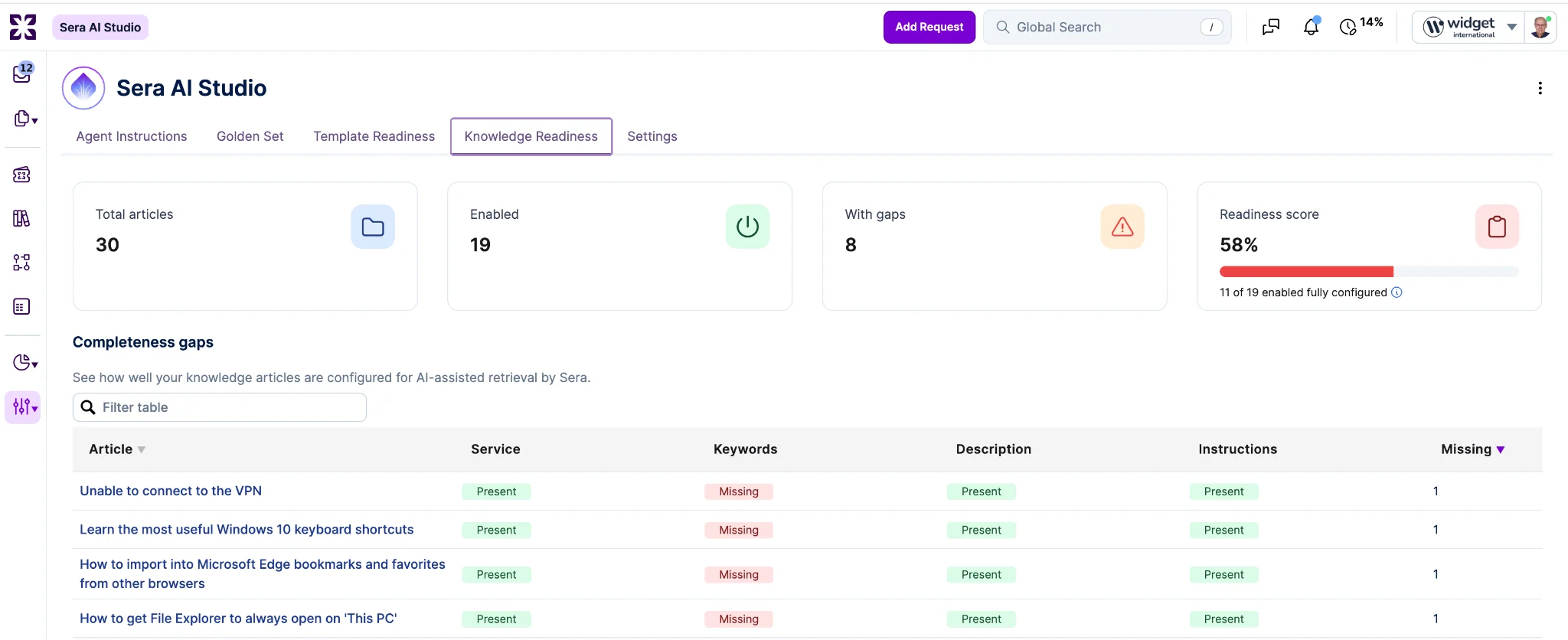
Four summary cards across the top give you the headline picture: "Total articles", "Enabled" (articles Sera is allowed to draw from), "With gaps", and a "Readiness score". The readiness score shows the percentage of enabled articles that are fully configured, with an N of M caption and a progress bar so you can track progress at a glance.
Each article is checked against four fields: "Service", "Keywords", "Description", and "Instructions". A field shows "Present" when it is filled in and "Missing" when it is empty. "Service" matters most here. Sera retrieves knowledge within the services it covers, so an article with no service attached will not surface for customers no matter how good the content is.
A "Completeness gaps" table lists only the articles that have at least one missing field, sorted so the articles needing the most attention appear first. Click an article title to open it, fill in what is missing, and watch the readiness score update as you go.
The score is based only on the articles Sera can actually use: published, non-archived articles within the services Sera covers. That means it reflects the real state of the knowledge Sera is working with, rather than being diluted by content the agent never sees. Because the score is calculated the same way as Template Readiness, you can compare the two directly.
The Search Phrases report at Analytics > Search Phrases now includes a "Sera AI Chat" tab, alongside the existing "Self Service" and "Service Desk" tabs. Account Administrators can see what topics drive end users into Sera AI conversations.
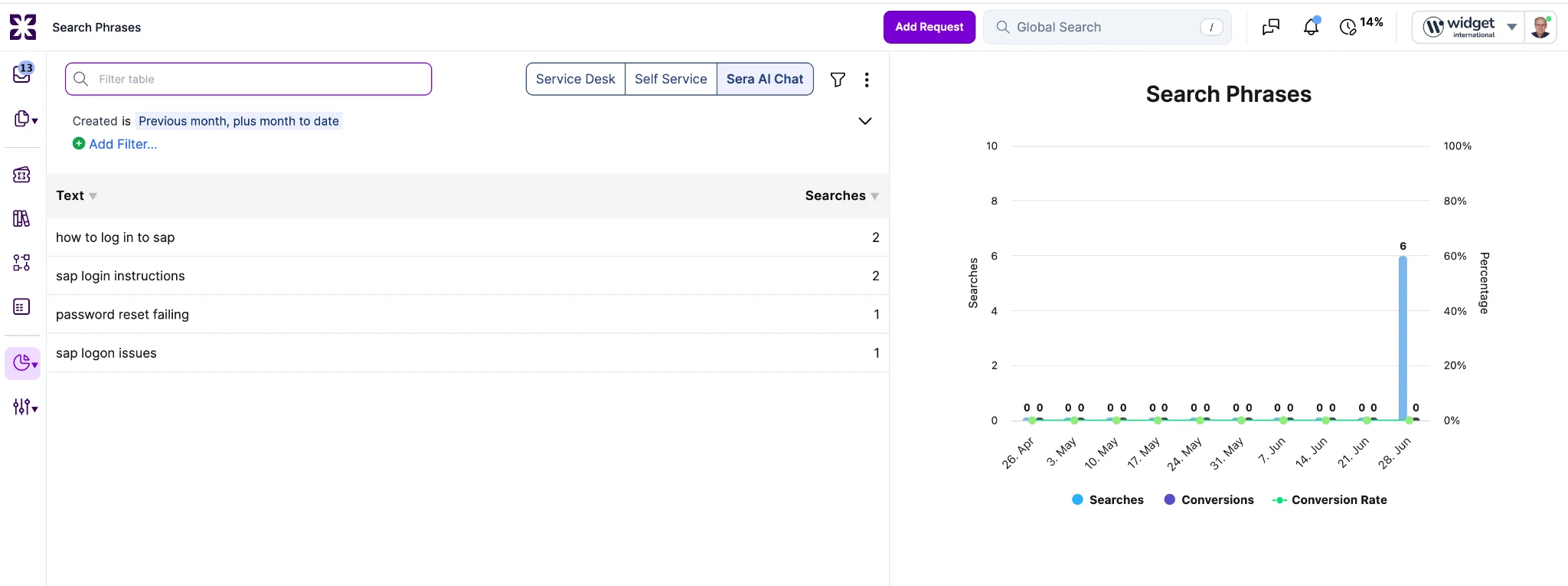
Each Sera AI conversation is summarized into a concise search phrase per intent, rather than logged as raw messages. A conversation that spans more than one distinct ask can produce more than one phrase. Personal data (email addresses, phone numbers, names, account or ID numbers) is detected and obfuscated before the phrase is stored or shown.
Sera AI Chat phrases are ranked by frequency, consistent with the other tabs. The Conversions and Conversion percentage columns are hidden on this tab, since chat has no result list or conversion rate; both columns remain in place on Self Service and Service Desk.
The tab is shown only for accounts with the virtual agent enabled.
You can now group shop articles that belong together into a single bundle. For example, a New Hire Kit that includes a laptop, monitor, and headset. A shop administrator sets the bundle up once, and requesters order the whole thing as one line in the shop.
Bundles live in their own "Shop Article Bundles" record. You give the bundle a "Name" and fill in the usual shop article fields: "Product", "Category", "Short description", and "Full description". Leave "Disabled" unchecked to make it available.
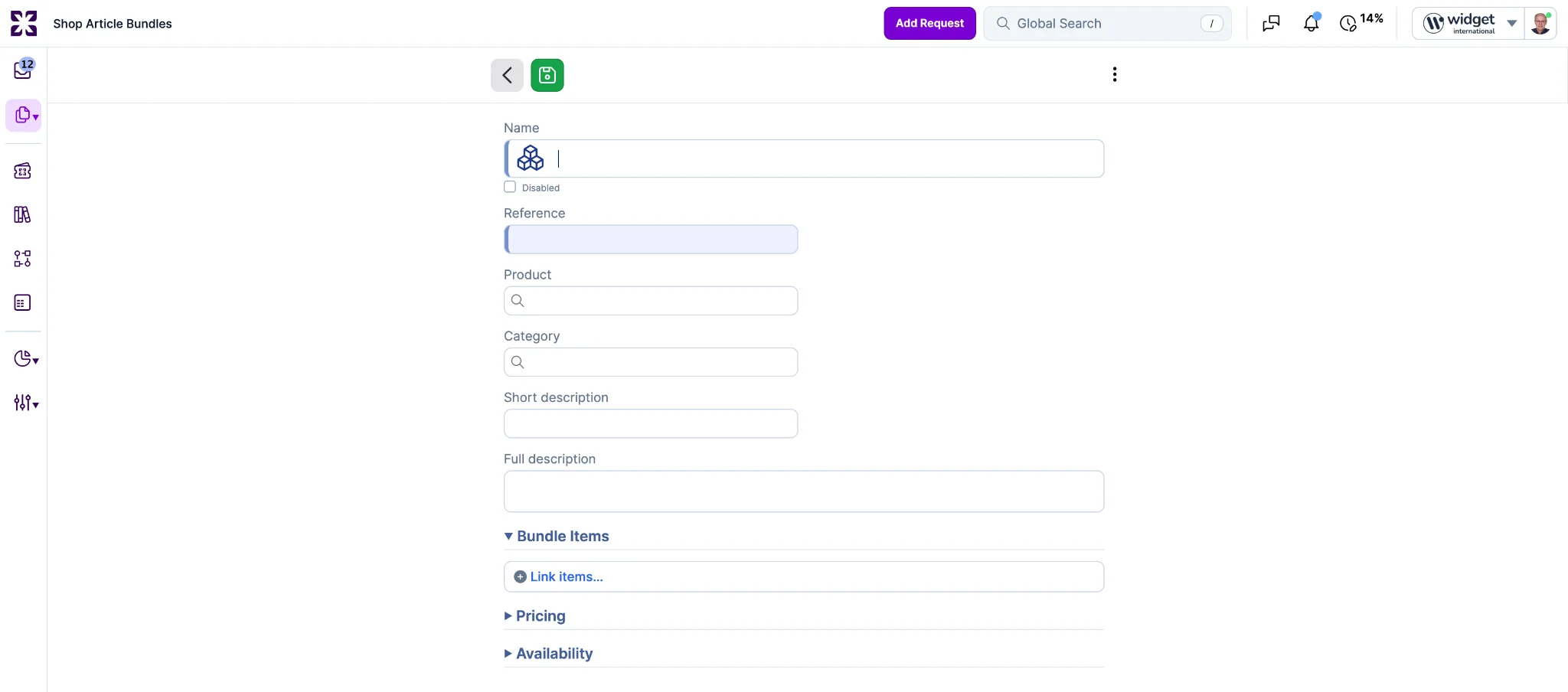
Then, under "Bundle Items", click "Link items..." to add the articles the bundle contains and set a quantity for each. Below that, "Pricing" and "Availability" have their own sections, covered next.
One thing to keep in mind while adding items: every article in a bundle must share the same pricing cadence, either all one-time or all recurring at the same frequency. The first item you add sets the cadence, and the picker then shows only matching items. (Bundles cannot contain other bundles in this release.)
You can let a bundle price itself, or set a fixed price. If you leave the price field empty, the bundle price is the total of its contained articles, calculated in each account's own currency. If you enter a price, that price is shown as-is, with no ceiling relative to the item total. If you set the price to zero, the bundle shows no price at all.
A bundle turns off automatically if any article inside it is disabled or removed, and an audit entry records why. It turns back on automatically once all its articles are valid again. You only need to step in when an article is permanently removed and leaves a gap the bundle can no longer resolve.
If you have set a fixed price and the price of an item inside the bundle changes, the bundle stays active, but a fixed price does not update on its own. You will be warned so you can adjust it yourself. And if you edit a standalone article in a way that would take its bundles offline, you will see a confirmation listing which bundles are affected before the change is applied.
Bundles available to a requester's account appear in the shop catalog and look like any other article. Coverage still applies per item, based on the requester's Service Offering: a self-priced bundle drops any items the requester is not covered for and prices from what remains. A fixed-price bundle only appears if the requester is covered for every item in it. A bundle the requester is covered for none of is hidden either way.
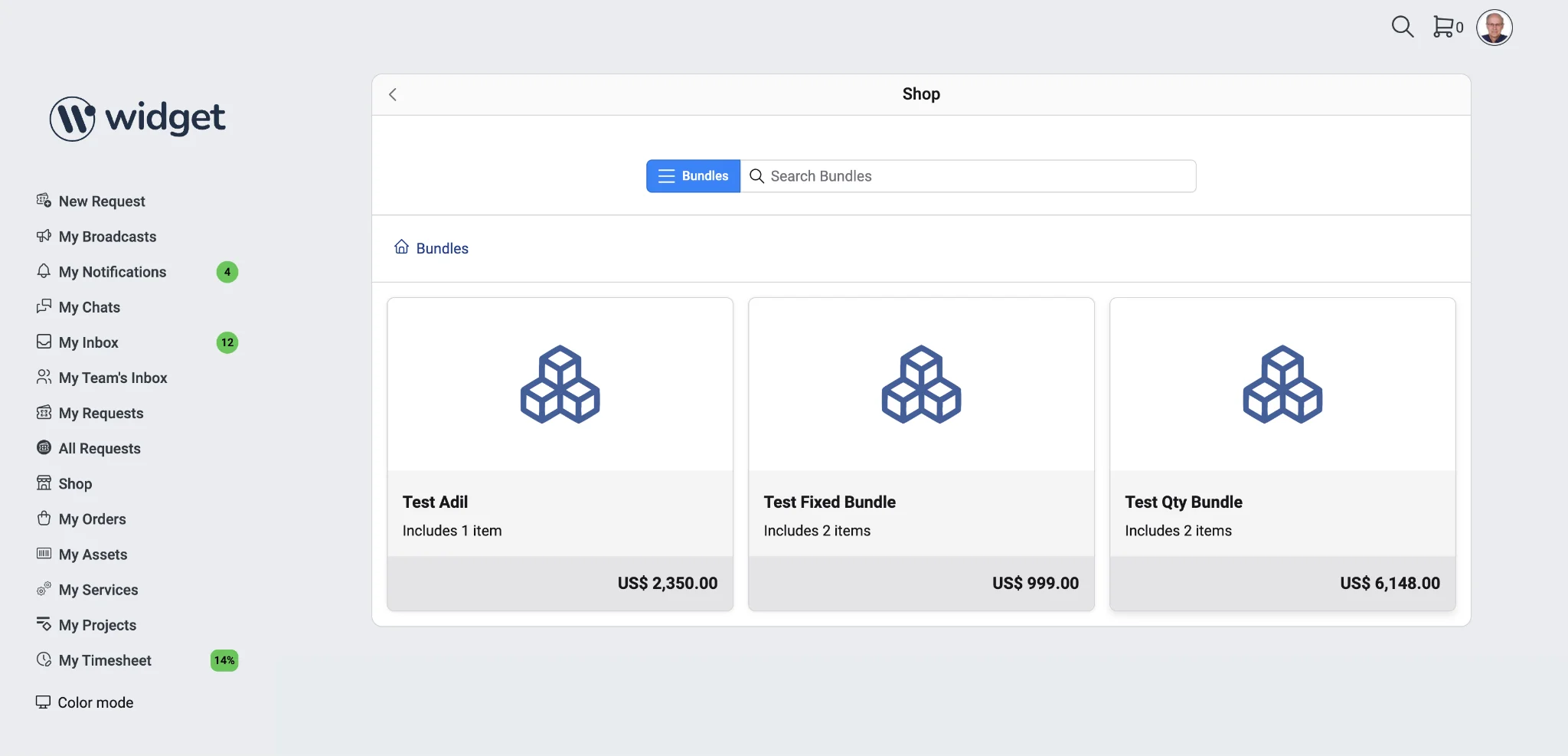
In the cart, a bundle is a single line. When the requester submits, it becomes one request per covered item, each routed under its own Service Offering and fulfillment template, exactly as if the item had been ordered on its own. Every request that comes out of a bundle records the bundle name for reference. The bundle itself is not a request.
The shop article REST and GraphQL APIs, the audit trail, and CSV import and export all cover the bundle flag, the contained items and their quantities, and the custom bundle price.
Request templates now support an optional parameter so that the subjects of requests created from it are never auto-translated. This is useful for templates whose subjects are structured operational identifiers (rollout codes, branch numbers, asset numbers) where translation can corrupt the intended value.
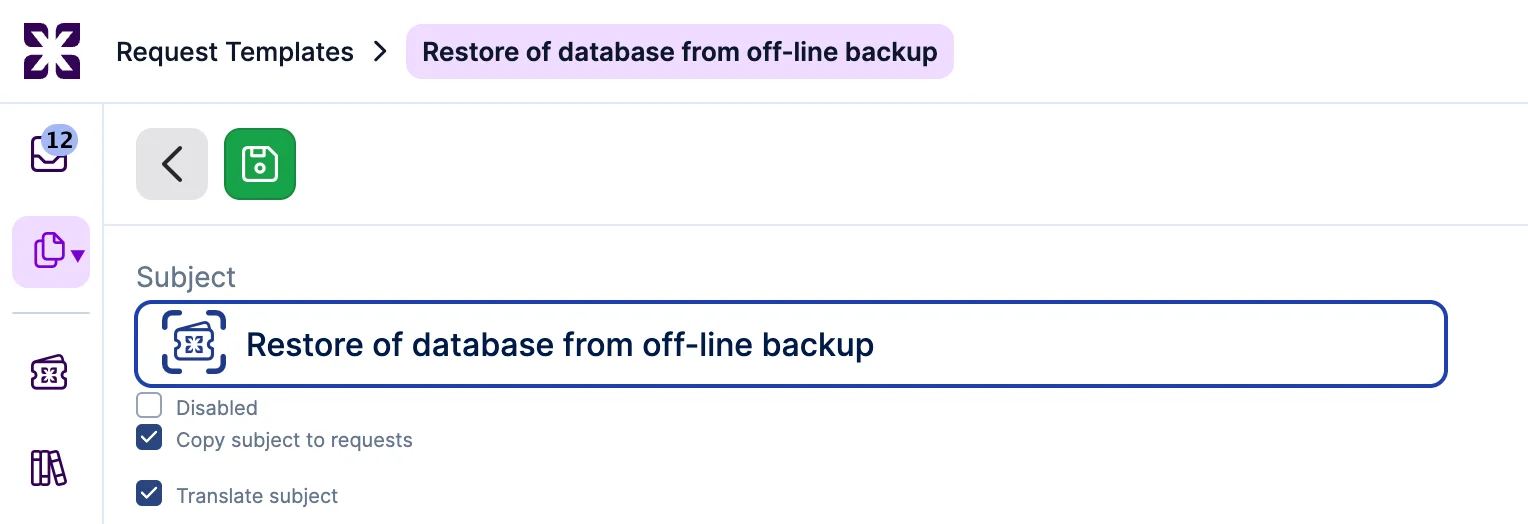
A new "Translate subject" checkbox appears in the subject group on the request template, beneath the Subject field, alongside "Disabled" and "Copy subject to requests". It defaults to checked, preserving today's behavior for existing templates. When unchecked, the subject renders verbatim in its source language everywhere it appears: the request list, request detail, agile board cards, notifications, and global search.
A request inherits the template's value at creation and carries it on the request. Later template edits do not change existing requests. The setting governs the subject only; note and description translation is unchanged, and the code-block workaround for notes still applies.
The Duplicate Request action now appears on RFCs that are linked to a Workflow or a Project, not just standalone RFCs. This unblocks a common workflow: specialists routinely want to spin up a near-identical RFC that references an existing workflow or project, and the previous hard block forced them back to manual re-keying.
The action's visibility follows the same base eligibility as unlinked RFCs: request-creation permission, RFC category, no Case Management enabled, and specialist UI. No new manager-role gate is added. RFCs linked to a Problem remain fully blocked for all users, since problems sit on the incident side and are outside the scope of change management.
The duplicate itself is unchanged from the base feature. It retains the source's request template, so on save it instantiates a new workflow from that request template's workflow template, exactly as an original request created from the same template would. The duplicate is not attached to the source's workflow, project, or problem; it is a fresh, standalone RFC.
Serbian Dinar (RSD) is now a selectable currency anywhere a currency can be chosen in Xurrent, including the Amount field on invoices, time entries, and expenses. Costs recorded in RSD convert to and from other currencies using the existing daily exchange-rate feed, and cost columns can be sorted and totaled in RSD like every other currency.
No existing data changes; the new option simply becomes available.



.avif)