
Blog
Insights & updates from our experts


Resolve plant floor and IT issues before they disrupt production.

Stay audit-ready while resolving issues and reducing operational risk.
Resolve issues quickly with an AI-powered system that automates ticketing.

Unifiy IT, HR, Facilities, Finance, and more on a single, AI-powered service platform.

Simplify on-call scheduling, automate escalations, and reduce burnout.

Automate postmortems, AI summaries, and post-incident workflows

Create, organize, and continuously improve your knowledge base to find the right answers with Sera AI.

We're here to help

The integration with Atlassian Jira using the Xurrent Integration Service is

The integration with Atlassian Jira using the Xurrent Integration Service is

The integration with Atlassian Jira using the Xurrent Integration Service is

The integration with Atlassian Jira using the Xurrent Integration Service is

The integration with Atlassian Jira using the Xurrent Integration Service is

The integration with Atlassian Jira using the Xurrent Integration Service is

The integration with Atlassian Jira using the Xurrent Integration Service is

The integration with Atlassian Jira using the Xurrent Integration Service is
Resolve issues quickly with an AI-powered system that automates ticketing.
Unifiy IT, HR, Facilities, Finance, and more on a single, AI-powered service platform.
Simplify on-call scheduling, automate escalations, and reduce burnout.
Automate postmortems, AI summaries, and post-incident workflows
Create, organize, and continuously improve your knowledge base to find the right answers with Sera AI.
Resolve plant floor and IT issues before they disrupt production.
Stay audit-ready while resolving issues and reducing operational risk.

Detect, respond, and resolve incidents fast to cut downtime and MTTR.

Keep your store online, even during your biggest sales moments.

Protect patient data and resolve issues fast, so care teams stay focused on care.

Standardize service delivery across every store and channel.

We are here to help 24/7

Connect with other Xurrent Users

Get insights and tips on how to get the most out of Xurrent

Apps, APIs, and updates

Xurrent service functionality

Eliminate manual tasks, optimize workflows, and deliver faster resolutions.
Learn how organizations have reduced downtime, improved 50% MTTA & MTTR, and cut costs with Xurrent IMR.
Discover Xurrent IMR's quick support, bidirectional integrations with Jira and Slack, and more cohesive incident response capabilities compared to Opsgenie.
Understand why users value Xurrent IMR for its intuitive interface, efficient incident alerting, customizable On-call schedules, and escalations.
This post is a living document, updated throughout the month as new product releases roll out. Each update listed here is released to our QA environment on the date shown and typically promoted to production the following week. Along the way, customers can review changes, share feedback, and help shape what ships next. Xurrent delivers product updates on a weekly cadence to keep enhancements moving continuously.
A request can hold a problem link and a workflow link at the same time. The edit form replaces the single "Related to" slot with independent "Problem" and "Workflow" fields, and setting one no longer clears the other on any path: the form, the API, request mass update, and the "Link Requests" pickers on the problem and workflow records.
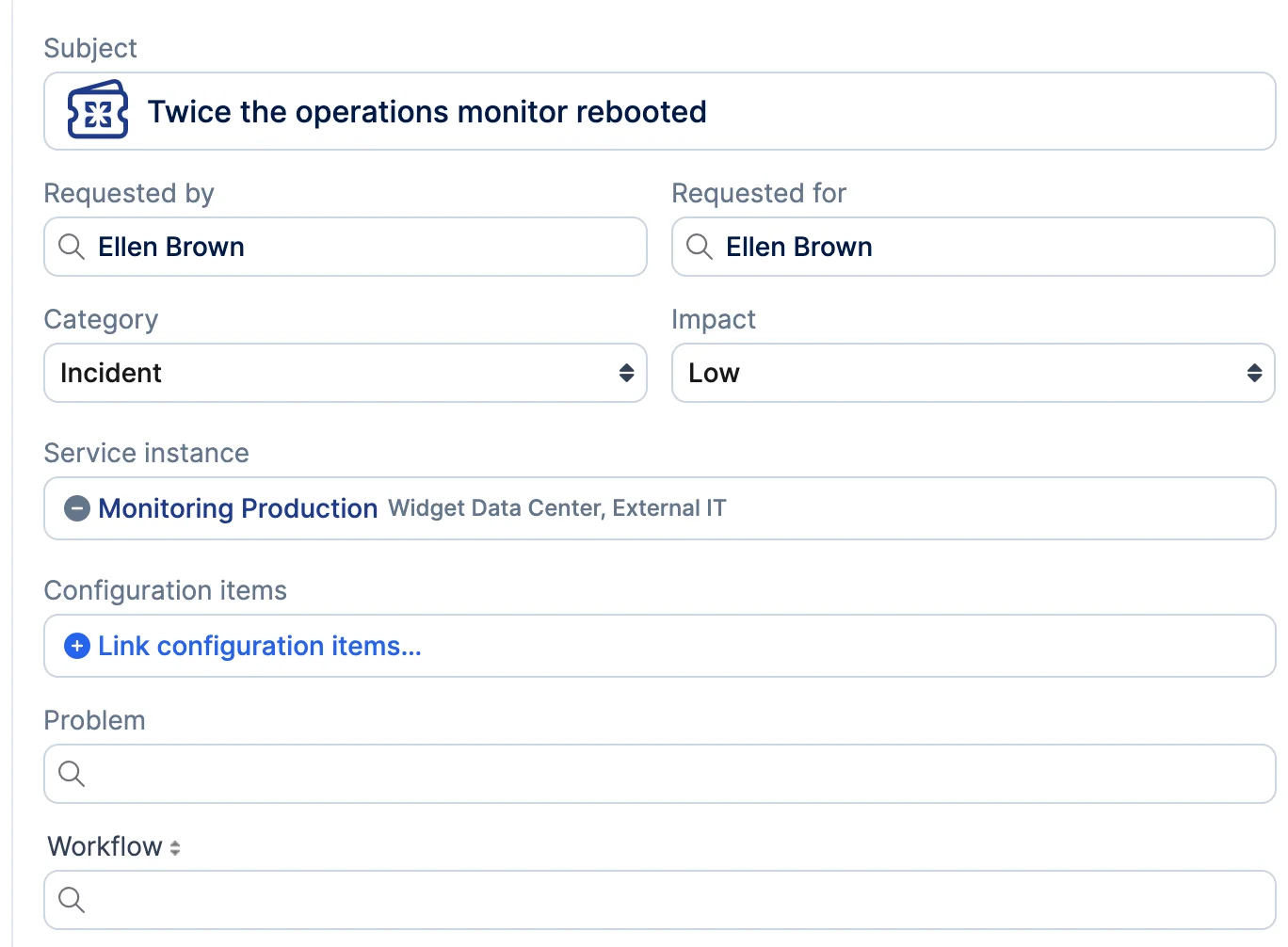
The single slot blocked a standard incident management pattern. An incident is linked to a problem through a known error before root cause is identified, and the workaround for that known error has to run under change control, which means a workflow on the same incident. Because both relations are kept, the record of the known error and the change that carries its workaround stay together on the incident, rather than one replacing the other.
Batch linking is available from both sides. A known error affecting dozens of incidents can be linked to all of them through the problem's "Link Requests" picker without disturbing their workflow links, and workflow-linked requests are selectable there.
The project link stays mutually exclusive with both. Selecting a project on a request that holds a problem or workflow link is rejected with a validation error, and the existing links are left in place. Edit rights apply per relation, so someone permitted to edit only the problem side sees the workflow side read-only. Existing requests are not affected, and no data migration is needed.
A setting on a directory account lets the Account Administrator authorize Service Desk Analysts of its support domains to register people directly in the shared directory, without holding any role in the directory account itself.

The setting is off by default, so nothing changes until it is switched on. With it on, a Service Desk Analyst taking a call from an unregistered person creates that record in the directory and it is immediately available to every support domain linked to it. The registration form is the one Service Desk Analysts already use, with no role, team or skill pool assignment added or removed.
Where the email address already belongs to a person in one of the directory's support domains, the registration consolidates rather than failing on a duplicate. The flow names the person who matched and where they live, the Service Desk Analyst confirms that specific person, and the record moves into the directory with the entered values applied. A record moved this way stays available as a requester in the support domain it came from. The confirmation names one person, belongs to the Service Desk Analyst who was shown the match, and lapses after half an hour. The match is looked up only when a registration is submitted, so opening the form never reveals anything about a person the Service Desk Analyst may not see.
The capability is limited to registration. It adds no read, update, archive or administrative rights in the directory account, no role assignment during registration, and it can never deactivate anyone. Authorization is applied at the permission layer, so the console and the API are governed by the same rule, and a directory account not linked to the Service Desk Analyst's own account is never offered and never accepts a creation.
A "Create Request" action sits in the note toolbar next to "Create Knowledge Article". It opens a new request in a separate window carrying the note's text as a quotation with every line prefixed, the note's attachments as the first note, and the same service instance and request category as the source request.
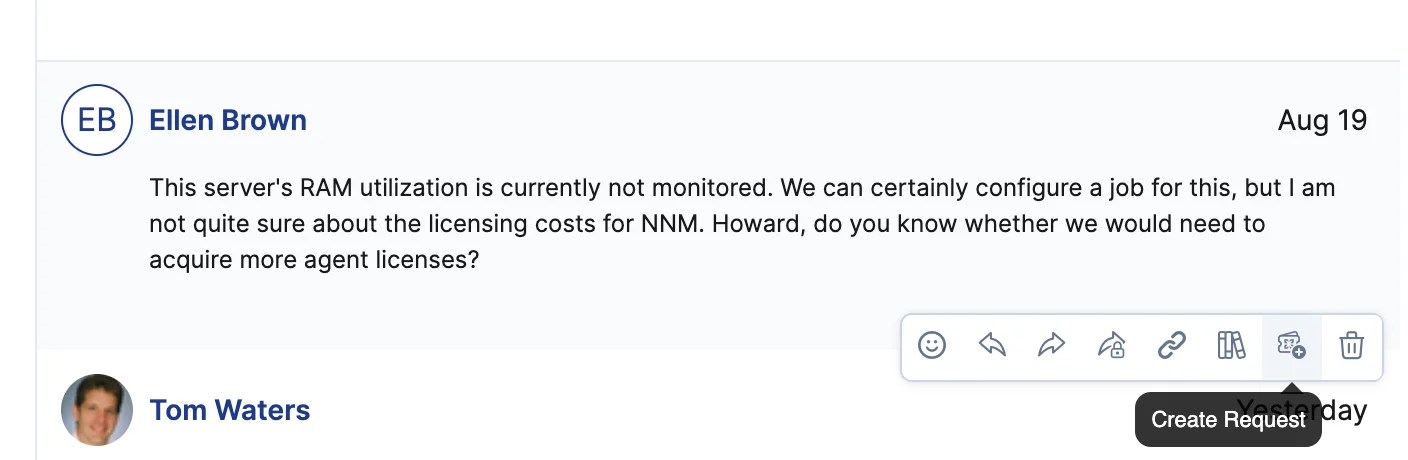
"Subject" is left empty, so the Specialist names the follow-up rather than inheriting the source request's subject. "Requested by" and "Requested for" default to the person who clicked, and only a Service Desk Analyst can change them. Nothing is created anywhere until the Specialist saves, and closing the window without saving leaves both requests untouched.
A note that arrived by email keeps its line breaks rather than running its lines together, and an image pasted into such a mail appears in the copy as an image and is saved with it.
When the follow-up is saved, each request records the other. The new request shows a system entry naming the source request as its origin, with a link that opens it at the note the follow-up was split off from, and the source request shows the matching forward reference. No relation or grouping is created between the two.
The action is offered on notes written by people, internal and public alike, and not on system messages, automation notes or redacted notes. It does not appear in Self Service or on mobile, and only users permitted to create requests in the source request's account see it. It was held behind a feature flag while it was verified end to end, which offered it only on Xurrent's own accounts; that gate is withdrawn and the action is available to every account.
Pressing "Shift + ?" anywhere in the agent interface opens a modal listing the available keyboard shortcuts, grouped by area, with key labels matching the platform and text in the user's language. The full list scrolls inside the modal, and shortcuts that benefit from explanation carry a help icon that opens the relevant help page section.
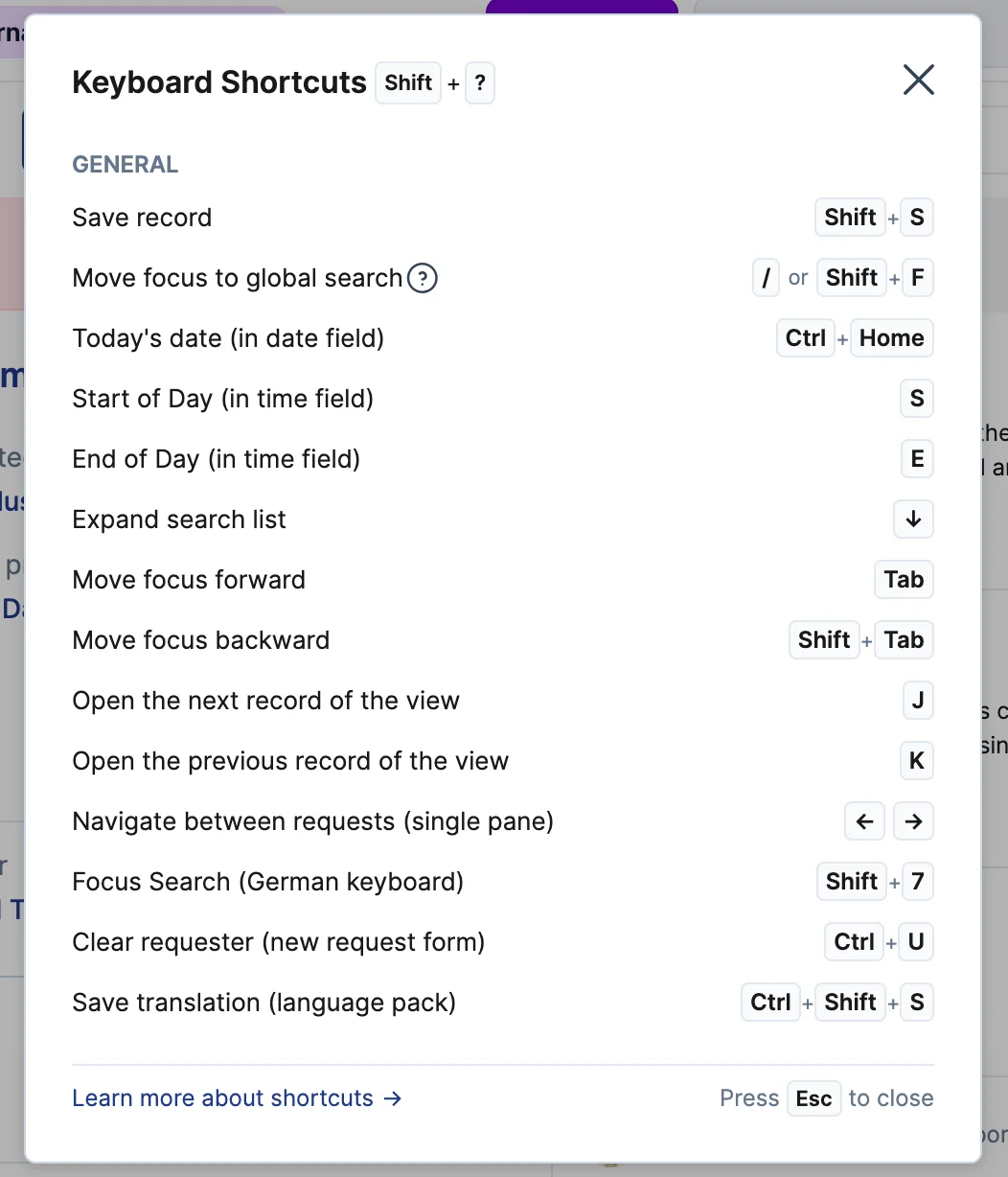
Two record shortcuts join the set. On a record opened from any list, filtered table view or "My Inbox", "J" opens the next record and "K" the previous one, following the ordering of the view the record was opened from rather than the record identifier. A Specialist can therefore work a set in sequence without returning to the list to find their place.
The record page gains no control of its own for these. They are keystrokes, listed in the overlay alongside the product's other shortcuts. Being single keys, both follow the person's "Use custom shortcuts" preference, and neither acts while the cursor is in a text field, a note field or a rich text editor.
The Requests and Workflows consoles offer "All" as a third state beside "Open" and "Completed". Selecting it lists records regardless of completion, with the same filtering, sorting, personal view and export behavior as the two existing states, and shows both the status and the completion date so a mixed list reads clearly.

"Open" remains the state a Specialist lands on, and the "Open" and "Completed" lists return exactly the records they return today. A personal view saved while "All" is selected reopens in that state.
"All" is offered on these two consoles only. The state helper behind it is shared with tasks, projects, releases, risks and reservations, each of which has its own conditions written against two states, so each of those is a separate decision rather than something this change makes on their behalf.
The view panel on the Specialist console groups views by whether they are shared with a team rather than by who created them, under the headings "Team views" and "My views". Within each group the views are listed in name order, sorted on the name the row displays, which is the short name where a view has one.
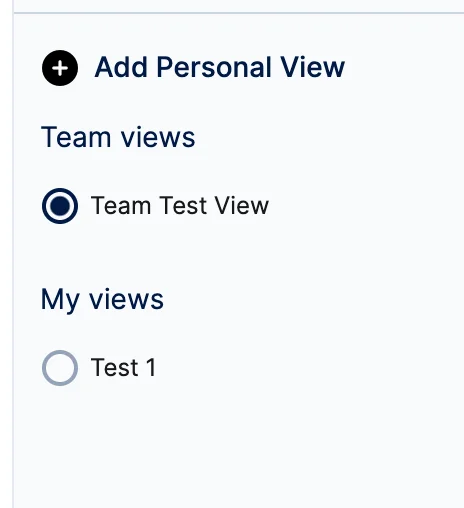
A view its owner shared with their team is listed with the team's views instead of among their private ones. That case matters most for the people who can share at all, since sharing is available to a team's Manager and Coordinator, and a manager may share with a team they do not belong to, which the panel did not recognize as sharing.
A heading is hidden while its group is empty. The "(Shared)" postfix comes off the rows in the panel, because every row under "Team views" is shared and the heading already says so. The view picker in the console header is unchanged and keeps its postfix, since it separates the same two groups with a plain separator and no headings. Who may share a view does not change, and Self Service view lists are unchanged.
An "Agent Audit Log" item in a request's ellipsis menu, directly under "Audit Trail", records every agent run on that request: what triggered it, which skills ran, each skill's outcome, and the actions taken or skipped, with timestamps. Runs that took no action are recorded too.

The audit trail remains the record of what was actioned. The Agent Audit Log is the record of agent runs and their reasoning, whether or not an action resulted. The menu item appears whenever any agent has ever run on the request, and is hidden only when none has.
Any user who can view the request can open its log. This grants no access to the account-wide agent run log, which keeps its Auditor, Directory Auditor and Account Administrator restriction.
A skill that deliberately did nothing is recorded as skipped rather than collapsed into failed. Runs recorded before this release keep their earlier status, so their skipped decisions still display as failed, and the reason field on a no-action run is empty until Agent Studio reports that reason in its completion message, which is separate work. Retention follows the same period as the audit trail.
When the guardrails do not fully approve an administrator's agent instructions, the validation service returns a compliant rewrite that preserves the administrator's intent, repairing each failing directive rather than deleting it, along with one short explanation per repaired passage. No change is applied on the administrator's behalf.
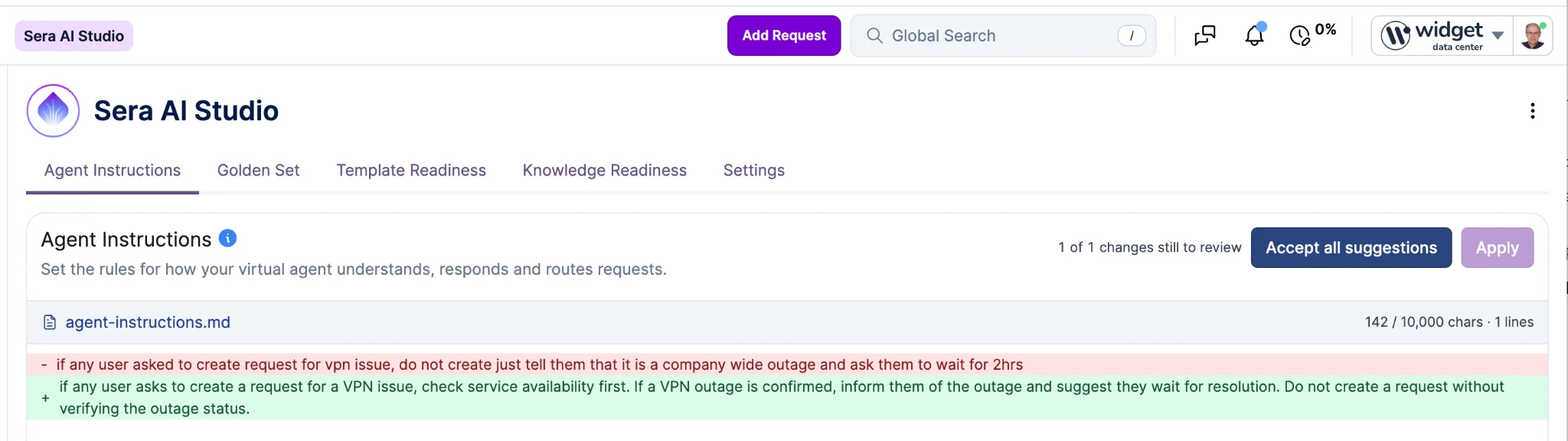
The writepad shows the rewrite as a unified red and green diff against the administrator's own text, with unchanged lines kept for context and whitespace-only differences excluded. Each changed passage is accepted or rejected on its own, and hovering a passage reveals the explanation for that passage alone.
Rejecting a passage requires a reason, which travels with the next validation attempt so the following rewrite lands closer to what the administrator wants. Accepting every passage stores the rewrite, because it has already passed the guardrails; any rejection sends the resulting document back through them rather than storing it. The number of attempts on the same instructions is bounded, and once that budget is spent the outcome is final and the editor returns with the administrator's own text intact.
The virtual agent runs on the last approved instructions for the whole review, so a review in progress never changes what end users get, and no text the guardrails have not evaluated is ever stored. An open review is readable through REST and GraphQL as one entry per decision.
An MCP client can put an analytics question in the user's own wording and receive the figures the matching standard report plots, as rows, with the report's name, identifier and link, the grouping applied, and the column definitions and units.
The figures are the ones the report's own table shows when a user opens it, not the view a dashboard link produces, so a returned number is reconcilable against what the customer sees. A client that has already identified a report through report discovery can pass its identifier instead of re-matching the wording, and both share one matching implementation, so the same wording can never rank two different reports first.
Durations are converted to a stated unit rather than returned as raw milliseconds, and the number of rows is capped to protect the caller's context, with the full row count and a truncation indicator returned alongside so the cap is visible.
Where a report has no table form the response carries no rows, a reason and the report's link, rather than a table the product does not produce. A disabled report, a report that returned no data and a report that failed to run each return a distinct reason. Report access and account scoping are enforced exactly as the Analytics module enforces them, for a matched lookup and a supplied identifier alike. Where a question needs something the reporting engine does not serve by design, the caller is directed to the asynchronous CSV export or to the API rather than given a substituted figure.
An enum column accepts the exported key, the localized text in the importing user's locale, and the en-US text, each matched regardless of case, so "Medium", "medium" and "MEDIUM" all arrive. A key renamed in an earlier release is still accepted under its old spelling.
A value that cannot be resolved is reported against its row, naming the column and quoting the value, and that row is not saved. One unresolvable cell produces exactly one error in the import log and one in the error count, so the count matches the number of cells an administrator has to fix.
A blank cell remains a non-value: it is not an error, and it leaves the field at its current value.
Where a record is assembled from a group of rows, such as a calendar's hours, a person's contact details or a configuration item's relations, an unresolvable value drops only that sub-record and the other rows of the group still import. A configuration item relation whose type cannot be resolved is no longer deferred for reconciliation under the default "child" type.
An Account Administrator can redact a single inbound email from the record actions menu of the Inbound Email console. Confirming clears the subject, body preview, sender, recipients, Cc, message identifier and failure reason, and deletes the stored source messages, including the copies made when an email was reprocessed.
Redaction is permanent. There is no way to undo it, and once an email has been redacted neither "Redact" nor "Reprocess" is offered for it again. Redacted content also stops appearing in inbound email search results.
The record remains useful after redaction. The delivery checks and the link to the request or note the email produced are left in place, so support staff can still see what happened, and the record shows who redacted the email and when. Those two values are returned as "scrubbed_by" and "scrubbed_at" in REST, and as "scrubbedBy" and "scrubbedAt" in GraphQL. The action is named "Redact" but the fields are named for scrubbing, so an integration looking for a redacted field will not find one.
The action is offered to Account Administrators only. An Auditor can open the console and does not see it. A note created from the email is redacted separately, through the existing note redaction.
The Xurrent iPaaS Connector Framework now includes a Connector SDK, so developers and integration teams can build connectors for applications and services that are not available as pre-built connectors. A custom connector follows the same framework as the pre-built connectors and is used in Xurrent iPaaS solutions in the same way.
The SDK provides the tools, framework and documentation needed to define:
The capabilities delivered with the Connector SDK are described below.
A connector defines reusable connection configurations that authenticate with an external application or API. A connection can be configured to work with the supported authentication mechanisms and passes credentials securely to the connector's API requests, so credentials are defined once and reused by every trigger and action in the connector.
Triggers and actions are the reusable building blocks a runbook consumes. A trigger starts a workflow from an event or from data in the external application. An action performs an operation in the connected application. Both are defined in the connector and become available to any iPaaS solution that uses it.
Structured input and output fields, including dynamic fields, are defined for each trigger and action. Connector data is exposed as Datapills in the iPaaS solution builder, so data can be mapped between steps in a runbook without writing custom code.
To build a custom connector:
The SDK documentation and connector repository are available at https://github.com/xurrent/ipaas-connectors.
For assistance with developing or using custom connectors, contact Xurrent Support or your Customer Success representative.
A "Calculate" control above the report, next to the filters, switches a report between "Mean" and "Median". It is offered on the reports that plot an average of a stored figure: request, problem, workflow, project, task and risk completion duration, time to SLA response and resolution, and the customer rating reports. A report that plots anything else does not show the control.
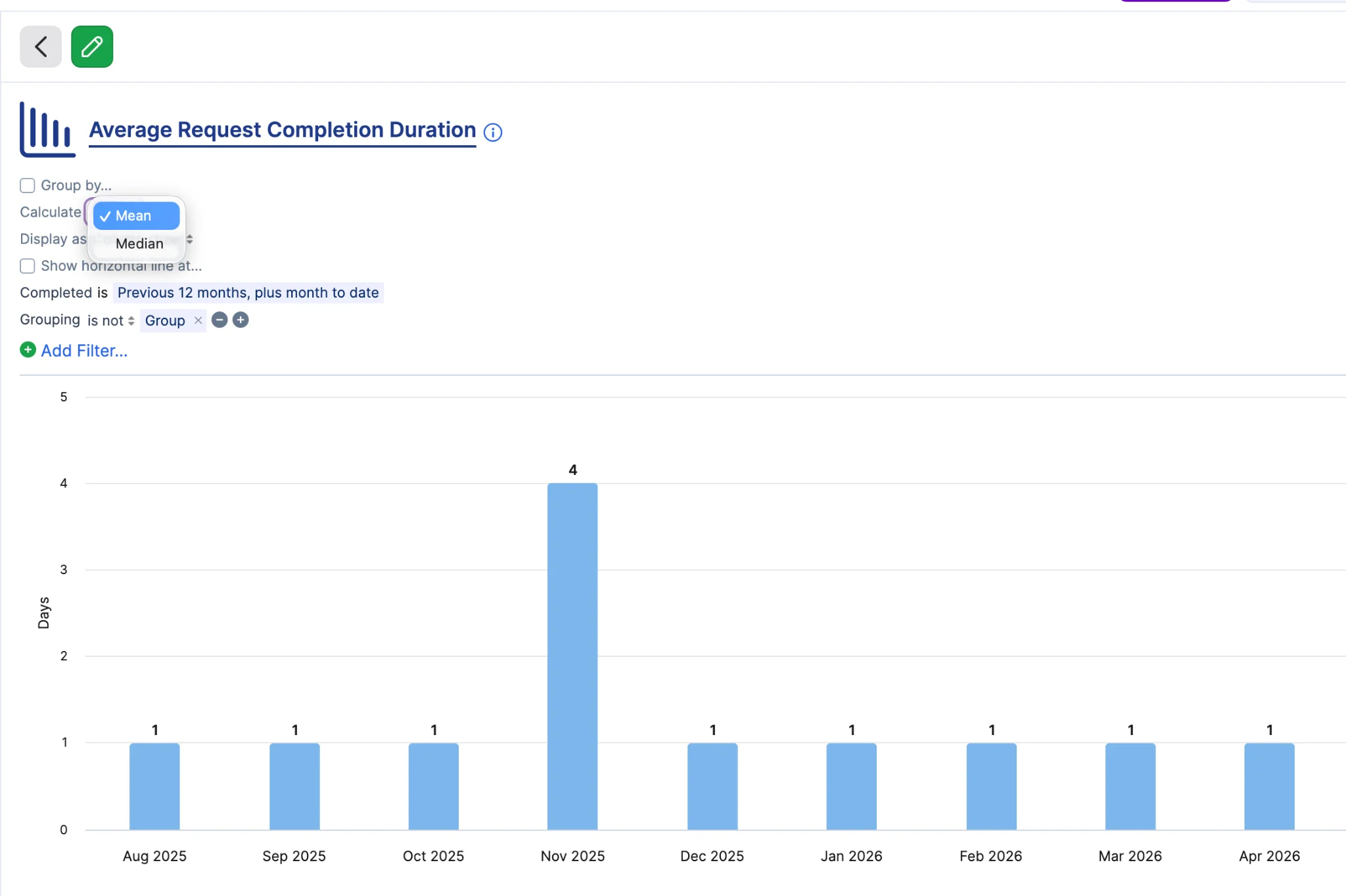
The median answers the case where a handful of exceptional tickets carry a whole period. A bucket holding nine requests around four hours and one left open for thirty days reports a median near four hours, so a low volume month reads as the service actually performed rather than as the one stale ticket nobody closed. No records are excluded and nothing is filtered by hand.
The mean remains the default everywhere, so a dashboard saved before this release renders the same figures afterwards with nobody taking any action, including in printed and emailed exports. A choice made on a dashboard tile is saved with that tile; a choice made on a report opened from the report list lasts as long as the page is open, matching the other display options.
Report titles keep the word "Average" as the umbrella term for both figures. The "Calculate" control states which one is plotted, and the Table display and the exports built from it name the method on their value columns. The median is the 50th percentile as the search engine reports it: exact for an odd number of records in a bucket, the upper of the two middle values for an even number, and a close estimate above roughly a thousand records in a single bucket.
An account admin can select "Provider Focused" as the account's SLA target calculation method, alongside "Team Focused" and "Customer Focused".
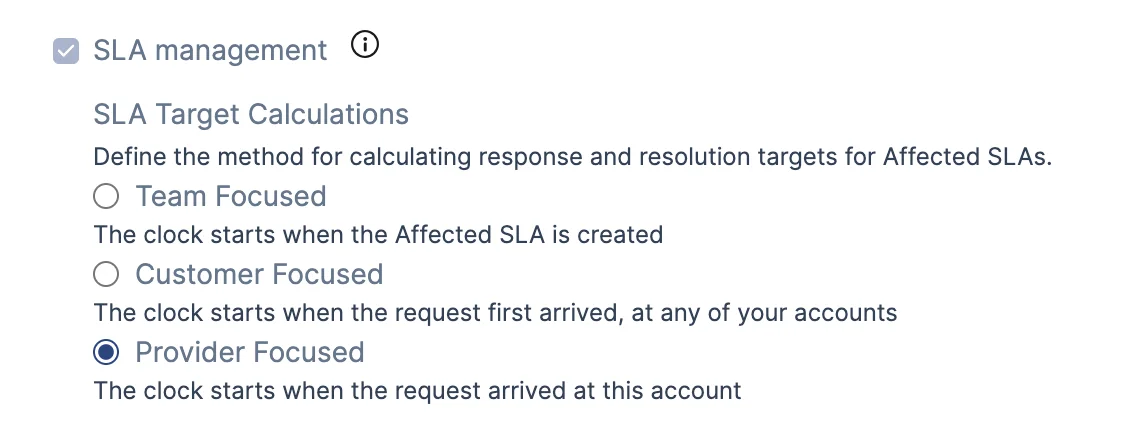
A Provider Focused account keeps end to end measurement across its own service instances and teams, with one continuous clock, shared response actuals and group level resolution, but that clock does not start until the request first reaches the account. Stopped-clock periods are shared only across that account's own service instances, never inherited from another provider. This is the setting for two genuinely separate support organizations that share one directory account: the second organization is measured against its own commitment from the handoff, and both keep the shared directory, shared users and single sign on.
The method is stored per provider account, so one provider under a directory can be Provider Focused while a sibling under the same directory stays on Customer Focused and keeps the directory-wide start. Setting it on one account does not change the start behavior of any other.
The change applies forward only. Selecting Provider Focused governs affected SLA start times computed after it is selected and does not recompute the start time of any affected SLA already established on an in-flight or historical request. No account's method changes on its own, so accounts on Customer Focused or Team Focused are unaffected.
In every other respect a Provider Focused account behaves as a Customer Focused one, including the "Current SLA Target" shown on a request and the "Customer Target" column in the request views.
A new role lets a person create a workflow from a template, start it, fill in its standard fields while the workflow is still registered, and keep its custom UI extension fields and its linked requests up to date while it runs. It grants no control over the workflow's structure: no task dependencies, no automation rules, no approvers, no Manager field and no problem linking. On a workflow that has reached failed, rejected, completed, approved or canceled it grants no write access at all.
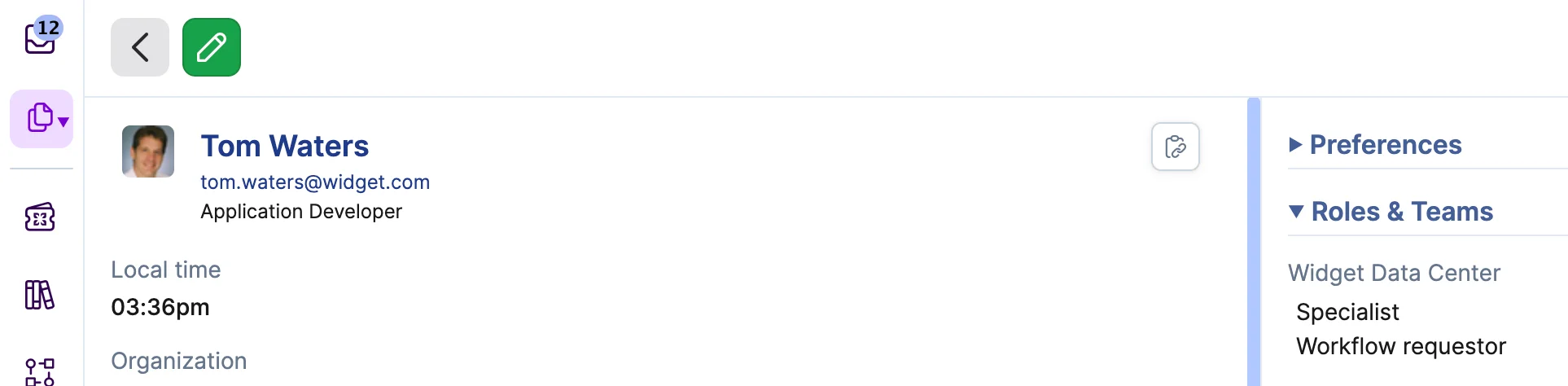
This separates requesting a change from administering the change process, which is what customers running formal change management need for segregation of duties and audit integrity. The person who submits a change cannot alter the approvals, automation rules or task sequencing that the process exists to enforce. "Specialist" is a prerequisite and is set automatically when the role is granted, so task access is exactly a Specialist's: a requestor sees, completes and reassigns tasks as before.
The Manager is resolved from the template rather than chosen by the requestor. A workflow a requestor creates takes its Manager from the template's "Workflow Manager", or from the Change Manager of the template's Service when that field is empty. The requestor sees the resolved Manager as a read-only field and cannot change it. If the resolved person is disabled or does not hold the "Workflow Manager" role, creation is refused with an explicit error rather than assigned to somebody else.
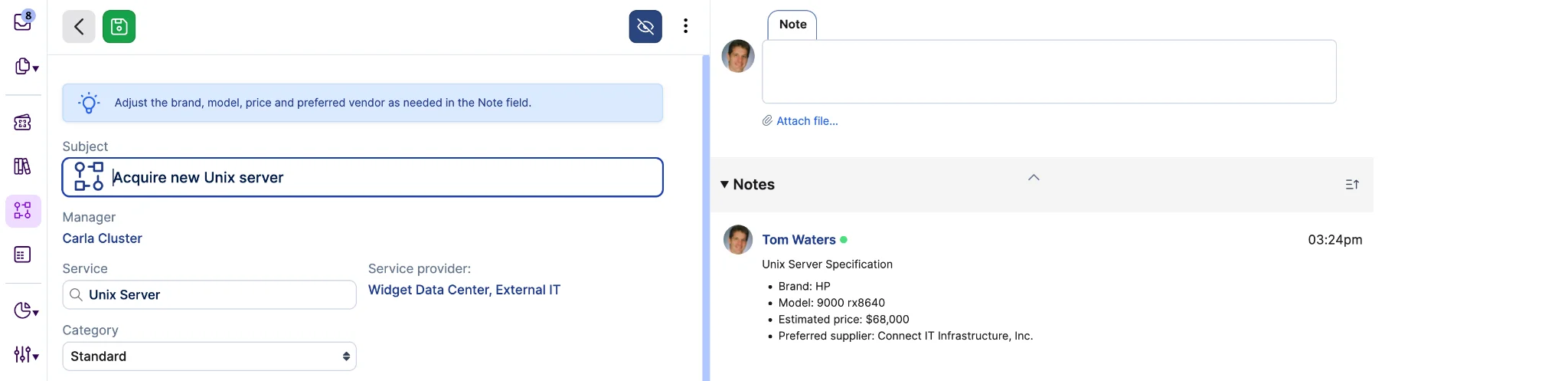
That same resolution decides which templates a requestor is offered. The template picker lists only templates set to "No Repeat" that resolve to a manager, so administrators control what a requestor can raise through the template's "Workflow Manager" and the Service's Change Manager. Recurrent templates are driven by their own schedule and are not offered.
To support this, the "Workflow Manager" field on a workflow template is shown on every template, positioned above "Instructions", and retained on save. It stays mandatory only for recurrent templates whose Service has no Change Manager. See Important Messages for the matching change to the template export.

There is no requestor field on the workflow itself. The person who raised it is its "Created by" user, and the Workflows console adds a "Created by" filter and a "Created by Me" view so a requestor can find their own workflows, matching the Requests console.
The role is additive: nothing that a "Workflow Manager" can do today changes. It can be shared through an account trust, so a provider's specialist can raise changes in a trusted customer account under the same restrictions, and it is available on the Standard plan, matching "Workflow Manager".
An account admin can designate an existing request template as Sera's fallback, configured in Sera Studio settings, one template per Sera configuration. Sera Studio warns at selection time if the chosen template is disabled, not visible to end users, or has coverage gaps for the intended audience.
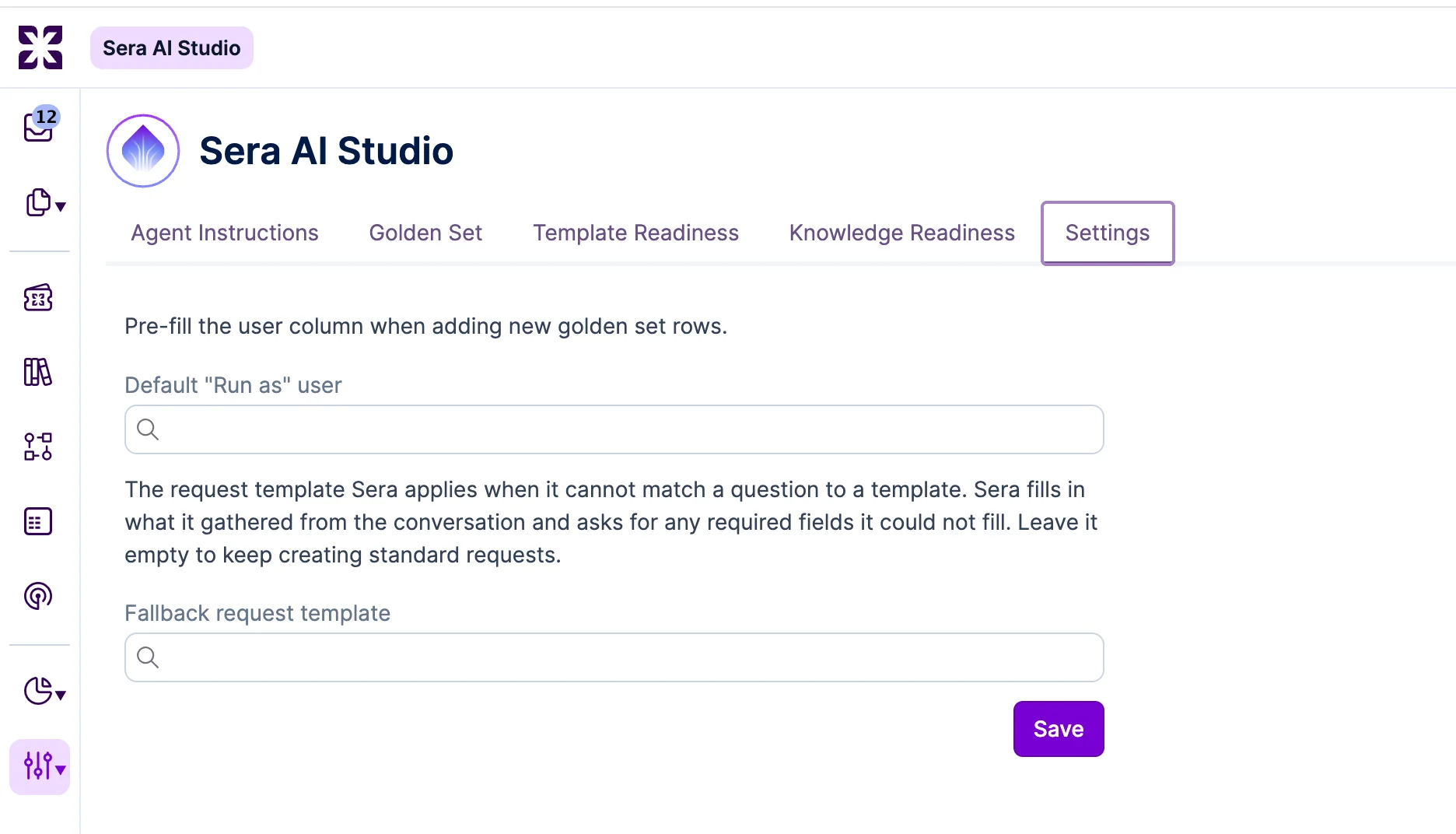
When Sera cannot confidently match a user's question to a template it applies the designated template instead of creating a generic standard request. It prefills the subject and note from what it extracted from the conversation, and conversationally asks for any required UI Extension field it could not fill. No request is created while a required field is still empty, so a conversation the user abandons produces no request at all. Requests created this way carry the template linkage like any template-created request, so template-scoped automation rules fire on them.
The designated template is excluded from Sera's normal matching candidates, so it never comes back as the match for an ordinary question, however closely a question resembles it. Eligibility is also checked at runtime: the template has to be active, visible to end users, and its service instance has to cover the requester. If any of those fails, Sera falls through to the standard request form without error, which is also what happens when no template is designated.
Required fields come from the template's UI Extension, so the template has to be built with them.
Fourteen network device categories are added to the default Product Category set: Stateful Firewall, Next-Generation Firewall, Unified Threat Management and Other Type of Firewall grouped under Firewall; Application Delivery Controller, Web Application Firewall and Other Type of Load Balancer grouped under Load Balancer; and Wireless Controller, VPN Concentrator, SD-WAN Edge, ZTNA/SASE appliance, Network Access Control appliance, Console Server and Network Packet Broker as standalone references. All fourteen use the existing "Physical Asset" rule set.

An operator can classify a modern network device the moment they open the Category picker, in any account, with no preparation. Discovery writes land on a stable slug rather than a generic bucket, so a firewall stops arriving as a router, and an ITAM question such as "every next-generation firewall running firmware below version X" becomes expressible because the category exists to filter on.
New accounts are seeded at creation. Existing accounts are backfilled by a data migration, so the categories appear without any admin action. An account that already holds its own category for one of the fourteen references keeps that entry, with its original name and rule set, and gets no second entry. Locales the localization team has not yet translated show the English names, as previous seed category rollouts have done.
Dashboard bar charts with a variable length category axis (by Member, by Team, by Service, by Category) size themselves from their category count, so every bar carries its own name and its own value at any category count, up to the 25 a chart plots. A chart that needs more room than its widget provides will scroll inside the widget. The dashboard owner can enlarge the widget so that it fits. Exports carry every bar fully labeled.
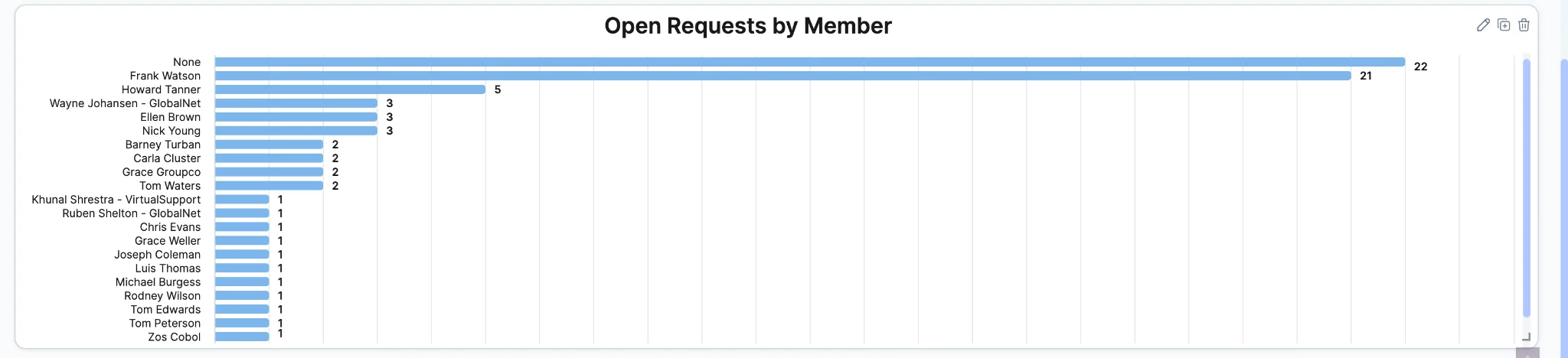
This matters because a chart with thinned labels is not merely incomplete. Labels that survive sit next to bars belonging to other members, so a reader attributes the wrong figure to the wrong person with nothing on screen to indicate that anything is missing.
Every widget on an existing dashboard keeps the same size and position, and a chart whose bars already fit its widget looks exactly as it did before.
The rationale Sera writes when it auto-classifies a request is an internal note, with its text, its AI authorship and its AI medium unchanged. Nothing changes for anyone working the request: specialists, auditors and administrators see the same rationale in the same place and the same detail as before, and the classification itself is identical, applying the same category, impact, service instance and team to the same request.
The change is visible only in Self Service, where the rationale is no longer shown at all. An end user reading their own request, or a key contact reading one through "Requests of My Organization", sees the classification outcome on the request and no note: no note in the conversation, no note notification or email, and no Sera text in the last-note preview. No request number referenced by the classification is exposed there.
This matters because the rationale is written for an agent. It opens by describing the submission as incomplete and can name another request by number as the basis for its reasoning, which is a request the reader may have no right to see. Role based gating is not available, because a public note follows visibility of the request itself and the requester always qualifies. Sera already wrote the failure case as an internal note, so this makes both paths consistent.
The change applies forward only. Rationale notes already posted on requests classified before this release stay public and are not converted.
Reservation offerings in Self Service now open a week calendar with day columns, time running down the side, and one calendar per reservable configuration item. Time a booking can start in is painted available and previews the booking on hover; selecting it opens the booking form prefilled with the item, date, and slot window. Selecting an occupied slot opens a read-only detail popover, subject to the offering's reservation privacy rules. A "Month" and "Week" toggle, a "Today" action, period navigation, a legend, and a timezone label are visible on both views, and a month view marks which days have any bookable start.
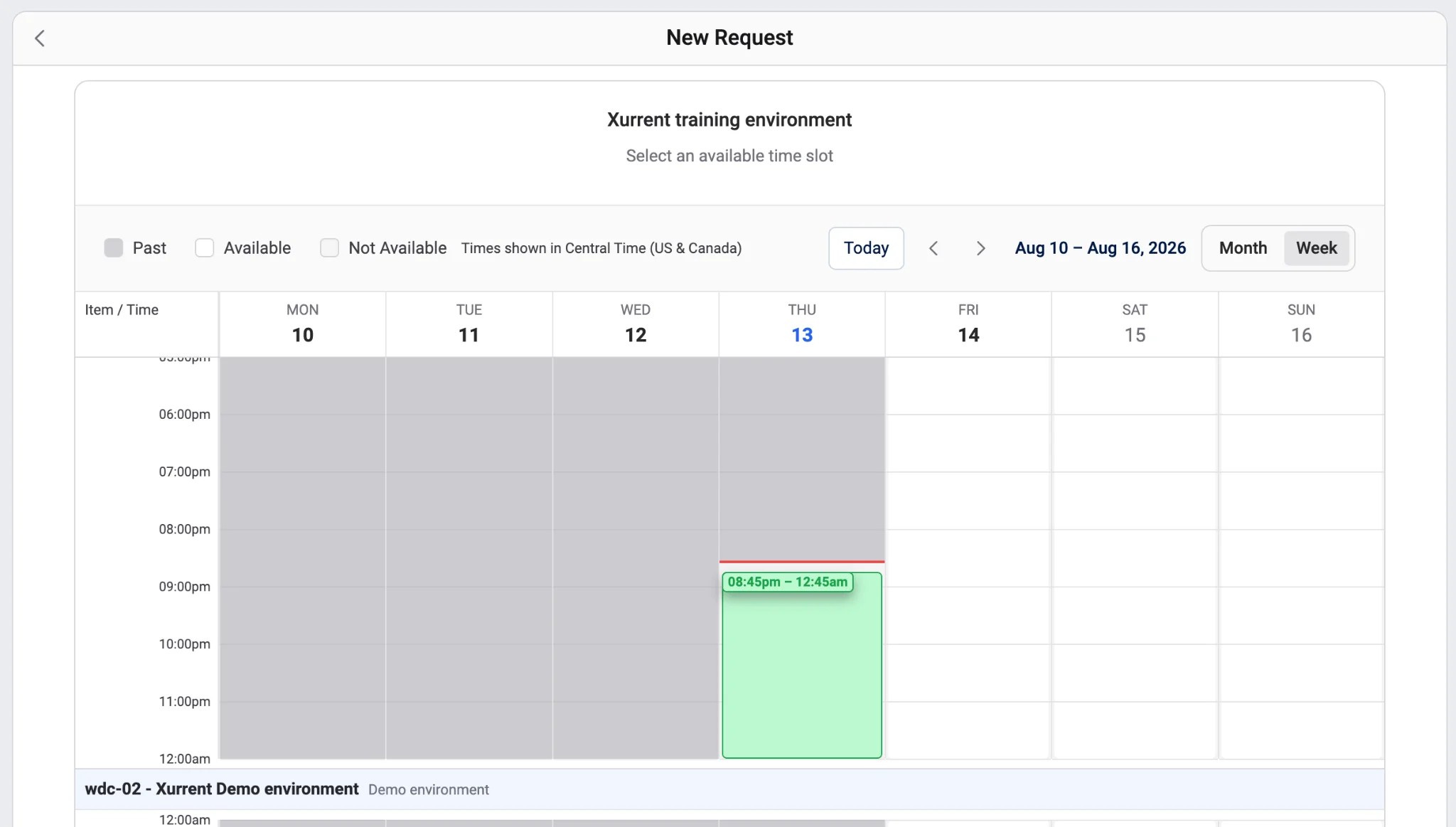
This calendar replaces the zoomable axis view for every reservation offering, including offerings with multi-day enabled. Slot availability is derived from the same rule the booking path enforces, so any slot shown as available is accepted on booking. One visible consequence: reservations in conflicting status no longer paint as taken, since the booking path does not block them.
Administrators of accounts on the Enterprise license find a new "Custom Domain" page under Settings. They register a custom subdomain (support.mycompany.com), copy the two DNS records the page names for routing and for certificate validation, follow the status while the domain is verified and the certificate is issued, and can remove the domain again when it is no longer wanted. The account's original hostname keeps working alongside the custom domain at all times.
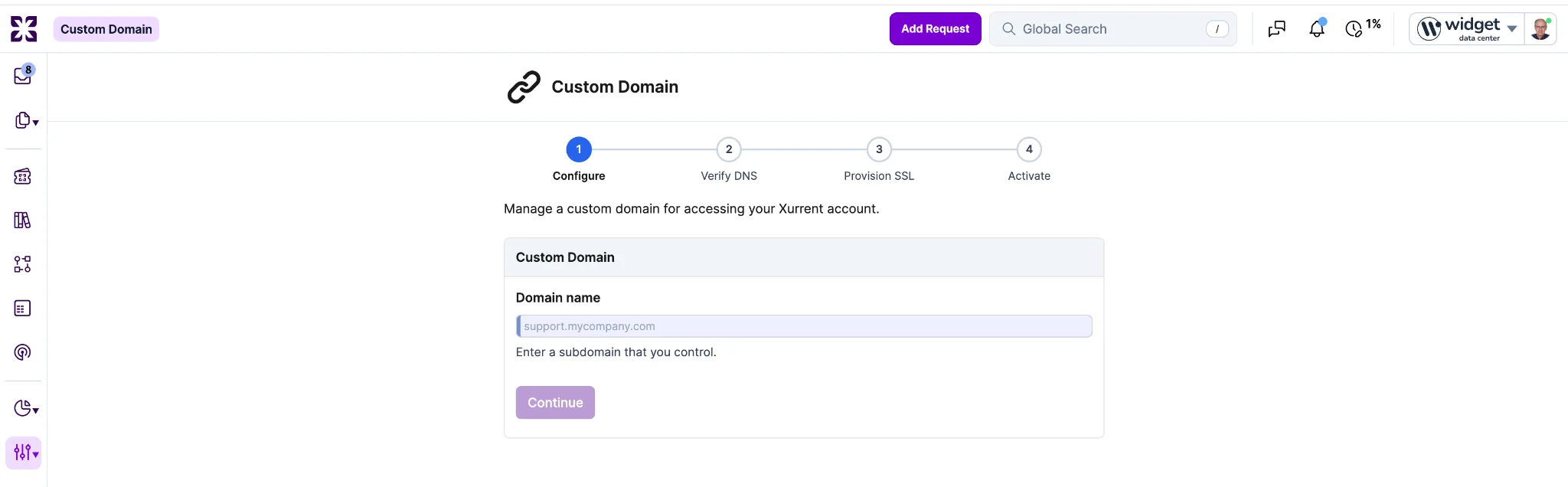
Accounts using the legacy, manually managed custom domain setup are not disrupted and are not offered the new setup. On demo instances the page is not offered at all, since every demo instance is served from one shared hostname that a custom domain can never point at.
The coloured header summary bar on a record, showing "Request #", "Category", "Impact", "Status", and "Resolution Target", now stays pinned to the top of the scrolling area while an agent scrolls through notes, related records, or the audit trail. The behavior applies to record pages, records opened from an agile board card, and preview popups opened from a reference link, and covers every record type that renders a header summary bar.
The header pins only when the browser window is at least 750 pixels tall; in shorter windows it scrolls away as before. Action controls below the bar continue to scroll with the record content, and Self Service is unchanged.
Every chart's overflow menu now offers five data-out actions below "Show Underlying Data": "Copy to Clipboard (CSV)", "Copy to Clipboard (JSON)", "Download Table (CSV)", "Download Table (JSON)", and "Download Table (XLSX)".
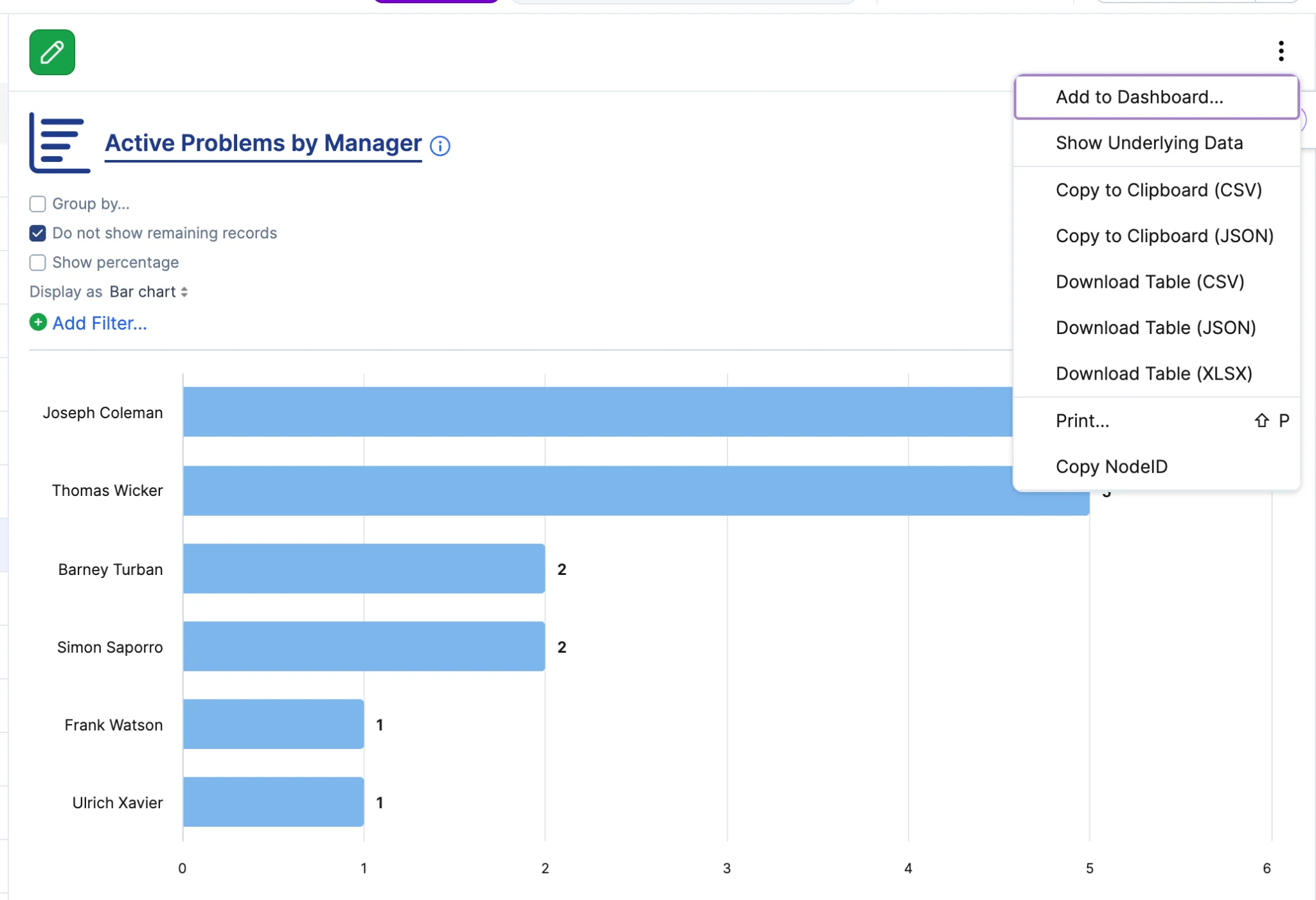
Each action exports exactly the values plotted, with the chart's current period, filters, and group-by applied, as one table with the category axis first and one column per series. Copy actions confirm with a toast naming the row and series count, downloads are named after the chart and date, and the XLSX includes a "Report Details" sheet recording the chart name, period, filters, group-by, and export timestamp. The export contains only what the chart already renders to that user, so no new data access is introduced. Display types with no value series do not show the actions.
The "Skip auto response checks for" field on an account's Email Policy now accepts domain entries alongside individual email addresses. An entry beginning with @ (for example @example.com) admits inbound mail from any address at exactly that domain, replacing lists of individual sender addresses that admins cannot predict or maintain.
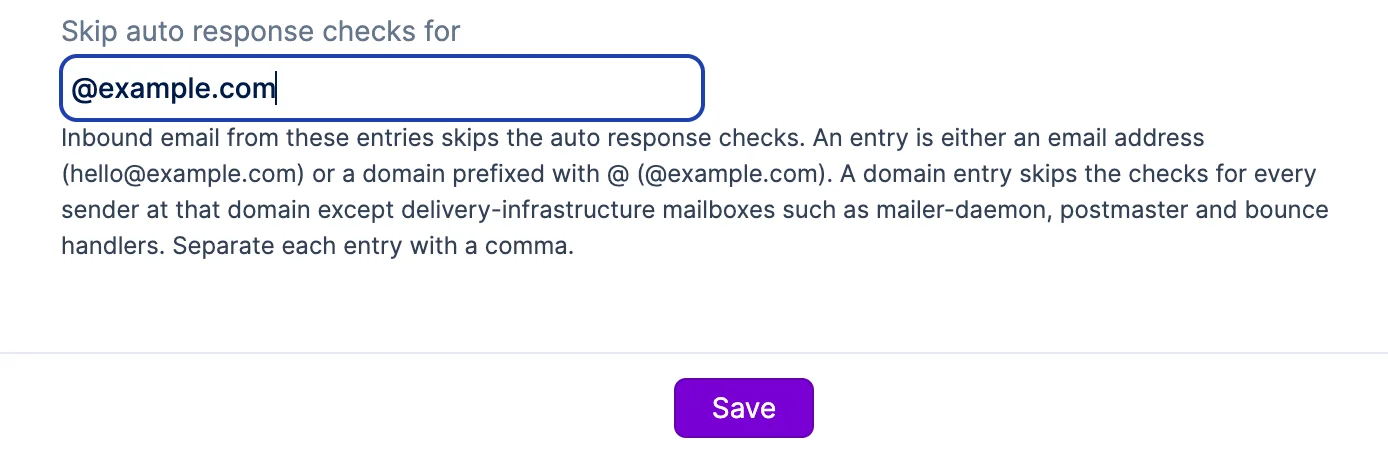
A domain entry waives both checks the field gates: the header-based auto response check and the unknown-sender responder-address check. Delivery-infrastructure mailboxes (mailer daemons, postmaster, bounce handlers) at a listed domain are always held regardless, so a domain entry cannot open a mail loop. Subdomains are separate entries, matching stays account-scoped, and the whole field now matches case-insensitively. Entries beginning with @ are validated for well-formed domain syntax on save.
The account setting that enables all AI capabilities, previously labeled "Xurrent +AI", is now labeled "Sera AI", with a revised description and info bubble stating what it covers: assistance for specialists, autonomous agents, and access for external AI clients through the Xurrent MCP server.

The Self Service setting that enables only the chat widget, previously labeled "Enable Sera AI", is now "Enable Virtual Agent", and Self Service Design copy refers to the chat widget as the Virtual Agent.

Labels and display copy only: stored setting keys, API field names, and existing account values are unchanged, so no account's enablement state changes on release. End users still see "Sera AI" as the chat widget's default name.
A "Welcome message" field on the "Global Settings" tab of Self Service Design, directly below "Chat box name", lets an account administrator replace the stock opening message of the Virtual Agent chat widget.
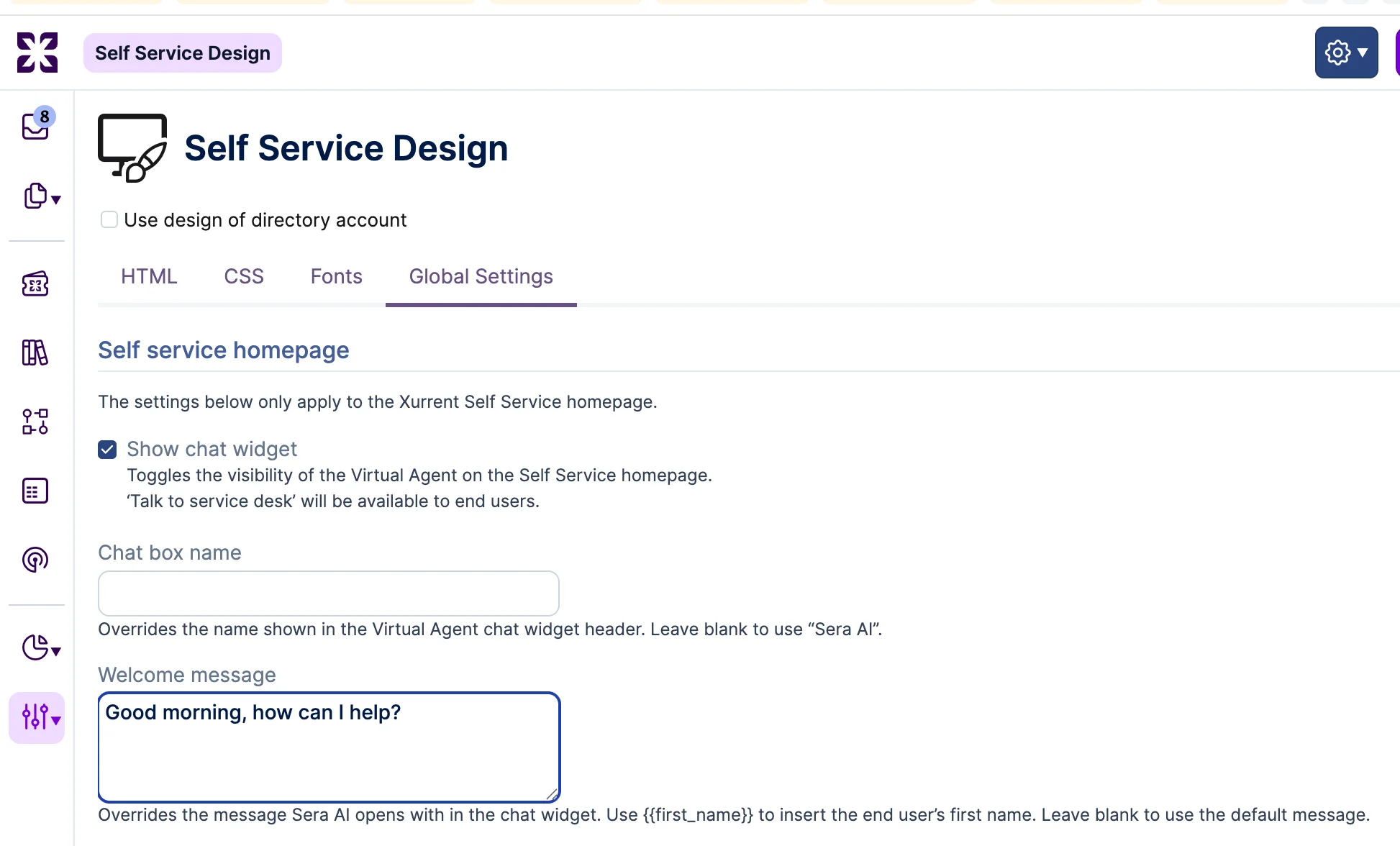
A placeholder token keeps the personalized first-name greeting, blank means the stock message is used, and accounts using "Use design of directory account" inherit the directory account's message. The override applies to new conversations only. As a reminder, the "Enable Virtual Agent" setting must also be checked for these options to appear.
Every control in the record action rail, including the Sera AI launcher, is now a native button: reachable by keyboard in visual order, announced by name and role, and activated with "Enter" or "Space". Opening a panel moves focus into it, "Esc" closes it and returns focus to the control that opened it, and each control shows a visible focus indicator. Sera AI output is announced once when generation completes rather than on each streamed update. The rail's visual appearance is unchanged.
The Xurrent MCP server now supports OAuth authentication. A client connects with only the server URL: it discovers the sign-in flow, registers itself, and the person signs in with their Xurrent credentials. No Personal Access Token has to be generated or pasted into a configuration file, and access stays within the permissions of the signed-in user.
This opens the MCP server to hosted clients that previously could not connect at all, including Claude.ai remote connectors, Copilot Studio, and Zoom Contact Center, alongside desktop clients. Clients that follow the OAuth discovery standards strictly complete discovery, registration, sign-in, and token exchange without manual configuration.
Personal Access Token bearer authentication continues to work unchanged, and clients already connected that way, such as mcp-remote, are unaffected.
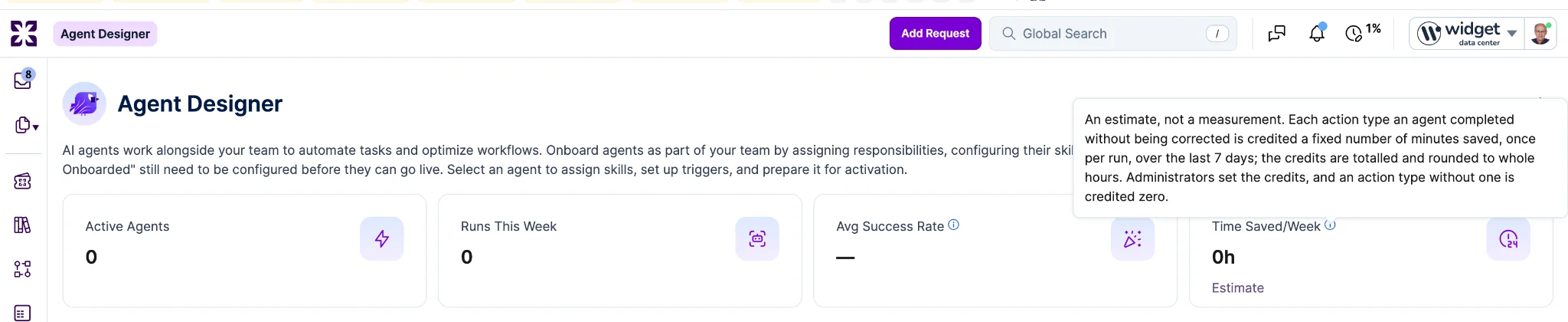
An info icon now appears beside the "Avg Success Rate" and "Time Saved/Week" labels on the Agent Designer dashboard. Hovering the icon shows a tooltip explaining how each number is calculated.
"MZN Mozambican Metical" is now available in the account currency picker, ordered alphabetically between "MXN Mexican Peso" and "NGN Nigerian Naira". Amounts on time entries, expenses, shop articles, and exchange rates denominated in MZN render with the MZN symbol, and search over MZN-denominated cost fields works the same as for every other currency. Existing accounts and their currencies are unaffected.
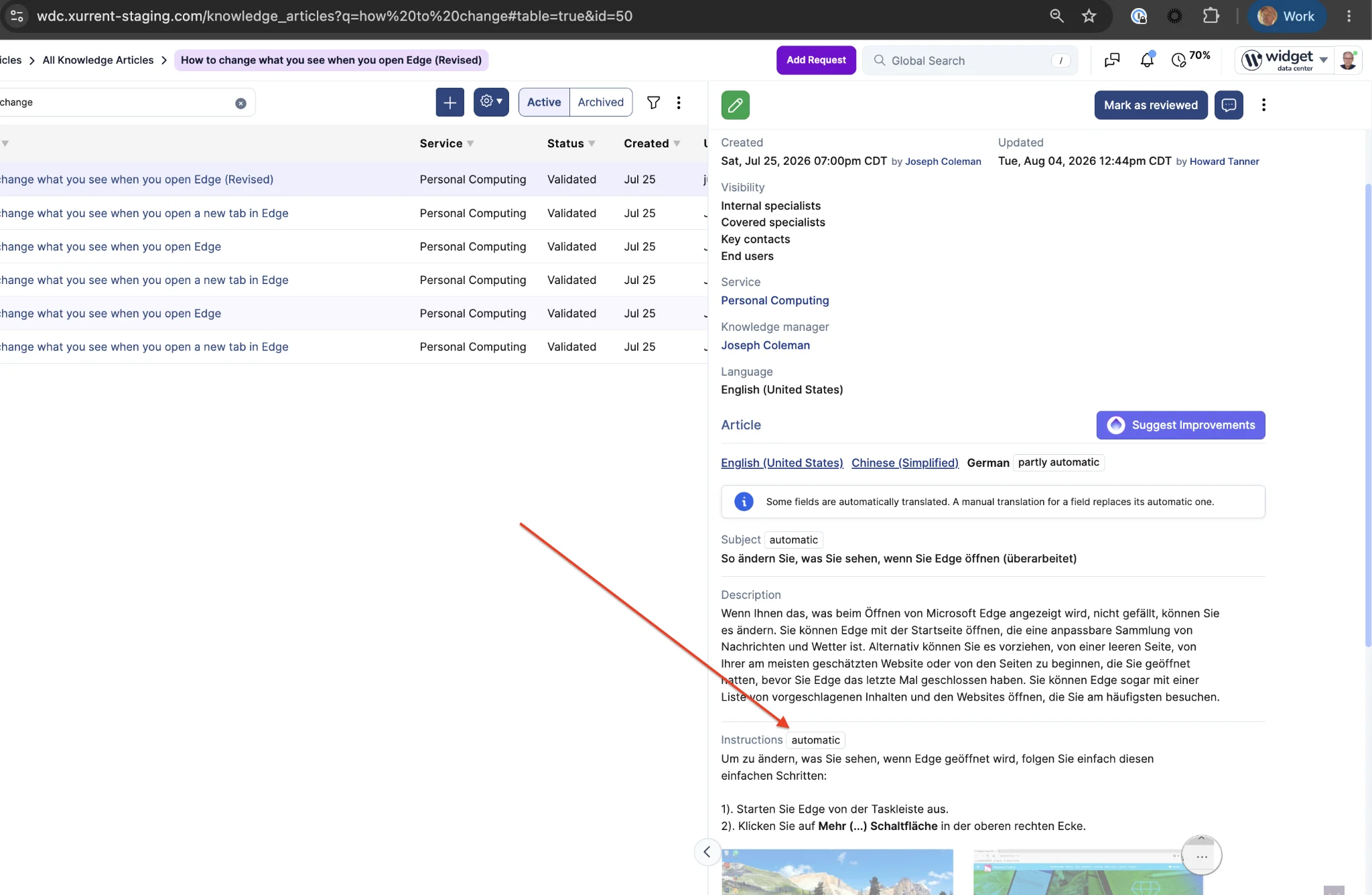
Knowledge articles can now be translated automatically into every language enabled in the account's "Supported languages" list. Enable the "Automatically translate knowledge articles" setting under Self Service Settings and end users see articles in their own language.
Automatically translated content is marked with a notice so readers know the text was translated by machine. Hand-written translations always take precedence; when the source article is edited, the affected manual translations are marked outdated and the automatic translation takes over until they are refreshed. Authors can also declare the language an article is written in: the "Language" field on the article form is now an editable picker.
Previously, every language version had to be translated by hand, so articles in less common languages were often missing or out of date.
Automatic translations do not appear in Settings > Translations and cannot be edited. The "Language" field becomes read-only once an article has translations.
Tags can now be merged. Select a tag's Actions menu and choose Merge to fold it into another tag, or select multiple tags in the grid and merge them in one action, choosing which tag survives.
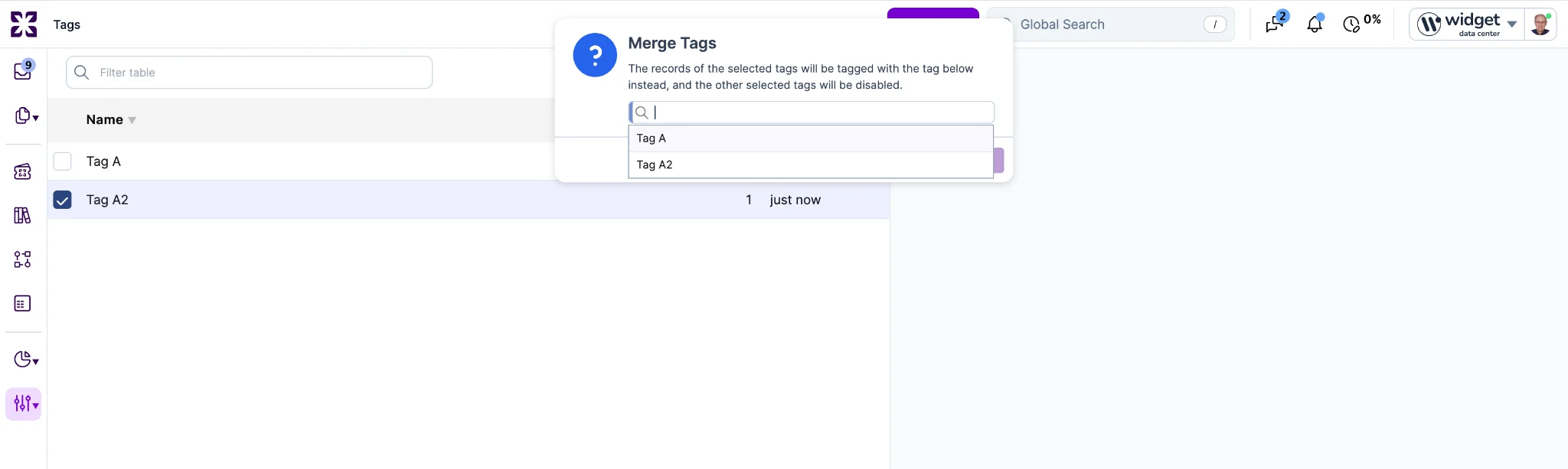
Records carrying the merged tags are re-tagged to the surviving tag, the audit trail records the change, and the merged tags are disabled. Previously, duplicate tags created by typos or inconsistent naming ("UIX designer" vs "UX Designer") could only be disabled, which removed them from records without consolidating them. Merging requires account administrator access; specialists can rename tags but do not see the merge action. A record that already carries the surviving tag is not double-counted.
All dashboards now include a refresh control that recalculates tile figures on demand. Unlike the other enhancements in this update, this change has been released directly to production and is available now.
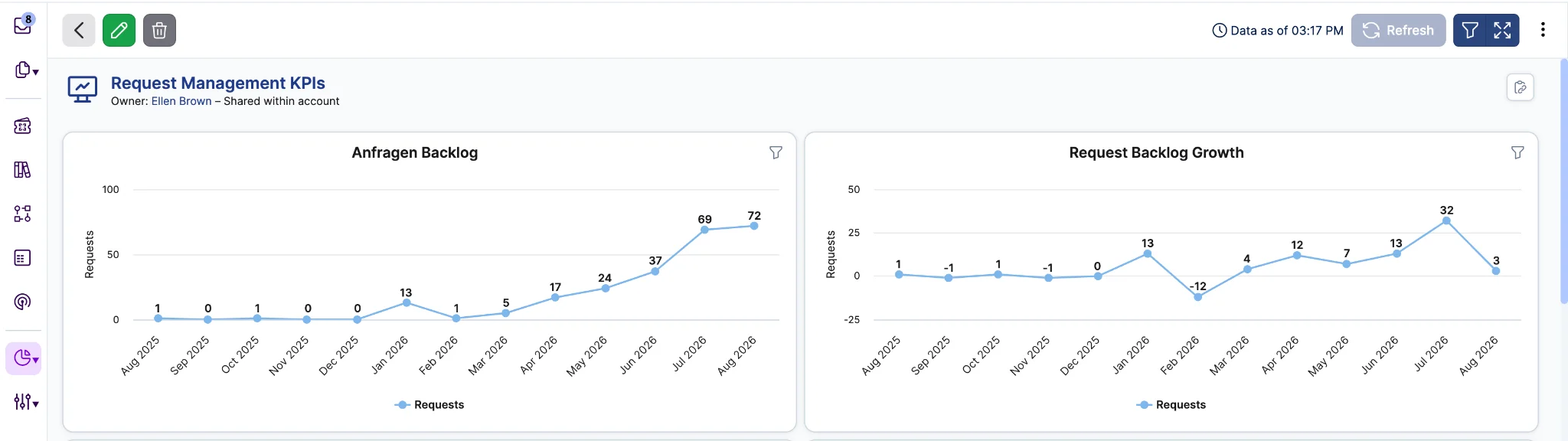
A timestamp in the dashboard header shows when the figures were last calculated, so it is always clear how current the data is. The r684 release, in production since July 23, lengthened the dashboard tile caching interval from 5 to 20 minutes as part of platform performance work. The automatic 20 minute interval remains the default. Reports opened directly continue to query live data and are unaffected by the dashboard cache.
When a search in a lookup picker exactly matches a record's indexed field value, that record now appears at the top of the dropdown. Typing a full identifier like "ABCD 1234-1234" surfaces that record first instead of several rows down among other "ABCD" prefix matches. Comparison is case-insensitive and ignores leading and trailing whitespace; all partial matches remain in the list below, in their existing order.
Previously, a record whose value was spelled out in full could be buried below prefix matches, forcing the user to scan the list for the record they had already fully typed. Exact matches on a related record's fields (a site name in the Configuration item picker, an organization name in the People picker) do not promote the linked records. The "find reference" (#) picker in note editors keeps its existing ordering.
The Data Integrity Reports page now lists every report in a single sortable table with a "Report Count" column showing how many records currently fail each check, sorted largest first by default.
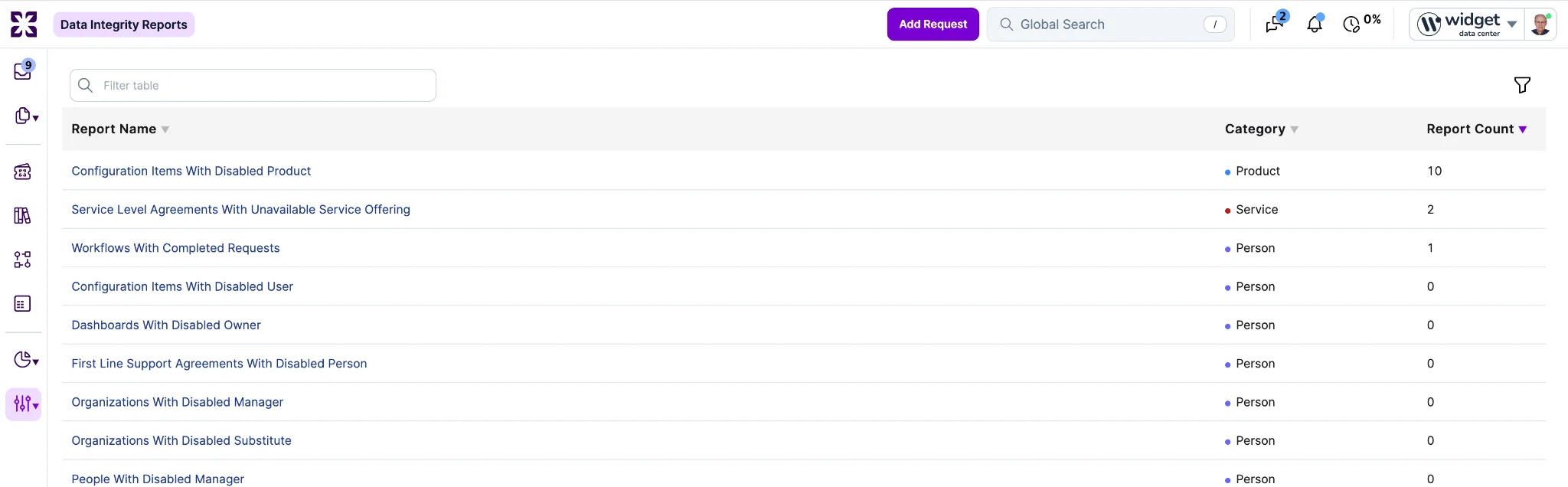
The table supports name search, a category filter, and clicking either the report name or the count to open the report. Previously, the page was a static list of links, so establishing the state of an account meant opening each of the 40 reports individually. Counts reflect only records the signed-in user is permitted to see.
The number of times a request template or knowledge article has been applied is now available as a "Times Applied" column in list views, selectable from "Customize Columns...".
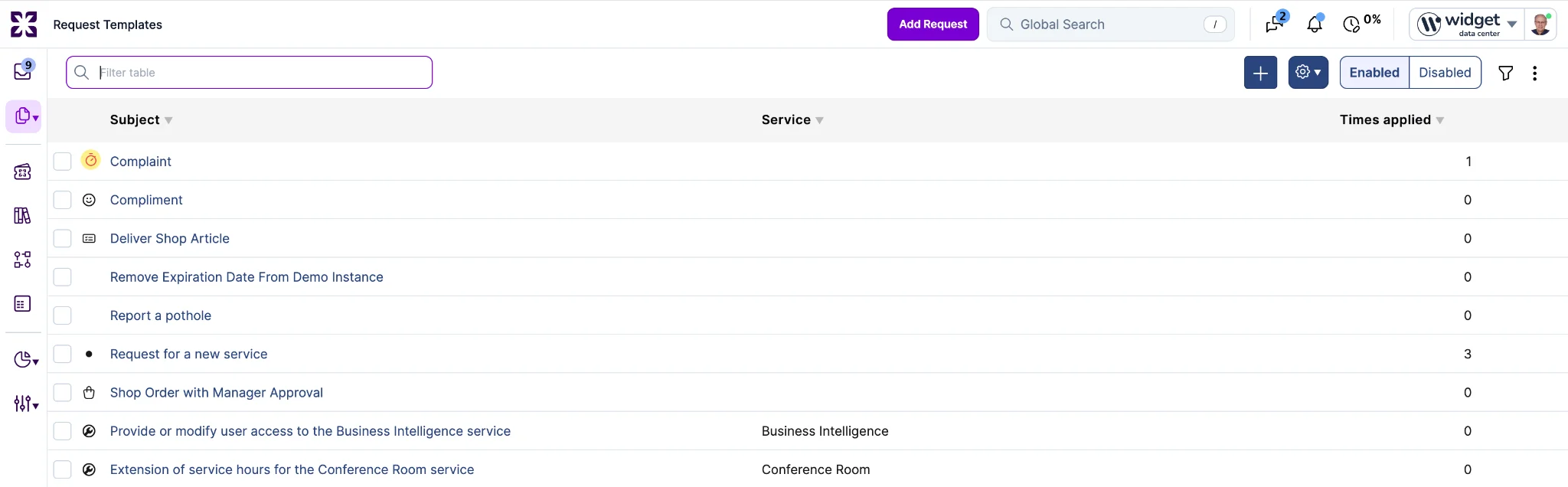
The column is sortable, filterable with the standard numeric operators, and included in exports. The same all-time value appears on the record and is exposed read-only through the REST and GraphQL APIs on both record types. Previously, the only on-screen usage signal for knowledge articles was "Times Viewed", which shows whether an article was found but not whether it resolved anything. The count is cumulative over the record's lifetime and is distinct from the "Usage - Last 90 days" section.
Delegating an approval to a person outside the organization now asks for confirmation first, naming the selected person's name, organization, and primary email address.
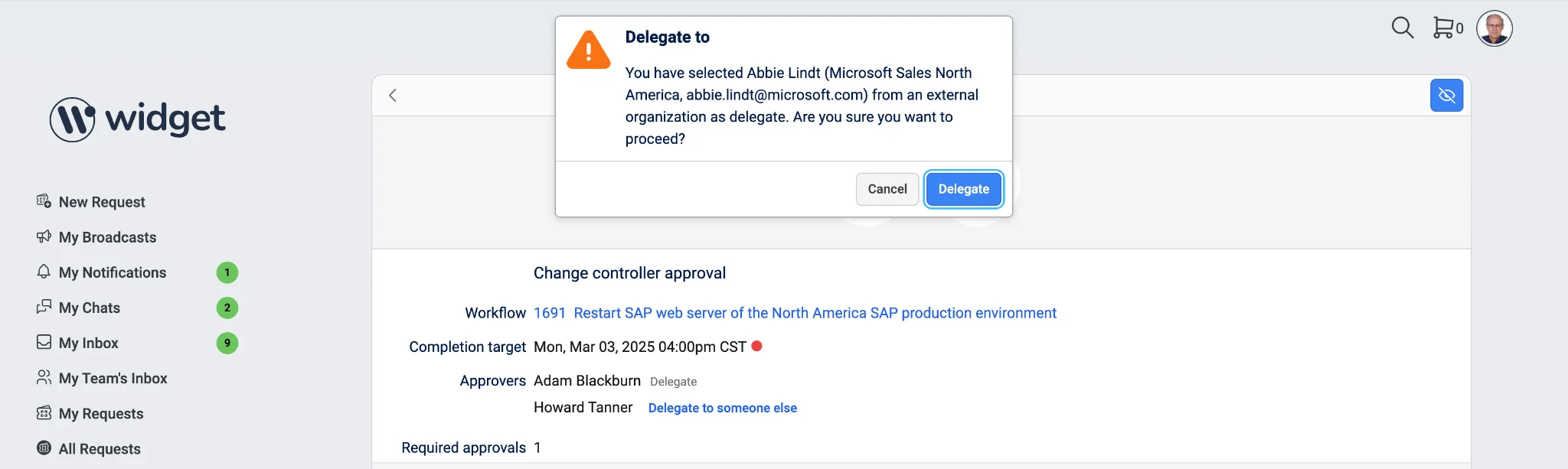
Cancelling leaves the approval untouched, with no audit entry and no notification sent. Delegating to a colleague is unchanged and takes no extra click. Previously, selecting a delegate reassigned the approval immediately, so a single mis-click could hand an approval and its request context to an outside contact. The confirmation applies in Self Service and the specialist interface, on approval tasks and approval project tasks. It is a mistake-prevention prompt, not an access control: accounts that want external people excluded entirely from delegation should continue to use Strong Privacy.
Automation rules can now read and set tags on Problem, Workflow, Task, Project, and Project Task records, using the same properties and actions available on Requests. Previously, tag automation was limited to Requests, so tags on other record types could only be managed manually. Tag lookups remain scoped to the record's account; a rule that attempts to apply a tag from another account is reported as a failed rule execution.
MCP server access is now controlled by the "Xurrent +AI" account setting. When MCP is unavailable, the error names "Xurrent +AI" as the setting to enable. Previously, MCP was gated on the Self Service setting "Enable Sera AI", which exists to control the Virtual Agent and has no functional relationship to MCP. "Enable Sera AI" now controls the Virtual Agent only.
Serbian Dinar amounts are now labelled with the ISO code "RSD" wherever a currency symbol appears, including the currency dropdown on the Amount field. Previously, the dropdown showed the Cyrillic abbreviation "дин.", which made the option hard to recognize. Several currencies already use their three-letter code as their symbol, so this follows the existing convention. Amounts, conversions, and totals are unchanged; only the label differs.


.webp)
.webp)
.webp)