Blog
Insights & updates from our experts


Resolve plant floor and IT issues before they disrupt production.

Stay audit-ready while resolving issues and reducing operational risk.
Resolve issues quickly with an AI-powered system that automates ticketing.

Unifiy IT, HR, Facilities, Finance, and more on a single, AI-powered service platform.

Simplify on-call scheduling, automate escalations, and reduce burnout.

Automate postmortems, AI summaries, and post-incident workflows

Create, organize, and continuously improve your knowledge base to find the right answers with Sera AI.

We're here to help

The integration with Atlassian Jira using the Xurrent Integration Service is

The integration with Atlassian Jira using the Xurrent Integration Service is

The integration with Atlassian Jira using the Xurrent Integration Service is

The integration with Atlassian Jira using the Xurrent Integration Service is

The integration with Atlassian Jira using the Xurrent Integration Service is

The integration with Atlassian Jira using the Xurrent Integration Service is

The integration with Atlassian Jira using the Xurrent Integration Service is

The integration with Atlassian Jira using the Xurrent Integration Service is
Resolve issues quickly with an AI-powered system that automates ticketing.
Unifiy IT, HR, Facilities, Finance, and more on a single, AI-powered service platform.
Simplify on-call scheduling, automate escalations, and reduce burnout.
Automate postmortems, AI summaries, and post-incident workflows
Create, organize, and continuously improve your knowledge base to find the right answers with Sera AI.
Resolve plant floor and IT issues before they disrupt production.
Stay audit-ready while resolving issues and reducing operational risk.

Detect, respond, and resolve incidents fast to cut downtime and MTTR.

Keep your store online, even during your biggest sales moments.

Protect patient data and resolve issues fast, so care teams stay focused on care.

Standardize service delivery across every store and channel.

We are here to help 24/7

Connect with other Xurrent Users

Get insights and tips on how to get the most out of Xurrent

Apps, APIs, and updates

Xurrent service functionality

Eliminate manual tasks, optimize workflows, and deliver faster resolutions.
Learn how organizations have reduced downtime, improved 50% MTTA & MTTR, and cut costs with Xurrent IMR.
Discover Xurrent IMR's quick support, bidirectional integrations with Jira and Slack, and more cohesive incident response capabilities compared to Opsgenie.
Understand why users value Xurrent IMR for its intuitive interface, efficient incident alerting, customizable On-call schedules, and escalations.
Widgets are convenient tools that help organizations add meaningful content to their Xurrent Self Service homepage. One of the most used widgets, the User Name widget, has just been enhanced so that it self-adapts to the situation it is used in.
When the widget {{user_name}} is added to the HTML code of the Self Service homepage, it shows the name of the person currently logged in. To display this name nicely, the widget creates a piece of HTML code. This means that, until now, this widget could not be used inside another widget or inside a hyperlink.

As of now, the {{user_name}} widget has become smarter. When it is used outside an HTML attribute, it behaves as it always has. But when it is used inside an HTML attribute, the name of the current user is rendered without wrapping it in HTML. If the HTML attribute in which the widget is used is href, a hyperlink, then the user name is even URL encoded. This ensures that no unsafe ASCII characters end up in a URL.
As an example, the following code in the ‘Self Service Design’ section of the Settings console uses the {{user_name}} widget in a link pointing to the ‘Requests’ section that lists the user’s requests:
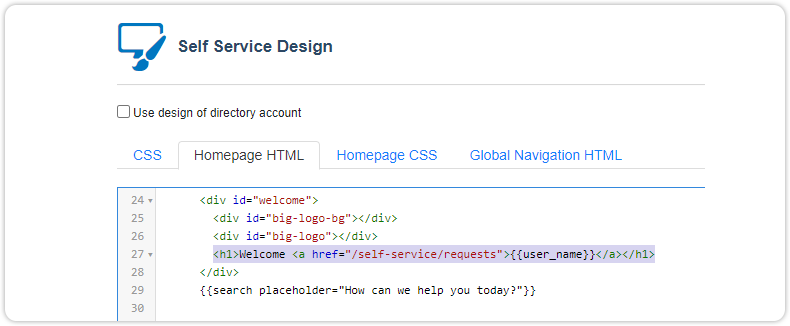
Using the widget inside an href attribute displays the user name on the Self Service homepage as a relative hyperlink pointing to ../self-service/requests.