
Blog
Insights & updates from our experts


Resolve plant floor and IT issues before they disrupt production.

Stay audit-ready while resolving issues and reducing operational risk.
Resolve issues quickly with an AI-powered system that automates ticketing.

Unifiy IT, HR, Facilities, Finance, and more on a single, AI-powered service platform.

Simplify on-call scheduling, automate escalations, and reduce burnout.

Automate postmortems, AI summaries, and post-incident workflows

Create, organize, and continuously improve your knowledge base to find the right answers with Sera AI.

We're here to help

The integration with Atlassian Jira using the Xurrent Integration Service is

The integration with Atlassian Jira using the Xurrent Integration Service is

The integration with Atlassian Jira using the Xurrent Integration Service is

The integration with Atlassian Jira using the Xurrent Integration Service is

The integration with Atlassian Jira using the Xurrent Integration Service is

The integration with Atlassian Jira using the Xurrent Integration Service is

The integration with Atlassian Jira using the Xurrent Integration Service is

The integration with Atlassian Jira using the Xurrent Integration Service is
Resolve issues quickly with an AI-powered system that automates ticketing.
Unifiy IT, HR, Facilities, Finance, and more on a single, AI-powered service platform.
Simplify on-call scheduling, automate escalations, and reduce burnout.
Automate postmortems, AI summaries, and post-incident workflows
Create, organize, and continuously improve your knowledge base to find the right answers with Sera AI.
Resolve plant floor and IT issues before they disrupt production.
Stay audit-ready while resolving issues and reducing operational risk.

Detect, respond, and resolve incidents fast to cut downtime and MTTR.

Keep your store online, even during your biggest sales moments.

Protect patient data and resolve issues fast, so care teams stay focused on care.

Standardize service delivery across every store and channel.

We are here to help 24/7

Connect with other Xurrent Users

Get insights and tips on how to get the most out of Xurrent

Apps, APIs, and updates

Xurrent service functionality

Eliminate manual tasks, optimize workflows, and deliver faster resolutions.
Learn how organizations have reduced downtime, improved 50% MTTA & MTTR, and cut costs with Xurrent IMR.
Discover Xurrent IMR's quick support, bidirectional integrations with Jira and Slack, and more cohesive incident response capabilities compared to Opsgenie.
Understand why users value Xurrent IMR for its intuitive interface, efficient incident alerting, customizable On-call schedules, and escalations.

Match incoming configuration items and resolve the records that need a reviewer.
The Reconciliation Queue is the workspace where incoming Configuration Items are matched against your CMDB, and where you resolve the records the engine cannot settle on its own.
If you have not turned reconciliation on yet, start with Getting Started with Reconciliation. This article is the reference for how the queue itself works.
Every record that arrives from an ingestion source runs through the same pipeline. The engine normalizes the incoming data, searches for matching Configuration Items, scores each candidate, and then either resolves the record automatically or parks it for a reviewer. Records that resolve on their own never need your attention. The queue is there for the rest.
The queue segments records two ways at once.
Views split records by pipeline phase:
State buttons then split each view by where the record sits:
Filter to Parked to see only the records that need a decision from you.
A parked record is always at one of three statuses:
Open any record to work it in the modal, which has two panels for the two halves of the job.
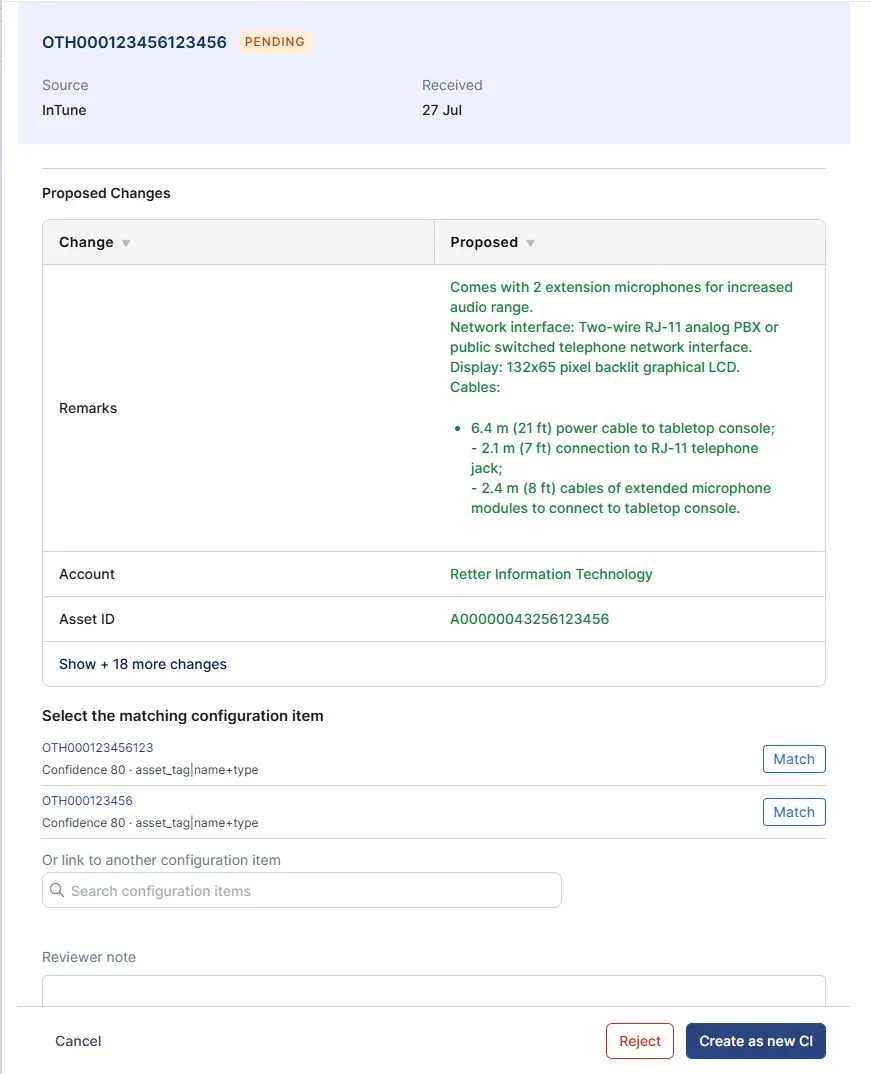
The Identify panel runs while a record is still being matched. It lists candidate Configuration Items with their confidence scores and what each one matched on, offers Create as new CI for genuinely new assets, and lets you search your account's own Configuration Items to link the record by hand when the engine did not find the match itself.
The Review panel runs once a Configuration Item is resolved. It shows a current-versus-proposed field comparison so you can see exactly what the update would change before committing it, with a note field to record your reasoning.
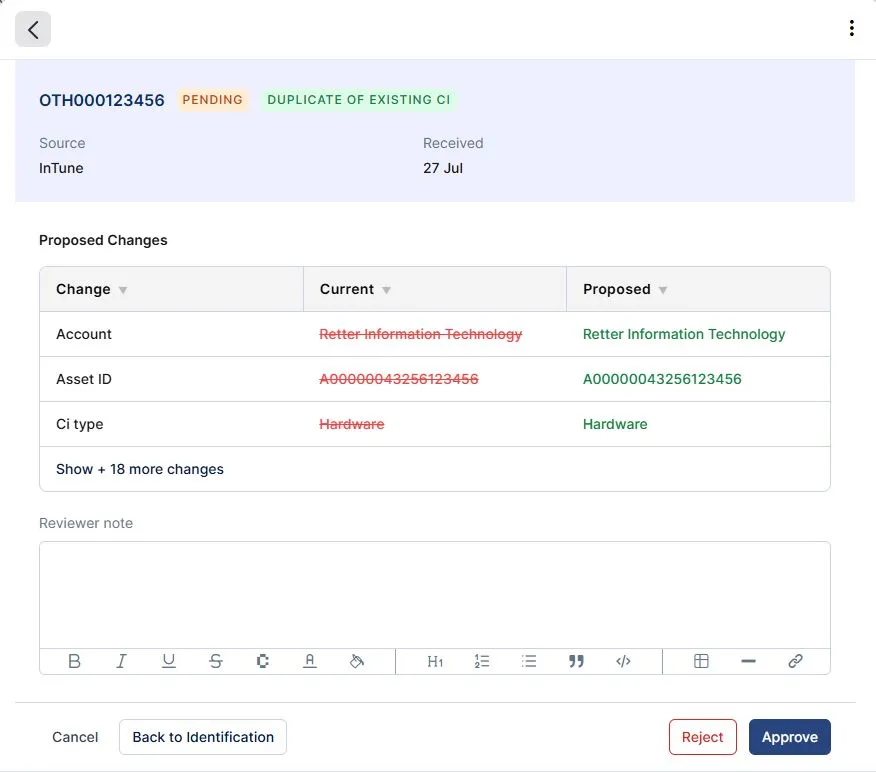
From the Review panel, three actions close a record:
If a reviewer resolved a record to the wrong Configuration Item, Back to identification undoes the identification and returns the record to matching.
In every case, the candidate matches are kept on the completed record, so there is always an audit trail of what the engine considered and what the reviewer decided.
When a source resolves to a Configuration Item, the system remembers that link so the same source pointing at the same device resolves straight to the same Configuration Item on later runs, without re-running the full match. A learned link is correctable: if it is ever wrong, fix it on the Configuration Item, and the system stops trusting a link once it no longer holds.



.webp)
.webp)