
Blog
Insights & updates from our experts


Resolve plant floor and IT issues before they disrupt production.

Stay audit-ready while resolving issues and reducing operational risk.
Resolve issues quickly with an AI-powered system that automates ticketing.

Unifiy IT, HR, Facilities, Finance, and more on a single, AI-powered service platform.

Simplify on-call scheduling, automate escalations, and reduce burnout.

Automate postmortems, AI summaries, and post-incident workflows

Create, organize, and continuously improve your knowledge base to find the right answers with Sera AI.

We're here to help

The integration with Atlassian Jira using the Xurrent Integration Service is

The integration with Atlassian Jira using the Xurrent Integration Service is

The integration with Atlassian Jira using the Xurrent Integration Service is

The integration with Atlassian Jira using the Xurrent Integration Service is

The integration with Atlassian Jira using the Xurrent Integration Service is

The integration with Atlassian Jira using the Xurrent Integration Service is

The integration with Atlassian Jira using the Xurrent Integration Service is

The integration with Atlassian Jira using the Xurrent Integration Service is
Resolve issues quickly with an AI-powered system that automates ticketing.
Unifiy IT, HR, Facilities, Finance, and more on a single, AI-powered service platform.
Simplify on-call scheduling, automate escalations, and reduce burnout.
Automate postmortems, AI summaries, and post-incident workflows
Create, organize, and continuously improve your knowledge base to find the right answers with Sera AI.
Resolve plant floor and IT issues before they disrupt production.
Stay audit-ready while resolving issues and reducing operational risk.

Detect, respond, and resolve incidents fast to cut downtime and MTTR.

Keep your store online, even during your biggest sales moments.

Protect patient data and resolve issues fast, so care teams stay focused on care.

Standardize service delivery across every store and channel.

We are here to help 24/7

Connect with other Xurrent Users

Get insights and tips on how to get the most out of Xurrent

Apps, APIs, and updates

Xurrent service functionality

Eliminate manual tasks, optimize workflows, and deliver faster resolutions.
Learn how organizations have reduced downtime, improved 50% MTTA & MTTR, and cut costs with Xurrent IMR.
Discover Xurrent IMR's quick support, bidirectional integrations with Jira and Slack, and more cohesive incident response capabilities compared to Opsgenie.
Understand why users value Xurrent IMR for its intuitive interface, efficient incident alerting, customizable On-call schedules, and escalations.

Read the four data-quality measures and act on each one.
The CMDB Health dashboard tells you whether your configuration data can be trusted. Four measures sit at the top, and each one maps to a specific next action.
The top of the dashboard carries four data-quality measures. Each has a section below it with the supporting detail.
Pairs of configuration items the platform suspects are the same asset, grouped by match rule and by review status. Work the queue to merge or dismiss each pair. Unresolved duplicates distort every count downstream, so this is the first measure to clear. If this tile reads Detection not configured, the capability is off rather than the data being clean; see below.
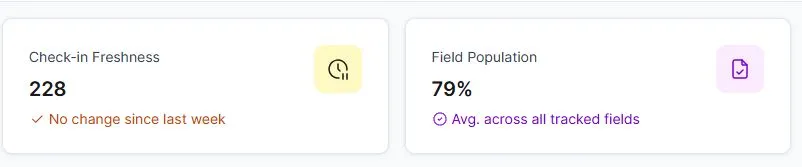
How recently configuration items were confirmed by a source, whether discovery, an integration, or a person. A number that does not move over time usually means sources are not reporting, not that your data is stable. Once an integration is feeding the CMDB, watch for stalls rather than absolute values.
Average completeness across the tracked fields. Raise it structurally rather than by hand: make fields required by status, enrich in bulk, and fix the import mappings that leave fields blank. Aim above 80 percent on the fields you govern.
How many configuration items carry the links you expect, to a user, a service instance, or a contract. Prioritize linking hardware to its users and every configuration item to its one service instance, since incident routing and affected-SLA logic depend on those links.
Below the four health measures, the Lifecycle & financial section holds configuration item status, warranty, age, and total value. Read these as descriptions of your estate rather than health alarms. They tell you what you have, not whether the data is trustworthy.
Tiles distinguish two kinds of empty, and the difference matters:
If a tile reads Detection not configured, the next action is to turn reconciliation on and connect a source. See Getting Started with Reconciliation.



.webp)
.webp)