Blog
Insights & updates from our experts


Resolve plant floor and IT issues before they disrupt production.

Stay audit-ready while resolving issues and reducing operational risk.
Resolve issues quickly with an AI-powered system that automates ticketing.

Unifiy IT, HR, Facilities, Finance, and more on a single, AI-powered service platform.

Simplify on-call scheduling, automate escalations, and reduce burnout.

Automate postmortems, AI summaries, and post-incident workflows

Create, organize, and continuously improve your knowledge base to find the right answers with Sera AI.

We're here to help

The integration with Atlassian Jira using the Xurrent Integration Service is

The integration with Atlassian Jira using the Xurrent Integration Service is

The integration with Atlassian Jira using the Xurrent Integration Service is

The integration with Atlassian Jira using the Xurrent Integration Service is

The integration with Atlassian Jira using the Xurrent Integration Service is

The integration with Atlassian Jira using the Xurrent Integration Service is

The integration with Atlassian Jira using the Xurrent Integration Service is

The integration with Atlassian Jira using the Xurrent Integration Service is
Resolve issues quickly with an AI-powered system that automates ticketing.
Unifiy IT, HR, Facilities, Finance, and more on a single, AI-powered service platform.
Simplify on-call scheduling, automate escalations, and reduce burnout.
Automate postmortems, AI summaries, and post-incident workflows
Create, organize, and continuously improve your knowledge base to find the right answers with Sera AI.
Resolve plant floor and IT issues before they disrupt production.
Stay audit-ready while resolving issues and reducing operational risk.

Detect, respond, and resolve incidents fast to cut downtime and MTTR.

Keep your store online, even during your biggest sales moments.

Protect patient data and resolve issues fast, so care teams stay focused on care.

Standardize service delivery across every store and channel.

We are here to help 24/7

Connect with other Xurrent Users

Get insights and tips on how to get the most out of Xurrent

Apps, APIs, and updates

Xurrent service functionality

Eliminate manual tasks, optimize workflows, and deliver faster resolutions.
Learn how organizations have reduced downtime, improved 50% MTTA & MTTR, and cut costs with Xurrent IMR.
Discover Xurrent IMR's quick support, bidirectional integrations with Jira and Slack, and more cohesive incident response capabilities compared to Opsgenie.
Understand why users value Xurrent IMR for its intuitive interface, efficient incident alerting, customizable On-call schedules, and escalations.

Sera AI's conversational interface for end users on the Self Service portal.
The Virtual Agent is Sera AI's conversational interface for end users. Available on the Self Service portal, it assists users by surfacing knowledge, creating requests, highlighting pending tasks, and providing information about degraded services. The Virtual Agent is designed with a bias toward action: when a user describes what they need, it moves toward resolution rather than asking unnecessary follow-up questions.
To enable the Virtual Agent:
To offer the Virtual Agent to some users only, use Limit access to skill pools.
Organizations that use the support chat functionality can continue to do so alongside the Virtual Agent.
The Virtual Agent appears in the bottom-right corner of the Self Service portal. When a user types a message, Sera AI processes the request and determines the best course of action.
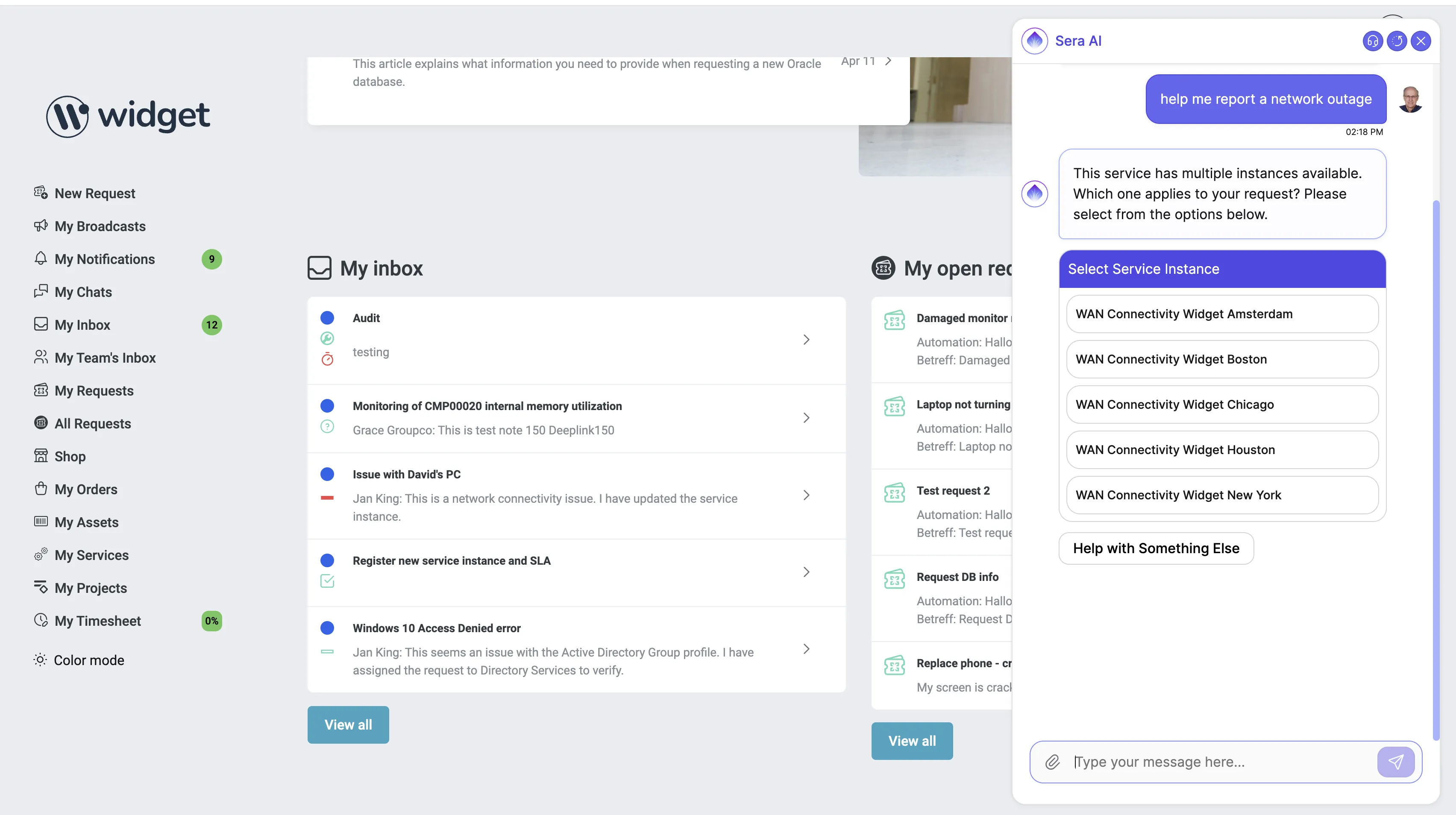
Finding request templates. When a user describes a need (for example, "I need a new docking station"), the Virtual Agent searches the organization's request templates to find a match. If a relevant template exists, the Virtual Agent identifies it and presents a request card with fields pre-populated from the conversation. The user can then review and submit the request. Because request templates are often linked to workflows, getting the right template from the start kicks off processes in the background without a human in the loop, leading to quicker resolution and less manual effort.
Handling requests without a matching template. When the Virtual Agent cannot find a matching request template (for example, for a brand-new service or feature), it lets the user know and offers to create a request anyway. The request uses the fallback request template set in Sera AI Studio when there is one, and is otherwise a generic request. Accounts that require a request template never create a generic request. Sera AI's auto-classification then routes the request to the right team in the background. Within seconds of submission, the request is assigned both a category and a service instance.
Pre-populating custom fields. The Virtual Agent can reference any custom fields that have been added to a given request template and pre-populate information deemed relevant and matching. The matching threshold is tempered to avoid hallucination, so custom fields may not always be filled in, particularly if the user's description was brief. If custom fields are marked as required in the request template, the user is redirected to the request page to complete those fields before submission. This avoids scenarios where a specialist has to go back to the requester for missing information.
Surfacing knowledge articles. When a user asks a question or describes a problem, the Virtual Agent searches the knowledge base and returns relevant information as concise summaries, helping users find answers without submitting a request.
Highlighting pending tasks. If a user has tasks in their inbox, the Virtual Agent summarizes them and suggests the user take action. This includes completed requests awaiting a satisfaction rating, requests with status "Waiting for Customer" that need input, and approval tasks.
Detecting degraded services. The Virtual Agent has access to the service catalog and can see if any services are currently degraded. When a user contacts the help desk about an ongoing problem, the Virtual Agent can inform them of known service issues.
Choosing the support domain. When a user can be served by more than one support domain and the request could belong to either, the Virtual Agent asks the user to confirm the right one, unless the directory has a default support domain set. This prevents sensitive requests from being sent to the wrong support domain (for example, an HR issue being routed to Facilities).
Virtual Agent conversations are saved in My Chats within the self-service portal. Users can review past conversations at any time. The conversation is also added to the request as an internal note when a request is created, which helps specialists who pick up the request understand the full context.
The Virtual Agent and AI request classification work as a connected system. When the Virtual Agent creates a request (either via a matched template or as a generic "Other" category request), the AI auto-classifier determines the appropriate Category, Impact, Service Instance, and Team. This combination of capabilities means the Virtual Agent can create well-routed requests without requiring users to navigate the service catalog manually.
The Virtual Agent is part of a broader knowledge management cycle. Knowledge articles enable ticket deflection through the Virtual Agent. When tickets are resolved, specialists can create new knowledge articles from the resolution. Those articles then become available for future Virtual Agent conversations. Every resolution today becomes an investment in preventing tomorrow's tickets. This flywheel accelerates over time as the knowledge base grows and improves.
The out-of-the-box Virtual Agent can meet needs right away for organizations with straightforward environments. For more complex scenarios, Xurrent works with customers to optimize areas such as knowledge article content, keyword coverage, and request template configuration to ensure the Virtual Agent addresses the scenarios that matter most.