







Blog
Insights & updates from our experts


Resolve plant floor and IT issues before they disrupt production.

Stay audit-ready while resolving issues and reducing operational risk.
Resolve issues quickly with an AI-powered system that automates ticketing.

Unifiy IT, HR, Facilities, Finance, and more on a single, AI-powered service platform.

Simplify on-call scheduling, automate escalations, and reduce burnout.

Automate postmortems, AI summaries, and post-incident workflows

Create, organize, and continuously improve your knowledge base to find the right answers with Sera AI.

We're here to help

The integration with Atlassian Jira using the Xurrent Integration Service is

The integration with Atlassian Jira using the Xurrent Integration Service is

The integration with Atlassian Jira using the Xurrent Integration Service is

The integration with Atlassian Jira using the Xurrent Integration Service is

The integration with Atlassian Jira using the Xurrent Integration Service is

The integration with Atlassian Jira using the Xurrent Integration Service is

The integration with Atlassian Jira using the Xurrent Integration Service is

The integration with Atlassian Jira using the Xurrent Integration Service is
Resolve issues quickly with an AI-powered system that automates ticketing.
Unifiy IT, HR, Facilities, Finance, and more on a single, AI-powered service platform.
Simplify on-call scheduling, automate escalations, and reduce burnout.
Automate postmortems, AI summaries, and post-incident workflows
Create, organize, and continuously improve your knowledge base to find the right answers with Sera AI.
Resolve plant floor and IT issues before they disrupt production.
Stay audit-ready while resolving issues and reducing operational risk.

Detect, respond, and resolve incidents fast to cut downtime and MTTR.

Keep your store online, even during your biggest sales moments.

Protect patient data and resolve issues fast, so care teams stay focused on care.

Standardize service delivery across every store and channel.

We are here to help 24/7

Connect with other Xurrent Users

Get insights and tips on how to get the most out of Xurrent

Apps, APIs, and updates

Xurrent service functionality

Eliminate manual tasks, optimize workflows, and deliver faster resolutions.
Learn how organizations have reduced downtime, improved 50% MTTA & MTTR, and cut costs with Xurrent IMR.
Discover Xurrent IMR's quick support, bidirectional integrations with Jira and Slack, and more cohesive incident response capabilities compared to Opsgenie.
Understand why users value Xurrent IMR for its intuitive interface, efficient incident alerting, customizable On-call schedules, and escalations.

Tuan Vu builds automations the way most people send a Slack message — describe what you want, hit enter, done.
"It creates that logic within 10 to 15 seconds," says Tuan, Xurrent's Global Training & Enablement Specialist. "That's incredibly fast. It would take me an hour or something before to have to do that manually myself."
An hour to 15 seconds. That's not an incremental improvement ... it's a completely different way of working.
This isn't about a feature demo. It's about what happens when AI removes the gap between having an idea and putting it into action.
This is the third and final post in our "How Xurrent Use Xurrent" series, where we pull back the curtain on how our own teams use the platform every day. (If it doesn't work for us, why would it work for you?)
In the first post, we looked at cross-functional collaboration without silos. In the second, we explored how Sera AI has changed how our CPO interacts with the service desk.
Today, we're looking at the feature three Xurrent employees said they couldn't live without: automation rules.
We've written a comprehensive guide to workflow automation that explores the full landscape — from definitions to best practices to AI.
The short version: every automated workflow follows the same basic pattern — a trigger kicks things off, rules define the "if-then" logic, conditions determine what qualifies, and actions execute automatically.
In Xurrent, automation rules are the engine behind that pattern. They work across every object in the system — incidents, tasks, projects, workflows, people records — and they can be stacked, chained, and combined.
As Phil Christianson, Chief Product Officer at Xurrent, says:
"You can think of it as basically in any of the objects — whether it's an incident or a task or a project or a workflow — you can dynamically build these automations to say, when this type of action occurs, for this type of object, do this thing."
"You can listen for, let's say, whenever a task gets set to urgent — take a series of actions or send a webhook out to a different system to let people know that something's going on."
While Phil's explanation sounds simple on the surface, it's not.
Xurrent customers have built pages and pages of automation rules to handle everything from ticket routing to cross-system notifications.
But here's the thing — you don't need to be one of those power users to get value.
Some of the most useful automations at Xurrent are tiny.
Here's what we mean by that.
Tuan Vu, Xurrent's Global Training & Enablement Specialist, has built automation rules into nearly every part of his team's workflow. A couple of examples:
The Kanban auto-sorter: As the training and enablement specialist, Tuan's team uses Kanban boards to manage work. He uses Xurrent to automate the sorting.
"They could be very small things — like if something's been assigned to the team and it's a specific service, say the Xurrent Academy, then we automatically set which Kanban board it goes to. It sits within a specific bucket, making it really easy to see what work we have going on — instead of monitoring the inbox all the time and doing that manually ourselves."
Note: This isn't a massive enterprise automation. It's a small, specific rule that saves minutes every day ... minutes that add up to hours.
Recurring workflows: Tuan also uses automation for recurring tasks that previously lived in Google Calendar reminders.
"Having those recurring workflows, making sure that every single quarter, every single year we have those regular tasks in play. It doesn't need to sit in a calendar. It doesn't have to be something that somebody reminds you of. It's just automatic. It happens every time. If somebody else comes in and joins the team, they will instantly be able to get those notifications."
The key: The automation outlasts any individual. New team members inherit the system without anyone explaining what needs to happen when.
Automation rules are powerful. But traditionally, building them required understanding the underlying logic — pseudo code, conditional statements, the structure of the system.
That's changed.
As Phil shared,
"We built the ability to generate these automation rules using AI, using natural language inputs. We took the most powerful component of our software — these automation rules — and put a natural language prompt in front of them."
Phil's referring to Xurrent's AI Automation Builder. As we discussed here, Sera AI will automatically build a new automation based on a prompt. Describe in plain language how the automation should work, and Sera AI builds it — saving 5-30 minutes per automation compared to manual configuration.
"You can say, 'If the CEO puts a ticket in on a Sunday and it is about his computer, add Phil as a watcher and mark the ticket as urgent.' And that's like 15 lines of pseudo code to make that happen. Translate and build it and turn it on from the natural language prompts."
That's a rule that would take someone with system knowledge an hour to build manually. Now, anyone who can describe what they want in a sentence can build it.
Jacob Roscoe, a Product Manager at Xurrent, has seen the same thing from the other side — watching how people actually interact with the builder.
"At the top, there's a 'use Sera AI' button, and in plain language, you can describe what you want your automation rule to do. I'd say most of the time it's getting you 90% of the way there — or further — with just a few small tweaks."
90% from a sentence. The remaining 10% is a tweak, not a rebuild.
"I think that's exactly the spirit of what we want to do with Sera and threading throughout the product — just create a lower barrier to entry on some of the more advanced features within Xurrent."
Most ITSM platforms treat automation as a top-down exercise — hire consultants, map process flows, and spend months configuring before anyone sees value.
Xurrent flips that.
"What I really like about Xurrent is that we've tried hard to empower leaders of teams to set up what they think is the important part of their job that needs help. Rather than walk through an elaborate process diagramming exercise, we said, 'Hey, leader of marketing or leader of HR — what are those tasks you're doing day in and day out that are repetitive, that could be automated, that you lose track of?' Set those things up in Xurrent." — Phil
The people closest to the work build the automations — because they know what needs automating.
Every automation rule running at Xurrent started as a simple observation: "I keep doing this manually."
The difference is that now, turning that observation into action takes 15 seconds — not an hour, not a sprint, not a consulting engagement.
That's what happens when you put the tools in the hands of the people doing the work.
— —
Over the course of this series, we've pulled back the curtain on how the Xurrent team actually uses Xurrent — not in demos, not in sales decks, but in the day-to-day.
In the first post, we showed how six departments collaborate on a single platform without silos. In the second, we explored how Sera AI changed the way our CPO interacts with the service desk. And in this post, we showed how automation rules — powered by Sera AI — let the people closest to the work eliminate repetitive tasks in seconds.
Collaboration. Intelligence. Automation. Three layers of the same platform, working together.
We shared all of this because we believe in using what we build. If it doesn't work for us, why would it work for you?
It works for us.



Most AI SREs are pattern matchers trained on public data. They know what a memory leak looks like in the abstract. They don't know that your payments-api has a flaky liveness probe everyone ignores, that the checkout team owns the retry policy, or that the last three "database incidents" were actually cache misconfigurations. That knowledge lives in your postmortems, your Slack channels, and the heads of two senior engineers.

Most vendors will tell you ITSM implementation takes six months to a year — but modern, configuration-first platforms have rewritten the math entirely. See what real implementations look like in 2026, and why a long rollout is now a choice, not a given.


.webp)
.webp)

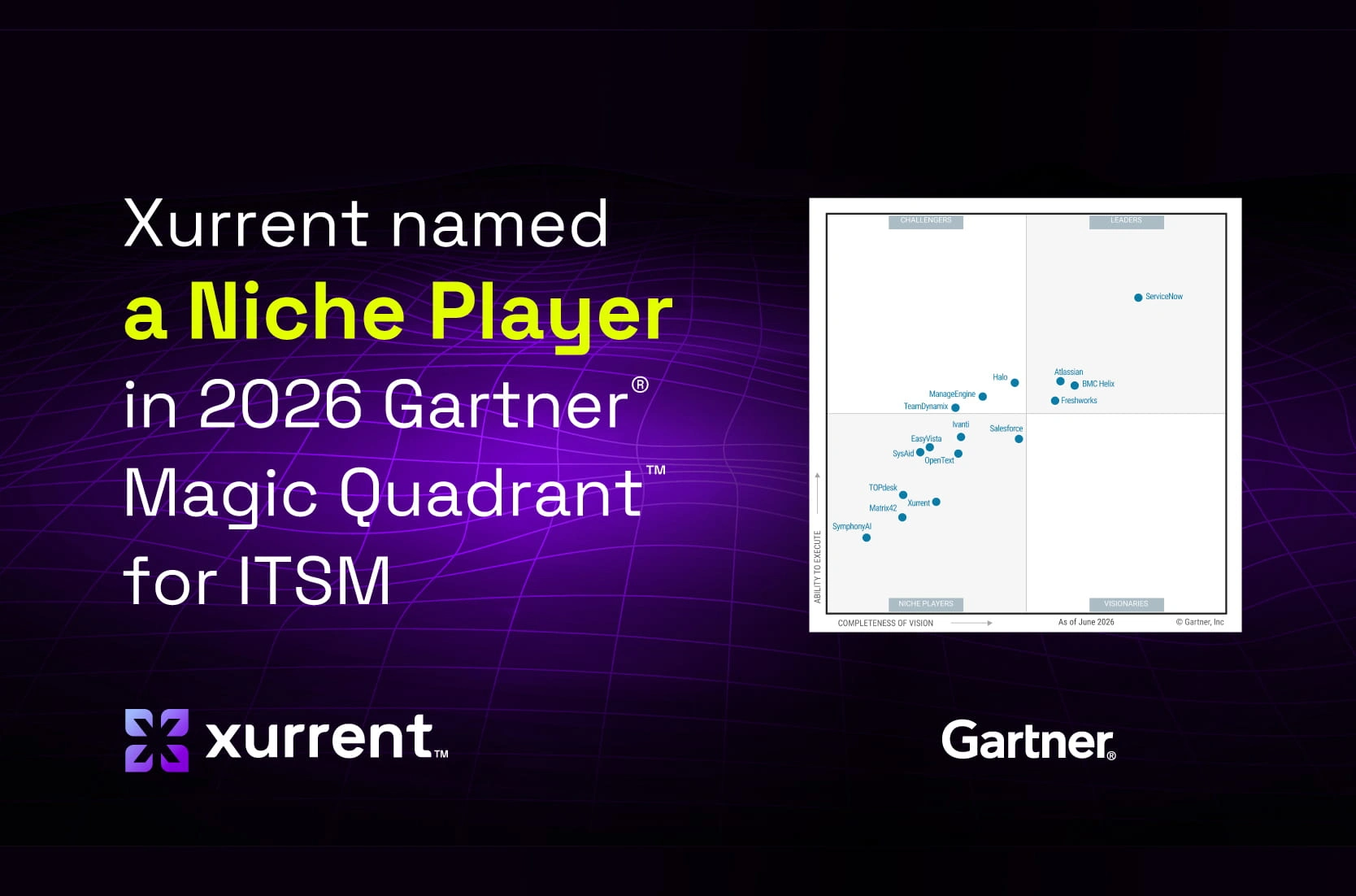
.webp)




