Blog
Insights & updates from our experts


Resolve plant floor and IT issues before they disrupt production.

Stay audit-ready while resolving issues and reducing operational risk.
Resolve issues quickly with an AI-powered system that automates ticketing.

Unifiy IT, HR, Facilities, Finance, and more on a single, AI-powered service platform.

Simplify on-call scheduling, automate escalations, and reduce burnout.

Automate postmortems, AI summaries, and post-incident workflows

Create, organize, and continuously improve your knowledge base to find the right answers with Sera AI.

We're here to help

The integration with Atlassian Jira using the Xurrent Integration Service is

The integration with Atlassian Jira using the Xurrent Integration Service is

The integration with Atlassian Jira using the Xurrent Integration Service is

The integration with Atlassian Jira using the Xurrent Integration Service is

The integration with Atlassian Jira using the Xurrent Integration Service is

The integration with Atlassian Jira using the Xurrent Integration Service is

The integration with Atlassian Jira using the Xurrent Integration Service is

The integration with Atlassian Jira using the Xurrent Integration Service is
Resolve issues quickly with an AI-powered system that automates ticketing.
Unifiy IT, HR, Facilities, Finance, and more on a single, AI-powered service platform.
Simplify on-call scheduling, automate escalations, and reduce burnout.
Automate postmortems, AI summaries, and post-incident workflows
Create, organize, and continuously improve your knowledge base to find the right answers with Sera AI.
Resolve plant floor and IT issues before they disrupt production.
Stay audit-ready while resolving issues and reducing operational risk.

Detect, respond, and resolve incidents fast to cut downtime and MTTR.

Keep your store online, even during your biggest sales moments.

Protect patient data and resolve issues fast, so care teams stay focused on care.

Standardize service delivery across every store and channel.

We are here to help 24/7

Connect with other Xurrent Users

Get insights and tips on how to get the most out of Xurrent

Apps, APIs, and updates

Xurrent service functionality

Eliminate manual tasks, optimize workflows, and deliver faster resolutions.
Learn how organizations have reduced downtime, improved 50% MTTA & MTTR, and cut costs with Xurrent IMR.
Discover Xurrent IMR's quick support, bidirectional integrations with Jira and Slack, and more cohesive incident response capabilities compared to Opsgenie.
Understand why users value Xurrent IMR for its intuitive interface, efficient incident alerting, customizable On-call schedules, and escalations.
This post is a living document, updated throughout the quarter as new product improvements roll out. Each update listed here is released to our QA environment on the date shown and typically promoted to production the following week. Along the way, customers can review changes, share feedback, and help shape what ships next. Xurrent delivers product updates on a weekly cadence to keep improvements moving continuously.
As part of the ongoing Asset Management update, a new Review Queue is now available in the Asset Management module, giving configuration managers a dedicated workspace to triage changes intercepted by CI automation rules.
When a CI automation rule flags an incoming change, it now lands in the Review Queue rather than being silently blocked or applied. Reviewers can see all pending entries in one place, with details on the affected CI, the source of the proposed change, when it was flagged, and which automation rule triggered the interception.

From the queue, reviewers can open a side-by-side comparison showing only the fields that differ between the current CMDB values and the proposed update. They can then approve or reject the change, with an optional note to document their reasoning. Approved changes are validated before being written to the CMDB. If validation fails, the reviewer can edit the proposed values or reject the entry. Rejected entries are retained for audit purposes.

The queue supports filtering by status (Pending, Approved, Rejected), source, and date range. It is visible to all users in the Asset Management navigation, but only configuration managers and account administrators can take action on entries.
The Datadog integration app is now available in the Xurrent App Store. It allows you to import and maintain host data from Datadog in the Xurrent Configuration Management Database (CMDB).
The integration automatically creates product categories, products, and configuration items for newly discovered hosts, checks the CMDB for existing assets and updates them as needed, and keeps asset information accurate through automated synchronization.
To get started, install the integration from the Xurrent App Store and follow the Datadog Installation Guide. If you run into any issues during setup, raise a support request for assistance.
The Virtual Agent chat widget has received several accessibility improvements:
Webhook policies that use asymmetric signing algorithms now support JSON Web Key Set (JWKS) for public key retrieval. This means you no longer need to store the public key at the time of policy creation. Instead, the public key for any asymmetric webhook policy can be retrieved at any time via its JWKS endpoint.

What's new
kid (key ID), iss (issuer), and alg (algorithm) claims, enabling standard automated key lookup and verification.What hasn't changed
The RequestTemplateRequest table has been removed from the Universal Data Connector. The template_id field on the existing Requests table already captures the same relationship, making the dedicated table redundant.
If your environment references the RequestTemplateRequest table in any queries, reports, or integrations, update them to use the template_id field on the Requests table instead.
The automation rules editor has been redesigned with an updated layout for easier rule creation and management. The new interface features a cleaner form structure, improved spacing for expressions and actions, and a more readable view of complex rule configurations.

Sera AI is also available to help build rules from a natural language description. On mobile, the automation rules panel has been optimized for smaller screens with a simplified layout.
When no automation rules exist yet, a guided empty state helps you get started with a prominent Add Automation Rule button.

Existing automation rules are unaffected. No changes have been made to rule behavior, triggers, expressions, or actions.
The RFC Type field is now available in the Edit Selected bulk edit panel and in import/export files for Request Templates.

Administrators can update RFC Type across multiple templates in a single bulk edit action or manage it through export and re-import.
Administrators can now configure which claim or attribute is used to match users during single sign-on, rather than relying solely on email (OIDC) or NameID (SAML).
This is especially useful for identity providers that do not guarantee stable email addresses or NameIDs, which is common in education federations and national academic identity systems. Previously, unstable identifiers could lead to duplicate user accounts or identity mismatches.
How it works:
When the SSO identifier is set to "Authentication ID," OIDC connectors now accept a configurable claim name (defaulting to sub) to identify users. SAML connectors accept an optional attribute name override, allowing administrators to specify a stable SAML attribute to use instead of NameID.
When the identifier is set to "Primary email," the claim/attribute configuration is automatically cleared to prevent misconfiguration.
The new fields are available in the SSO configuration form for both OIDC and SAML connectors.
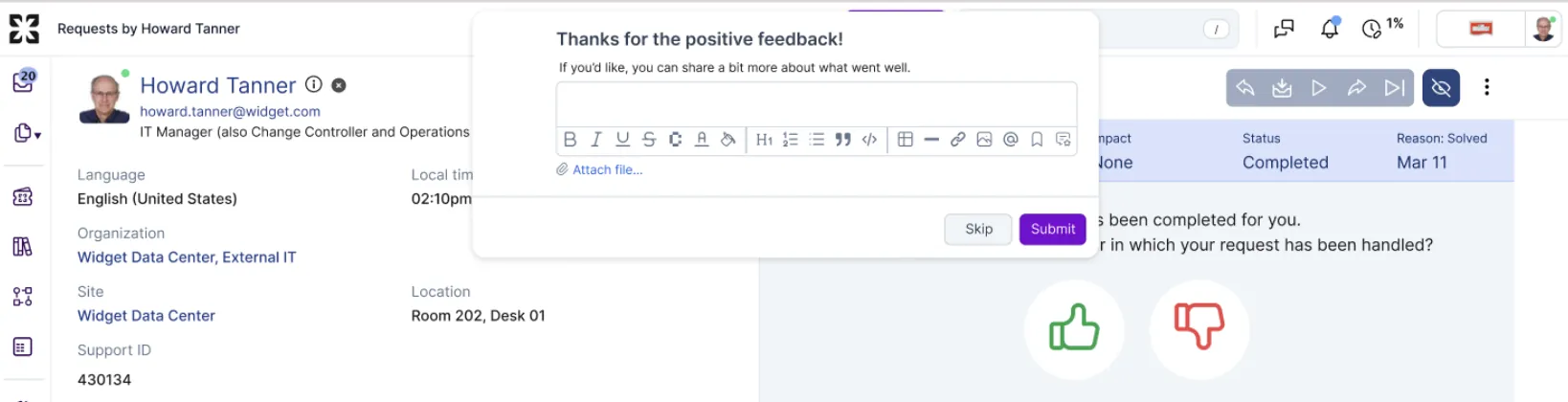
The positive feedback modal has been refreshed. Header and body content have been rewritten for a more natural tone, and the Cancel button has been renamed to Skip.
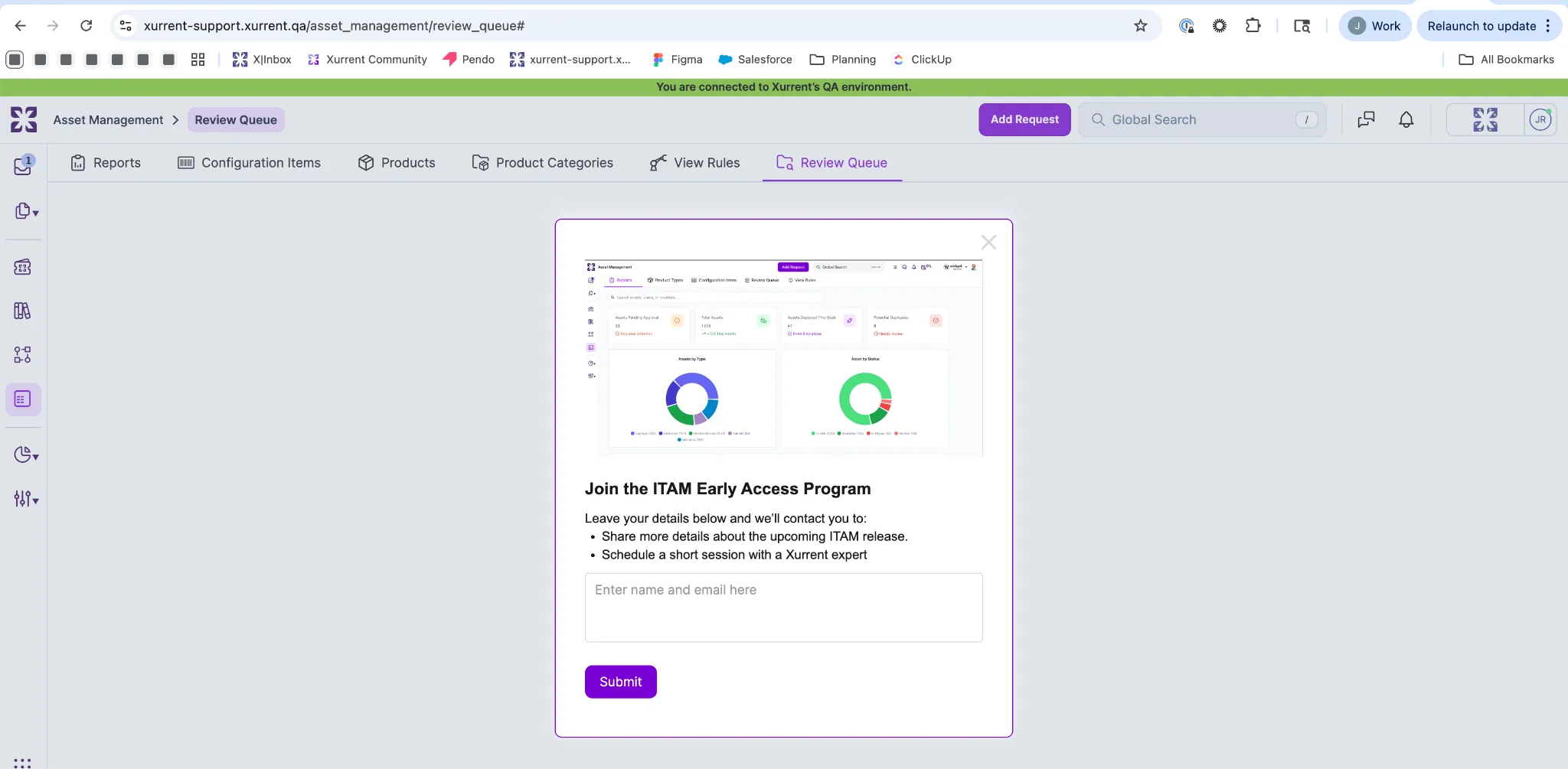
Asset Management now has its own dedicated section in the primary navigation. The new console provides a centralized landing page with direct access to Product Categories, Products, and Configuration Items.

Entry points from Settings and the Records console now redirect here for a consistent experience.
You'll also see tabs for Reports, View Rules, and Review Queue. These features are coming soon, and you can sign up directly from each tab to join the early access program and be notified when they're available.
You can now configure billing based on RFC Type. RFC Types are available as activity IDs in both the Activities section of Service Level Agreements and the Activity Rates section of Service Offerings under Financial Details.

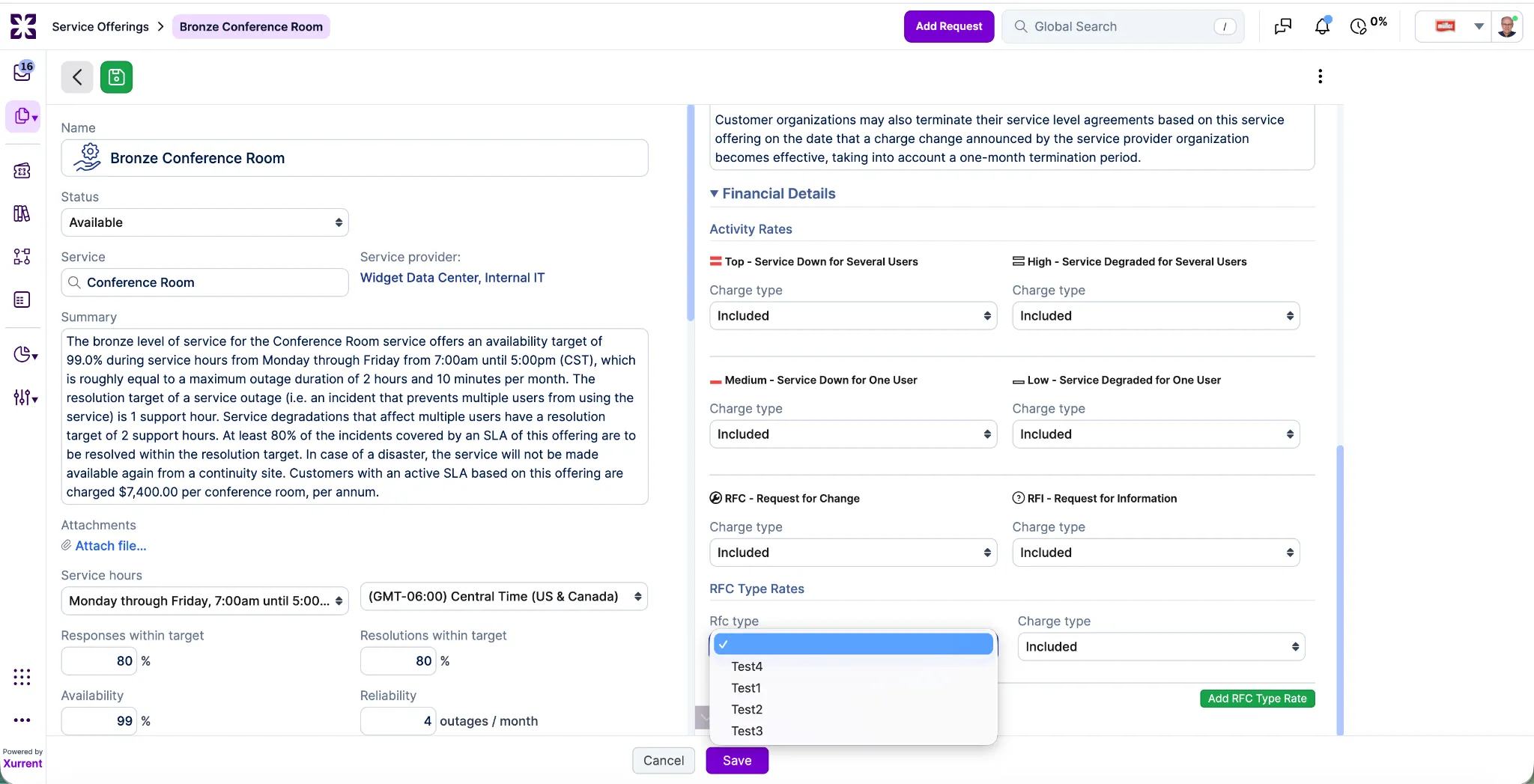
If a rate isn't defined for a specific RFC Type, the system will automatically fall back to the rate configured for the parent RFC.
Requesters can now leave an optional comment when giving thumbs up feedback on a closed request. Previously, the comment field was only available for thumbs down.
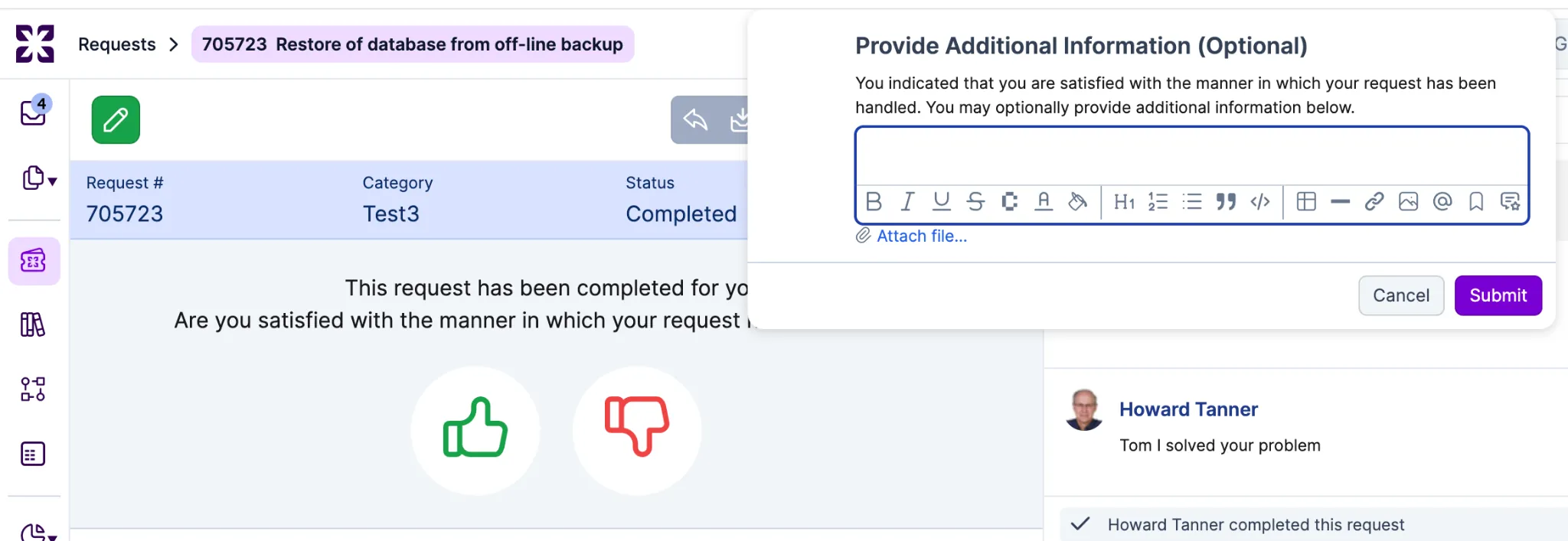
The experience mirrors the existing thumbs down flow: after pressing thumbs up, a text field appears where requesters can add context or positive feedback before submitting. The comment is entirely optional, and skipping it records the thumbs up just as it does today.
When editing a workflow that still has open tasks, a warning banner now appears if you change the status to Completed. This helps prevent accidental completion of a workflow, which previously could auto-complete all open tasks and related pending requests without confirmation.
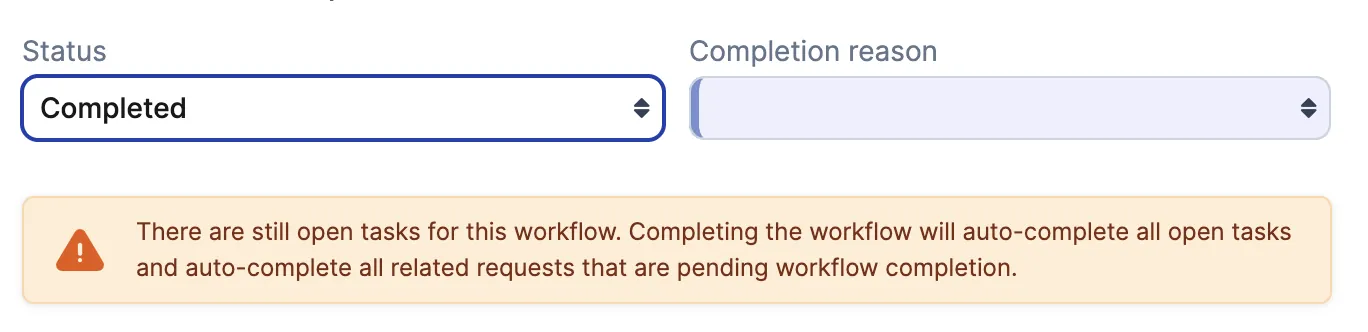
The warning is only shown when open tasks remain, giving workflow managers a clear prompt to review before proceeding.
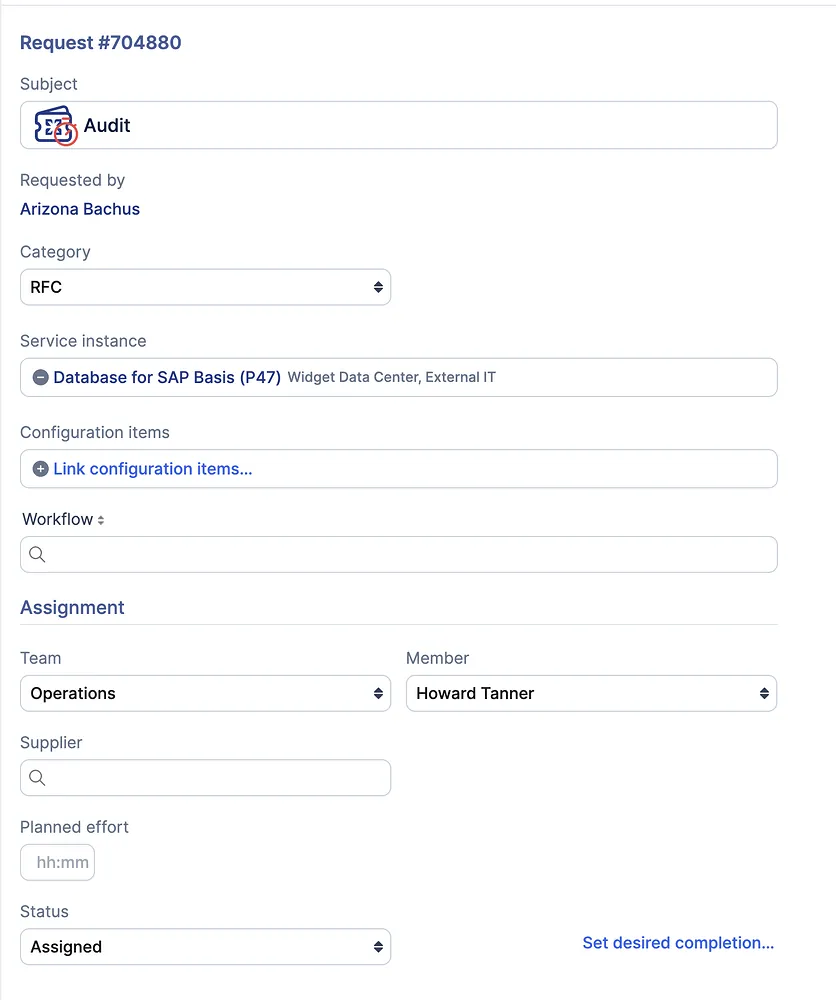
Organizations that follow ITIL practices often distinguish between Service Requests and Changes, as they represent different types of work with different lifecycles and reporting needs. Previously, when using RFCs in Xurrent, there was no clear way to differentiate these request types.
With this update, administrators can configure an RFC Type list under the Settings menu at the support domain level to distinguish different types of RFCs, such as Change and Service Request.
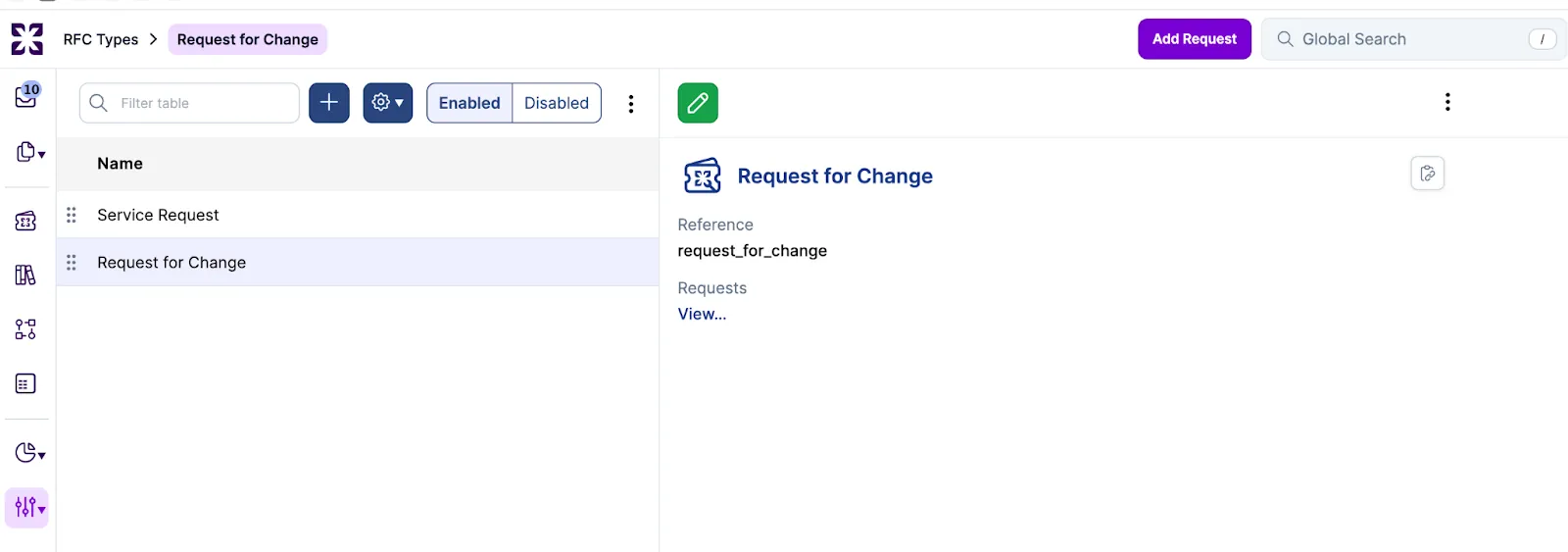
When creating a request, the RFC Type appears as a subcategory of RFC.
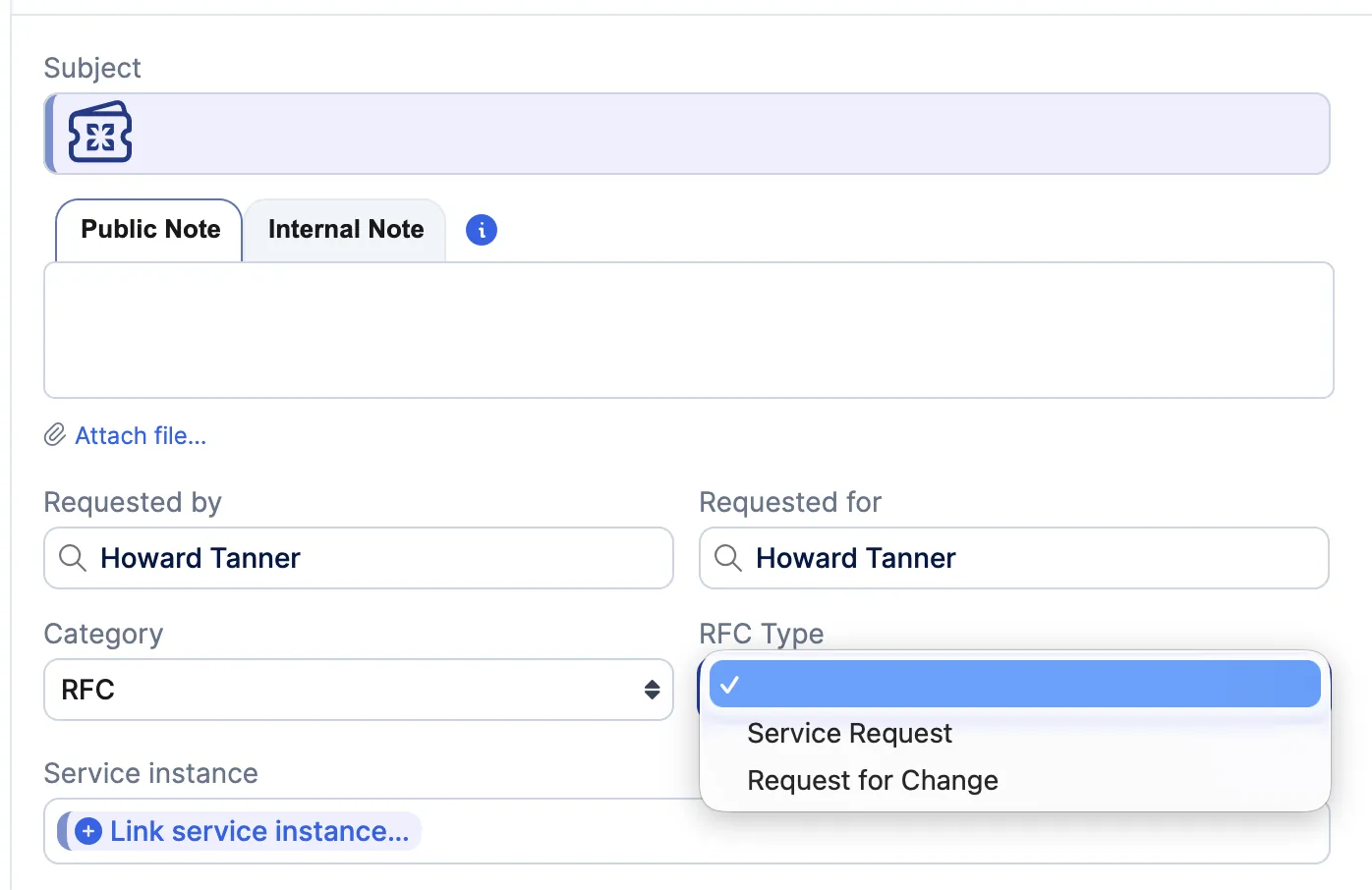
Once the request is submitted, the selected RFC Type is shown as the Category on the request, making the request type easier to understand at a glance.

The RFC Type is also available for search and reporting, allowing reports such as Completed Requests by Category to group results more clearly (for example: Incident, RFI, RFC, Service Request).
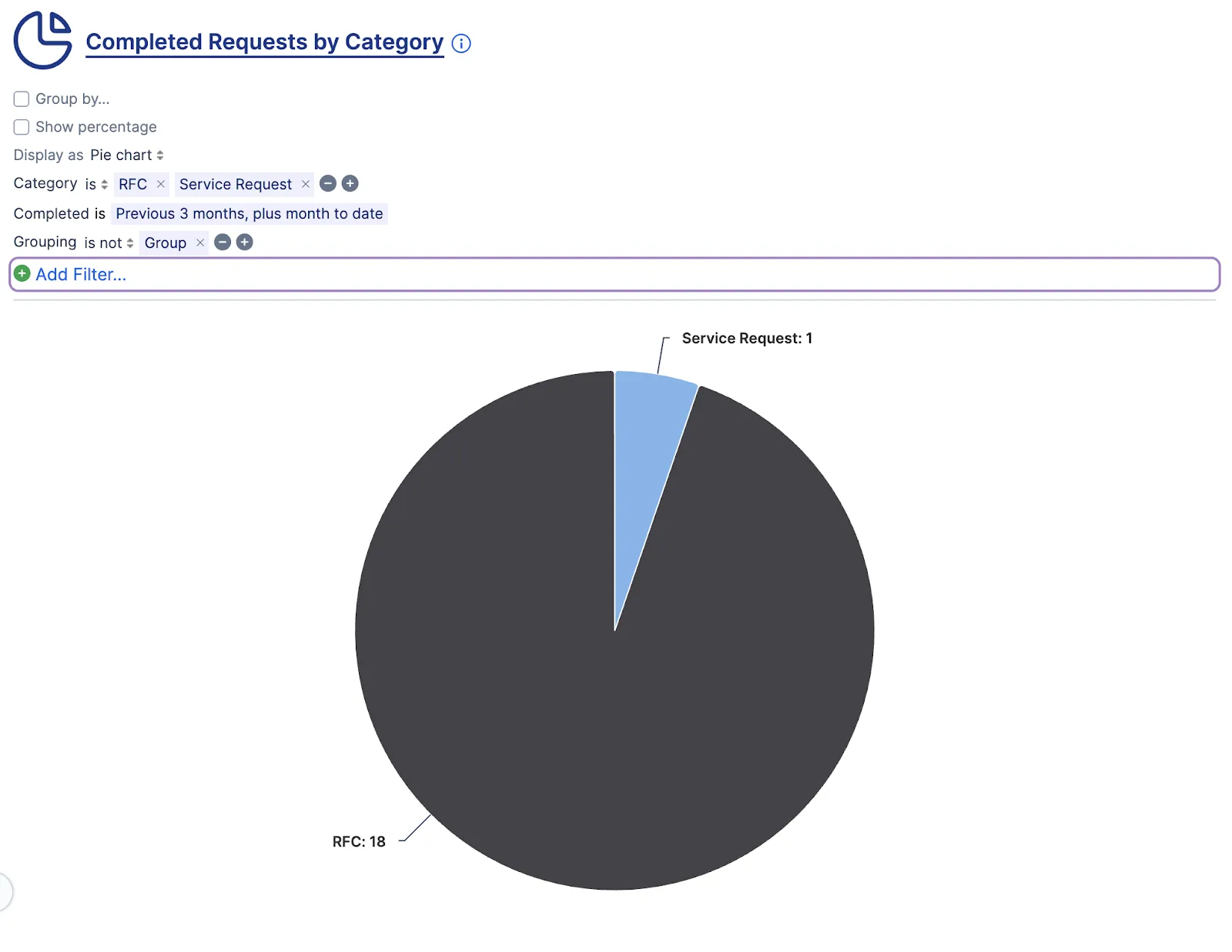
The RFC Type list is optional. If no RFC Types are configured, RFCs continue to behave as they do today.
The search bar in the Inbox and Requests views of Self Service now supports table filtering, allowing users to quickly narrow down the records displayed in the current view. As you type, results are filtered dynamically across all records, including those on other pages, making it easier to locate specific requests without leaving the console.

Pressing Enter in the search bar continues to trigger a global search, consistent with the specialist experience. The Refine Search Filter option only appears when performing a global search.

This functionality is available in both table and list view options.
Customers often roll out the Virtual Agent in phases, starting with a limited group of users during pilots or early adoption. Previously, this type of access control relied on Xurrent-managed configurations, requiring the Xurrent team to handle access changes on behalf of customers.
With this update, administrators can now configure Virtual Agent access through the UI at the Support Domain Account level. When Enable Sera AI is enabled in Self Service Settings, a new option allows administrators to limit access to specific skill pools. Only users who belong to the selected skill pool(s) will be able to access the Virtual Agent.
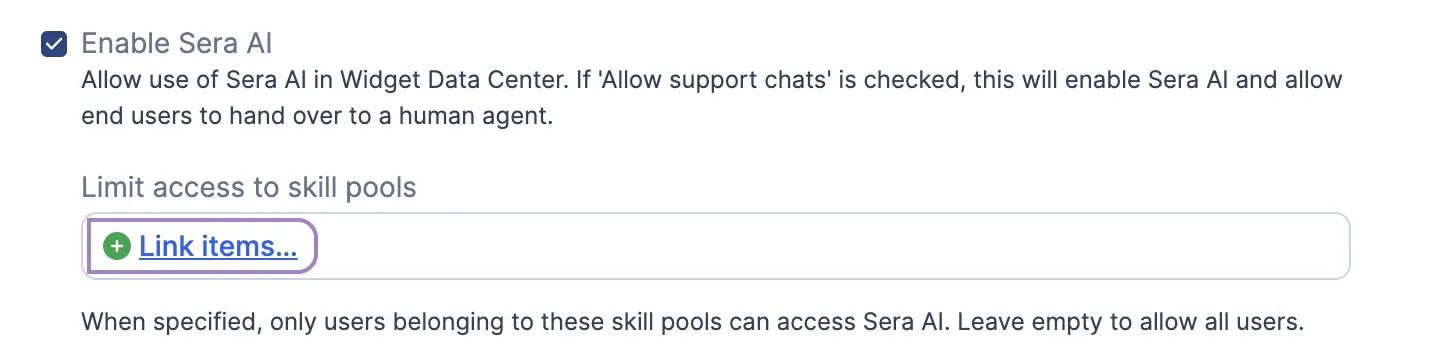
This provides a simple way to control access and support phased rollouts without requiring code changes or deployments. The feature applies to Support Domain Accounts, where skill pools are defined.
Attachment fields in UI Extensions can now restrict uploads to specific file types at the field level. A new Allowed extensions option in the UIX designer lets administrators define a comma-separated list of permitted extensions.
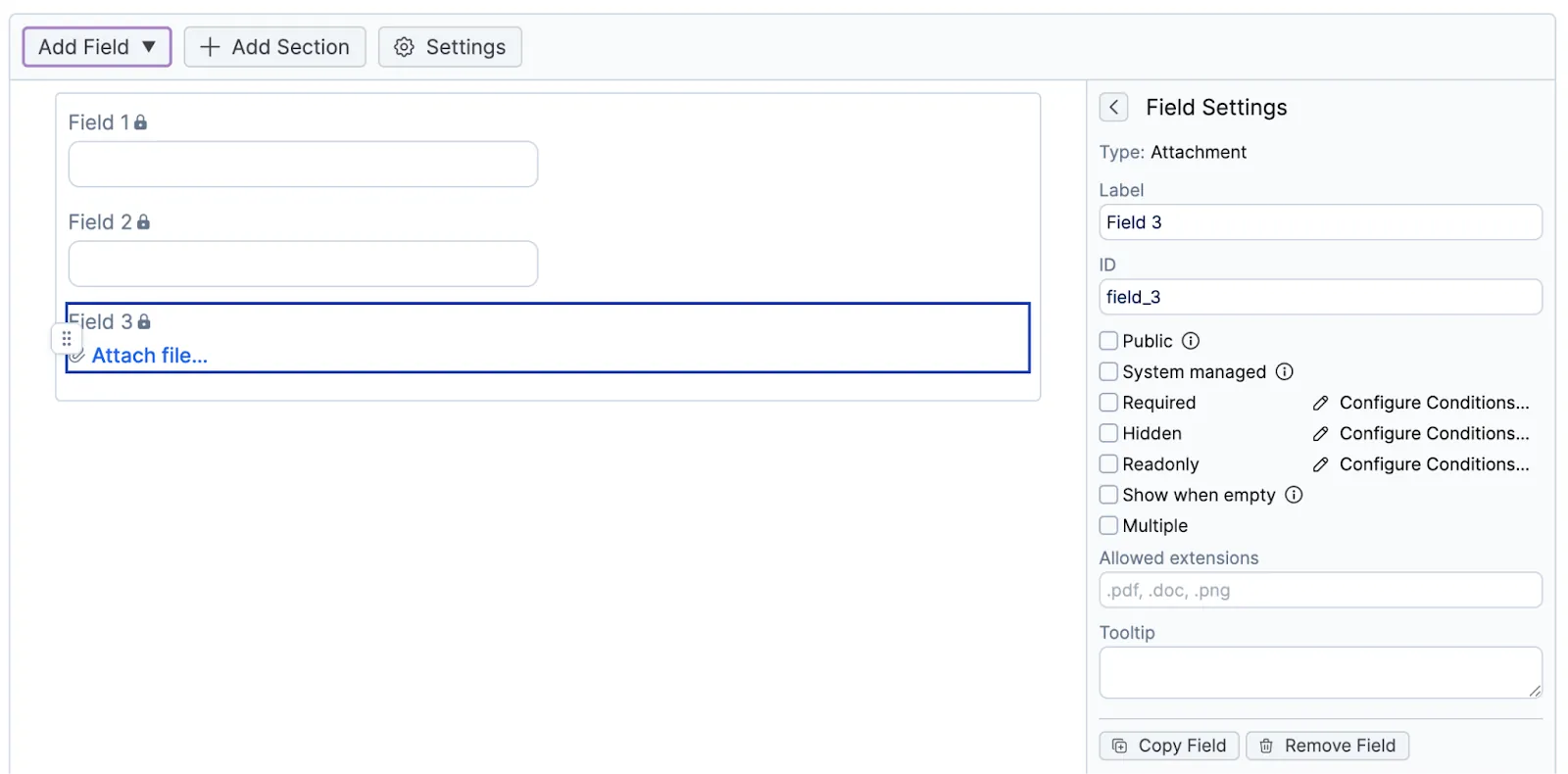
For legacy UI extensions, the same behavior can be configured using the data-accept attribute.
Field-level settings can further limit allowed file types but cannot extend beyond the account-level attachment security settings. Attachment restrictions always follow the account where the request is created, ensuring consistent and expected security behavior.
The Contracts object is now available in the Unified Data Connector (UDC), enabling customers and partners to access and integrate contract data for automation, reporting, and external integrations.
Additionally, UDC Reminder v2 is now available in the Store. While Reminder v1 continues to be supported, customers are encouraged to download v2 to benefit from the latest improvements.
Quick replies now support dynamic variables, helping specialists save time and personalize responses more efficiently. Variables can be inserted using {{ command or through the toolbar icon, consistent with the experience available in email templates.
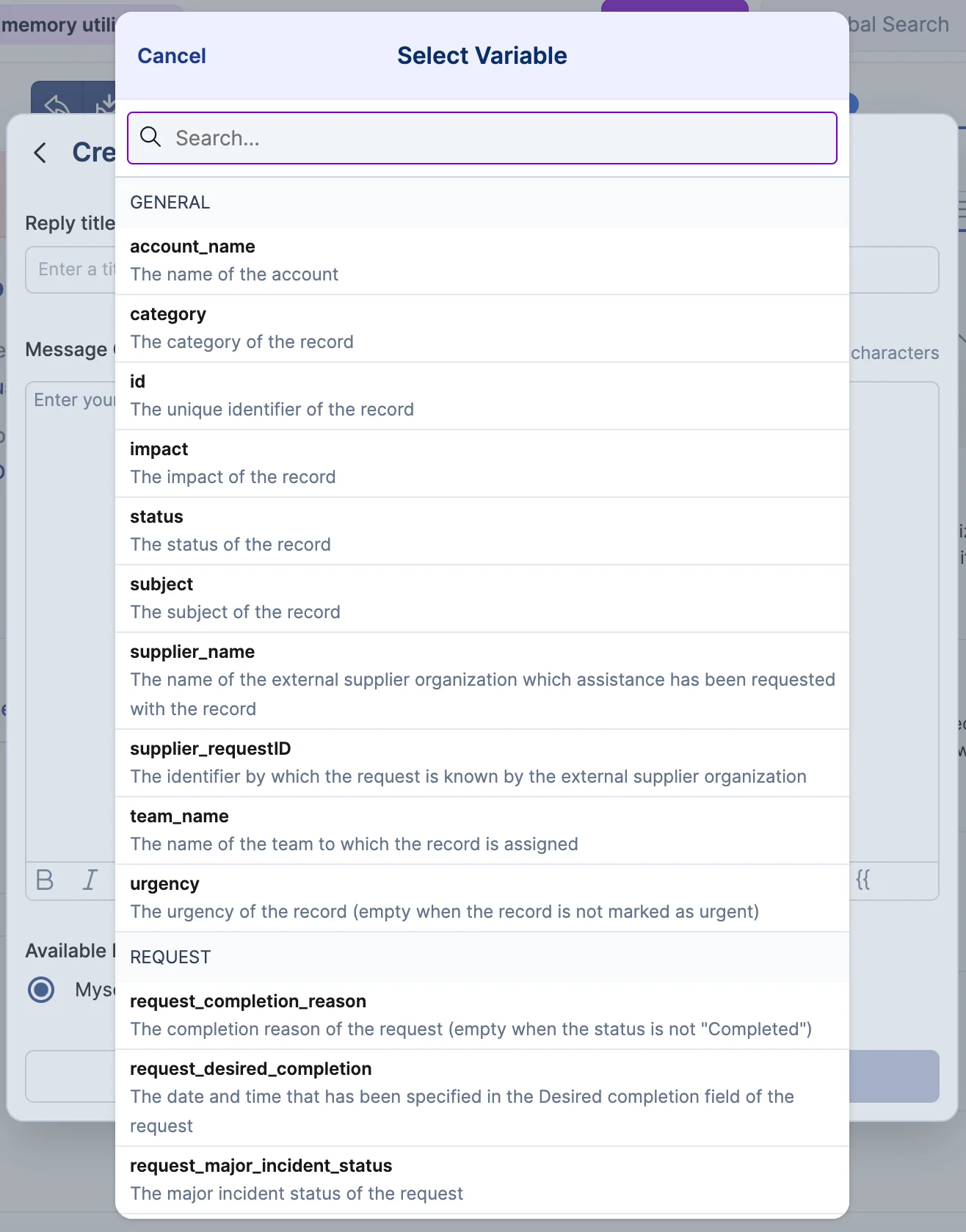
Users can select from categorized variables including General, Request, Task, and Problem. General variables work across all record types, while record-specific variables resolve only when used with their matching record type.
If a variable cannot be resolved for the current record, it will remain as placeholder text and can be manually edited before sending, ensuring a smooth and flexible workflow.
Specialists can now share quick replies with teams they belong to, improving collaboration and response consistency.
When creating a quick reply, specialists can mark it as available to selected teams. Team shared quick replies are visible to all members of those teams. Specialists may only share replies with teams they are part of.

Editing or deleting a team shared quick reply is limited to the creator and users with appropriate permissions, such as Account Administrators and Service Managers. If a specialist is removed from a team, they will lose access to that team's shared quick replies, which remain available to the team.
We have introduced two new reports to better align with operational reporting needs. The new reports maintain the same metrics and structure, including counting each request only once and segmenting results by priority, but group results by the month the request was completed instead of when it was created. This provides a more accurate view of performance based on when work was finalized.

We've updated the Virtual Agent experience for longer responses. Previously, the interface automatically scrolled to the bottom of the message, requiring users to scroll up to begin reading.
Now, the view anchors to the start of the response, allowing users to read from the top naturally. Any associated action card, such as a "New Request" card, now appears at the bottom of the message instead of above the instructional text, creating a clearer and more intuitive flow.

With this update, roles are now displayed in alphabetical order based on the included roles for the service. The second column is filled from top to bottom to ensure a predictable and intuitive reading order.

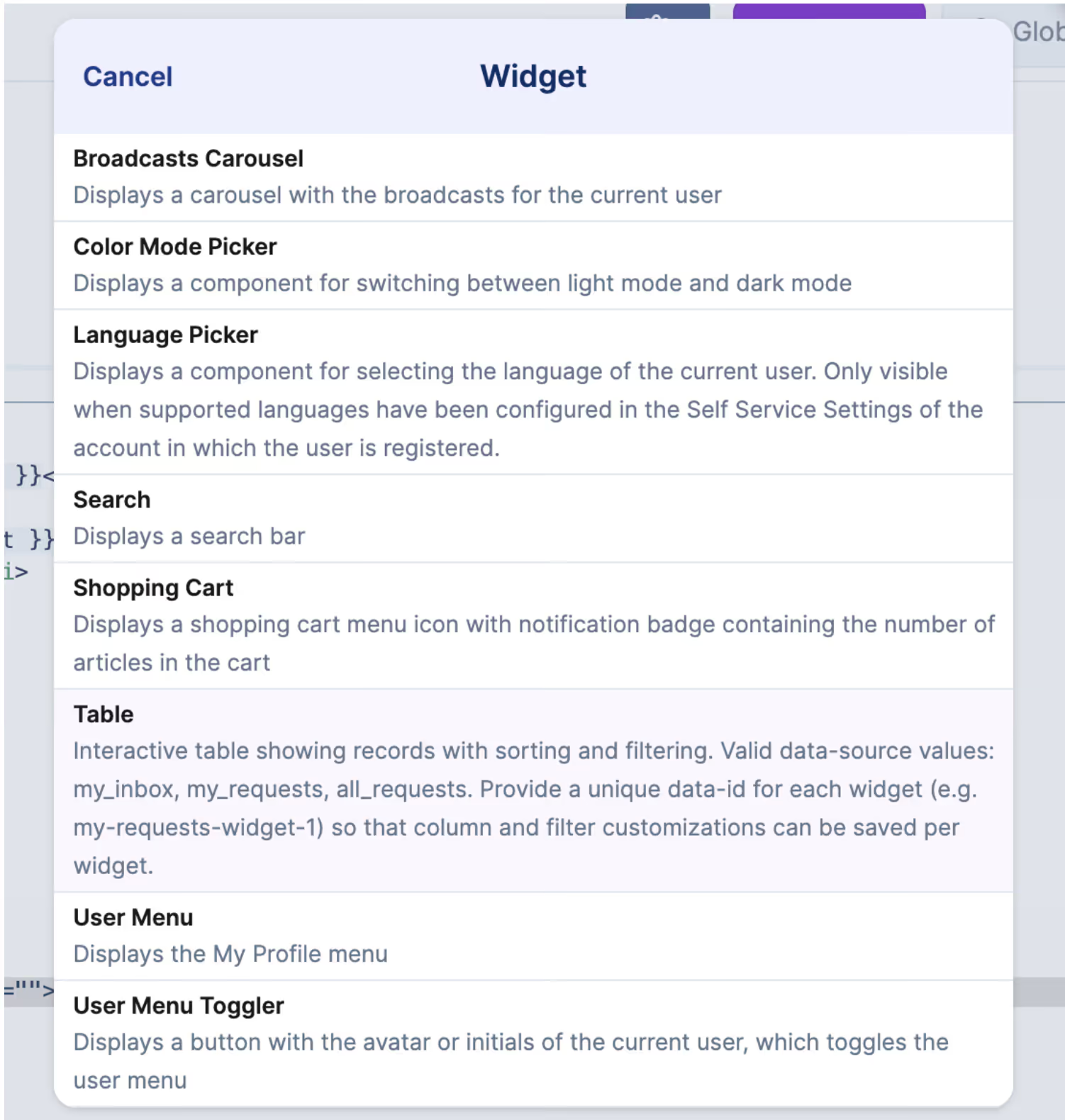
Self Service v2 now supports table-based homepage widgets for inbox and request views, giving users greater flexibility to design a homepage that surfaces the information most relevant to them.
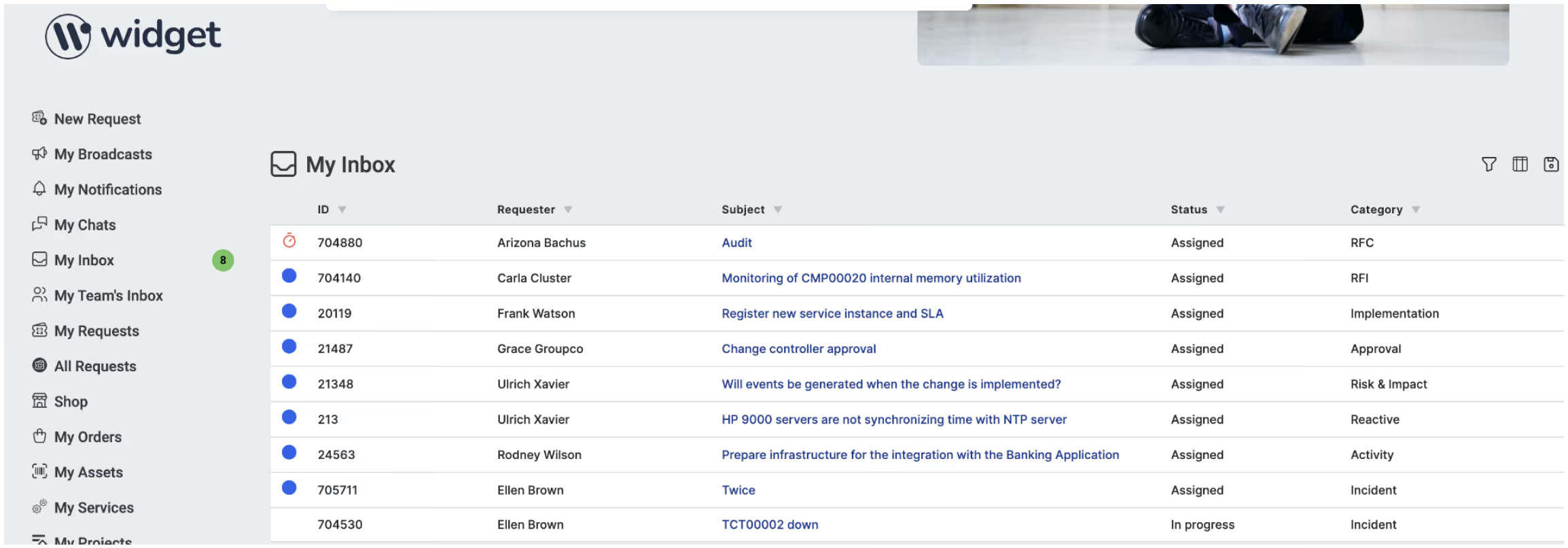
Table widgets use the same modern table experience, including support for filtering and sorting. User preferences are saved across sessions.
How to Add a Table Widget in Self Service Designer:
Tip: Each table widget must have a different ID. If two widgets use the same ID, their settings may overwrite each other.
Previously, certain email templates tied to key system actions were required to remain enabled so that related notifications were always sent.With this update, administrators can now choose whether these templates are enabled or disabled.
How it works:

What this means
Important
This change only applies to the specific templates listed below. These templates were previously locked and could not be disabled:
Self Service users in Xurrent can now create and manage Personal Views within Table View Mode. Personal Views can store filters, sorting preferences, visible columns, column order, and grouping where applicable. Personal Views are user-specific and do not affect other users. Users can switch between the default view and their saved Personal Views at any time. Navigating away from a page and returning resets the view to the default.
Users can create a Personal View in one of two ways, both aligned with the existing Specialist Console experience. From the ellipsis menu, users can select "Save as Personal View…", or they can choose "Add Personal View" directly from the Personal View panel.

The Personal View panel can be expanded or collapsed to provide more space for the inbox when needed. An arrow above the five-dot indicator controls the expand and collapse action, while the dots remain visible to signal that the panel is available.

Personal Views are only supported in Table View Mode. The historic list view does not support or retain Personal View preferences.
We have enhanced the Quick Replies feature with a new role-based management model that supports both personal and shared templates. A new Quick Replies page is now available in the Settings Console within the Support domain. All users can access this page to view quick replies available to them, including shared templates. Each reply displays its title, scope, creator, and last updated date.

Users can continue to create and manage their own personal quick replies. Account Admins and Service Desk Managers can additionally create and manage shared quick replies for Teams or All Specialists. Editing rights for shared replies are restricted to these roles to ensure consistency and governance across the organization.

The Quick Reply creation modal also now includes scope options. Non-admin users can create replies for themselves, while administrators can assign replies to specific teams or to all specialists. Quick replies are sorted by most recently updated, and an Audit Trail is available from the ellipsis menu.

Existing quick replies remain personal by default, and will not be impacted by the release.
As a refresher, beginning in release r660, Add Request by CI became an optional account setting under Configuration Management. In this release, we have refined how the scope of this setting is enforced.
The setting determines whether Service Desk Analysts can initiate requests from Configuration Items within a specific account. An analyst can start a request from a CI only if they hold the Service Desk Analyst role in that account and the setting is enabled there.
If the setting is not enabled in a particular account, it should be understood that the account has chosen not to allow requests to be created from its Configuration Items. Please keep this behavior in mind when configuring and testing the setting in your environments.
In this release, we have introduced a two-column layout to improve readability and reduce vertical scrolling across key pages (configuration item page example below).
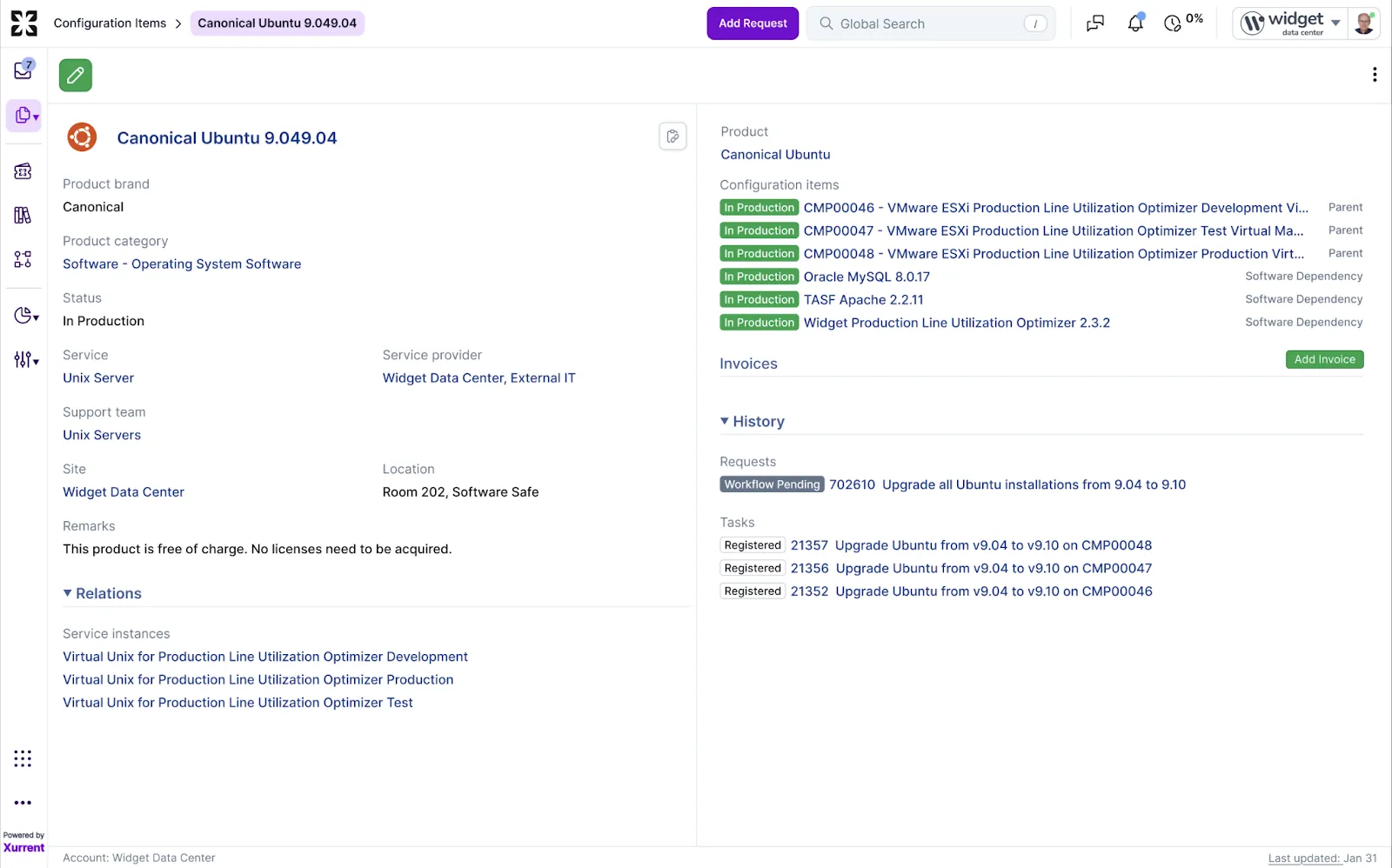
The following pages have transitioned from a centered single-column layout to a two-column format, similar to the Request page:
This updated layout makes better use of available horizontal space, keeps important information visible, and provides a more efficient and streamlined viewing experience.
We're pleased to announce that the Virima integration app is now available in the Xurrent QA environment. This integration enables seamless import and ongoing synchronization of asset data from Virima into the Xurrent CMDB. Newly discovered hardware assets are automatically created as product categories, products, and configuration items. The integration also checks for existing records and updates them as needed, helping ensure your asset data remains accurate and up to date through automated synchronization.
Installation Details
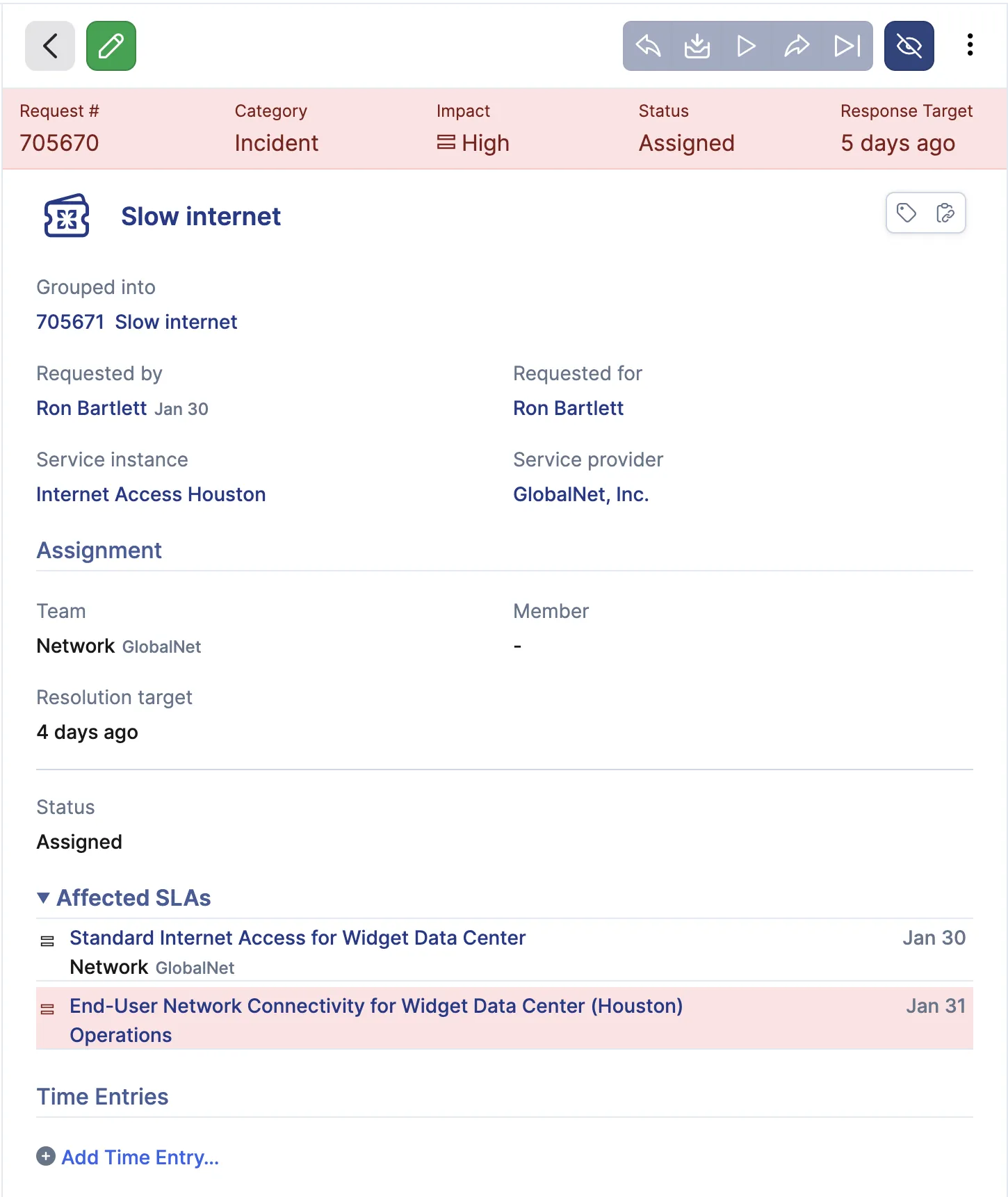
We have made additional refinements to the record (and knowledge article) layout in QA based on feedback, including

The ASLA refresh is also planned and will be included in the upcoming patch release on February 10, as requested by customers who preferred a single coordinated update. This will deliver the remaining feature item from the r661 production release.

To join the conversation, please see the UI/UX community post.
SLA response handling has been improved to ensure performance is measured consistently from the customer perspective when a Service Instance (SI) is changed.
Previously, changing the SI could restart SLA response tracking, even when the request had already been actioned. With this update:
If the new SI has a shorter maximum response duration, the SLA is recalculated from the original start time, which may result in a valid breach.
Scenario 1, shorter duration after SI change
09:00 - Request created with SI Finance (SAP) Production (6 hour max response duration)
15:00 - Status set to In Progress
15:10 - SI changed to Conference Rooms Houston (4 hour max response duration)
Result
Response at 15:00 is retained.
Finance SLA remains met.
Conference Room SLA evaluates from 09:00 and shows a breach due to its shorter response duration.
Scenario 2, response inherited by new SI
09:00 - Request created with SI Conference Rooms Houston
11:00 - Status set to In Progress
15:10 - SI changed to Finance (SAP) Production
18:00 - Status set to In Progress
Result
The 11:00 response is inherited by the Finance SLA.
Finance SLA is calculated from the original 09:00 start time using the 11:00 response, resulting in a met target rather than restarting at 15:10.
As part of the Self Service table view, which we expect to release to production later this month, we continue to make enhancements based on customer feedback. One such improvement is the addition of a Print button, now available from the ellipsis menu on the Self Service request page.

Based on customer demand for enhanced reporting and broader business initiative support, the following records are now available in the UDC:
Please note that UDC V2 must be installed to take advantage of these updates. UDC V2 was previously announced in the January 8 release note, which provides additional details.
Based on customer feedback, we have made further improvements to the Add Request by CI feature, which was originally introduced in release r658, but has remained in QA since then.
The feature has now been moved to an optional account setting under Configuration Management. As a result:

This change gives administrators clearer control over when and how configuration items can be used to create requests, ensuring the feature is only enabled where it aligns with the organization's configuration management practices.
We have made several updates to the layout of both view and edit modes for records to improve readability and provide a more intuitive experience.

To ensure a smooth transition to the updated UI Extensions look and feel, we've maintained full backward compatibility.
The Snippets in the legacy UI extension editor have been updated:

This is especially useful if you are still using legacy styling and are not ready to update an entire UI extension yet.
Migrating a Legacy UI extension to the new look and feel is often straightforward, but the effort depends on how much custom styling or layout logic has been applied. In legacy UI extensions, fields were wrapped using the row class. To adopt the new look and feel, rename: row to uix-row. Date-time fields require one additional adjustment: Wrap the input element in its own <div>. This prevents the date and time controls from wrapping onto separate lines in the new layout.
For a practical reference, insert a snippet that uses the new look and feel and compare the generated markup with your existing implementation.
We have improved how delegations work during Out-of-Office (OOO) periods:
Example: If you manually delegate a task before going OOO, that delegation will stay in place even after your OOO period ends. Only delegations set by the system during your OOO period will be automatically cancelled, and this will be logged in the audit trail.
We have updated the currency formatting in the shop to match Swiss standards. The currency format is now 1'234.56 CHF, with a ' as the thousand separator and a . for the decimal, as used in Switzerland.
This applies based on your profile language settings. For example, if Deutsch Schweiz (de-CH) is selected, all currencies will be displayed in the correct Swiss format.
New Locales Added:
This ensures full localization for users in Switzerland.
When Self Service v2 (SSV2) is enabled, the background of public Knowledge Articles follows the Self Service settings:
To change the background of public Knowledge Articles, update the Self Service background settings.
The Xurrent Virtual Agent has been updated with a refreshed visual experience and improved functionality. Users will notice a larger, more accessible chat interface, updated design for request cards, and overall visual improvements that address accessibility gaps in the previous version. These changes make conversations clearer, easier to follow, and more consistent with the broader Xurrent user experience.


Behind the scenes, the Virtual Agent has also been significantly enhanced. New underlying tools and routing logic now power how the agent understands user intent and responds to questions. This allows the Virtual Agent to more accurately guide users to the right outcome, whether that is finding relevant knowledge, viewing or managing existing requests, or creating new service requests. As a result, end users benefit from higher-quality responses, better contextual understanding, and more reliable solutions during their interactions with the Virtual Agent.
Specialists can now use Quick Replies when adding notes, making it faster and easier to respond with consistent, commonly used messages. This feature reduces repetitive typing and helps ensure clear, standardized communication across teams.

A new Quick Replies icon is available in the notes quick actions menu. Selecting it opens a searchable list of existing quick replies, with the option to add new ones.
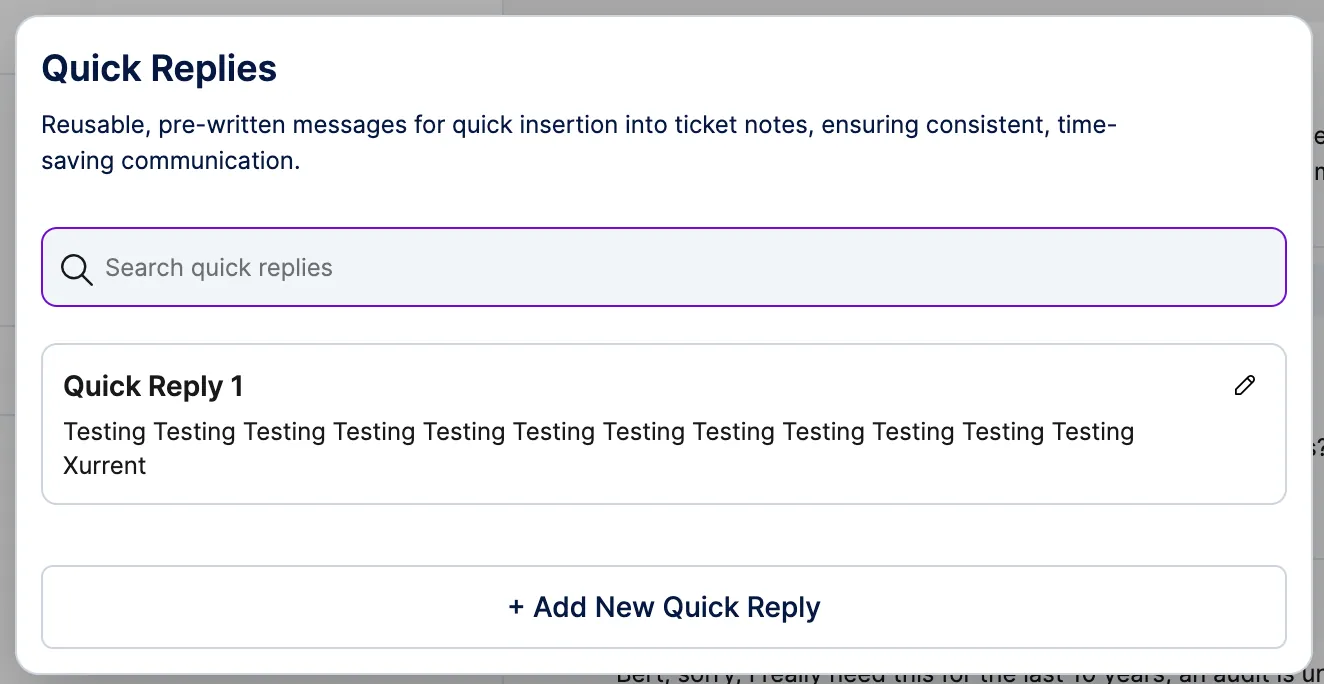
Each quick reply consists of a title, used for identification in the list, and a message, which is inserted directly into the note when selected.

Quick replies are managed per support domain account, ensuring that responses remain relevant to the teams and services within each domain. The feature is fully integrated into the notes experience and follows standard Xurrent interaction and design patterns.
The Lansweeper V2 integration app is now available in the QA environment of Xurrent. This app enables customers to import and maintain hardware and software assets from Lansweeper in the Xurrent CMDB, including automatic creation of products and configuration items, software checks, and user-to-asset linking where applicable.
There are no functional changes compared to the current Lansweeper integration. All future enhancements, fixes, and updates will be delivered exclusively through Lansweeper V2.
To begin testing in QA, uninstall the existing Lansweeper integration app and install Lansweeper V2 from the Xurrent App Store, then proceed with validation as usual. We welcome your feedback to support a smooth production rollout.
Dashboards that support aggregation across multiple Support Domains now provide clearer, in-context messaging to indicate when this roll-up capability is available and when it is enabled. This improvement helps avoid confusion when viewing summarized metrics and makes it easier to understand how dashboard data is being calculated.
When viewing a dashboard at the Directory Account level, no message is shown, as aggregation settings cannot be managed there. When a dashboard owner views a dashboard where cross-Support Domain aggregation is supported but not enabled, an informational message appears below the dashboard title explaining that the Report Summary for Permitted Support Domains option can be enabled to view aggregated data.

When aggregation is enabled, all viewers see a clear message confirming that the dashboard is displaying summarized metrics across multiple Support Domains.

We are excited to introduce an enhancement that makes executive and cross-domain reporting in Xurrent easier and more accessible.
Until now, reporting was limited to the single Support Domain Account (SDA) you were signed in to, with cross-domain views available only to users with directory-level access. We have heard from customers that this made it difficult for managers and stakeholders who work across multiple support domains to create unified dashboards and reports.
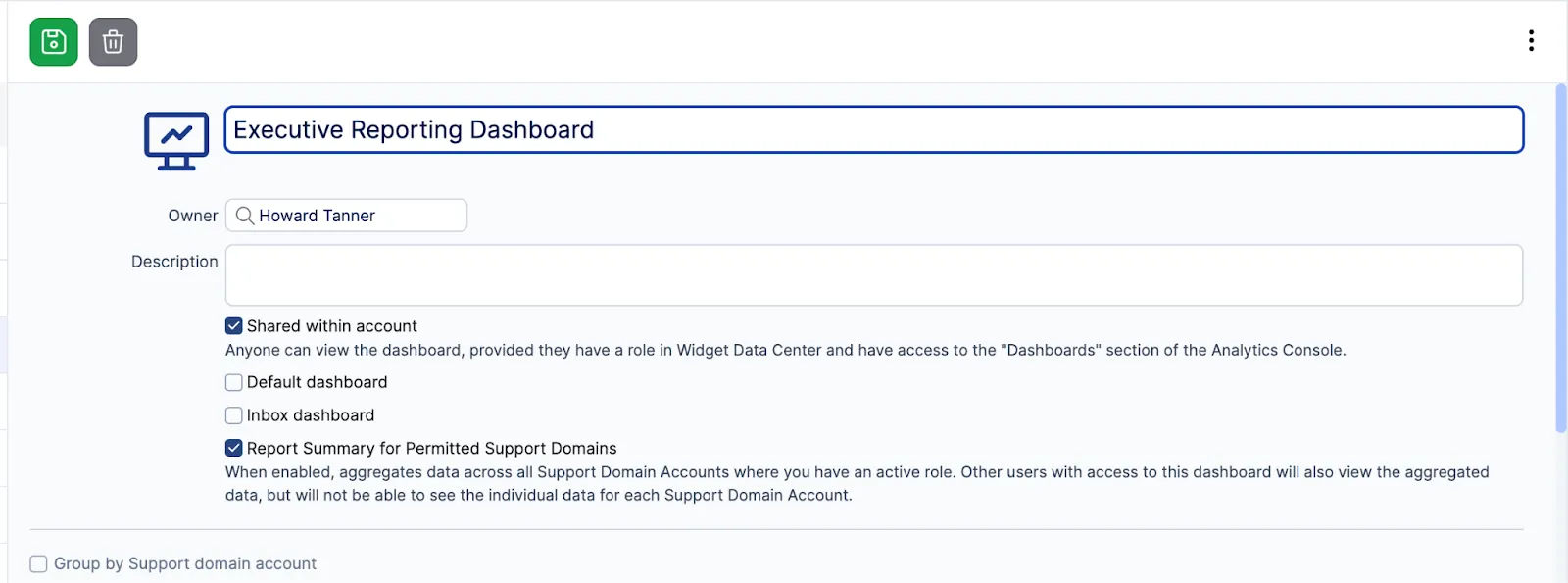
With this update, dashboard owners can now generate summary reports across all Support Domains where they hold active roles, without requiring administrative access.
What's new:
We're introducing an enhancement that allows helpdesk agents to initiate requests directly from a Configuration Item (CI), rather than starting from the requestor. This better reflects how help desks investigate and log issues, especially when acting on behalf of an end user.

With this update, the selected CI determines who the request is created for, making it easier to accurately capture requests tied to specific devices or assets.
What's included:
Request creation behavior aligned with the existing Relate to New Request experience.
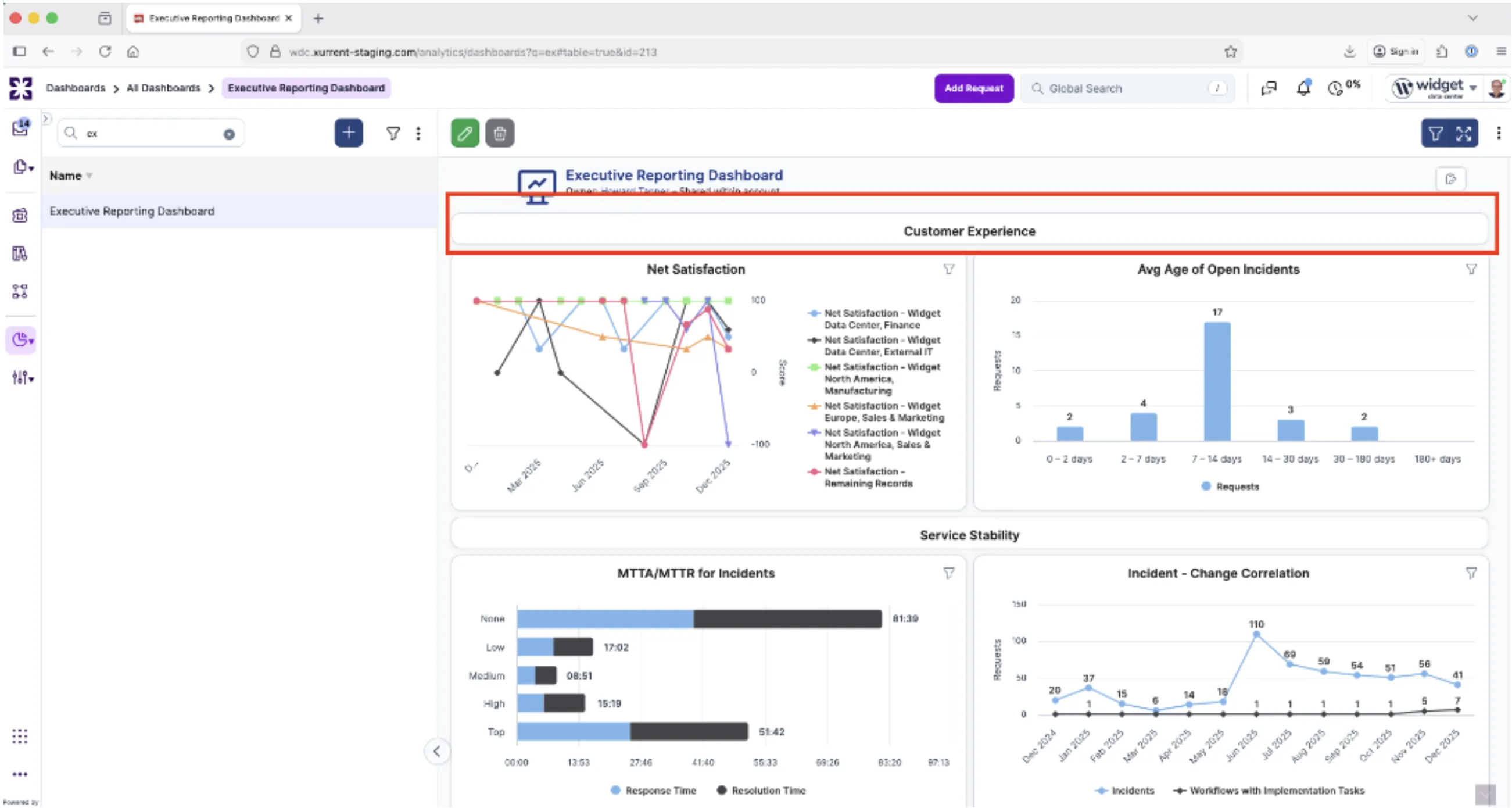
A new Executive Reporting Dashboard has been introduced to provide leadership teams with a consolidated view of service performance, operational efficiency, and automation impact.
The dashboard brings together multiple executive-focused reports into clearly structured sections, enabling faster insights and easier trend analysis. The initial set of reports includes:
Each report supports interactive exploration, allowing users to drill down into underlying data and better understand performance trends over time.
We plan to make several follow-ups in Q1, including extending data aggregation to support multiple SDAs and expanding coverage for asset management.
We have introduced a new GraphQL mutation that allows account administrators to revoke request visibility when a Service Level Agreement (SLA) unintentionally grants access to another account. This can occur, for example, when a request is moved and becomes visible to additional customer or provider accounts through an SLA.
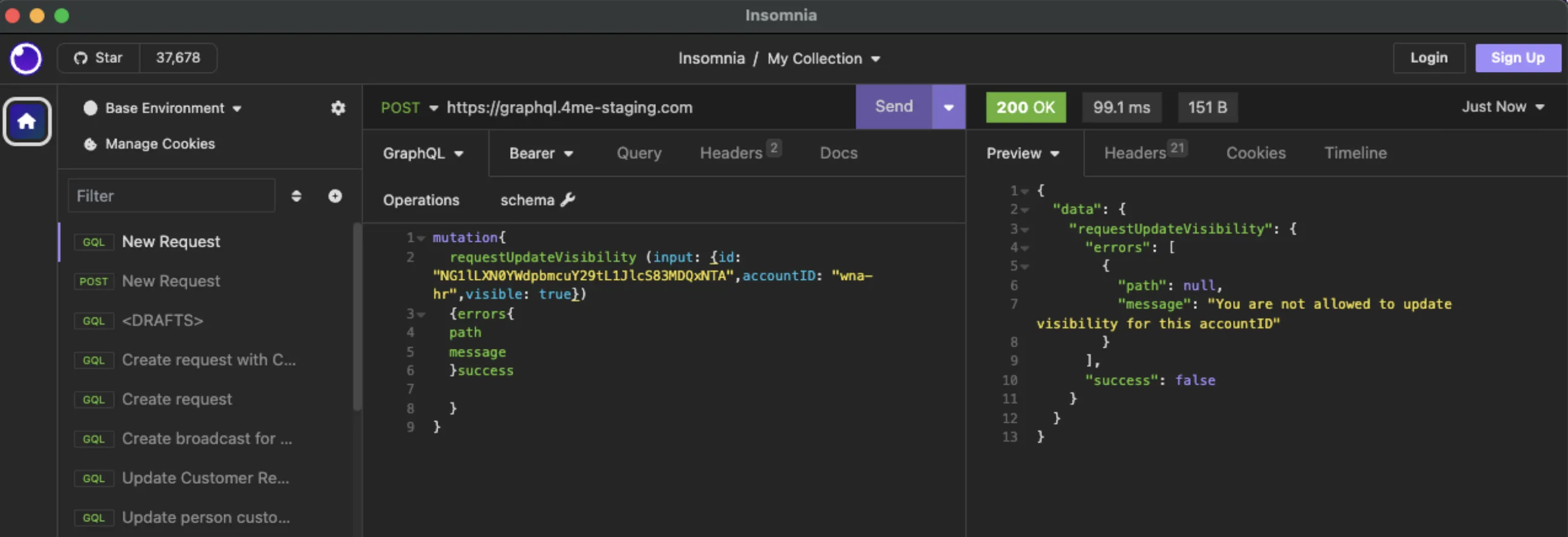
With this mutation, administrators can remove visibility for affected request accounts to ensure requests are only accessible to the intended parties. Visibility changes are subject to the following conditions:
If a service change later results in a new SLA being created for an account whose visibility was previously removed, the request will automatically become visible again.
Full details are coming soon in the Xurrent developer documentation: https://developer.xurrent.com/graphql/mutation/requestupdatevisibility/.
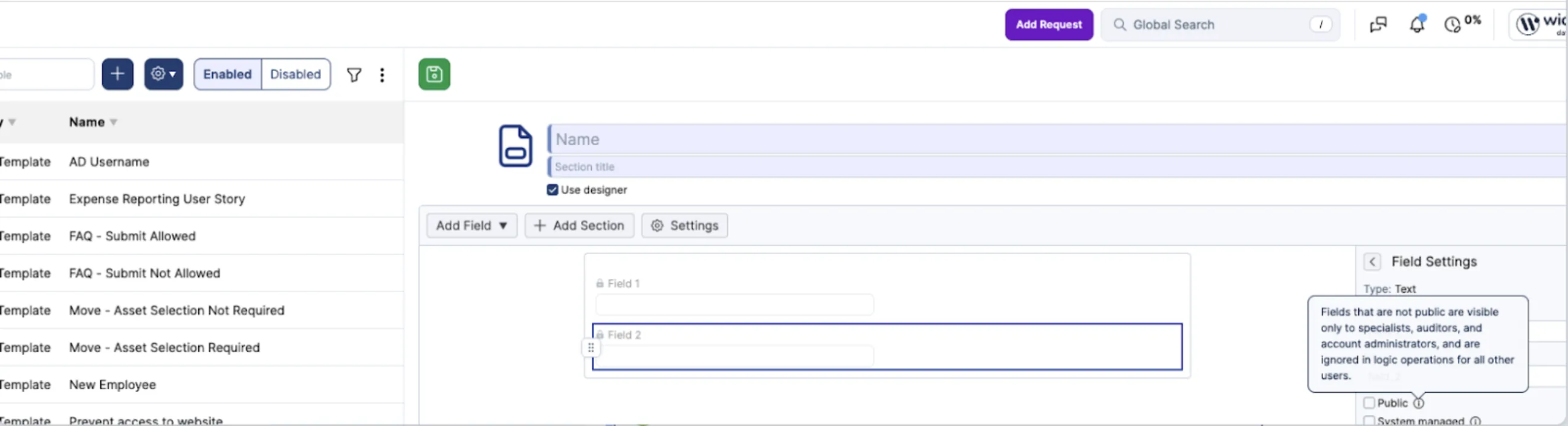
We have clarified how internal fields behave in Self Service UI Extensions. Tooltips now explain that internal fields are not evaluated for end users, so any visibility, section display, or required-field logic based on them will not apply. This helps avoid unexpected form behavior when designing conditional logic for Self Service.
A new reporting capability has been added to support insights into change stability.
The Failed Change Rate metric measures how often workflows enter a progress halted state, displaying the count of halted workflows as a share of registered workflows in a combined bar/line chart.

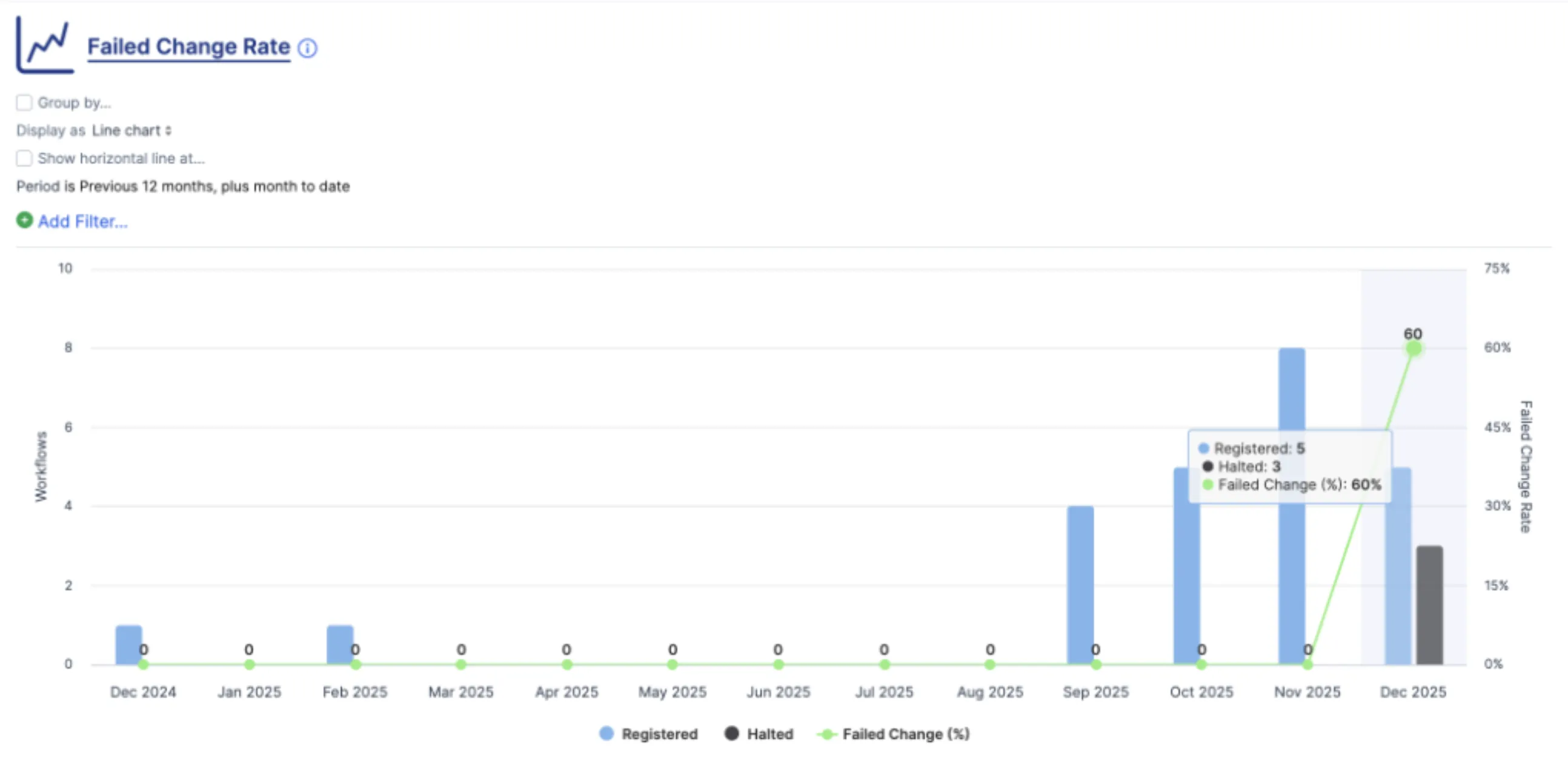
This enhancement improves visibility into change reliability and helps leadership teams identify patterns that may require process improvements. It's important to notice that only new events are recorded as this is a new tracking. So the "halted" value only appears from the date of the implementation of this feature.


.webp)
.webp)

.webp)