

Blog
Insights & updates from our experts


Resolve plant floor and IT issues before they disrupt production.

Stay audit-ready while resolving issues and reducing operational risk.
Resolve issues quickly with an AI-powered system that automates ticketing.

Unifiy IT, HR, Facilities, Finance, and more on a single, AI-powered service platform.

Simplify on-call scheduling, automate escalations, and reduce burnout.

Automate postmortems, AI summaries, and post-incident workflows

Create, organize, and continuously improve your knowledge base to find the right answers with Sera AI.

We're here to help

The integration with Atlassian Jira using the Xurrent Integration Service is

The integration with Atlassian Jira using the Xurrent Integration Service is

The integration with Atlassian Jira using the Xurrent Integration Service is

The integration with Atlassian Jira using the Xurrent Integration Service is

The integration with Atlassian Jira using the Xurrent Integration Service is

The integration with Atlassian Jira using the Xurrent Integration Service is

The integration with Atlassian Jira using the Xurrent Integration Service is

The integration with Atlassian Jira using the Xurrent Integration Service is
Resolve issues quickly with an AI-powered system that automates ticketing.
Unifiy IT, HR, Facilities, Finance, and more on a single, AI-powered service platform.
Simplify on-call scheduling, automate escalations, and reduce burnout.
Automate postmortems, AI summaries, and post-incident workflows
Create, organize, and continuously improve your knowledge base to find the right answers with Sera AI.
Resolve plant floor and IT issues before they disrupt production.
Stay audit-ready while resolving issues and reducing operational risk.

Detect, respond, and resolve incidents fast to cut downtime and MTTR.

Keep your store online, even during your biggest sales moments.

Protect patient data and resolve issues fast, so care teams stay focused on care.

Standardize service delivery across every store and channel.

We are here to help 24/7

Connect with other Xurrent Users

Get insights and tips on how to get the most out of Xurrent

Apps, APIs, and updates

Xurrent service functionality

Eliminate manual tasks, optimize workflows, and deliver faster resolutions.
Learn how organizations have reduced downtime, improved 50% MTTA & MTTR, and cut costs with Xurrent IMR.
Discover Xurrent IMR's quick support, bidirectional integrations with Jira and Slack, and more cohesive incident response capabilities compared to Opsgenie.
Understand why users value Xurrent IMR for its intuitive interface, efficient incident alerting, customizable On-call schedules, and escalations.

An AI assistant for specialists that opens as a panel on any request, loaded with the record's context, to summarize, find similar requests, draft notes, and answer questions.
An AI assistant for specialists, built into the Xurrent interface to help you work through your inbox faster.
Sera Assist opens as a slide-out panel on the record you are working on, with that record's context already loaded. Use it to:
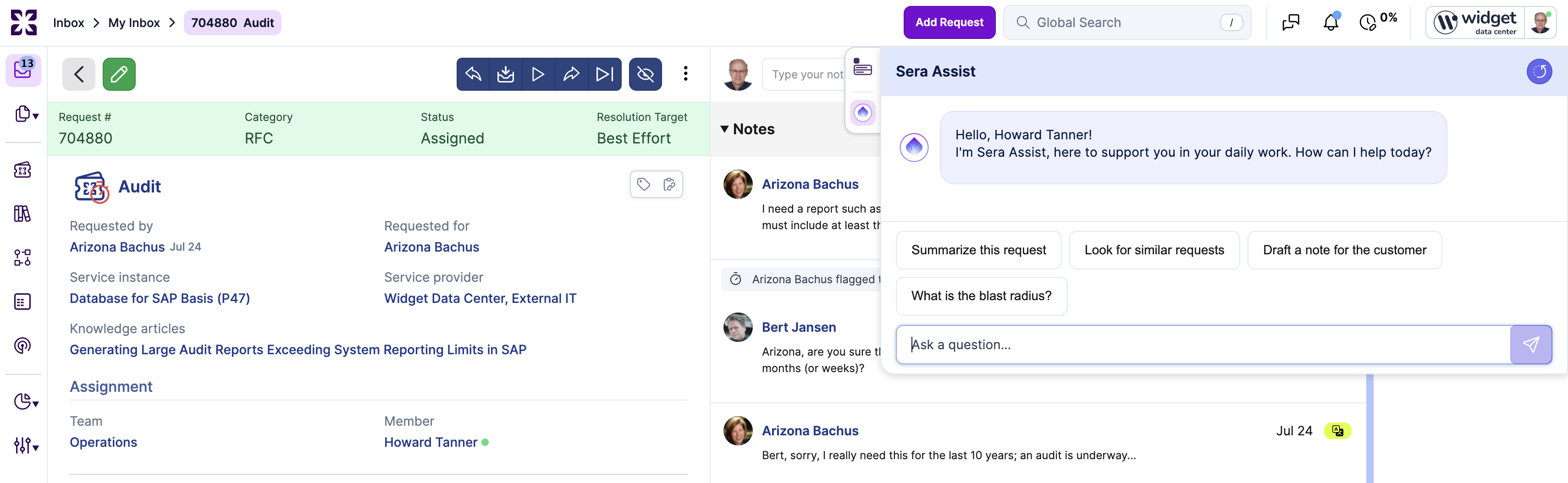
Start with an action pill or type your own question in the Ask a question... field.
The pills adapt to the record type. On a request:
On a task, the pills cover summarizing the task, the instructions given, drafting a completion note, and the workflow status.
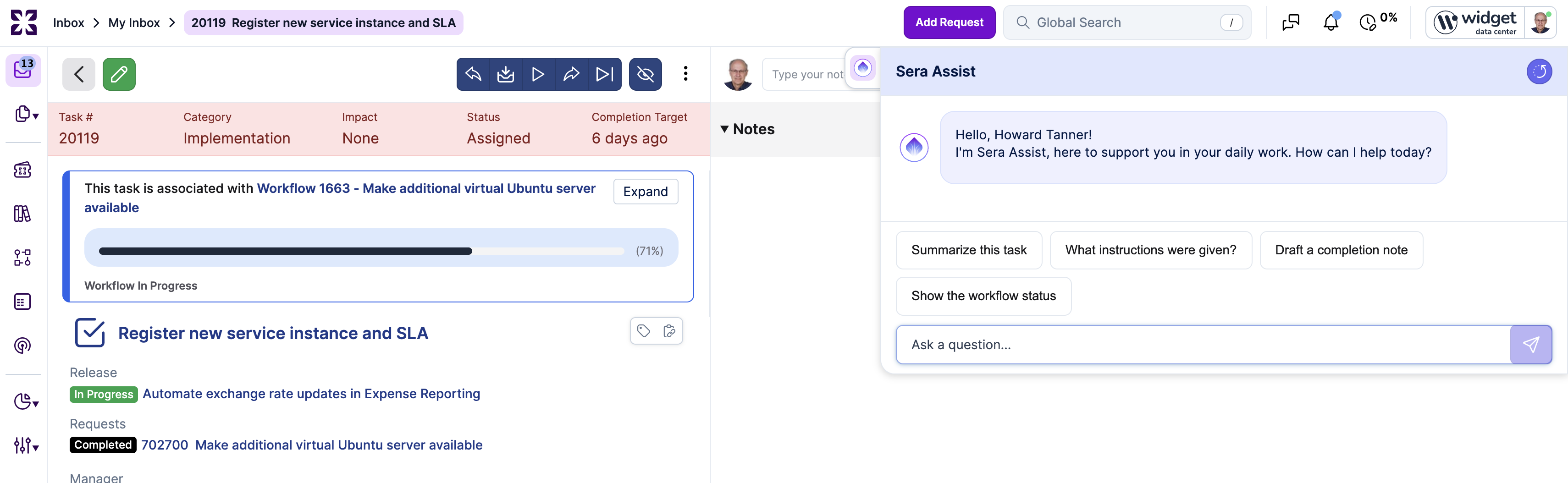
3. Working with ResponsesSera Assist answers in the panel using the record in front of you, related knowledge articles, and solutions from similar past records. Sera Assist sees only the notes you can see, and it can read images and documents attached to a request's notes.
When Sera Assist drafts a note, the card offers Apply Public Note, Apply Internal Note, or Post Both Notes to Request. Nothing is added to the record until you choose one. When it prepares a request, Finalize Request creates it and Finalize in Full Form opens it in the request form first. Use the thumbs up or down on a response to give feedback.
Availability: Linked records are currently available in the QA and demo environments. They are not yet available in production. Follow the release notes for updates on production availability.
Ask Sera Assist what is related to the record you are on, for example "What is related to this request?". On a request, Sera Assist knows the request group it is in, the requests grouped into it, the problem, workflow or project it is linked to, and the records referenced in its notes. On a task, it knows the workflow, the requests of that workflow, and the predecessor and successor tasks.
Each record is listed with its type, number, subject and status, and with how it is related. Click a record to open it. When nothing is linked, Sera Assist says so. Records that only share a configuration item, a service instance or a requester are not listed as related; use Look for similar requests for those. An answer lists up to 25 records and says when there are more. Only records you are allowed to see are listed.
Sera Assist is available on requests (including incidents, changes, and requests for information) and tasks. It is also available in the Reports view of the Analytics console, where it helps find and open reports and apply filters. It is not yet available in project management or other modules of Xurrent. Each specialist has a daily limit on the number of prompts, which resets at midnight in the account's time zone.