Blog
Insights & updates from our experts


Resolve plant floor and IT issues before they disrupt production.

Stay audit-ready while resolving issues and reducing operational risk.
Resolve issues quickly with an AI-powered system that automates ticketing.

Unifiy IT, HR, Facilities, Finance, and more on a single, AI-powered service platform.

Simplify on-call scheduling, automate escalations, and reduce burnout.

Automate postmortems, AI summaries, and post-incident workflows

Create, organize, and continuously improve your knowledge base to find the right answers with Sera AI.

We're here to help

The integration with Atlassian Jira using the Xurrent Integration Service is

The integration with Atlassian Jira using the Xurrent Integration Service is

The integration with Atlassian Jira using the Xurrent Integration Service is

The integration with Atlassian Jira using the Xurrent Integration Service is

The integration with Atlassian Jira using the Xurrent Integration Service is

The integration with Atlassian Jira using the Xurrent Integration Service is

The integration with Atlassian Jira using the Xurrent Integration Service is

The integration with Atlassian Jira using the Xurrent Integration Service is
Resolve issues quickly with an AI-powered system that automates ticketing.
Unifiy IT, HR, Facilities, Finance, and more on a single, AI-powered service platform.
Simplify on-call scheduling, automate escalations, and reduce burnout.
Automate postmortems, AI summaries, and post-incident workflows
Create, organize, and continuously improve your knowledge base to find the right answers with Sera AI.
Resolve plant floor and IT issues before they disrupt production.
Stay audit-ready while resolving issues and reducing operational risk.

Detect, respond, and resolve incidents fast to cut downtime and MTTR.

Keep your store online, even during your biggest sales moments.

Protect patient data and resolve issues fast, so care teams stay focused on care.

Standardize service delivery across every store and channel.

We are here to help 24/7

Connect with other Xurrent Users

Get insights and tips on how to get the most out of Xurrent

Apps, APIs, and updates

Xurrent service functionality

Eliminate manual tasks, optimize workflows, and deliver faster resolutions.
Learn how organizations have reduced downtime, improved 50% MTTA & MTTR, and cut costs with Xurrent IMR.
Discover Xurrent IMR's quick support, bidirectional integrations with Jira and Slack, and more cohesive incident response capabilities compared to Opsgenie.
Understand why users value Xurrent IMR for its intuitive interface, efficient incident alerting, customizable On-call schedules, and escalations.
Note: We're just getting started with Q2. This post is a living document, and we'll keep adding new updates right here until the quarter ends on June 30th.
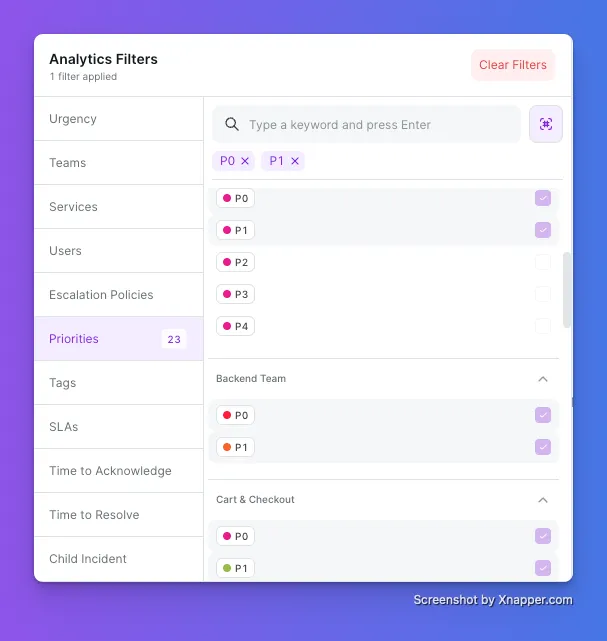
Analytics now lets you stack priority filters. Select P0, P1, or any combination, scoped to the teams you care about. Results update the moment you click, so you go straight to what matters instead of scrolling to find it.
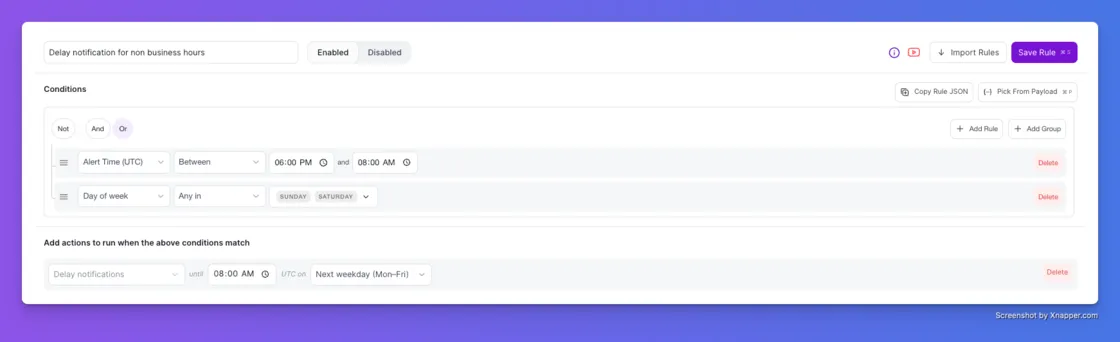
Not every alert deserves a 2 AM page. The new Delay Notifications action in Alert Rules holds the page for low-priority alerts until a time someone can actually act on it. The incident is still triggered and recorded the instant the alert arrives. Only the notification waits.
A non-critical storage warning fires at 11 PM on a Friday. Your Alert Rule catches it, holds the notification, and pages on-call at 8 AM Monday. Nothing suppressed, nothing lost.
Set the release time and day right in the rule. When the window opens, the notification routes through your escalation policy as usual.
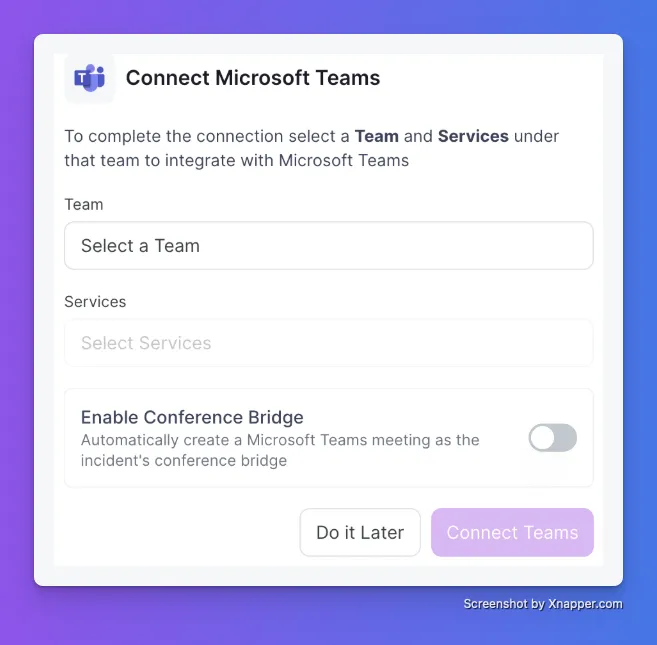
The first five minutes of a major incident usually go to one thing: getting everyone on a call. With the Microsoft Teams Conference Bridge, that step disappears.
Enable it once, and every new incident gets a Teams meeting link attached automatically. An instant virtual war room, ready before anyone thinks to ask for one.
Toggle on Enable Conference Bridge when you connect Microsoft Teams.
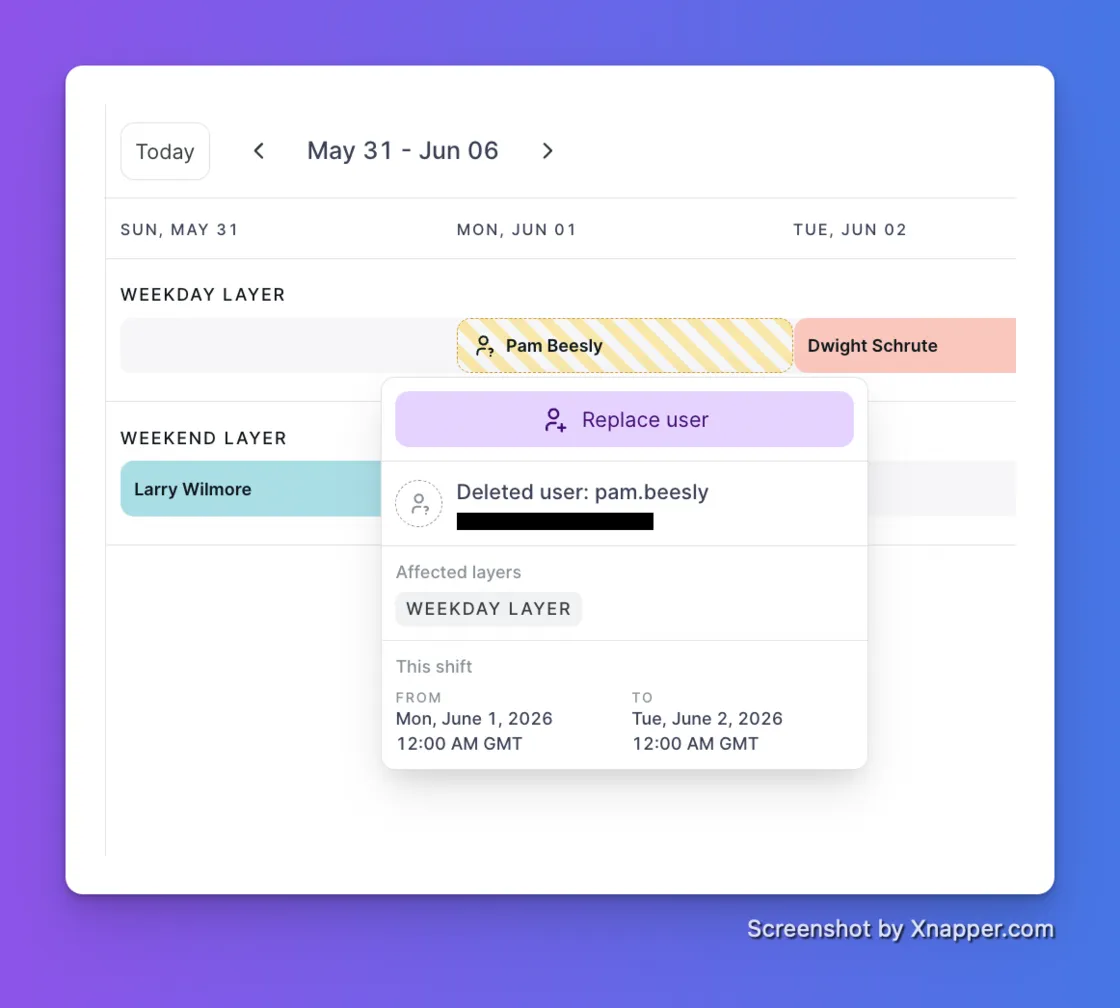
Deleting a user used to quietly reshuffle your whole on-call schedule and leave displaced shifts behind. Not anymore.
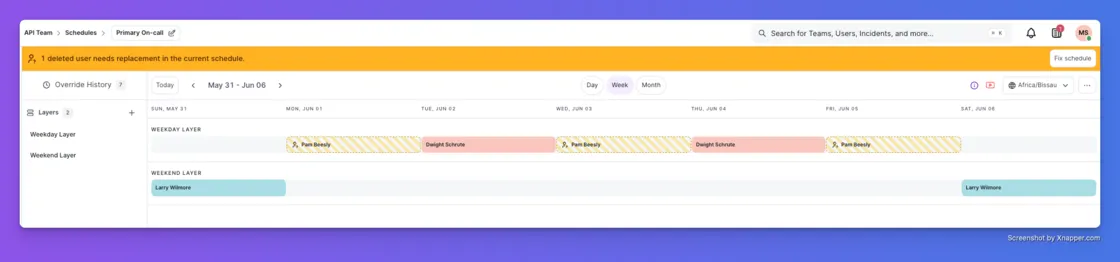
When a user is deleted, their shifts are marked inactive and flagged on the schedule. The rest of the rotation stays exactly as you set it. Team managers get notified right away with the specific schedules affected, and a reminder every 24 hours until every gap is filled. One click on a flagged shift reassigns it and restores full coverage.
You can now pull on-call schedules from other teams into any escalation policy. If the primary on-call doesn't acknowledge in time, the incident escalates to a shared support team, a leadership schedule, or any other team in your org.
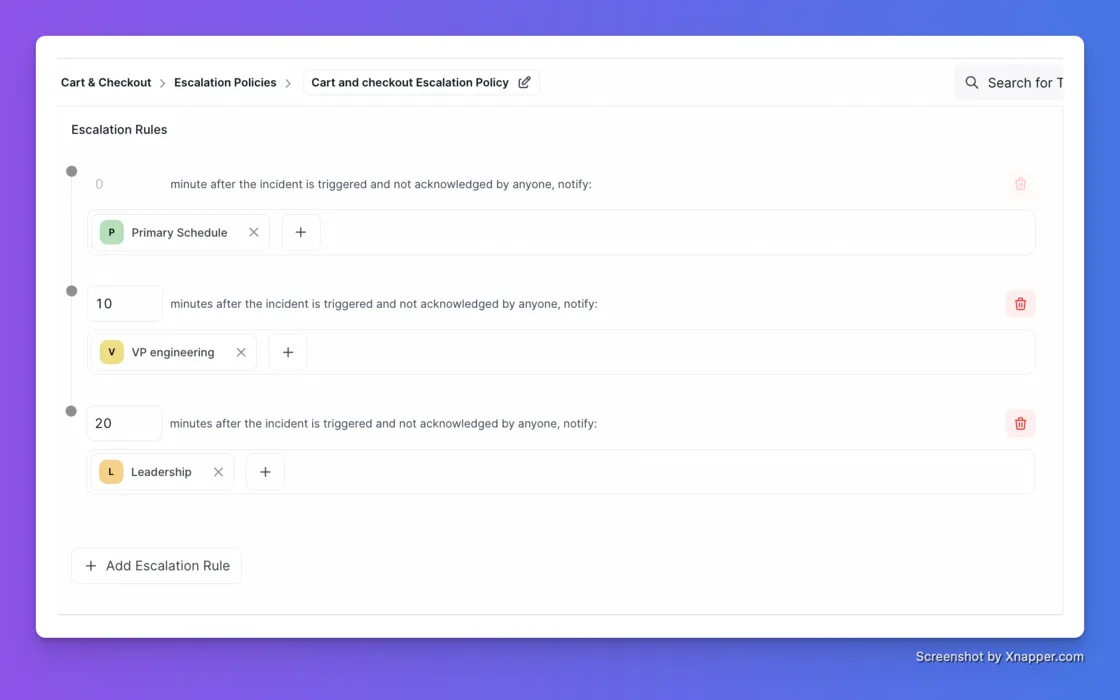
A payment failure hits at 2 AM. Payments on-call is paged first. No ack in 10 minutes, the VP of Engineering is notified. Still nothing at 20 minutes, the Leadership schedule takes over.
When a major incident hits, the right people need to know immediately, not after someone hunts down email addresses by hand.
A single Workflow action can now notify multiple stakeholders at once: individual users, entire teams, or anyone outside Xurrent IMR by email. Pair it with a Stakeholder Template and every notification goes out pre-formatted the instant your trigger fires.
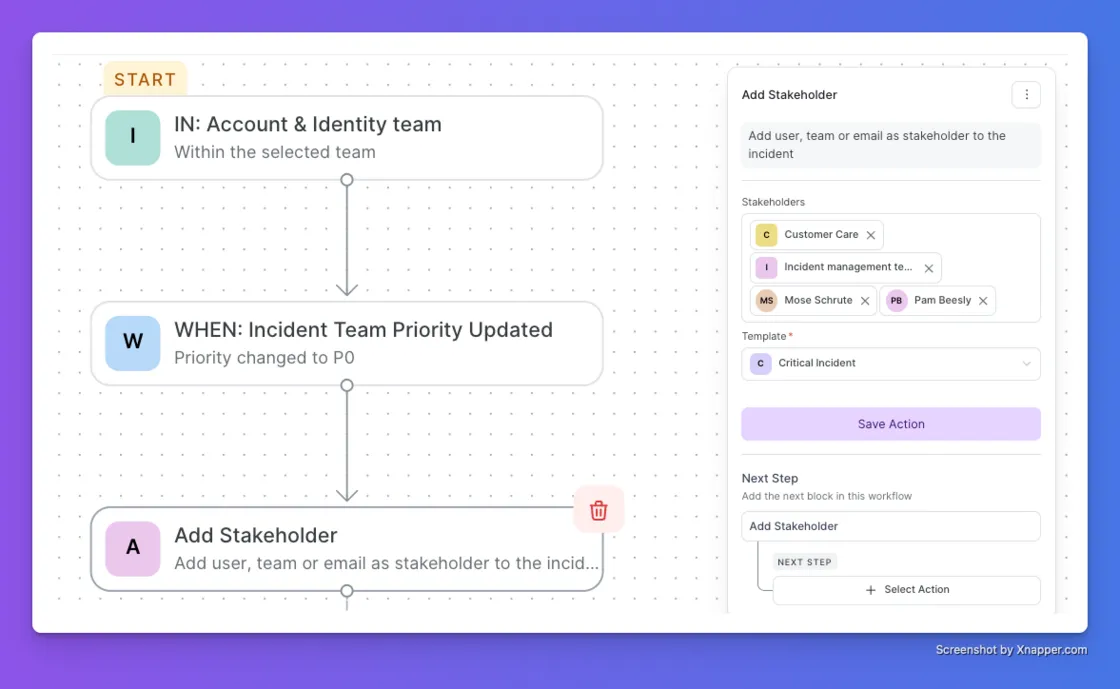
A P3 escalates to a P0. The workflow fires, and your CTO, directors, and major incident team all get a structured critical-incident update with zero manual steps. Previously you could add only one stakeholder per action, with no templates and no external emails.
When a P0 hits, every minute spent tracking down the right people is a minute lost. You can now add escalation policies from any team as responders in a workflow, not just individual users from your own team. Select multiple policies in one action and the right people across your org are looped in automatically, based on the conditions you define.
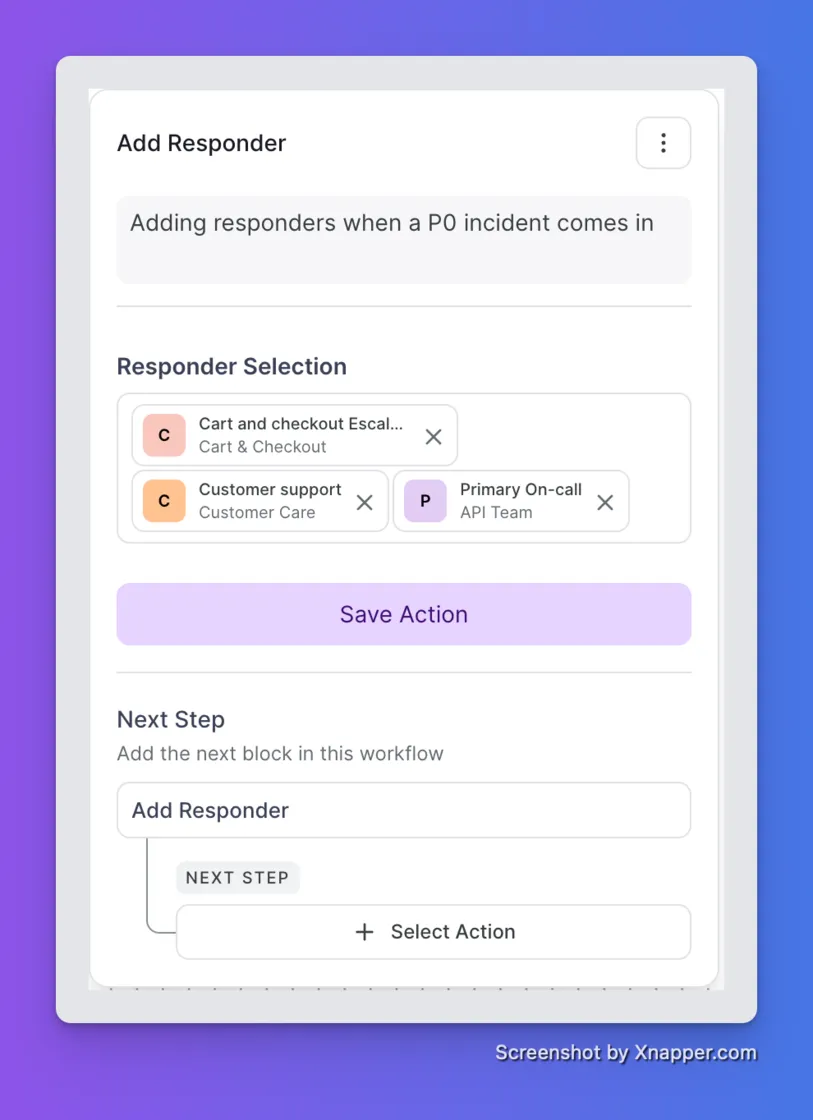
No manual paging. No cross-team coordination overhead. Just the right responders, already on it.
If you've ever tried to scale our old ServiceNow integration across more than a handful of services, you know the pain. It needed a Configuration Item to route alerts, and every service needed its own manual setup. For teams managing hundreds of services, it just didn't work.
We heard about this. A lot. So we rebuilt it.
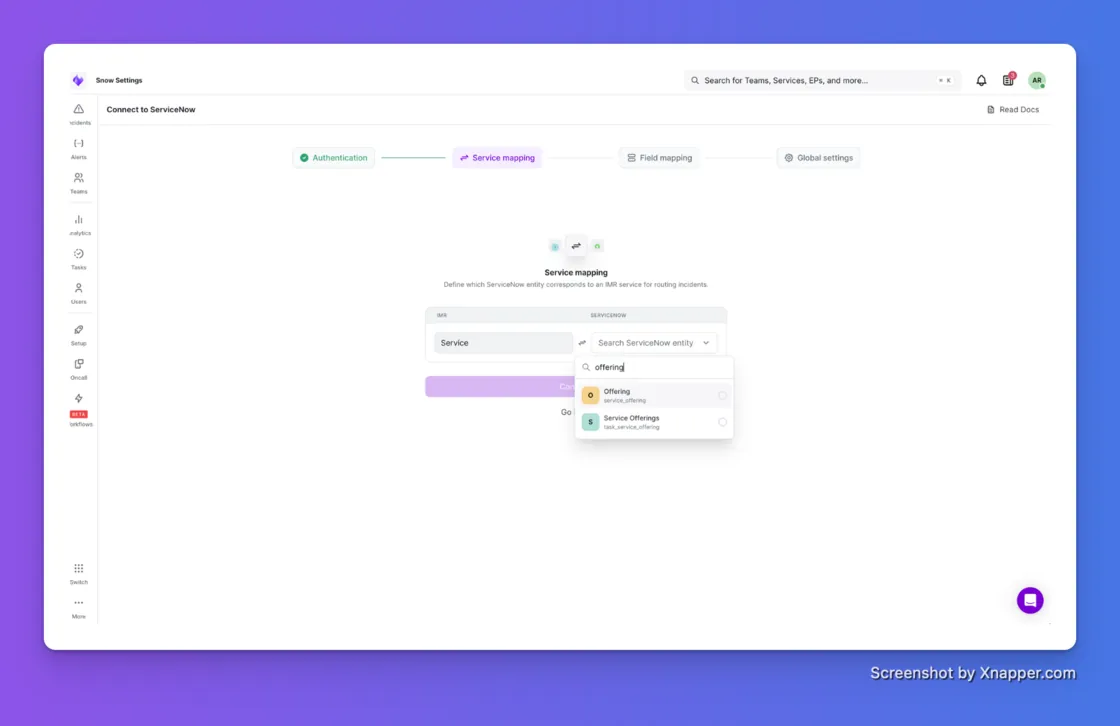
No CI dependency. Map any ServiceNow field to your IMR services. Configuration Item, Assignment Group, Service Offering, or a custom field your team already uses. Pick whatever makes sense for how your org runs.
Auto-mapping that actually works. Name Match maps services automatically by name. Custom Match lets you define exact ServiceNow value to IMR service mappings when you need full control. No more spreadsheets, no more manual one-by-ones.
One global template. Configure status, urgency, priority mappings, note syncing, and mandatory fields once. It applies across all your services automatically. Set it and forget it.
Bulk setup. Create integrations across all your services in a single step. What used to take an afternoon now takes minutes.
If you're running ServiceNow and have been waiting to roll out IMR more broadly, this is the unblock.
You can now connect Xurrent IMR to Claude and ask questions about your incident data in plain English. No tab switching, no SQL, no logging in.
Ask things like:

Claude connects directly to your IMR account through an MCP server and returns real data: on-call schedules, incident lists, timelines, and more. The kind of context you usually have to dig through three tools to find.
This is read-only today. No changes, no risk. Just faster access to the context your team needs during an incident, in the place where a lot of you already do your thinking.
Setup takes under 5 minutes.
Alert fatigue is one of the most common reasons on-call engineers burn out. Noise Reduction fixes that by grouping related alerts into a single incident, so your team isn't paged repeatedly for the same underlying issue.
Two ways to correlate alerts, depending on what fits your stack.
Time-based Correlation. Group all alerts that arrive within a set time window (1 to 20 minutes) for a particular service into a single incident. Simple, predictable, easy to reason about.
Content-based Correlation. Group alerts based on matching payload fields. You choose:

A cluster goes down. Within seconds, your monitoring fires a memory alert, a CPU alert, a disk I/O alert, and a few more. All symptoms of the same root cause.
Without Noise Reduction, each of these creates a separate incident and wakes up your on-call engineer multiple times. With Noise Reduction, all of them roll up into a single incident. Your team gets paged once and has full context in one place. The engineer wakes up to "the cluster is down" instead of "five things are on fire and I have to figure out which is which."
[Read the full documentation →]
We have two more pieces in the pipeline that will join Noise Reduction shortly:
Click Get Beta Access on the Noise Reduction tab if you want early access to these.
You can now add Jira and Slack as action steps in your Workflows, so the right people and tools are looped in automatically when an incident event fires. No more "did anyone open the Jira ticket?" five minutes into an incident.
Create Jira Ticket. Opens a Jira issue with your pre-configured project, issue type, and custom fields. Triggered automatically when your conditions are met. No manual ticket creation after every incident.
Send Slack Message. Send a message to an existing Slack channel or create a new one on the fly. Two ways to use it:
Both actions plug into the same Workflow trigger system we shipped in Q1. Pick a trigger (incident created, status updated, urgency changed, etc.), set your conditions, and the Jira ticket or Slack message fires the moment your conditions are met.


.webp)
.webp)

.webp)