Blog
Insights & updates from our experts


Resolve plant floor and IT issues before they disrupt production.

Stay audit-ready while resolving issues and reducing operational risk.
Resolve issues quickly with an AI-powered system that automates ticketing.

Unifiy IT, HR, Facilities, Finance, and more on a single, AI-powered service platform.

Simplify on-call scheduling, automate escalations, and reduce burnout.

Automate postmortems, AI summaries, and post-incident workflows

Create, organize, and continuously improve your knowledge base to find the right answers with Sera AI.

We're here to help

The integration with Atlassian Jira using the Xurrent Integration Service is

The integration with Atlassian Jira using the Xurrent Integration Service is

The integration with Atlassian Jira using the Xurrent Integration Service is

The integration with Atlassian Jira using the Xurrent Integration Service is

The integration with Atlassian Jira using the Xurrent Integration Service is

The integration with Atlassian Jira using the Xurrent Integration Service is

The integration with Atlassian Jira using the Xurrent Integration Service is

The integration with Atlassian Jira using the Xurrent Integration Service is
Resolve issues quickly with an AI-powered system that automates ticketing.
Unifiy IT, HR, Facilities, Finance, and more on a single, AI-powered service platform.
Simplify on-call scheduling, automate escalations, and reduce burnout.
Automate postmortems, AI summaries, and post-incident workflows
Create, organize, and continuously improve your knowledge base to find the right answers with Sera AI.
Resolve plant floor and IT issues before they disrupt production.
Stay audit-ready while resolving issues and reducing operational risk.

Detect, respond, and resolve incidents fast to cut downtime and MTTR.

Keep your store online, even during your biggest sales moments.

Protect patient data and resolve issues fast, so care teams stay focused on care.

Standardize service delivery across every store and channel.

We are here to help 24/7

Connect with other Xurrent Users

Get insights and tips on how to get the most out of Xurrent

Apps, APIs, and updates

Xurrent service functionality

Eliminate manual tasks, optimize workflows, and deliver faster resolutions.
Learn how organizations have reduced downtime, improved 50% MTTA & MTTR, and cut costs with Xurrent IMR.
Discover Xurrent IMR's quick support, bidirectional integrations with Jira and Slack, and more cohesive incident response capabilities compared to Opsgenie.
Understand why users value Xurrent IMR for its intuitive interface, efficient incident alerting, customizable On-call schedules, and escalations.

Automatic classification, routing, and prioritization of incoming requests using Sera AI.
AI request classification automatically determines the Category, Impact, Service Instance, and Team for new requests that arrive without a clear classification. This reduces misrouted tickets, accelerates response times, and ensures requests reach the right specialists without manual triage.
Classification runs on a new request, shortly after it is created, when:
Requests that arrive with any other category are not classified. Sera AI first looks for a matching request template, then for the most similar past request, and then for a service. It posts a note on the request saying which template or request it used. It determines values for:
Classification happens within seconds of request submission. When a request is created through the Virtual Agent, the assigned category and service instance typically appear on the request card almost immediately.
In the Account Settings, administrators can choose how classification behaves. The setting is not offered on directory accounts.
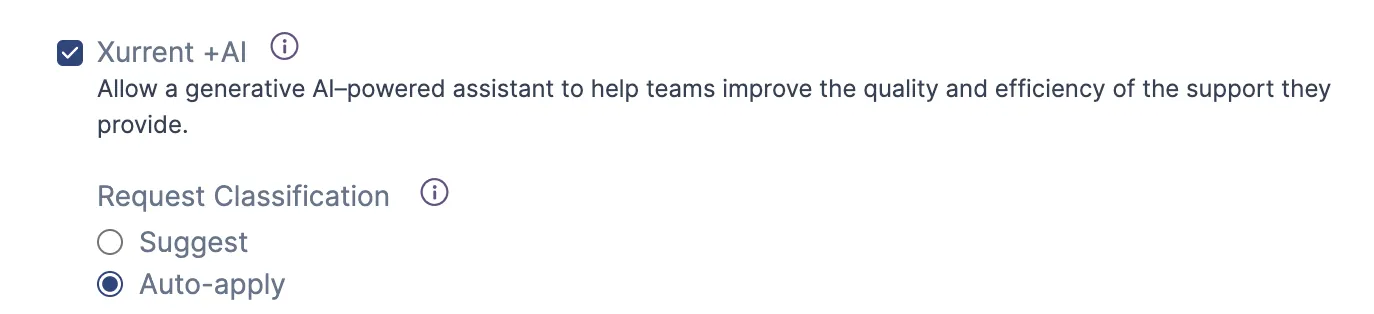
Both options apply to the same requests, described above.
Organizations can start with Suggest mode to build confidence in classification accuracy, then switch to Auto-apply when ready.
The combination of fields that AI classification sets on arrival effectively automates triage. When Sera AI classifies a request and assigns Category, Impact, Service Instance, and Team within seconds, the request is triaged without a specialist touching it.
Impact drives priority. The Impact value assigned by Sera AI directly influences the request's priority and, by extension, the SLA targets that apply. A request classified as high impact is immediately subject to shorter response and resolution targets than one classified as low impact. This means the urgency of a request is established at the moment it enters the system, not when a specialist first opens it.
Team assignment eliminates routing delays. By identifying the responsible team automatically, classification removes one of the most common causes of slow triage: requests sitting in a general queue waiting for someone to read them and decide where they should go. The request lands directly in the right team's inbox.
Sentiment adds a prioritization signal. Within the team's inbox, Sera AI's sentiment analysis provides an additional layer. When a specialist has multiple requests with similar resolution targets, a negative sentiment indicator can help them decide which to address first. See AI Sentiment Analysis for details.
Automation rules extend triage logic. For organizations that want to go further, automation rules can act on classification results to implement custom triage workflows. For example, a rule could automatically escalate requests where Impact is high and the affected service is business-critical.
Automation rules and AI classification serve different needs:
Both can be used together. For example, automation rules can handle well-defined patterns while AI classification catches everything else.
The ai_similar_request expression is available for use in automation rules. It gives a rule the most similar past request, so the rule can copy values such as its service instance or team. See AI Similar Requests and Ticket Clustering for details.
Classification only runs on the requests described under How it works. The requester must be covered by a service instance; when no service covers them, the request stays unclassified. Requests that already have a specific category are left as they are.