


Xurrent ITSM - Q2 2026 Product Updates

This post is a living document, updated throughout the quarter as new product improvements roll out. Each update listed here is released to our QA environment on the date shown and typically promoted to production the following week. Along the way, customers can review changes, share feedback, and help shape what ships next. Xurrent delivers product updates on a weekly cadence to keep improvements moving continuously.
April 02, 2026
Records in Modals Now Use the Full Two-Column Layout
Records opened from agile boards, product backlogs, Gantt charts, and other views now display in a modal with the same two-column layout used on the regular record page, with record fields and notes side by side. The modal also includes the full record-actions toolbar, so you can edit, forward, complete, decline, flag urgent, group, watch, or move items to an agile board, sprint, or product backlog without navigating away.
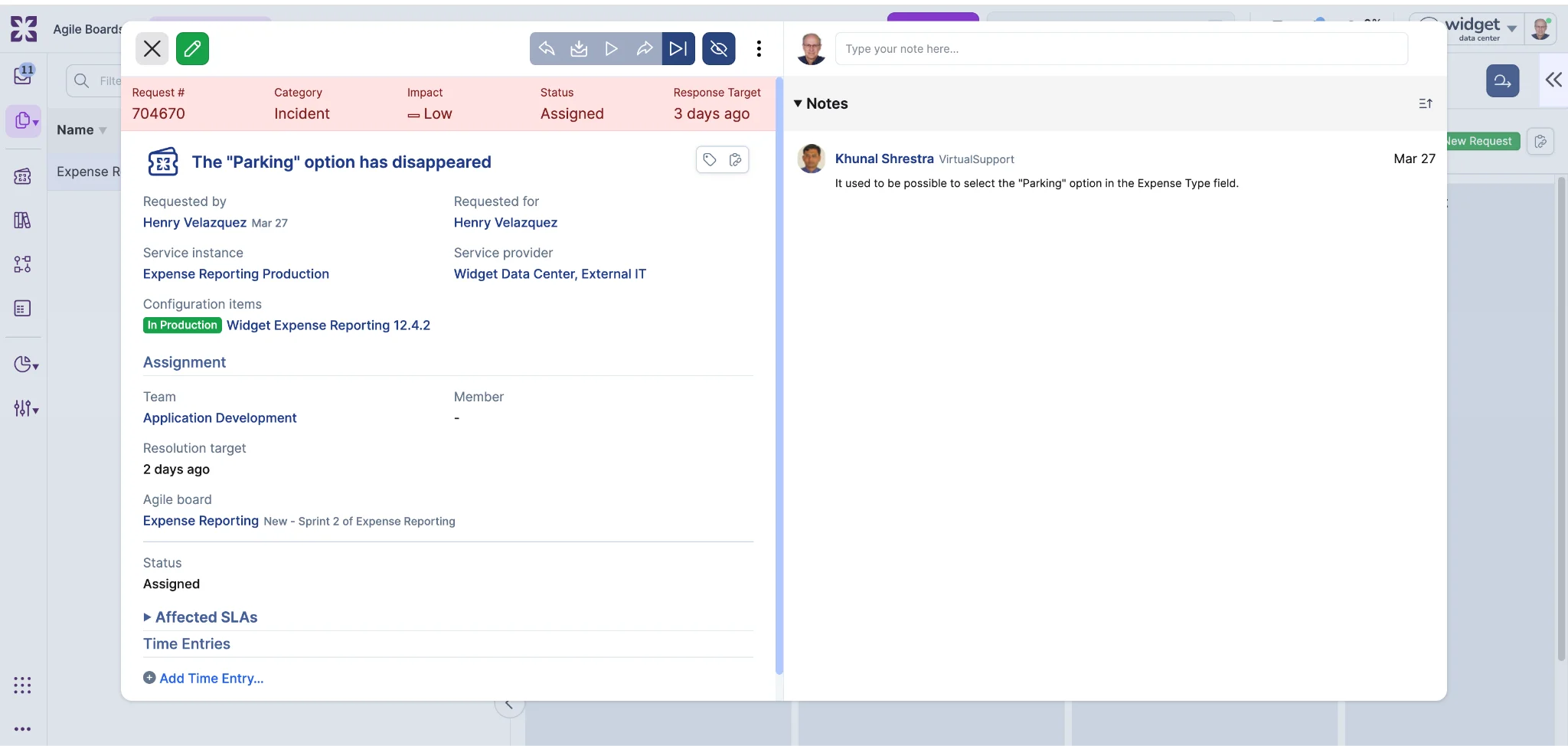
Save and cancel buttons in edit modals now stay pinned to the bottom of the modal rather than floating over the page, and pressing Escape closes the modal.

Task Templates: Translatable Instructions
Task template instructions can now be translated. When translations are configured for a template's instructions field, each viewer sees the instructions in their own locale automatically.
In template views, instructions display in the viewer's locale when a matching translation exists. In task views, the system checks whether the task's instructions still match the original template text. If they do, the translated version is shown. If a manager has edited the instructions on the task itself, the edited text is preserved as-is.
For API consumers, GraphQL exposes a translations connection on TaskTemplate for managing translations, and the REST API automatically includes localized_instructions in TaskTemplate responses.
Virtual Agent: Skills Pool for Directory Account Self Service
As more customers bring their Virtual Agent into production and leverage directory account self-service, we've heard consistent feedback about how skills pool restrictions should work across accounts. With this update, skills pool restrictions configured on supporting domain accounts now extend to the directory account as well.
Previously, self-service on the directory account was unaffected by skills pool settings, meaning all users could interact with the Virtual Agent regardless of restrictions on supporting domain accounts. Now, if any supporting domain account has a skills pool restriction in place, only person records included in those skill pools will be able to use the Virtual Agent on the directory account. Person records with roles exclusively in the directory account will not have access.

A warning indicator in the directory account settings will show when Virtual Agent access is being restricted by one or more accounts. Removing all skills pool restrictions from supporting domain accounts will restore unrestricted access on the directory account.
Rich Text Editor: Improved Markdown Support
Rich text fields now handle Markdown content more naturally in two ways.
First, pasting Markdown into note fields renders it as formatted text automatically. When you copy from .md files, AI assistant output, or development tools, headings, code blocks, bold text, lists, and other Markdown syntax display as properly formatted content instead of raw syntax. The editor detects Markdown in both plain text and rich clipboard formats (such as content copied from VS Code). Pasting into a code block still preserves raw text, and URL paste behavior is unchanged.

Second, GFM-style pipe tables now render as formatted tables. Previously, only HTML table syntax was supported, so pipe tables copied from GitHub, GitLab, or AI tools displayed as raw text. Table cells support inline formatting including mentions, bold, links, and colors.
