







Blog
Insights & updates from our experts


Resolve plant floor and IT issues before they disrupt production.

Stay audit-ready while resolving issues and reducing operational risk.
Resolve issues quickly with an AI-powered system that automates ticketing.

Unifiy IT, HR, Facilities, Finance, and more on a single, AI-powered service platform.

Simplify on-call scheduling, automate escalations, and reduce burnout.

Automate postmortems, AI summaries, and post-incident workflows

Create, organize, and continuously improve your knowledge base to find the right answers with Sera AI.

We're here to help

The integration with Atlassian Jira using the Xurrent Integration Service is

The integration with Atlassian Jira using the Xurrent Integration Service is

The integration with Atlassian Jira using the Xurrent Integration Service is

The integration with Atlassian Jira using the Xurrent Integration Service is

The integration with Atlassian Jira using the Xurrent Integration Service is

The integration with Atlassian Jira using the Xurrent Integration Service is

The integration with Atlassian Jira using the Xurrent Integration Service is

The integration with Atlassian Jira using the Xurrent Integration Service is
Resolve issues quickly with an AI-powered system that automates ticketing.
Unifiy IT, HR, Facilities, Finance, and more on a single, AI-powered service platform.
Simplify on-call scheduling, automate escalations, and reduce burnout.
Automate postmortems, AI summaries, and post-incident workflows
Create, organize, and continuously improve your knowledge base to find the right answers with Sera AI.
Resolve plant floor and IT issues before they disrupt production.
Stay audit-ready while resolving issues and reducing operational risk.

Detect, respond, and resolve incidents fast to cut downtime and MTTR.

Keep your store online, even during your biggest sales moments.

Protect patient data and resolve issues fast, so care teams stay focused on care.

Standardize service delivery across every store and channel.

We are here to help 24/7

Connect with other Xurrent Users

Get insights and tips on how to get the most out of Xurrent

Apps, APIs, and updates

Xurrent service functionality

Eliminate manual tasks, optimize workflows, and deliver faster resolutions.
Learn how organizations have reduced downtime, improved 50% MTTA & MTTR, and cut costs with Xurrent IMR.
Discover Xurrent IMR's quick support, bidirectional integrations with Jira and Slack, and more cohesive incident response capabilities compared to Opsgenie.
Understand why users value Xurrent IMR for its intuitive interface, efficient incident alerting, customizable On-call schedules, and escalations.
This post is a living document, updated throughout the quarter as new product improvements roll out. Each update listed here is released to our QA environment on the date shown and typically promoted to production the following week. Along the way, customers can review changes, share feedback, and help shape what ships next. Xurrent delivers product updates on a weekly cadence to keep improvements moving continuously.
All customers now have the option to send emails with attachments instead of file links. This enables files to be included directly in outbound emails, rather than shared via expiring links.
To enable this feature, the account administrator should set the file attachment size limit (in MB) in the Email Policy settings.

In addition to setting the MB limit within the Support Domain Account Settings, you'll need to configure the "Send Email from" template(s) where you want the attachment feature to apply. To do this, check the 'File attachments' option within the template setup.

Note in this example, 4MB has been configured as the attachment size limit.
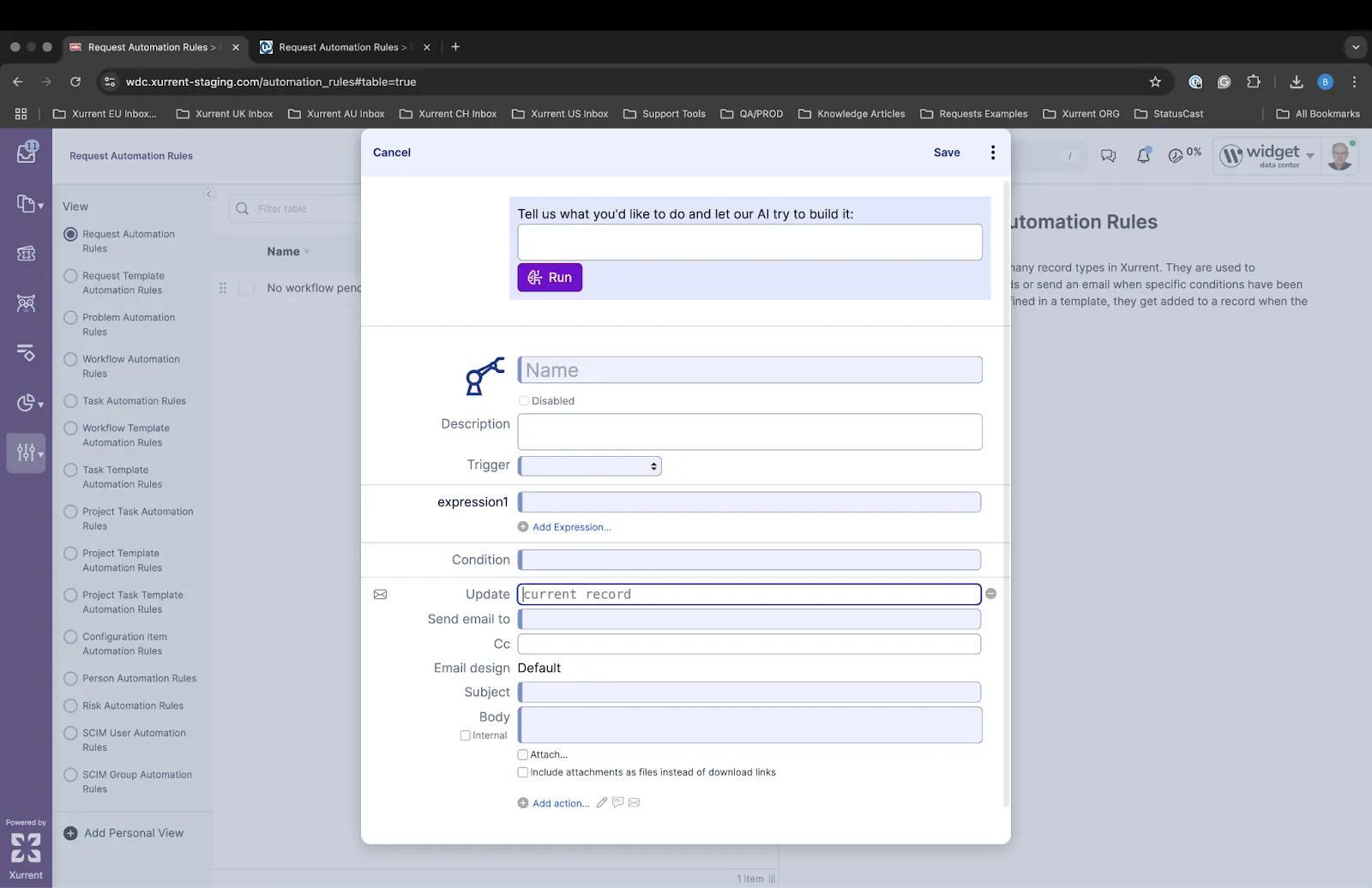
Support for sending email attachments via automation rules has also been added. The new option has been introduced as a checkbox in the automation rule setup interface. When enabled, it ensures attachments are delivered as files, while continuing to respect the file size limits defined in the applicable email policy.
The Virtual Agent interface has been updated with revised call-to-action (CTA) prompts, designed to guide users more effectively toward the areas where the Virtual Agent delivers the most value - specifically, knowledge summarization and request card creation.
These enhancements will roll out across this and next week's QA releases, beginning with improved starting CTAs this week, followed by updates to follow-up CTAs next week.
The goal is to increase direct CTA engagement, helping users reach the right answer more quickly while also providing clearer recovery paths when conversations veer off track.

Notification preference changes made in a user's Person record, such as toggling email or in-app alerts, are now tracked in the audit trail. These entries provide admins with visibility into whether a user updated their notification settings at a specific time.
Example View:

Out-of-office period records can now be removed using both REST and GraphQL APIs. This enhancement supports better automation for customers syncing absence data from external systems such as time tracking tools.
REST API
DELETE /v1/out_of_office_periods/:id
GraphQL
mutation {
outOfOfficePeriodDelete(input: {id: "<nodeID>"}) {
errors { path message }
success
}
}
Create an Out of Office Period to test deletion:

Successfully delete the record using GraphQL mutation:

Out of Office Period removed from the UI table post-deletion:

The "Requester Organization" filter is now available in the Self Service All Requests view for key contacts. It appears when the user's organization has descendant organizations and helps narrow search results when many requests are visible.

If the number of matching requesters reaches the system limit, the filter switches to use the organization structure to suggest more results. A message appears when this limit is reached to prompt users to add more filters.

Xurrent users can now delegate approval tasks to others for any reason, not just out-of-office coverage. The "Delegate Task" option is available in both the self-service and specialist interfaces, with delegation limited to users in the assigned delegate pool.

Inbound email handling has been enhanced to improve transparency when emails are rejected as auto-responses. Previously, the system displayed a generic "Detected as an Auto response" message. With this update, a specific reason for rejection is now shown in the inbound email console based on the detection logic.
For example, cases such as a missing 'Return-Path' header will now be clearly indicated, enabling faster diagnosis and resolution by service teams without the need for manual investigation.

The default password for all demo users in the demo data is changing from 4me to xurrent.
After logging into the demo instance, using your own credentials, it is possible to select a demo account (e.g., Widget International) and log in there, using the demo user credentials (e.g., howard.tanner@widget.com).
Log in is still working using the 4me password until an Instance Reset is performed from the demo environment. After the reset, the environment will be fully updated, and only the new xurrent passwords will work for demo users.

Virtual Agent responses that surface Knowledge Articles will now always include a direct link to the full article. Previously, links appeared inconsistently, which caused confusion for users seeking more detail beyond the AI-generated summary. This update ensures better transparency and easier access to complete information.
Before:

After:

Users will be able to add Service Instance as a column in the Problem table view, making it easier to sort and filter issues by the services they impact. This helps MSP customers quickly identify which problems are relevant to which clients, reducing delays in diagnosing and addressing the right issues.

Global search was one of the most frequently mentioned areas of feedback in the specialist update. In response, we've introduced several improvements in this release.
The global search has been expanded and is now more prominent, addressing concerns that it was previously hidden within the header icon. Additionally, we've improved the connection between the table filter and global search. Pressing Enter or Return after typing in the table filter will now extend the term into a global search, restoring a popular and intuitive workflow.

Customers using the new multi-select feature in the updated Specialist Interface have requested that quick action icons, including the cog icon for bulk edit options, be moved from the record header to the table level. This change ensures that actions are more accessible and efficient when working with one or more selected records, improving the overall usability of the multi-select experience.

We have implemented a hybrid search approach that combines vector search, commonly used by the virtual agent, with lexical search, which powers most other areas of the application such as the existing ElasticSearch in Xurrent. This improvement is designed to enhance the accuracy and relevance of search results for knowledge base articles and request templates, directly addressing a key area of user feedback around findability.
Users with Directory Account admin permissions can now select the Directory Account when using Add Request > Add a new person from within a Support Domain Account. This update ensures a smoother user creation experience without requiring a context switch.
The Directory Account now appears as an option in the "Add a new person" dialog.

The Self-Service Portal (SSP) has been updated to retain predefined filters throughout the service catalog navigation flow. Previously, filters applied at the initial "New Request" view would reset when users drilled down into a service category or tile. With this enhancement, filters such as "Request Template", "Workflow", and "Task" remain active across all levels of catalog exploration, ensuring a consistent and intuitive experience.

To implement this change:
The Xurrent team continues to work closely with customers who are live in production with the Virtual Agent or in advanced stages of QA testing, making targeted improvements based on real-time usage and feedback.
One area we identified for enhancement was how the Virtual Agent handles context when assigning request templates. In some cases, the agent did not collect enough information from the user to confidently select the appropriate request template. This can lead to downstream impacts for service desk teams, who may then need to manually update the service instance or re-route the request.
To address this, the Virtual Agent has been refined to assess whether it has gathered sufficient user context before presenting a knowledge article or request template. For example, a vague input like "my account broke" now triggers a follow-up interaction to gather more specific details, improving the accuracy of the resulting request assignment and resolution.
Now:

Previous:

We will continue to monitor user feedback and tune this behavior further in the coming weeks.
We've introduced a new Customer-Focused SLA setting to give organizations greater flexibility in how response and resolution times are calculated when the service on an existing request is changed.
By default, when a request's service is updated and a new SLA (with its own service offering) is applied, the SLA timers begin from the moment the new service is assigned. This existing behavior is now referred to as Team-Focused SLA.
Some customers, however, have requested that the new SLA inherit the start time of the original SLA, ensuring continuity from the time the request was first created. To support this need, we've introduced a new account-level setting that enables this Customer-Focused SLA behavior.
This setting allows each organization to select the SLA calculation model that best aligns with their operational goals and customer expectations. The Team-Focused SLA remains the default behavior, and the Customer-Focused SLA is available as an optional configuration.

The expand/collapse state of the secondary view panel in the Specialist interface is now "sticky." This means the user's preference is retained across both pages and sessions, eliminating the need to repeatedly click to maintain a preferred view.
We have added the ability to expand or collapse the Secondary Navigation (View Panel), giving users more space in the table view - especially helpful on smaller screens. This aligns the experience more closely with the existing SHB feature.

We brought back default focus on table-level search and filtering. This was a widely used and appreciated feature, and it's now been reintroduced in the new Specialist experience.

We've launched a new Dynamic View setting that intelligently switches between single pane and two pane layouts - no more guesswork. This feature automatically adjusts based on your screen size and the number of table columns in your view, ensuring the optimal layout at all times.
Dynamic Mode is enabled by default, but users can also choose to manually set their preference globally. Plus, the layout now adapts in real time to window resizing, offering greater flexibility across devices and screen sizes.

To improve usability in split view, checkboxes have been added for multi-select support. This aligns the experience more closely with full-table mode and prepares for future mass action enhancements. The rest of the multi-select actions remain in the top header for now.

The gray text indicating the "Parent" project/workflow - previously shown in the production list view - is now available as a custom column option in the Inbox.


The placeholder text for table-level search has been updated from "Search" to "Search and filter table" to avoid confusion with the global search bar now located in the top navigation. This small UI tweak improves clarity and user experience when interacting with tables.

As a refresher, in the March 27 release note, the team announced the new "Detailed Submit" feature for request template assignment. In this mode, when a user interacts with the Virtual Agent, it analyzes the chat context and suggests an appropriate request template with relevant fields prefilled.
Based on comprehensive user testing, the team has now enhanced the template identification algorithm to address previously reported issues with incorrect or missing templates. This update also includes changes to the template field pre-fill approach, limiting input to actual chat text and removing predictions for missing fields. These changes will be available in QA by Tuesday, April 22.
The request button now clearly differentiates between direct submissions via the "Quick Submit" mode and redirects to the web application for "Detailed Submit" mode.
The new Single Pane specialist interface delivers a more intuitive, easy to navigate UI/UX. The primary changes are summarized below. Although the illustrative screenshots are taken from the Inbox view, the single-pane layout is now the default setting across requests, tasks, problems, projects, workflows, releases, and risks. In addition, the updates will be accompanied by in-app guides - available to all users - to smooth the change management process.
The new single pane layout brings all columns into "full width" view, maximizing space and improving readability. Impact and Category now have their own dedicated column, giving clearer visibility to the representative icon beside each checkbox. Note that since the new layout provides an ideal column layout for the single pane view, all "Default view" checkboxes for single pane consoles have been reset.

Custom views now appear directly in a secondary navigation pane, no longer tucked away in a dropdown—making access faster and more visible.

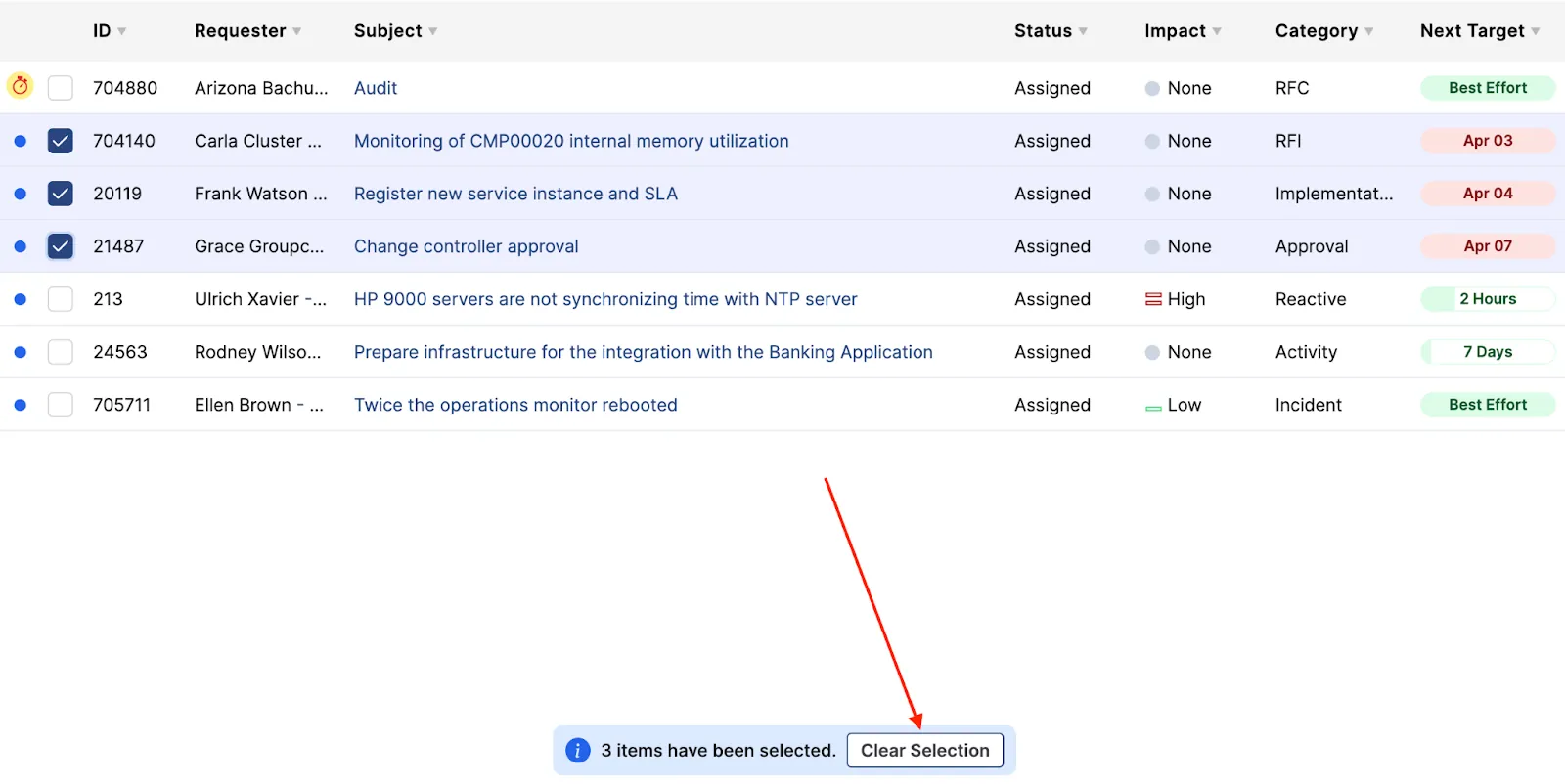
Multiple rows can now be selected or deselected using checkboxes—no keyboard shortcuts required. Actions can be applied to all selected rows. The new "Clear Selection" modal removes selections without needing to navigate away or manually deselect.
A dynamic search bar has been introduced within the table. This adds flexibility to focus on table level filtering. Global search moved to the right top (more details below).

Navigate back to the previous page using the new breadcrumb trail in the top left corner. Alternatively, users can also leverage the gray back arrow next to the green edit icon.

The single pane view is the default selection, however we have retained the ability to continue using the split view. This selection can be made at a page level from the ellipsis menu. When switching to Split View, the configured Inbox dashboard is again visible on the right side of the screen. For flexibility, users have the option to switch to split view if preferred, but please note that certain capabilities, such as multi-select are only supported in the single pane view.


The plus icon where you select to add workflows, requests, etc… has been moved to the page level and is no longer in the top bar.

A search bar has been added to the settings dropdown to improve navigation.

The duplicate vertical menu on the Settings and Analytics pages has been removed and replaced with the updated view pane for improved usability.

A dedicated dropdown is now available for accounts with custom links. The icon appears dynamically and is only visible when custom links are configured, keeping the interface streamlined and relevant.

Global search has been relocated to the right side of the interface and now expands and collapses based on user interaction. This creates a cleaner layout while keeping search easily accessible when needed.


Bring Your Own Key (BYOK) status is now visible in Account Settings. This improves transparency and security awareness for teams managing encryption.
When BYOK is enabled, it now appears in the Account Overview, and Account Support Domains.
This release introduces an enhancement to the Virtual Agent's ability to respond to workflow-related queries. When users ask the Virtual Agent about a request that is linked to a workflow, the response now includes key contextual details that were previously missing.
Instead of a simple reference to the request, the Virtual Agent now provides structured information such as:
For example, when a user asks about a workflow like "what's the latest with getting a new computer for the new employee Sean", the Virtual Agent can now respond with something like:


You can ask follow-up questions to get more context.
It's now possible to limit which specialists from a trusted account can be selected as requesters when raising a request via the Service Desk Console.
When enabling the setting "[Trusted account] service desk analysts can submit requests for our specialists", admins will now see a new "Link specialist teams…" option. By linking only specific teams, trusted partners will be restricted to submitting requests for those team members only. If no teams are selected, all specialists from the account will continue to be visible by default.
Here's how it works:
1. Go to Settings > Account Trust > "Widget Data Center"
Select the new option to link specific specialist teams.

Enable trusted request setting and access team restriction field.
2. Go to Service Desk Console and search for "Sarah"
Only specialists from allowed teams are suggested.

3. Search for "Mary"
Another specialist from a linked team is visible.

4. Search for "Oliver"
No results if the specialist is not part of a linked team.




.webp)
.webp)

.webp)



