







Blog
Insights & updates from our experts


Resolve plant floor and IT issues before they disrupt production.

Stay audit-ready while resolving issues and reducing operational risk.
Resolve issues quickly with an AI-powered system that automates ticketing.

Unifiy IT, HR, Facilities, Finance, and more on a single, AI-powered service platform.

Simplify on-call scheduling, automate escalations, and reduce burnout.

Automate postmortems, AI summaries, and post-incident workflows

Create, organize, and continuously improve your knowledge base to find the right answers with Sera AI.

We're here to help

The integration with Atlassian Jira using the Xurrent Integration Service is

The integration with Atlassian Jira using the Xurrent Integration Service is

The integration with Atlassian Jira using the Xurrent Integration Service is

The integration with Atlassian Jira using the Xurrent Integration Service is

The integration with Atlassian Jira using the Xurrent Integration Service is

The integration with Atlassian Jira using the Xurrent Integration Service is

The integration with Atlassian Jira using the Xurrent Integration Service is

The integration with Atlassian Jira using the Xurrent Integration Service is
Resolve issues quickly with an AI-powered system that automates ticketing.
Unifiy IT, HR, Facilities, Finance, and more on a single, AI-powered service platform.
Simplify on-call scheduling, automate escalations, and reduce burnout.
Automate postmortems, AI summaries, and post-incident workflows
Create, organize, and continuously improve your knowledge base to find the right answers with Sera AI.
Resolve plant floor and IT issues before they disrupt production.
Stay audit-ready while resolving issues and reducing operational risk.

Detect, respond, and resolve incidents fast to cut downtime and MTTR.

Keep your store online, even during your biggest sales moments.

Protect patient data and resolve issues fast, so care teams stay focused on care.

Standardize service delivery across every store and channel.

We are here to help 24/7

Connect with other Xurrent Users

Get insights and tips on how to get the most out of Xurrent

Apps, APIs, and updates

Xurrent service functionality

Eliminate manual tasks, optimize workflows, and deliver faster resolutions.
Learn how organizations have reduced downtime, improved 50% MTTA & MTTR, and cut costs with Xurrent IMR.
Discover Xurrent IMR's quick support, bidirectional integrations with Jira and Slack, and more cohesive incident response capabilities compared to Opsgenie.
Understand why users value Xurrent IMR for its intuitive interface, efficient incident alerting, customizable On-call schedules, and escalations.
This post is a living document, updated throughout the quarter as new product improvements roll out. Each update listed here is released to our QA environment on the date shown and typically promoted to production the following week. Along the way, customers can review changes, share feedback, and help shape what ships next. Xurrent delivers product updates on a weekly cadence to keep improvements moving continuously.
Previously, keywords added to a knowledge article were only recognized by the global search. This reduced the accuracy of search results within the Knowledge Articles console.
The Knowledge Articles console now considers the Keywords field in its default filter terms. This will improve search outcomes in the console.
Example:
Add keywords (e.g., "vendor," "connect," "logging") to a knowledge article.

And then a search in the service desk console:

Articles containing those keywords now appear in the results.
Previously, the request summary feature within Notes used a checkmark (✔️) and a cross (❌) to solicit user feedback. To create a more consistent experience with the AI chat in self-service, these icons have been replaced with thumbs up and thumbs down icons.

As a reminder, providing feedback via these icons is important to Xurrent's model training and continuous improvement of AI features.
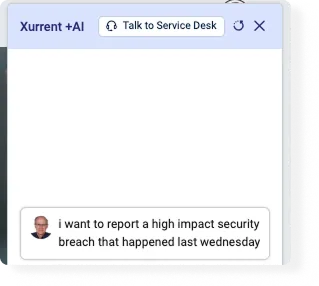
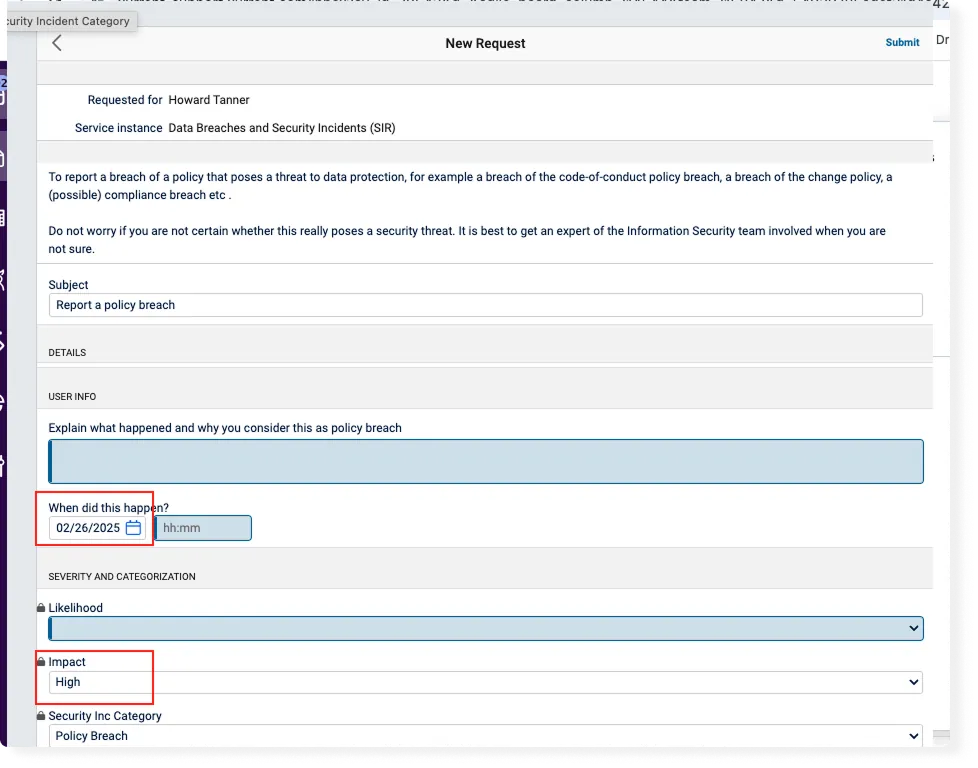
This enhancement provides a new operating mode for the Virtual Agent called "Detailed Submit". In this mode, when a user interacts with the Virtual Agent, it analyzes the request context and suggests an appropriate request template with relevant fields prefilled. If a template is identified, the Virtual Agent provides a direct link to Xurrent. There, the request will have any context from the chat pre-populated, any additional required fields can be configured, and then the user can manually submit. For this QA release, the Detailed Submit mode is implemented as a default setting for all users.
Example of this functionality:
1. A user types into the Virtual Agent:
"I want to report a high-impact security breach that happened last Wednesday."
2. The Virtual Agent recognizes the appropriate request template (e.g., "Report a policy breach").

3. The Virtual Agent automatically fills in relevant fields such as the date and impact level based on context from the chat. The user is then redirected from chat to the Xurrent request to review the field inputs, and manually submit.
The team continues to believe that the original "Quick Submit" functionality - i.e. no template routing - is still valuable for some use cases. The team expects to release the optionality in settings to toggle between Quick and Detailed modes as part of an upcoming release.
The success message on request creation has been updated. The bright lime color has been replaced with a more balanced green shade for better legibility. In addition, the layout has been refined to ensure the message displays correctly without unwanted spacing or extraneous characters. An example of the updated success message can be found below.

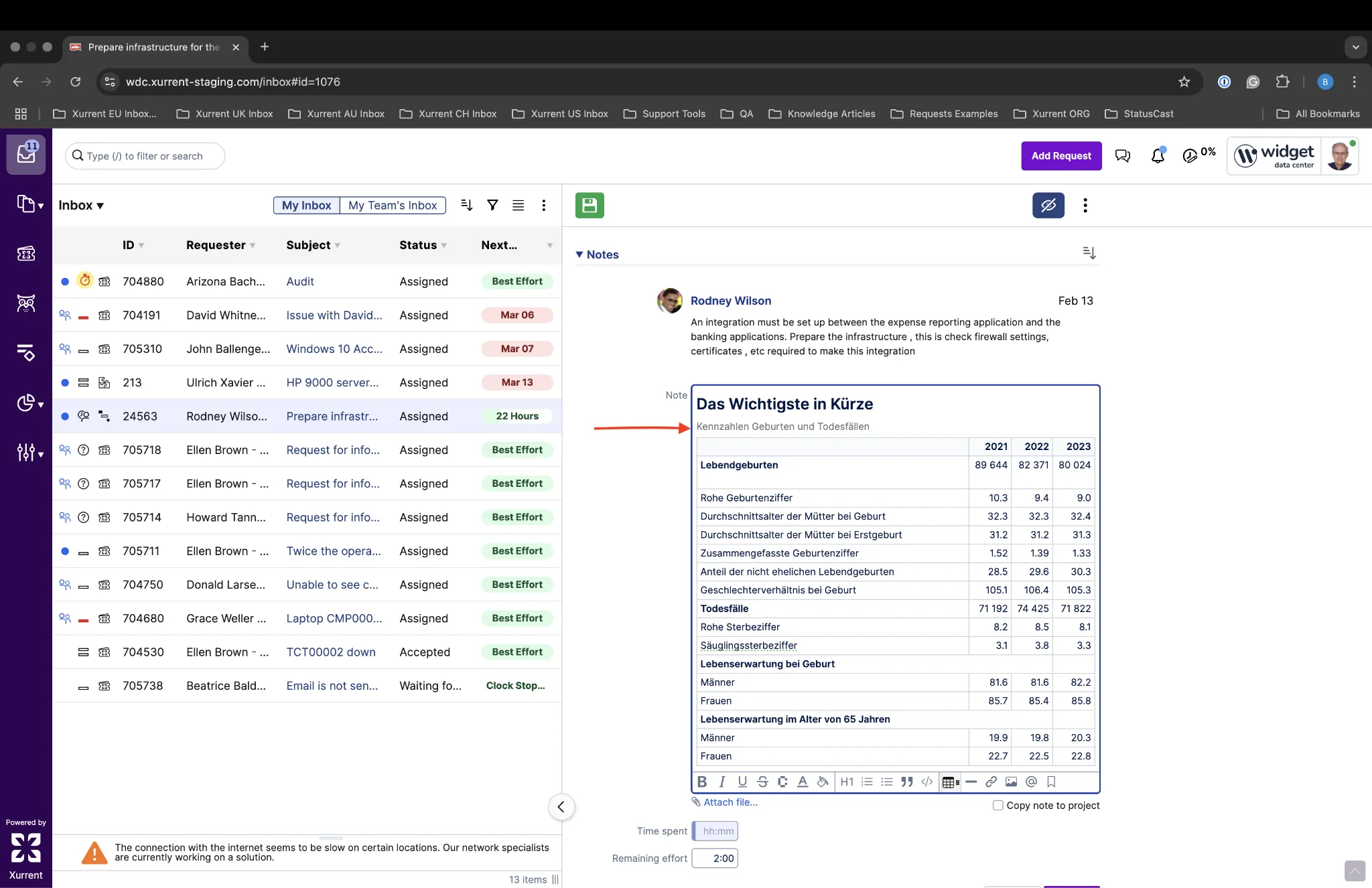
This improvement addresses an issue where intended formatting is lost during paste operations in the Xurrent Notes feature. In the example below, the intended table title and formatting is preserved during paste operation.

When viewing the audit trail with "Show field changes only" selected, users with Auditor or Account Administrator roles will now see an "Export to PDF" button. This button will export the entire audit log history in a single file. This removes the need for workarounds to produce a PDF, and includes the entire audit history in a single file.
Note: The PDF generation process runs in the background, and once complete, the user receives an email notification with a link to download the PDF file.

In Xurrent, teams can work with or without a coordinator. Coordinators can assign requests to the team members. It is also possible to let the system decide which assignments go to which members. For this, the Auto-assign checkbox is available on the Team record.

A small improvement has been made to this feature. This is best explained with an example.
When a person reassigns a request that has been auto-assigned to them, the auto-assign feature looks for another team member to route the request to. Historically, in the case where there were no other team members in the same working hours, that same person who reassigned the request could be assigned it again. Now, if there are no other team members in the same working hours, the auto-assign feature has been updated to instead select a team member in a time zone starting soon.
This is a small enhancement to the Group by capabilities in the My Team's Inbox Report - enabling Type as a grouping option.

The enhancement that was first announced as an important message in the Development Update of January 25, 2025, is now again available in QA. When an approval must be done in Self Service, all the relevant fields and notes are available to populate. When the approver makes their choice between 'approve' or 'reject' and a required field was not yet filled in, a message is displayed to warn the user of this. If no field is required, the approval or rejection is effected immediately.
In last week's release, some changes were already made to the Actions menu. This week, the Action menu in several of the Settings pages have been removed. The actions they contained are moved to the Ellipsis menu of those pages. This concerns the following pages:
As previously announced, we have now updated several icons. The icon for requests had become outdated, as only a fraction of requests are registered by the service desk from a phone call. The icon for workflows has also been updated. Since we updated the term 'Change' to 'Workflow', the wrench icon which we continued to use was not an obvious match for every user. The icons for Request Template, Standard Service Request (in Self Service), and Workflow Template have also been updated.

In the release to QA of February 10, 2025, we announced an enhancement to the self-service search results. Based on feedback from our customers, we took this enhancement back and improved it. Now, it is ready to be tested again.
Until now, the self-service search results would by default include any results from the following record types, depending on the availability of these record types for the user who is logged in:
For most organizations and their end users, though, standard service requests and knowledge articles are more important than any of those other results. For other end users, configuration items or services may be more important. They were already able to change the results by pressing the Refine Search button, but only after the search.
That is why the self-service search has now been made configurable. An account administrator or account designer can configure the default record types that can come up in self-service search in the 'Self Service Design' section of the Settings console, after which the end user is still able to refine the search. Depending on how the self-service portal has been designed, the homepage can contain two types of search fields. Both can be configured independently.

Let's configure these two search fields to by default limit the global search field in the top bar to just Standard Service Requests, Knowledge Articles and Services, and the search bar to just show Assets.
In the 'HTML' section of the Self Service Design look for the search element with class global-user-menu-btn global-search-link and change the href attribute to:
/self-service/search?types=request-template,knowledge-article,service
It will then look like this:
<a class="global-user-menu-btn global-search-link" title="Search" href="/self-service/search?types=request-template,knowledge-article,service">
To configure the search bar, look for an element called self-service-search. We can change it as follows:
<self-service-search data-placeholder="Search assets" data-types="ci"></self-service-search>
Searching for 'Email' from the top will now only show standard service requests, knowledge articles, and services. Pressing the Refine Search button will show those three record types selected. The user can remove or add record types, which immediately changes the results.

With the upcoming change where table views and assignment records are by default shown in full view, adjustments have to be made to many related elements. One of those is the Actions menu, the one with the cogwheel icon. This menu, and its options, were built to dynamically control either the view, or the record. These options should now be separated, and some changes have already been made.
'Help & Support' and 'Rate Xurrent' were already moved to the Personal settings, so are now removed from the Actions menu. The 'New record' option (e.g. New Request when in a Request view) has also been removed, as it is redundant. The shortcut, which was displayed next to that option, is now shown when a specialist hovers their mouse over the + button.
Lastly, the 'Change Calendar' and 'Project Calendar' links have been removed, too. From assignment records, such as a request or project task, these links can be found under the ellipses menu. Pressing them shows the calendar filtered on the service of the request. When the change or project calendar was selected from a view, the unfiltered calendar was shown. This is no different from accessing these calendars from the Analytics console, where they can still be found.
To improve the alignment of records such as requests and tasks when switching between 'View' mode and 'Edit' mode, these records were displayed left-aligned in production as of last week. Especially when the SHB was opened, the pages would 'jump' from right to left. This left-alignment was especially an improvement on small to regular size screens, but it did not look as good on large screens. It now only happens when the screen width is smaller than 2080 pixels. On larger screens, the pages are center-aligned, again.
When a specialist uses Xurrent on a small tablet, or sets the window or screen to a very small size, Xurrent changes to 'Tablet Mode'. This adds a Back button (chevron) to the record, to navigate back to the original views, and two buttons to navigate to the previous or next record in the view. The back button has now been moved a bit down, next to the Edit Record button. The Previous and Next buttons have been removed, in preparation for an upcoming change.

When a request, problem, release, workflow, task, project, project task, or risk does not have any notes yet, this is now indicated at the right side of the record, if the specialist's screen is wide enough to display the record over two columns. This helps the user to more quickly see the current state of the record, is a visual improvement if the record is viewed in full view, and is a preparatory step for allowing specialists to add notes in view mode.

Until now, navigation within the Records menu worked differently from the Analytics and Settings menus. Where the Records menu has always been a dropdown menu, the Analytics and Settings menus behaved more like separate consoles. After pressing these menu buttons, a secondary navigation was displayed with further options within those menus. This has now changed, for several good reasons. First, a consistent user interface improves the overall user experience. Second, pressing the Analytics console menu button immediately loaded the first dashboard, causing possibly unnecessary strain on the database. And finally, we will soon introduce a secondary navigation bar for most views in Xurrent, clashing with the Analytics and Settings secondary navigation.
The Analytics dropdown now shows the options in three categories: Dashboards & Reports, Changes & Projects, and Data & Insights:

The Settings dropdown shows the options in the same categories as were already available in the settings overview page:

Some adjustments will still be made to this dropdown menu, including a filter option to quickly find the right settings page.
The Xurrent AI Autoclassifier has proven to be very useful when an end user registers a request without selecting a Service Instance. By selecting 'None of the Above' the category is set to 'Other' by default. When requests are logged in this manner and the status of the request is 'Assigned', a 'Nearest Neighbors' search is started, attempting to find a similar request that was previously registered. If the level of confidence of the AI for this classification is high enough, it then classifies: Service Instance, Team, Category, and Impact.

There are, of course, other scenarios where auto-classification would be useful. Requests may come in via an observability integration directly to a specific service instance. It's also possible that a customer may want to have the AI classification run at different points in time. For example, if a request has been misrouted manually. Now, organizations can set up automation rules to help classify requests, using the new 'ai_similar_request' expression.

We have added a simple feedback mechanism, where the end user can let us know if the answer of the Virtual Agent on Self Service v2 was helpful or not, by clicking the thumb up or thumb down button. This will allow us to continuously improve the results of this feature.

As you are probably aware, we are making some major changes to the Specialist Interface. The next big change, which we hope to release within two weeks, is showing the assignment records (requests, tasks, workflows, releases, problems, projects, project tasks, and risks) in full width view by default, and so no longer in the current split view. In an intermediary step, we had to place the quick action buttons aligned with the table view (left), while the records they control are at the right of the screen. This has now been improved.
The quick action buttons for e.g. editing, starting, or completing a record have now been moved down and sit atop the assignment record.

The + button which adds a new record, stays above the table but is now purple, just like the Add Request button. The Gear button, which opens the Action menu, will soon disappear; its options moved to other menus.
When using global search in Xurrent Self Service, many record types are searched, including requests, tasks, project tasks, and even shop articles and services. For most end users, though, standard service requests and knowledge articles are more important than any of those other results. That's why we now show only these record types by default.
End users who use global search on the self-service homepage can still refine their search, by pressing the Refine Search button. They will see that 'Standard Service Request' (request templates) and 'Knowledge Article' are the only options that are selected for this search. As soon as any other options are selected, these are immediately presented to the user. Reversely, when an option is disabled, the results are also immediately updated.

When an approval task for a workflow or a project is sent to an approver by email, the summary of that workflow or project - which contains important information for the manager to decide whether the task should be approved or rejected - is added as an attachment. Senior managers who are tasked with many such approvals are able to finish these tasks faster when the summary is displayed inline in the email, instead as an attachment. This is now possible.
Two new email template variables have been added: {{workflow_summary}} for the Task Assigned to Approver template, and {{project_summary}} for the Project Task Approver Assignment template.
| Variable | Email Template |
|---|---|
| {{workflow_summary}} | Task Assigned to Approver |
| {{project_summary}} | Project Task Approver Assignment |
Adding these variables to the email template will add the summary to the email text.

If your organization also wants to stop sending the workflow and project summaries as attachments, just clear the PDF design field from the (project) task template.
Two weeks ago, we added a 'Currently Signed In' section in the Access & Security tab of the Personal Settings, allowing users to see if the system is accessed from an unknown device, and immediately revoke that access. A similar section has now also been added to Xurrent Self Service.

Since last year it has been possible to customize the colors of dashboards, using color palettes. These dashboards can be shared to key contacts and customer representatives, or with specific teams or skill pools. Dashboards can also be printed to PDF, from the ellipses menu. These PDFs are now also created in the same color scheme as the dashboards.
The N-able app is now available in the App Store on QA, allowing organizations to use N-able Central as their Remote Monitoring and Management (RMM) tool while automating request creation in Xurrent.
This integration enables organizations to establish rules within their existing N-able Central account to automatically create and manage tickets in Xurrent based on key system events or triggers. Whether it's responding to a critical system alert, managing device health, or tracking maintenance tasks, this integration ensures that your IT team stays efficient and responsive.
With this app, you can help eliminate manual processes and gain better visibility into your IT environment, all while leveraging Xurrent's service management capabilities.

For guidance on installation, please refer to the Knowledge Article Installing and Configuring the N-able App.
It is now possible to access the Out of Office information of a person in Xurrent using automation rules. There are many practical use cases for this enhancement. It is now, for example, possible to check whether someone is, or will soon be, out of office. When the automation rules are used to reassign a request, problem, workflow task, or project task, the logic could be configured to pass the assignment to someone else instead. Also, if a team member assigned to a request is absent and the requester adds a note, it is now possible for the other team members to be automatically notified, so they can respond or take action.
Below is an overview of the fields that are now exposed:

And here is a note created with this automation:

What is this about? Giving more insight into resolution targets up the service chain.
Why is this useful? No matter how far down the chain a request has arrived, the whole company should be responsible for the customer-facing SLA. Even if the current targets are safe for your team, the original SLA may be in danger of being breached.
Who will benefit? First line support teams, service owners, and ultimately end users.
When a request is registered, the next target for that request (based on the SLA, i.e. coverage, the service instance (SI) and the service offering) is displayed in the request header. The color of that header indicates whether the related service level agreement is still ok, about to breach, or already breached. In the example below, the SLA is about to be breached.

The service-oriented architecture of Xurrent makes it very easy to forward a request to a supporting team, by applying a child SI to the request. Looking at the header of the request, members of the newly assigned team then see the next target for them, which is based on another SLA with its own response and resolution targets.
As a first step to give service owners and other specialists a better overview of the complete SLA chain, a customizable column has been added to all request views. This column, the Customer Target, shows the resolution target (not the response target) of the customer of the SLA within the same directory account.

Customer organizations that are on the Enterprise plan could already display their logo at the top right of the Specialist Interface. This logo is also the button for the account switcher, which means that every support domain can be easily identified if each account has its own logo.
Customer organizations that are on the MSP plan can now also display their logo on the Specialist Interface.




.webp)
.webp)

.webp)



