Blog
Insights & updates from our experts


Resolve plant floor and IT issues before they disrupt production.

Stay audit-ready while resolving issues and reducing operational risk.
Resolve issues quickly with an AI-powered system that automates ticketing.

Unifiy IT, HR, Facilities, Finance, and more on a single, AI-powered service platform.

Simplify on-call scheduling, automate escalations, and reduce burnout.

Automate postmortems, AI summaries, and post-incident workflows

Create, organize, and continuously improve your knowledge base to find the right answers with Sera AI.

We're here to help

The integration with Atlassian Jira using the Xurrent Integration Service is

The integration with Atlassian Jira using the Xurrent Integration Service is

The integration with Atlassian Jira using the Xurrent Integration Service is

The integration with Atlassian Jira using the Xurrent Integration Service is

The integration with Atlassian Jira using the Xurrent Integration Service is

The integration with Atlassian Jira using the Xurrent Integration Service is

The integration with Atlassian Jira using the Xurrent Integration Service is

The integration with Atlassian Jira using the Xurrent Integration Service is
Resolve issues quickly with an AI-powered system that automates ticketing.
Unifiy IT, HR, Facilities, Finance, and more on a single, AI-powered service platform.
Simplify on-call scheduling, automate escalations, and reduce burnout.
Automate postmortems, AI summaries, and post-incident workflows
Create, organize, and continuously improve your knowledge base to find the right answers with Sera AI.
Resolve plant floor and IT issues before they disrupt production.
Stay audit-ready while resolving issues and reducing operational risk.

Detect, respond, and resolve incidents fast to cut downtime and MTTR.

Keep your store online, even during your biggest sales moments.

Protect patient data and resolve issues fast, so care teams stay focused on care.

Standardize service delivery across every store and channel.

We are here to help 24/7

Connect with other Xurrent Users

Get insights and tips on how to get the most out of Xurrent

Apps, APIs, and updates

Xurrent service functionality

Eliminate manual tasks, optimize workflows, and deliver faster resolutions.
Learn how organizations have reduced downtime, improved 50% MTTA & MTTR, and cut costs with Xurrent IMR.
Discover Xurrent IMR's quick support, bidirectional integrations with Jira and Slack, and more cohesive incident response capabilities compared to Opsgenie.
Understand why users value Xurrent IMR for its intuitive interface, efficient incident alerting, customizable On-call schedules, and escalations.
This post is a living document, updated throughout the quarter as new product improvements roll out. Each update listed here is released to our QA environment on the date shown and typically promoted to production the following week. Along the way, customers can review changes, share feedback, and help shape what ships next. Xurrent delivers product updates on a weekly cadence to keep improvements moving continuously.
Time spent reports can now be grouped by 'type' instead of only filtered. This enhancement allows users to better understand how time is divided between requests and projects, making reporting more actionable. It adds flexibility to analytics by giving a clearer picture of how work is being tracked and completed.

Rich text fields now auto-adjust colors for better readability in light and dark mode. Text and background colors adapt to ensure clear contrast, while Xurrent brand colors use CSS variables for seamless theme switching.

We've introduced two improvements to address issues with custom colors in legacy UI extensions:
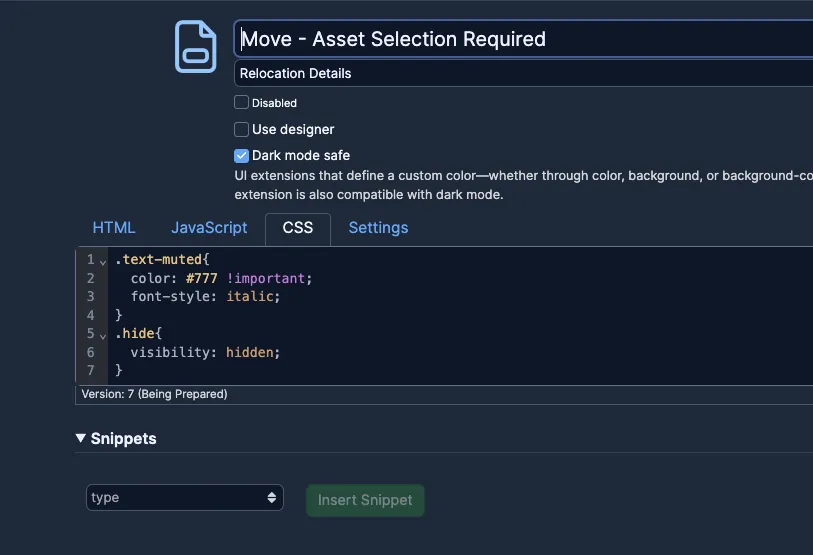
The UI Extension Designer remains the best path for ensuring long-term compatibility with future Xurrent UI/UX updates.
The team continuously reviews Virtual Agent prompts and responses against the latest model versions available regionally. Recent evaluations showed that the current prompting was regressing in several regions, so we have moved to a previous prompt version that delivers stronger performance against benchmark evaluations.
We have improved Out-of-Office delegation to make task management smoother. When the original approver returns, any delegated approvers will now be automatically removed from pending tasks.
This update applies to out-of-office periods ending after the deployment. Existing delegated approvals will remain in place and can be removed manually if needed.
We have made a series of updates to Dark Mode across Specialist and Self-Service experiences, improving reliability, appearance, and accessibility. These updates ensure color mode preferences apply consistently, settings save correctly, and visual issues in chat, automation rules, reports, and calendars are resolved.
We appreciate all the positive feedback on Dark Mode and will continue to refine the experience based on your input.
This has been an oft requested feature, and we are excited to share it in an off-cycle production release. You can access it now in your profile dropdown.

The refreshed design flips the palette to darker backgrounds with lighter text, while keeping familiar colors like purple accents and warning banners intact. Enjoy a sleeker, modern look with the same functionality you rely on throughout the Xurrent application.
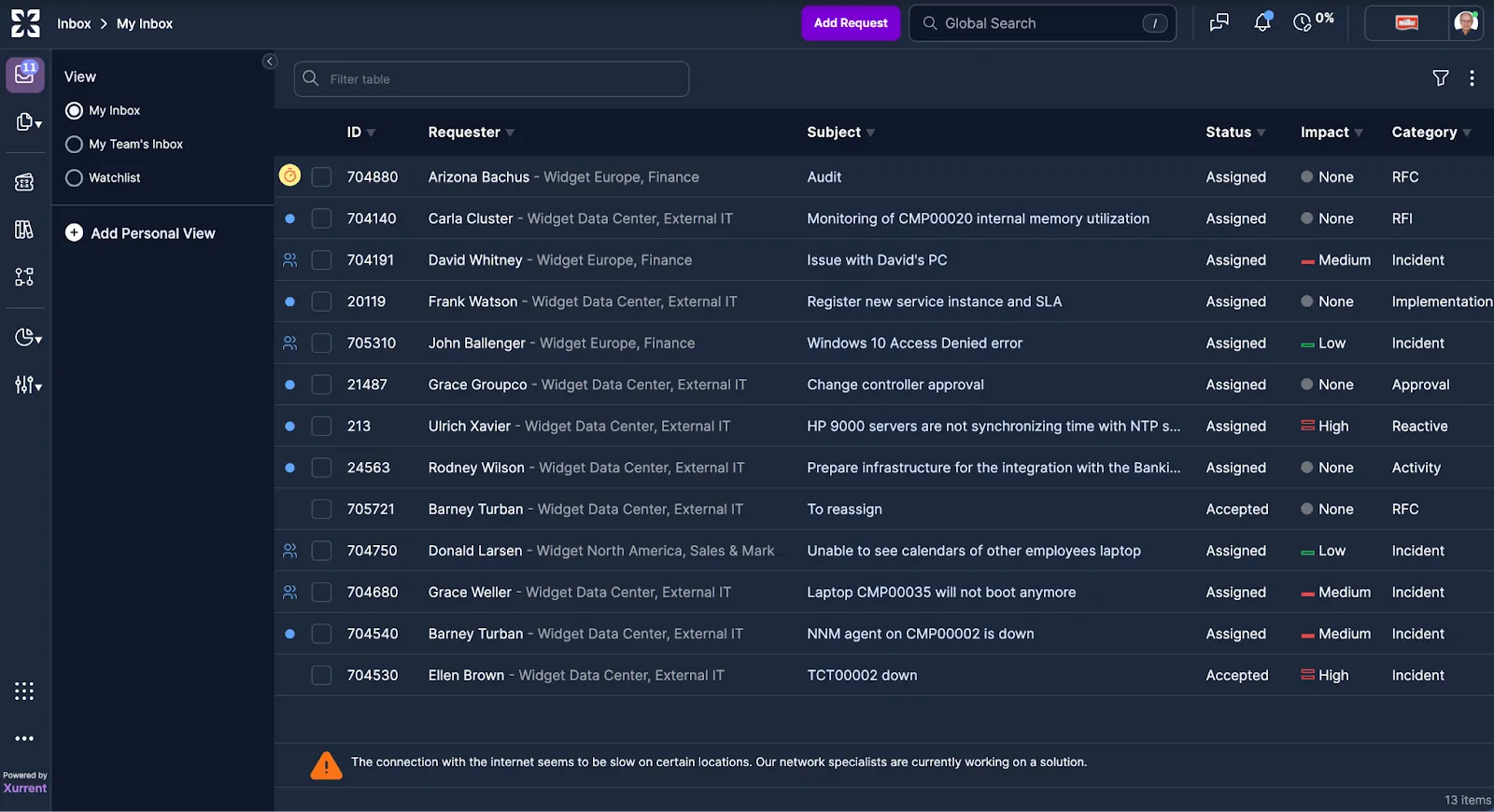
We've added extra convenience by creating a dedicated section for all custom links. This builds on last week's launch of the new Resource Hub menu, which consolidates all key resources in one place.

We've updated our sidebar to a clean white look for better focus and clarity. Our signature purple still exists throughout the site as our primary color.

To ensure our icon is universally understood and inclusive for our global users, we've changed it from an owl to a book, a classic symbol for knowledge (see above).
'Workflows' has been added to the main navigation, replacing 'Projects'. This change reflects current usage patterns and user feedback (see above).
We've added a new Waffle Icon! This provides a seamless transition to your StatusCast instance, with Zenduty integration coming soon. If you already have an account, you'll be logged in automatically using the shared credential. If not, you'll be directed to pages where you can learn more and sign up.

We've consolidated all key resources into a new Resource Hub menu. From one convenient spot, you can now access the Help Page, API Docs, Community, Xurrent Academy, and download our mobile apps. We're also actively working on enhancements to the Help Page, scheduled for release in Q4.

We've improved navigation with smarter breadcrumbs:

We've added the ability to read the attachments field of a knowledge article in automation rules.
Sera AI marks an exciting milestone in the evolution of our AI capabilities at Xurrent. The initial release introduces subtle enhancements, such as the new logo in the Virtual Agent Self-Service. More importantly, it represents the creation of an AI fabric, which serves as the enablement layer for innovations like the Specialist Co-Pilot. This foundation will continue to drive increasingly sophisticated features for our customers.
Remember, AI features are included in your Xurrent license, so there is no better time to start exploring their potential if you have not already.

Read more in our press release and feel free to reach out to me directly to discuss how AI could benefit your organization!
Updating a request to Waiting for Customer no longer triggers a notification to the same user who made the change, eliminating unnecessary self-notifications and reducing inbox noise.
Xurrent continuously evaluates our application against leading WCAG accessibility guidelines. As part of this effort, we have delivered several quick wins to enhance screen reader compatibility, readability, and semantic correctness:
These updates make the product more inclusive and improve the overall user experience.
We've enhanced the Virtual Agent's accuracy with a powerful new update to the Knowledge Improver. You can now add targeted keywords to your existing knowledge articles and request templates, making it easier for the Virtual Agent's search engine and AI to find exactly what users are looking for.
By improving retrieval accuracy and relevance, this update means more precise answers, fewer fallback responses, and a smoother, more helpful experience for your users.

The new collapse button for Notes is now available to help users reclaim vertical space, especially when drafting longer notes in two-pane view or on smaller screens.

Rich text fields now support inline playback of .mov video files. This enhancement improves the usability of Apple-native screen recordings and other .mov media, allowing them to be displayed directly within request notes, knowledge articles, and other editable content areas without requiring download or conversion.

The team received consistent feedback that customers missed the legacy arrows for navigating to the top or bottom of the notes. We have restored this functionality.

With the interaction between the SHB and the new sticky Notes placements, our aim is to ensure specialists are aware of the helpful tools available in the SHB while maintaining clear access to key features on the request card. In certain scenarios, particularly in two-pane view, the SHB was found to be too obtrusive. We have made updates to dynamically create space next to the request card, reducing overlap and improving usability.

A new collapse button will help users reclaim vertical space, especially when drafting longer notes in two-pane view or on smaller screens. We expect this improvement to be available in production early next week.
Based on community interest, we are adding the new closure codes to Case Management. These updates will be available in QA by Tuesday, and are scheduled for production release on July 31.
The features previously reported as "in progress" have now been completed and were included in the production release that went out yesterday.
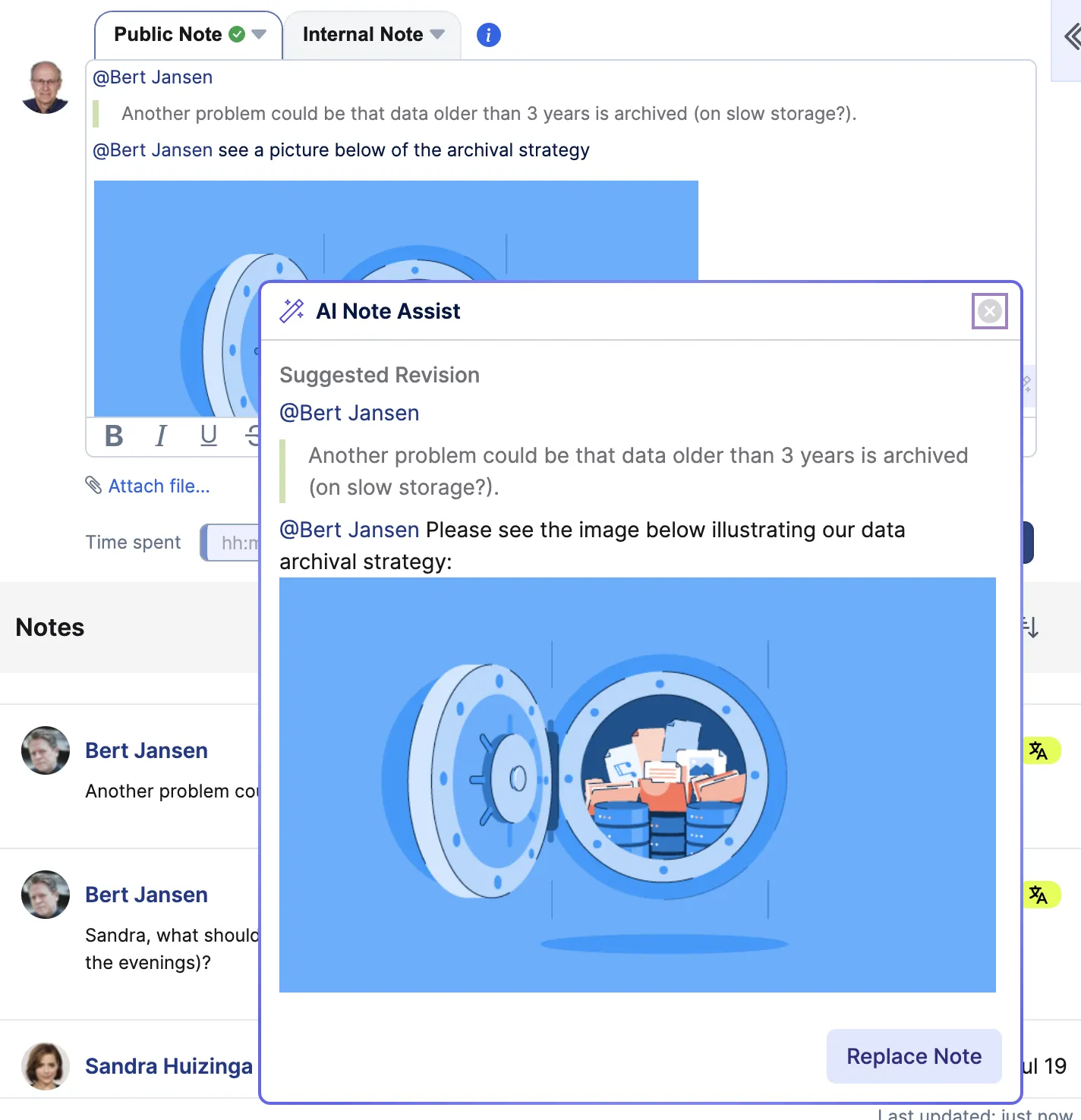
The Note Assist feature is now functioning well, with recent refinements addressing scenarios involving @mentions, reply notes, and images (example below). These updates enhance the feature's performance beyond general Grammarly-style improvements.
The team is excited to release to QA an overhaul of the Notes section on the request card. Pendo guides and a walkthrough video from Betty are included to highlight the updates. Please see the list of what's new below:


As always, we welcome your feedback and suggestions here in the community. If you'd prefer to discuss anything more specific to your account's needs, I'm happy to schedule time for a 1:1 conversation.
A new Closure Code field is now available when completing a request. This feature enables accounts to define a custom list of closure reasons, offering additional, configurable context alongside the existing Completion Reason options in Xurrent. It supports more accurate tracking and analytics of completed requests.
When a user completes a request, a dropdown menu will appear (if configured for the account) allowing selection of a relevant Closure Code, such as "Bug Fix," "User Error," or "Configuration Issue." These codes are customizable and managed by administrators from account settings.
Closure Codes:
Create Closure Codes
In Settings → Closure Codes, create examples like:

Assign a Closure Code to a Request
Open a request (e.g. #705310), set Status to Completed, add a Completion Reason, then select a Closure Code from the dropdown (disabled options are excluded), and save.

View & Filter by Closure Code
In the Requests Console, add the Closure Code column and filter results by specific codes.
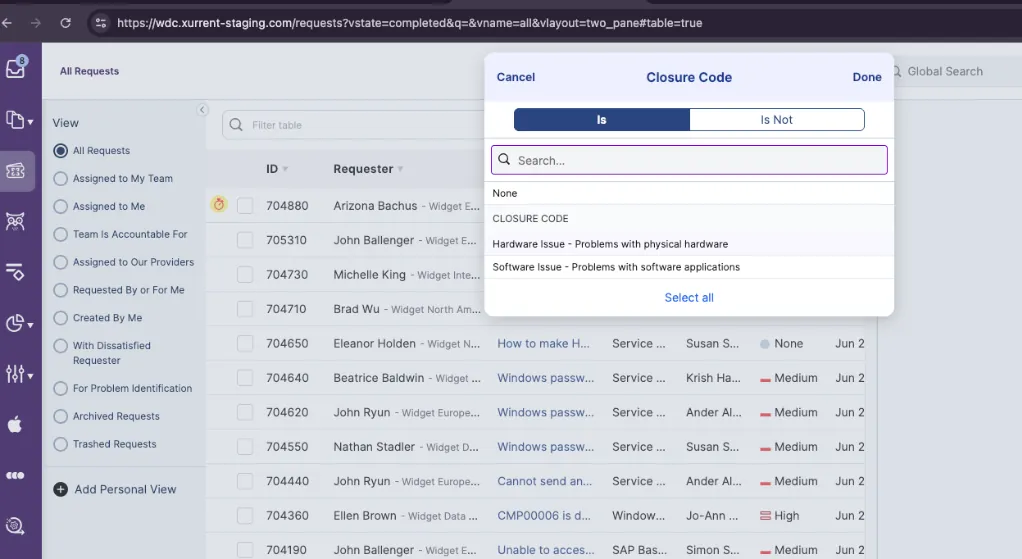
Verify in Reports
Go to the Reports Console, filter by Closure Code, and review data in Completed Requests by Closure Code.

The inline workflow summary has been enhanced to provide a more comprehensive and user-friendly experience.
These improvements make key data more accessible and help streamline your daily workflows.
Example
Begin with a default email template and update it to contain the {{workflow_summary}} variable.

Running the workflow with UI extension custom fields triggers an email that includes the workflow summary.

The Virtual Agent is expected to support a limited set of inbox scenarios with high fidelity, including summarizing requests in the self-service My Inbox and providing a summary count.
This week's update improves outcomes for these scenarios and introduces better redirects to My Inbox for prompts that the VA cannot currently support, such as updating the note of an existing request. Additional updates are planned for next week's release to ensure that tasks and problem records are similarly improved.


The Audit Trail view now uses the label "Email PDF" instead of "Export to PDF" to more accurately reflect its behavior. When selected, a PDF of the audit trail is generated and sent to the user's email as an attachment, rather than initiating a download or opening a print dialog. The confirmation message has also been updated to clearly state that the PDF has been emailed. This change addresses prior confusion and is currently limited to the Audit Trail screen.
This week, we're building on the updated "load" call-to-action experience by introducing dynamic follow-up prompts within the Virtual Agent. These enhancements consolidate all available user actions into the call-to-action pill section - whether it's redirecting to a knowledge article, revising a request, or finalizing it via a browser link. By centralizing these interactions, the experience becomes more consistent and intuitive for end users. The dynamic nature of these prompts also enables us to adapt and expand the available actions over time based on actual usage data, making the Virtual Agent increasingly responsive to user needs.

As part of this release, we've addressed feedback from several customers testing the Virtual Agent regarding gaps in support for non-English languages. This work has focused on two areas. First, we've improved how the Virtual Agent prioritizes the language defined in a user's personal preferences, ensuring a more consistent and localized experience. Second, we conducted a thorough review of translation coverage and identified missing localization for several key call-to-action elements. These translation files have now been completed and will undergo manual review. In alignment with our standard process, these will then be pushed to QA around Tuesday next week to ensure full coverage across supported languages.


.webp)
.webp)

.webp)