Blog
Insights & updates from our experts


Resolve plant floor and IT issues before they disrupt production.

Stay audit-ready while resolving issues and reducing operational risk.
Resolve issues quickly with an AI-powered system that automates ticketing.

Unifiy IT, HR, Facilities, Finance, and more on a single, AI-powered service platform.

Simplify on-call scheduling, automate escalations, and reduce burnout.

Automate postmortems, AI summaries, and post-incident workflows

Create, organize, and continuously improve your knowledge base to find the right answers with Sera AI.

We're here to help

The integration with Atlassian Jira using the Xurrent Integration Service is

The integration with Atlassian Jira using the Xurrent Integration Service is

The integration with Atlassian Jira using the Xurrent Integration Service is

The integration with Atlassian Jira using the Xurrent Integration Service is

The integration with Atlassian Jira using the Xurrent Integration Service is

The integration with Atlassian Jira using the Xurrent Integration Service is

The integration with Atlassian Jira using the Xurrent Integration Service is

The integration with Atlassian Jira using the Xurrent Integration Service is
Resolve issues quickly with an AI-powered system that automates ticketing.
Unifiy IT, HR, Facilities, Finance, and more on a single, AI-powered service platform.
Simplify on-call scheduling, automate escalations, and reduce burnout.
Automate postmortems, AI summaries, and post-incident workflows
Create, organize, and continuously improve your knowledge base to find the right answers with Sera AI.
Resolve plant floor and IT issues before they disrupt production.
Stay audit-ready while resolving issues and reducing operational risk.

Detect, respond, and resolve incidents fast to cut downtime and MTTR.

Keep your store online, even during your biggest sales moments.

Protect patient data and resolve issues fast, so care teams stay focused on care.

Standardize service delivery across every store and channel.

We are here to help 24/7

Connect with other Xurrent Users

Get insights and tips on how to get the most out of Xurrent

Apps, APIs, and updates

Xurrent service functionality

Eliminate manual tasks, optimize workflows, and deliver faster resolutions.
Learn how organizations have reduced downtime, improved 50% MTTA & MTTR, and cut costs with Xurrent IMR.
Discover Xurrent IMR's quick support, bidirectional integrations with Jira and Slack, and more cohesive incident response capabilities compared to Opsgenie.
Understand why users value Xurrent IMR for its intuitive interface, efficient incident alerting, customizable On-call schedules, and escalations.
This post is a living document, updated throughout the quarter as new product improvements roll out. Each update listed here is released to our QA environment on the date shown and typically promoted to production the following week. Along the way, customers can review changes, share feedback, and help shape what ships next. Xurrent delivers product updates on a weekly cadence to keep improvements moving continuously.
A new Executive Reporting Dashboard has been introduced to provide leadership teams with a consolidated view of service performance, operational efficiency, and automation impact.
The dashboard brings together multiple executive-focused reports into clearly structured sections, enabling faster insights and easier trend analysis. The initial set of reports includes:
Each report supports interactive exploration, allowing users to drill down into underlying data and better understand performance trends over time.
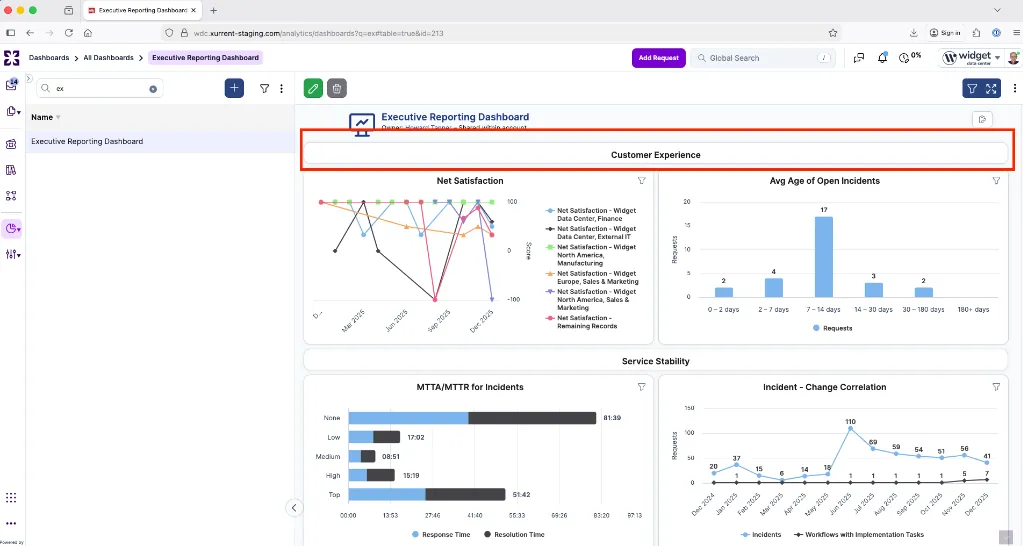
We plan to make several follow-ups in Q1, including extending data aggregation to support multiple SDAs and expanding coverage for asset management.
We have introduced a new GraphQL mutation that allows account administrators to revoke request visibility when a Service Level Agreement (SLA) unintentionally grants access to another account. This can occur, for example, when a request is moved and becomes visible to additional customer or provider accounts through an SLA.
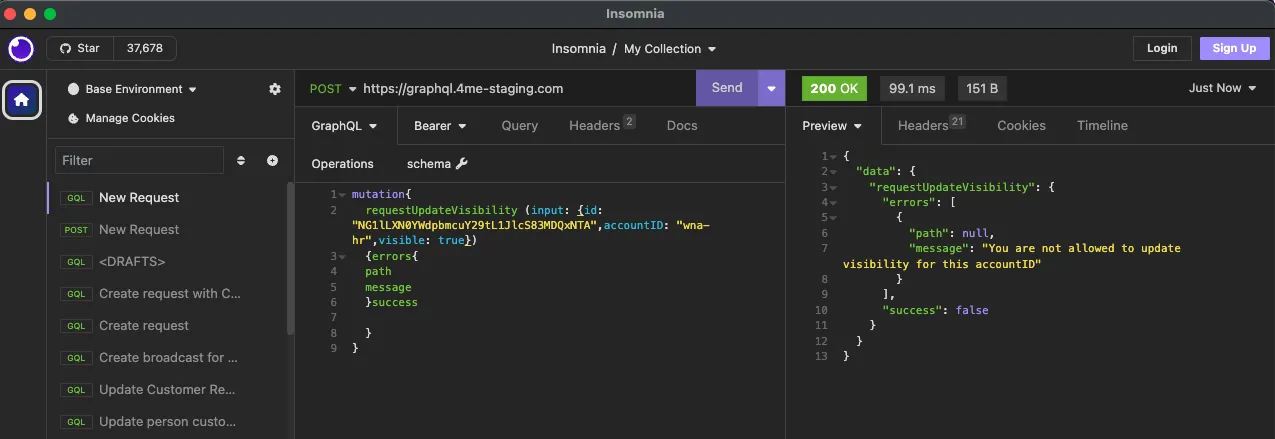
With this mutation, administrators can remove visibility for affected request accounts to ensure requests are only accessible to the intended parties. Visibility changes are subject to the following conditions:
If a service change later results in a new SLA being created for an account whose visibility was previously removed, the request will automatically become visible again.
Full details are coming soon in the Xurrent developer documentation: https://developer.xurrent.com/graphql/mutation/requestupdatevisibility/.
We have clarified how internal fields behave in Self Service UI Extensions. Tooltips now explain that internal fields are not evaluated for end users, so any visibility, section display, or required-field logic based on them will not apply. This helps avoid unexpected form behavior when designing conditional logic for Self Service.

A new reporting capability has been added to support insights into change stability. The Failed Change Rate metric measures how often workflows enter a progress halted state, displaying the count of halted workflows as a share of registered workflows in a combined bar/line chart.

Chart/tooltips:
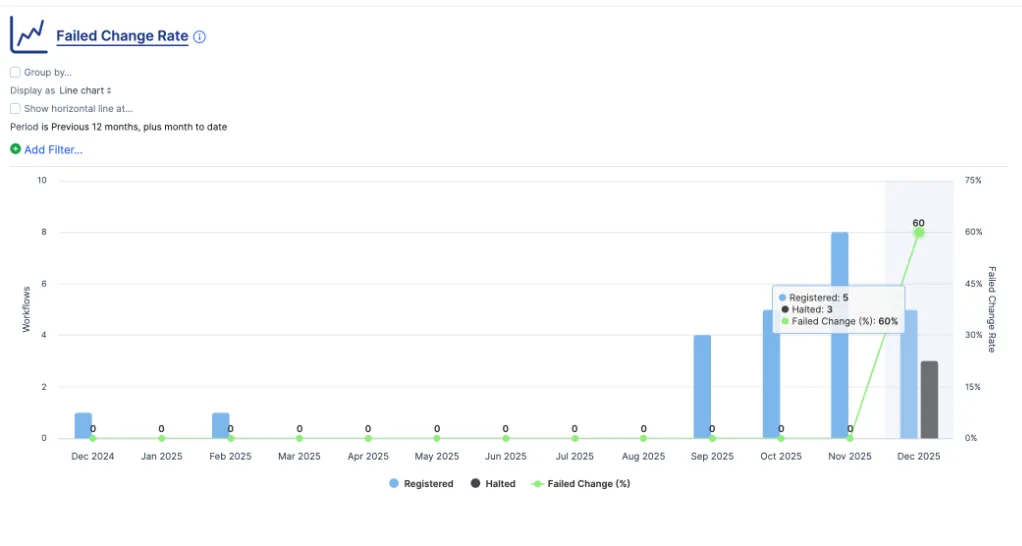
User Interactions:
Key capabilities include:
This enhancement improves visibility into change reliability and helps leadership teams identify patterns that may require process improvements. It's important to notice that only new events are recorded as this is a new tracking. So the "halted" value only appears from the date of the implementation of this feature.
The Registration Message configuration has been upgraded from a plain text field to a Rich Text field, enabling teams to format content using headings, colors, lists, and other styling options.
While plain text remains recommended for optimal clarity and accessibility, users can now choose enhanced formatting when needed.
This update introduces a more informative workflow progress bar that gives users clearer visibility into each workflow's overall progress. The new design highlights active phases, shows completed tasks, and presents a measurable progress indicator.
These improvements reduce the need for extra clicks and help users quickly understand the current status of a workflow or request. The update includes the workflow, request and task views for consistency.


Task templates now include an optional setting to "Copy to request as a public note by default."

When enabled, tasks created from the template automatically inherit this behavior.
This update supports more consistent communication across workflows and reduces the need for repeated manual configuration by teams that rely heavily on structured templates.
A new report has been introduced to support satisfaction tracking across organizations. It uses a methodology similar to customer NPS.
Net Satisfaction (%) is calculated as:
(Satisfied – Dissatisfied) ÷ (Satisfied + Dissatisfied) × 100
This metric helps reporting teams better understand experience patterns and monitor changes over time.

Like here: August has 12 total responses with 10 Satisfied 2 Dissatisfied.
Thus, (10-2) divided by (10+2) x 100 = 66.67
We have added a new report to provide better visibility into time spent at the request level. Customers can now view the total time logged per request for a selected period (for example, monthly), helping improve tracking and analysis of effort over time.

We have expanded the new ellipsis-menu functionality for hiding internal notes by adding a "Hide email notes" option. These options appear only when the relevant content type is present, and they automatically reset whenever you navigate away from a request to ensure nothing important is accidentally missed.

We have added new reporting capabilities to help customers better understand end-user adoption of the Virtual Agent. This includes a new report that tracks Virtual Sessions, defined as distinct instantiations of the self-service chat box, with visuals showing both total volume and the percentage share of overall chat sessions across Virtual Agent and legacy Support Chat. These insights help organizations measure adoption and monitor mix-shift away from support chat where relevant.

Additionally, the existing source filter in the Requests Registered in Self Service report now includes Sera AI, enabling teams to track the share of request volume routed through the Virtual Agent - another key indicator of engagement.

We have introduced a new optional setting that allows users to always show the category step, even when only one service is nested under it. This step was previously hidden due to a dynamic rule, but teams that rely on this consistency can now enable it. The default behavior remains unchanged to preserve a fast flow for users who prefer fewer clicks. This enhancement is now available in the Self Service Settings of the Support Domain Account.

We have introduced several important updates to improve the user experience when posting public notes to a linked request from a workflow task.
First, there is now a new visual cue that includes a warning message and a confirmation checkbox. These elements clearly indicate when a task note will be posted publicly if the task status changes to "Waiting for Customer." This has always been the technical behavior, but it often caused confusion and sometimes resulted in unintended note sharing. These updates make the process clearer and help prevent accidental disclosures.

The "Copy to request as public note" checkbox is now available in all scenarios, allowing customers to post a public note even without a status change. As an example, specialists can add public notes from the task while it is in the Waiting for Customer status.

Previously, there was no visual cue showing that a task note had been posted, and specialists had to navigate to linked requests or workflows to verify. This is now resolved with a new "Posted to" indicator on the task. If a note is copied to both a workflow and a request, both destinations are shown, separated by a comma.
For request groups, we display up to two request numbers, followed by "+ More." Each link takes you directly to the request.
This mirrors the source information that has always existed on the workflow or request side. We have also trimmed the text shown there to keep it cleaner while still linking to the full details.

Admins can now add an account-level registration message that appears in the New Request flow (Self Service v2 and Specialist Console), ensuring consistent guidance without editing every template.


ZenDuty is rebranding to Xurrent Incident Management & Response (IMR). See our new marketing page here. As part of this transformation, we have updated in-product references from Zenduty to Xurrent IMR.
The first deliverable in our Workflows UI/UX updates introduces targeted improvements to usability in the Gantt view. These changes are implemented across both Workflows and Project Management modules.
This enhancement adds "Add New Task Template" and "Add Existing Task Template" options alongside the existing "Add Task" button, opening a modal for quick template creation or reuse. Together, these updates create a clear and consistent menu of options for adding tasks and task templates, streamlining project planning by reducing navigation and keeping your context within the Gantt page.

The Add Task function has also been revised to use the same new modal approach, removing confusion for users who previously struggled to distinguish the meaning of the old icons.

You will also find that task templates can now be used multiple times within the same workflow, removing a previous point of friction.
We have added a new option in the notes toolbar that lets you hide internal notes while viewing or presenting requests. This allows you to keep sensitive or internal content private during meetings or screen shares. The toggle appears under the three-dot overflow menu, switching dynamically between "Hide Internal Notes" and "Show Internal Notes."

Your choice is saved for the session, so once hidden, internal notes stay out of view until you choose to show them again.

We have extended OpenID Connect (OIDC) Just-in-Time provisioning to support additional attributes: organization, site, and manager.
This brings OIDC to feature parity with SAML-based single sign-on and enables smoother user provisioning for enterprise environments using modern identity providers.
The Service Insight analytics page has been updated for smoother navigation. When you click on a row, details now open in line with your selected view preference:
This update provides a more consistent and intuitive experience across all views.
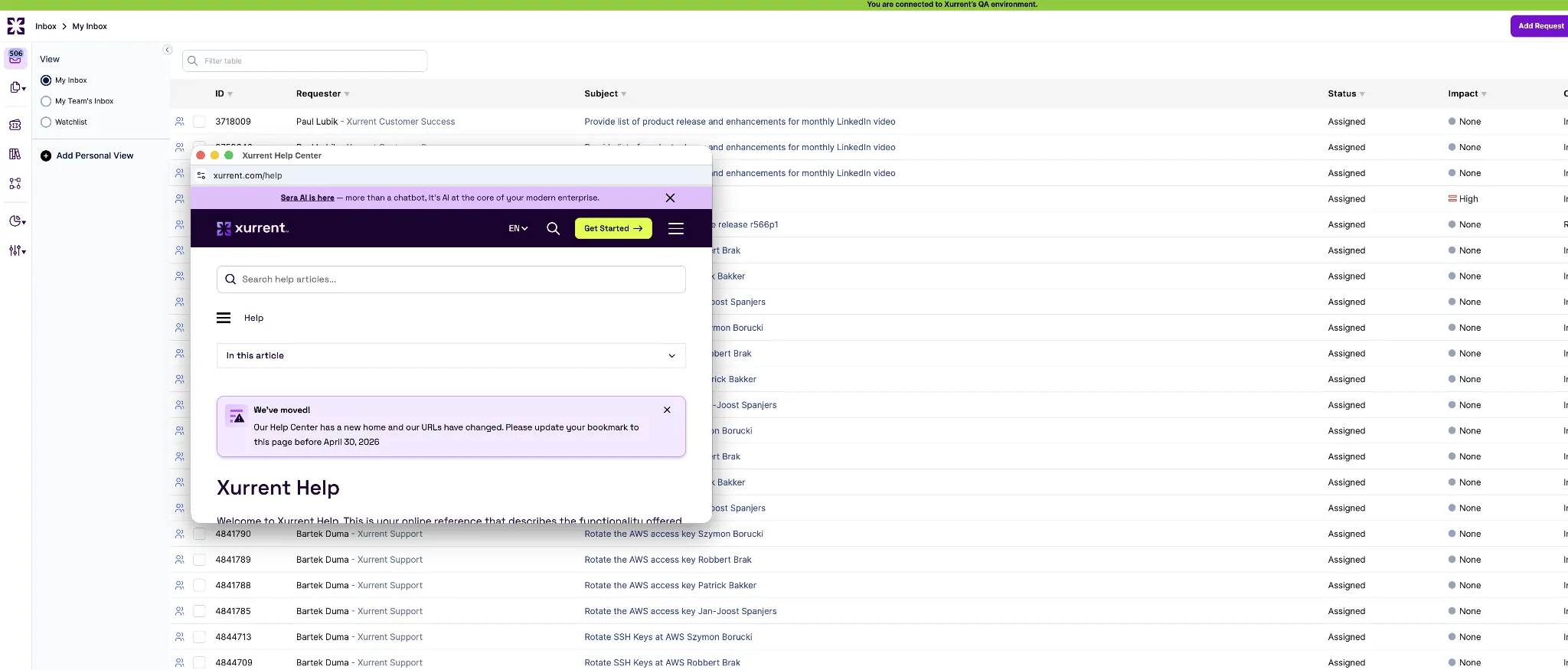
We've updated the Help experience so that when you access Help from the side navigation, it now opens in a new browser tab. This change provides a consistent and smoother navigation experience across the product.
We have standardized the date and time format to yyyy-mm-dd HH:MM:SS UTC offset for both the current view export and the all fields export. This update ensures consistency across export types and makes it easier to work with your data.
Managers can now set default Service Instance and Request Type values on Agile Boards, with support in the index view, filtering, import/export, REST, and GraphQL. Product Backlogs can also store a default Service Instance, which pre-populates when creating new requests and is included in import/export, REST, and GraphQL.

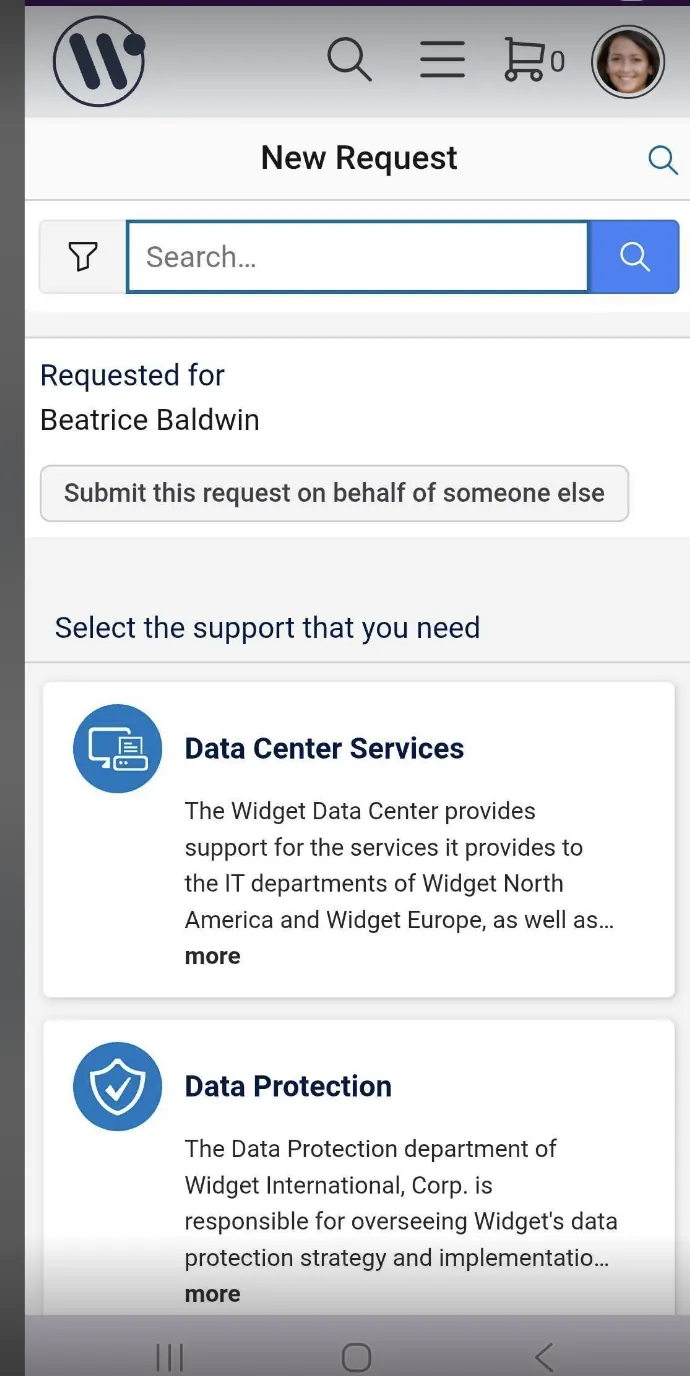
We have improved spacing and layout on the mobile "New Request" screen. The extra white space between the Search and Requested For fields has been removed for a cleaner, smoother experience.
We are excited to announce the launch of the new Xurrent Help, a more modern and easy-to-navigate help experience designed to make it simpler to find the information you need.

You can access it from the existing Help link in the left-hand navigation or through the Field Help ellipsis menus throughout the application.
We would love to hear your feedback as we continue to refine and improve the experience.
We're excited to begin the first in a new series of connections aimed at populating customers' CMDBs. We're introducing a templated connection that enables automatic population of the CMDB from Microsoft Intune.
Widely used across our customer base, Intune is a cloud-based service that allows organizations to manage and secure employee devices, including mobile phones, laptops, and tablets.
This connection automatically creates and updates below details:
Once installed, the app:
Installation instructions and more specific details can be found in a public Knowledge Article titled 'iPaaS • Intune - CMDB • Installation Guide' in your QA environment.
We've introduced a new "System Managed" option for UI extensions to improve data reliability and prevent race conditions when working with integration fields that are automatically maintained through automation rules or API updates.
When a field is marked as System Managed, the following configuration options are automatically cleared and hidden to prevent conflicts:
Previously, these fields were rendered as hidden input fields in the GUI. This created a common race condition scenario: a user would have a request open in edit mode while an automation rule updated one of these fields in the background. When the user pressed save, the automation's value could be inadvertently cleared and replaced.
With the new System Managed option, fields marked as such will no longer be editable through the GUI. Instead, their values are maintained automatically, and they are excluded from the data sent from the browser to the server. A tooltip is displayed in the interface indicating that these fields are managed by automation or API calls, making their behavior clear to end users.

Phase labels in workflow Gantt charts now keep their blue background steady by default, instead of fading until selected. This makes phases easier to spot and improves readability, especially in complex workflows. The highlight remains consistent through all interactions and works in both dark and light modes.
New:

Previous:

The AI Summary is now triggered on demand through a new 'Generate Summary' button. This change, driven by customer feedback, gives users more control over when summaries are created and reduces the space the summary occupies in notes.

A new 'Cancel' button is now available when editing notes from show mode (i.e., not the request's edit mode). This gives users the flexibility to discard changes and return to the original note without saving.
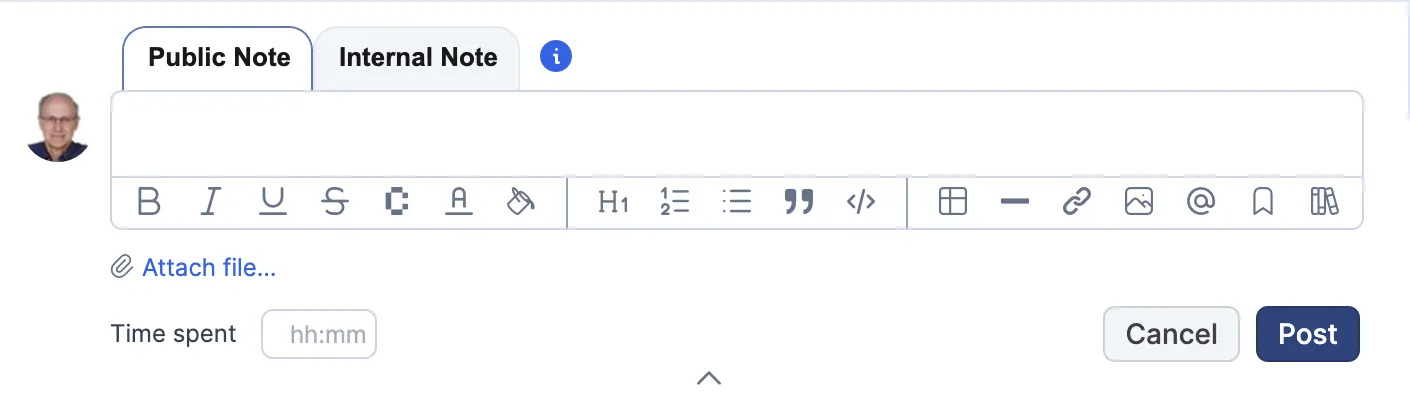
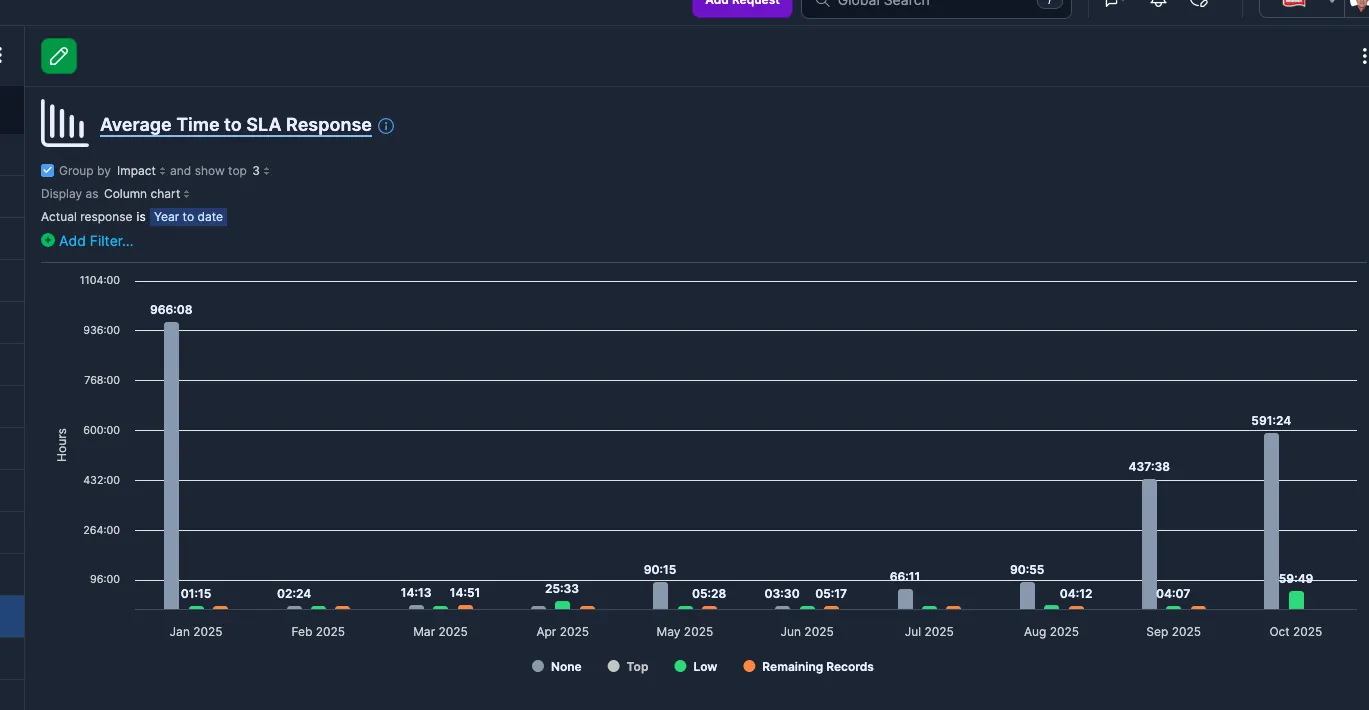
We have introduced two improvements to enhance visibility and consistency in Dark Mode:
Together, these updates deliver a more polished visual experience in Dark Mode.
Xurrent now explicitly supports uploading employee photos through data URLs using the picture_uri or pictureUri fields in REST and GraphQL APIs. This approach aligns with GDPR standards, clarifies the 2 MB size limit, and ensures safer, compliant data handling.
Since the introduction of writing notes directly in view mode, one frustration was losing drafts when switching to edit mode unless you copied them first. This has now been addressed. Your note draft is automatically preserved when moving to edit mode so you can continue seamlessly without losing progress.
As part of last week's release, we introduced improvements to address readability issues with custom colors in legacy UI extensions. By default, extensions now display in light mode when dark mode is enabled, preventing text and color conflicts. We also added a new option to mark an extension as dark mode safe once you've reviewed its compatibility, available in the UI via a checkbox.
This week, we extended that functionality to import/export, REST API, and GraphQL. You can now set the dark_mode_safe field on UI extensions programmatically as well.
Until now, Service and Service Instance objects showed the same default icon when no picture was assigned. With this update, the service instance icon is now used consistently across all views (show mode, search, service catalog, etc.), ensuring a clear distinction and resolving a longstanding inconsistency, previously displayed incorrectly. This correction makes navigation clearer and more consistent for users.


.webp)
.webp)

.webp)