


How to Accelerate Incident Response with Freshdesk + Xurrent IMR Integration


When something breaks, customers don’t wait. They expect fast solutions. In fact, 90% of customers expect a quick response when they reach out.
If your team can’t handle high-severity tickets quickly, it’s trust lost, revenue impacted, and customers looking elsewhere. The good news? There’s a better way to stay ahead of critical issues. Before we jump to the solution, let’s deep dive into the major problems businesses face when incident response gets delayed.
Why High-Severity Tickets Are Critical to Your Business Success
High-severity incidents can disrupt services, frustrate customers, and hurt your business. Here’s what happens when you don’t respond fast enough:
- Customers walk away: One bad experience, and 1 in 3 customers will consider switching to a competitor.
- Revenue takes a hit: Missed SLAs lead to penalties and lost opportunities.
- Loyalty drops: On the flip side, 75% of customers are willing to pay more for companies that deliver great customer service.
Bottom line: handling critical tickets isn’t just about fixing problems, it’s about protecting your relationship with customers.
The Solution: Xurrent IMR + Freshdesk
If your team is drowning in manual processes or struggling to keep up with critical tickets, there’s a better way. Integrating Xurrent IMR with Freshdesk gives your team the tools to handle incidents faster and more effectively, all while keeping customers in the loop.
With Xurrent IMR + Freshdesk, you can:
- Monitor critical tickets in real-time.
- Collaborate seamlessly to resolve issues faster.
- Automate workflows, so nothing slips through the cracks.
Ready to make incident management less chaotic and more effective? Let’s walk you through how it works.
Step-by-Step Guide: Integrating Xurrent IMR with Freshdesk
Getting started is easier than you think. Follow these steps to integrate Xurrent IMR and Freshdesk for seamless incident management:
Connect Freshdesk and Xurrent IMR
Here are the steps to set up a two-way integration between Xurrent IMR and Freshdesk:
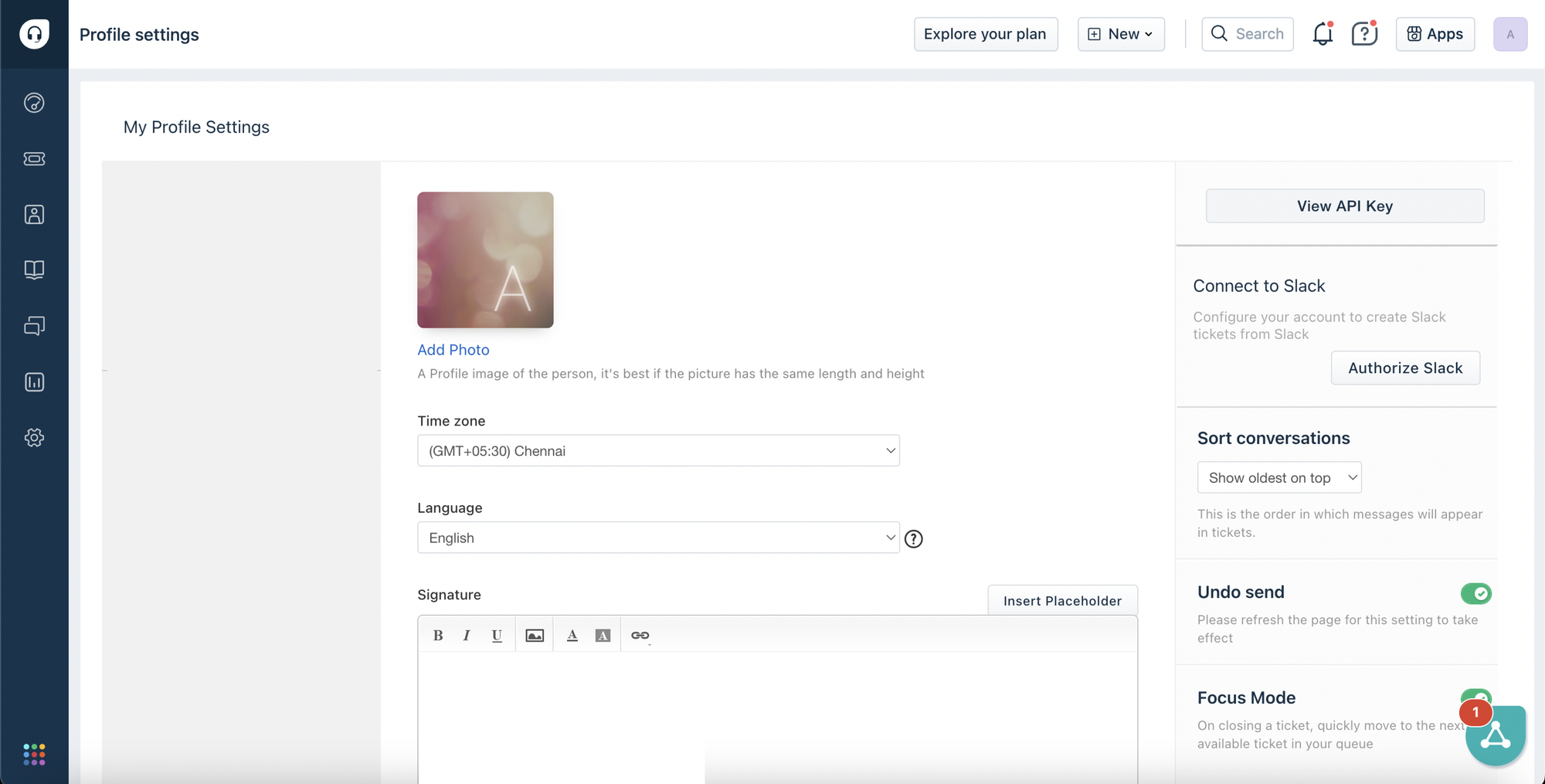
1. Create a Freshdesk API Key:
- In the API Key section, copy the key provided.
- Navigate to your profile picture in the top right corner, click on it, and select "Profile Settings."
- Log in to your Freshdesk account.
2. Create a Xurrent IMR Integration:
Click on "Add Integration" and select "Freshdesk" from the list of available integrations.
- Go to the "Integrations" section from the sidebar.
- Log in to your Xurrent IMR account.

3. Configure the Integration:
- Fill in other required details, such as your Freshdesk domain and any additional configuration settings as prompted.
- Enter the Freshdesk API key you copied earlier in the relevant field.

4. Set Up Incident Creation Rules:
Define the rules for creating incidents in Xurrent IMR based on Freshdesk ticket updates. Choose which Freshdesk ticket statuses will trigger incident creation in Xurrent IMR.
5. Test the Integration:
- Check Xurrent IMR to confirm that the incident was created successfully. Also, ensure that updates made in Xurrent IMR reflect back in Freshdesk.
- Create a test ticket in Freshdesk with a status that should trigger an incident in Xurrent IMR.
These steps will help you establish a seamless two-way integration between Xurrent IMR and Freshdesk for efficient incident management.
Real-Time Monitoring and Incident Response with Xurrent IMR
Once your integration is live, Xurrent IMR takes the guesswork out of managing critical incidents:
- Use Response Playbooks: Predefined playbooks guide your team through common high-severity incidents, reducing response times and improving outcomes.
- Assign Responsibilities Clearly: Assign specific team members to handle different aspects of an incident, so nothing falls through the cracks.
- Collaborate Effectively: Use Xurrent IMR’s communication tools to share updates, assign roles, and resolve incidents as a team.
- Monitor in Real-Time: See critical Freshdesk tickets immediately, so your team can act fast.
Post-Incident Review
Once an incident is resolved, take a moment to reflect. Xurrent IMR makes it easy to review what happened and improve for next time:
- Share Insights: Encourage a culture of improvement by sharing lessons learned with your team.
- Refine Processes: Update your playbooks, workflows, or training based on what you’ve learned.
- Analyze Performance: Look at response times, team collaboration, and customer feedback.
Drive Customer Satisfaction with Xurrent IMR and Freshdesk Integration
In today’s customer-first world, how you handle critical incidents says a lot about your business. With Xurrent IMR + Freshdesk, you’re giving your team the tools to:
- Faster Resolutions: Critical tickets are flagged immediately, and automated workflows ensure the right people act quickly.
- Happier Customers: Faster responses build trust and loyalty, while keeping stakeholders informed minimizes frustration.
- Stronger Teams: By automating repetitive tasks, your team can focus on solving problems and not juggling processes.
Don’t let critical tickets become critical problems. Start managing incidents with confidence today.



Xurrent named a Market Leader in Research In Action’s Vendor Selection Matrix™ for IT & Enterprise Service Management Solutions
Xurrent earns #1 rankings in customer satisfaction, price vs value, and recommendation index in Research In Action's global ITSM/ESM Vendor Selection Matrix report.
